
Zerone AKB73715603
Zerone AKB73715603 Universal Remote Control User Manual
Model: AKB73715603 | Brand: Zerone
1. Introduction and Overview
This manual provides comprehensive instructions for the use and maintenance of your Zerone AKB73715603 Universal Remote Control. Designed as a direct replacement, this remote offers seamless control for compatible LG television models.
Key Features:
- Direct replacement for LG AKB73715603 remote.
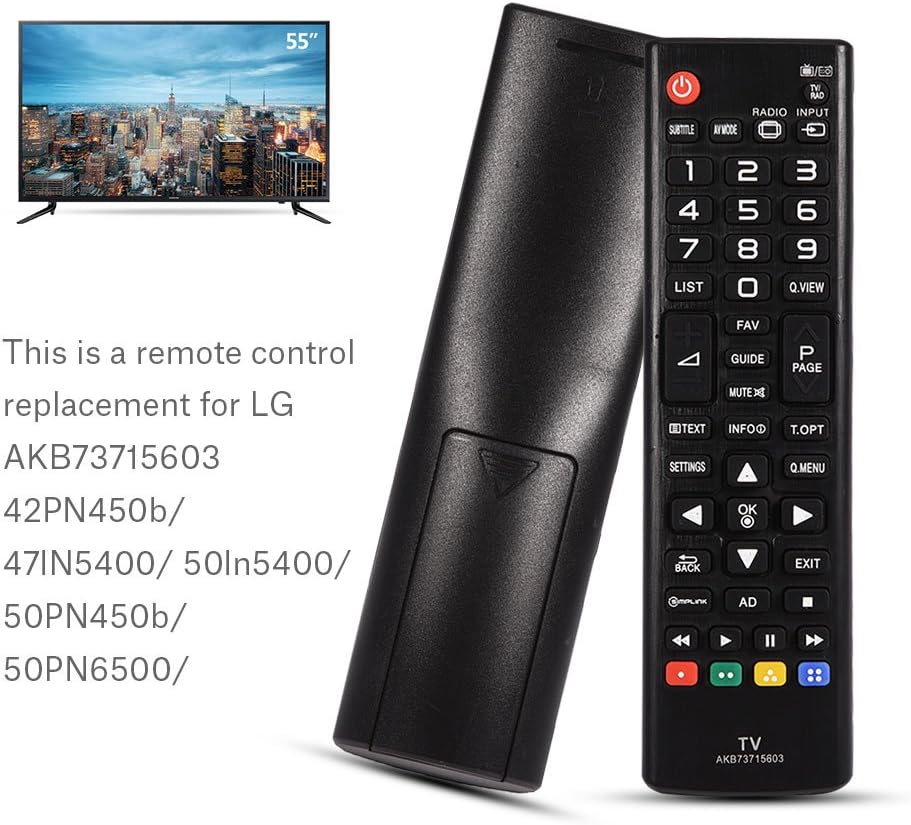
- Compatible with various LG TV models including 42PN450b, 47lN5400, 50ln5400, 50PN450b, 50PN6500, and 60PN6500.
- Operating distance of up to 10 meters (33 feet).
- Compact, lightweight, and comfortable design.


2. Setup
2.1 Battery Installation
The Zerone AKB73715603 remote control requires two (2) AAA batteries for operation. Batteries are NOT included with the remote.
- Locate the battery compartment on the back of the remote control.
- Press down on the tab and slide the battery cover downwards to open it.
- Insert two AAA batteries, ensuring the positive (+) and negative (-) terminals align correctly with the markings inside the compartment.
- Slide the battery cover back into place until it clicks securely.
Once batteries are installed, the remote is ready for use with compatible LG TVs; no programming is typically required for this replacement model.

3. Operating Instructions
The Zerone AKB73715603 remote control functions identically to the original LG remote it replaces. Simply point the remote towards your LG TV and press the desired button.
3.1 Basic Functions
- Power Button (Red): Turns the TV on or off.
- Number Pad (0-9): Directly input channel numbers.
- Volume Up/Down (VOL +/-): Adjusts the TV's volume.
- Channel Up/Down (CH +/-): Changes TV channels.
- Mute: Silences the TV audio.
- Navigation Buttons (Up, Down, Left, Right, OK): Used to navigate menus and select options on your TV screen.
- Settings: Accesses the TV's main settings menu.
- Exit: Exits current menu or function.
- Input: Changes the TV's input source (HDMI, AV, etc.).
The effective remote control distance is up to 10 meters (33 feet). Actual remote distance may vary depending on the model of your TV and environmental factors.

4. Maintenance
To ensure the longevity and optimal performance of your remote control, follow these maintenance guidelines:
- Cleaning: Wipe the remote with a soft, dry cloth. For stubborn dirt, slightly dampen the cloth with water or a mild, non-abrasive cleaner. Avoid excessive moisture.
- Storage: Store the remote in a cool, dry place away from direct sunlight and extreme temperatures.
- Handling: Avoid dropping the remote or subjecting it to strong impacts, which can damage internal components.
- Battery Care: If the remote will not be used for an extended period, remove the batteries to prevent leakage and potential damage.
5. Troubleshooting
If you encounter issues with your remote control, try the following troubleshooting steps:
- Remote Not Responding:
- Check if the batteries are inserted correctly with the correct polarity (+/-).
- Replace the batteries with new ones. Weak or dead batteries are a common cause of remote control issues.
- Ensure there are no obstructions between the remote control and the TV's infrared receiver.
- Point the remote directly at the TV.
- Limited Range:
- Replace the batteries.
- Ensure there are no strong light sources (like direct sunlight or bright fluorescent lights) interfering with the remote's signal.
- Specific Buttons Not Working:
- This is rare for a replacement remote. Ensure the remote is compatible with your specific TV model.
- Clean the remote's surface, especially around the non-working buttons, to ensure no debris is preventing button presses.
If these steps do not resolve the issue, please refer to the support information provided in Section 7.
6. Specifications
| Specification | Detail |
|---|---|
| Model Number | AKB73715603 (Zer one2k8rz3fvxe) |
| Color | Black |
| Shell Material | ABS |
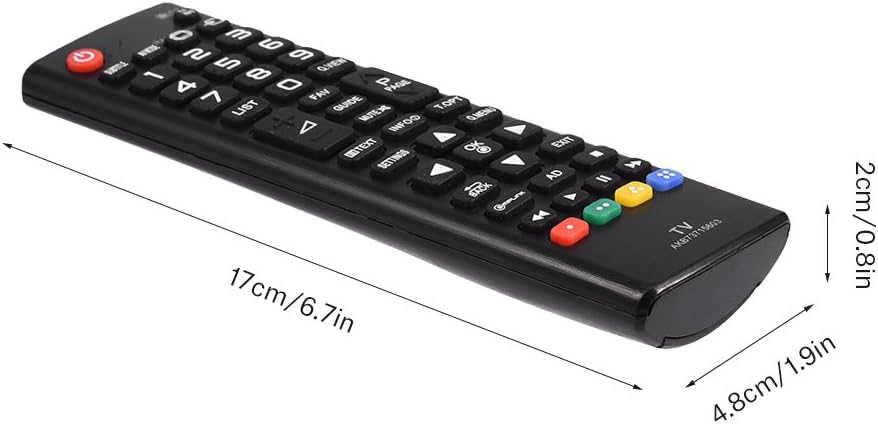
| Dimensions (L x W x H) | 17 x 4.8 x 2 cm / 6.7 x 1.9 x 0.8 inches |
| Weight | 73g / 2.11 ounces |
| Remote Control Distance | Up to 10 meters (33 feet) |
| Battery Type | 2 x AAA Batteries (NOT Included) |
| Power | DC 3V |
| Compatibility | LG TV models: AKB73715603, 42PN450b, 47lN5400, 50ln5400, 50PN450b, 50PN6500, 60PN6500 |
| Country of Origin | China |
7. Warranty and Support
Zerone provides customer service and support for its products. If you have any questions regarding the AKB73715603 Universal Remote Control, or if you require assistance beyond the troubleshooting steps provided in this manual, please contact your retailer or the manufacturer's customer support channel.
For the most up-to-date warranty information and support options, please refer to the product listing on the platform where you purchased the item or visit the official Zerone store page.
Note: Specific warranty terms may vary by region and retailer. Please retain your proof of purchase for any warranty claims.
Ask a question about this manual
Ask about setup, troubleshooting, compatibility, parts, safety, or missing instructions. Manuals+ will review the question and use this page’s manual context to help answer it.