
Introduction
The Creative T100 2.0 Compact Hi-Fi Speakers are designed to deliver immersive audio for your computer, laptop, gaming console, or smartphone. Featuring multiple connectivity options and powerful acoustics, these speakers provide a wide soundstage and clear audio reproduction.
Setup
Setting up your Creative T100 speakers is straightforward. Ensure both speakers are placed on a stable, flat surface, ideally equidistant from your listening position for optimal stereo imaging.
Connecting the Speakers
- Connect the right speaker to the left speaker using the provided speaker cable.
- Connect the power adapter to the right speaker's power input and then to a wall outlet.
Initial Power On
Once connected, press the Power On/Off button located on the top of the right speaker to turn on the unit. The LED indicator will illuminate.

Operating Instructions
Power On/Off
Press the power button on the top of the right speaker or on the remote control to turn the speakers on or off.
Input Source Selection
Cycle through available input sources (Bluetooth, AUX-in, Optical-in, USB) by pressing the 'Input Source' button on the speaker's top panel or the 'INPUT' button on the remote control.
Volume Control
Adjust the volume using the '+' and '-' buttons on the top of the right speaker or the 'VOL+' and 'VOL-' buttons on the remote control.
Audio Playback (USB Mode)
When a USB flash drive is connected, use the playback controls (Play/Pause, Next Track, Previous Track) on the remote control to manage your audio. The speakers support FLAC, WMA, and MP3 formats.
Connectivity Options
The Creative T100 speakers offer versatile connectivity to suit various devices:
- Bluetooth 5.0: For wireless connection to smartphones, tablets, and laptops.
- 3.5mm AUX-in: For wired connection to devices with a standard headphone jack.
- Optical-in: For high-quality digital audio connection, ideal for gaming consoles like PS4 Pro.
- USB Flash Drive: Play audio directly from a USB drive (supports FLAC, WMA, and MP3).
Bluetooth Pairing
- Select Bluetooth as the input source. The LED indicator will blink.
- On your device, search for and select 'Creative T100' from the list of available Bluetooth devices.
- Once paired, the LED indicator will turn solid blue.

Audio Features
The Creative T100 speakers are engineered for a rich audio experience:
- Powerful Acoustics: Equipped with 2.75-inch full-range drivers and a built-in digital amplifier, delivering up to 40W RMS and 80W peak power.
- Wide Soundstage: Experience immersive, room-filling audio with impressive depth and clarity.
- BasXPort Technology: Enhances bass response for deep, impactful tones without the need for a separate subwoofer.


EQ Presets and Tone Control
Use the remote control to select from various EQ presets (Music, Cinema, Concert, Gaming) or manually adjust the treble and bass levels to customize your audio experience.
Controls
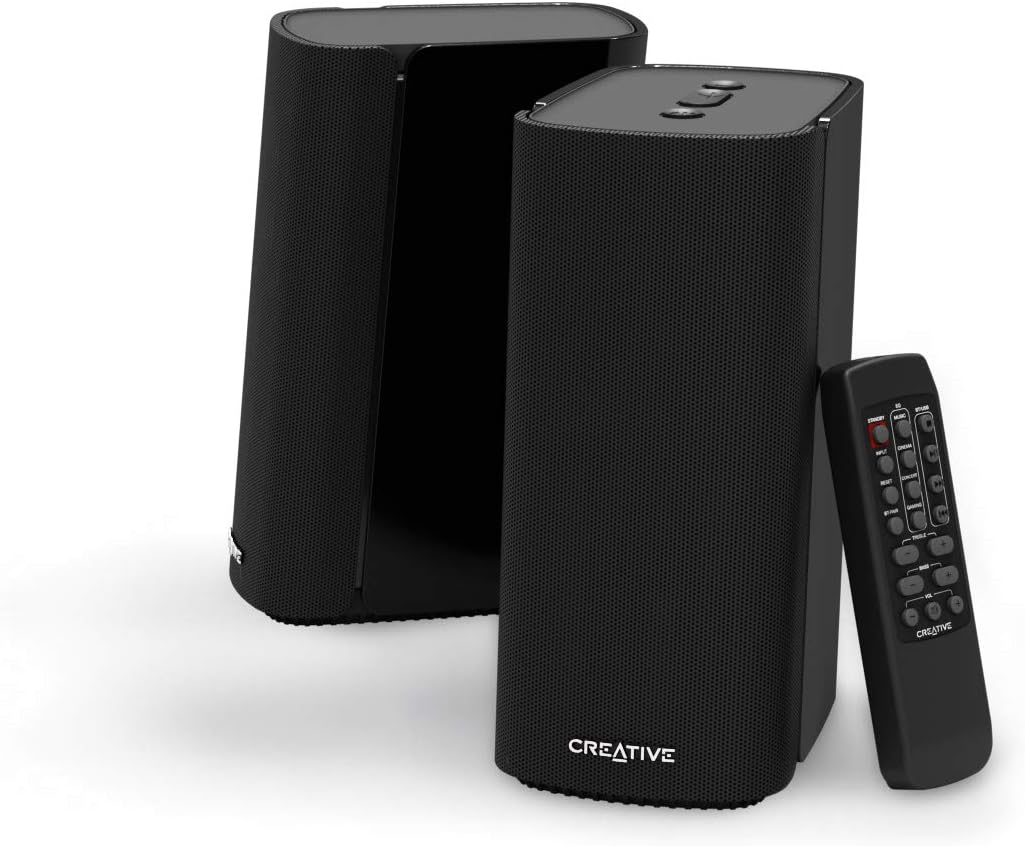
The Creative T100 speakers can be controlled via the top panel buttons on the right speaker or the included wireless remote control.
Top Panel Controls
- Input Source Button: Cycles through available audio inputs.
- Volume Up/Down Buttons: Adjusts the master volume.
- Power On/Off Button: Turns the speakers on or off.
Remote Control Functions
The remote provides comprehensive control over the speakers:
- Standby: Puts the speakers into low-power standby mode.
- Input: Selects the audio input source.
- EQ Presets: Buttons for Music, Cinema, Concert, Gaming audio modes.
- BT-Pair: Initiates Bluetooth pairing mode.
- Reset: Resets audio settings to default.
- Treble +/-: Adjusts high-frequency levels.
- Bass +/-: Adjusts low-frequency levels.
- Volume +/-: Adjusts the master volume.
- Mute: Mutes or unmutes audio.
- Playback Controls: Play/Pause, Next Track, Previous Track (for USB mode).


Maintenance
To ensure the longevity and optimal performance of your Creative T100 speakers, follow these maintenance guidelines:
- Cleaning: Use a soft, dry cloth to wipe the speaker surfaces. Avoid abrasive cleaners or solvents.
- Placement: Keep speakers away from direct sunlight, heat sources, and excessive moisture.
- Ventilation: Ensure adequate airflow around the speakers to prevent overheating.
- Power: Disconnect the power adapter during electrical storms or when not in use for extended periods.
Troubleshooting
If you encounter issues with your Creative T100 speakers, refer to the following common solutions:
| Problem | Solution |
|---|---|
| No power | Check if the power adapter is securely connected to both the speaker and the wall outlet. Ensure the power button is pressed. |
| No sound | Verify the correct input source is selected. Check volume levels on both the speakers and the connected device. Ensure cables are properly connected. |
| Bluetooth pairing failure | Ensure the speakers are in Bluetooth pairing mode (blinking LED). Turn off and on Bluetooth on your device. Move closer to the speakers (max 10 meters range). |
| Distorted audio | Reduce the volume on both the speakers and the source device. Check for loose cable connections. Try a different audio source or cable. |
| Remote control not working | Replace the remote control battery. Ensure there are no obstructions between the remote and the speakers. |
Specifications
| Feature | Detail |
|---|---|
| Model Name | T100 |
| Speaker Type | Multimedia, 2.0 Channel |
| Connectivity | Bluetooth 5.0, 3.5mm AUX-in, Optical-in, USB |
| Output Power | 40W RMS, 80W Peak |
| Driver Size | 2.75-inch Full-range Drivers |
| Control Method | Remote Control, On-speaker Buttons |
| Product Dimensions | 3.7"D x 5.1"W x 8.2"H |
| Item Weight | 4.4 Pounds |
| Material | Plastic |
| Bluetooth Range | Up to 10 meters (line of sight) |
Official Product Video
Watch the official product video for an overview of the Creative T100 speakers.
Warranty and Support
The Creative T100 speakers come with a limited warranty. For detailed warranty information, product support, or technical assistance, please visit the official Creative website or contact their customer service.
Online Support: www.creative.com/support


