
Introduction
This manual provides detailed instructions for the assembly, operation, and maintenance of your Monarch Specialties I 2820 TV Stand. This low-profile entertainment center features an industrial-inspired design with a warm brown reclaimed wood-look finish, black satin metal supports, an open shelf for media equipment, and three closed drawers for storage. Please read these instructions carefully before beginning assembly and retain this manual for future reference.
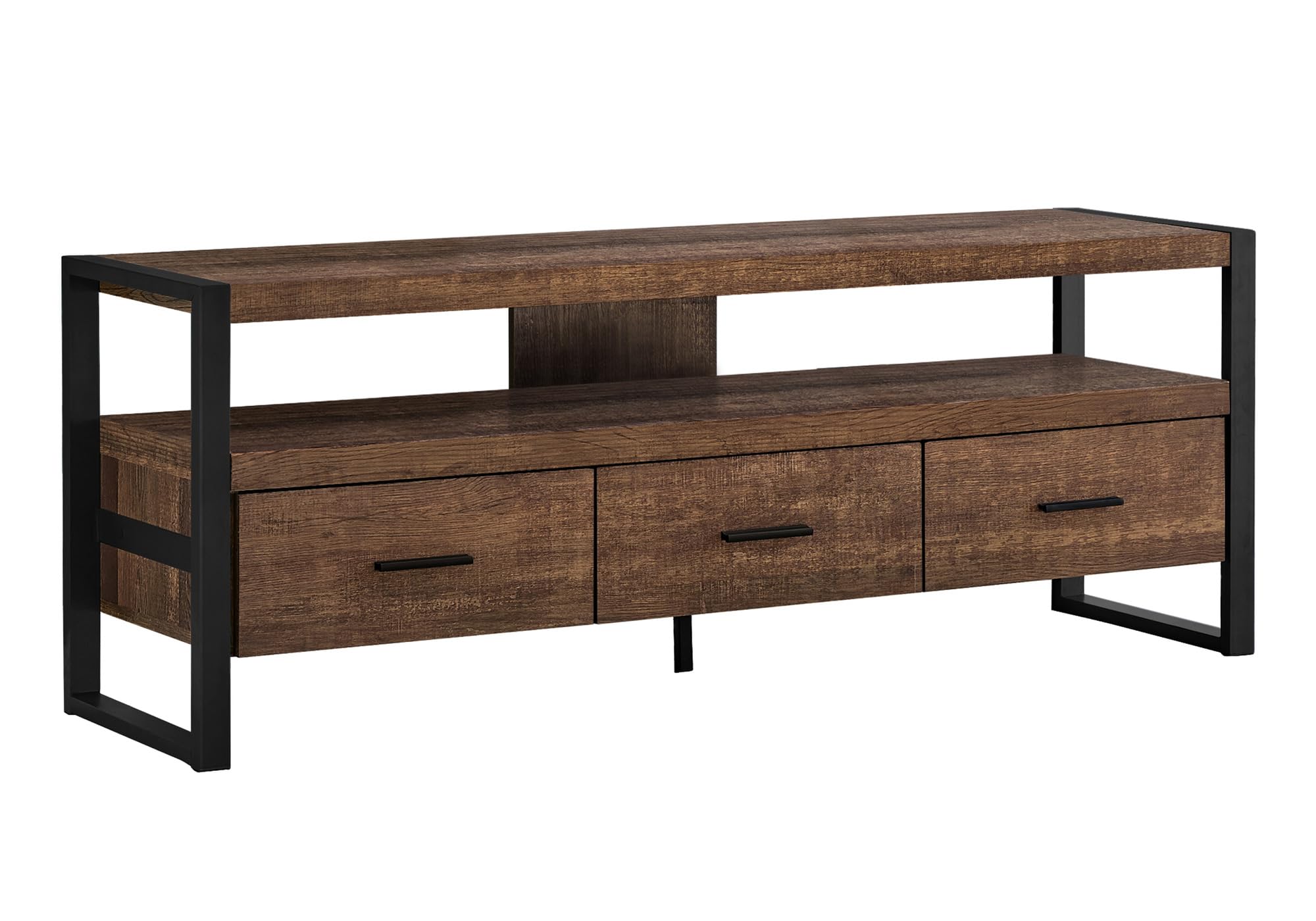
Image: Monarch Specialties I 2820 TV Stand, showcasing its industrial design with a brown reclaimed wood-look finish and black metal frame. A television is placed on top, and media devices are on the open shelf.
Safety Information
Please observe the following safety precautions during assembly and use:
- Always assemble the unit on a soft, clean surface to prevent scratches.
- Ensure all hardware is securely tightened before use. Periodically check and re-tighten as necessary.
- Do not exceed the recommended weight capacity for the top surface or shelves. Refer to the Specifications section for details.
- Keep small parts and packaging materials away from children and pets to prevent choking hazards.
- Use caution when moving the assembled unit to avoid injury or damage. It is recommended to have two people move the stand.
- Avoid placing hot items directly on the surface. Use coasters or protective pads.
Package Contents
Before beginning assembly, verify that all components and hardware are present and undamaged. If any parts are missing or damaged, please contact customer support.
- TV Stand Panels (Top, Bottom, Side, Shelf, Drawer components)
- Metal Frame Supports
- Hardware Pack (screws, dowels, cam locks, drawer glides, handles, etc.)
- Assembly Instructions Manual
Setup and Assembly Instructions
Assembly is required for this TV stand. Please follow the included step-by-step instructions carefully. It is recommended to have two adults for assembly.
- Unpack and Identify Parts: Carefully remove all contents from the packaging. Lay out all panels and hardware on a clean, soft surface. Compare them against the parts list in the separate assembly guide to ensure everything is accounted for.
- Assemble the Metal Frame: Attach the horizontal metal supports to the vertical metal legs using the provided hardware. Ensure all connections are firm.
- Attach Side Panels: Secure the side panels of the TV stand to the metal frame using the designated screws.
- Install Shelves: Insert the main shelf and the open shelf into their respective positions, securing them with the appropriate hardware.
- Assemble Drawers: Follow the specific instructions for assembling each of the three drawers. This typically involves attaching the front, back, and side panels, then installing the bottom panel and drawer glides.
- Install Drawers: Slide the assembled drawers onto the pre-installed drawer glides within the TV stand frame.
- Attach Handles: Secure the sleek black handles to the front of each drawer.
- Final Checks: Ensure all screws and fasteners are tight. Gently lift and place the TV stand in its desired location.
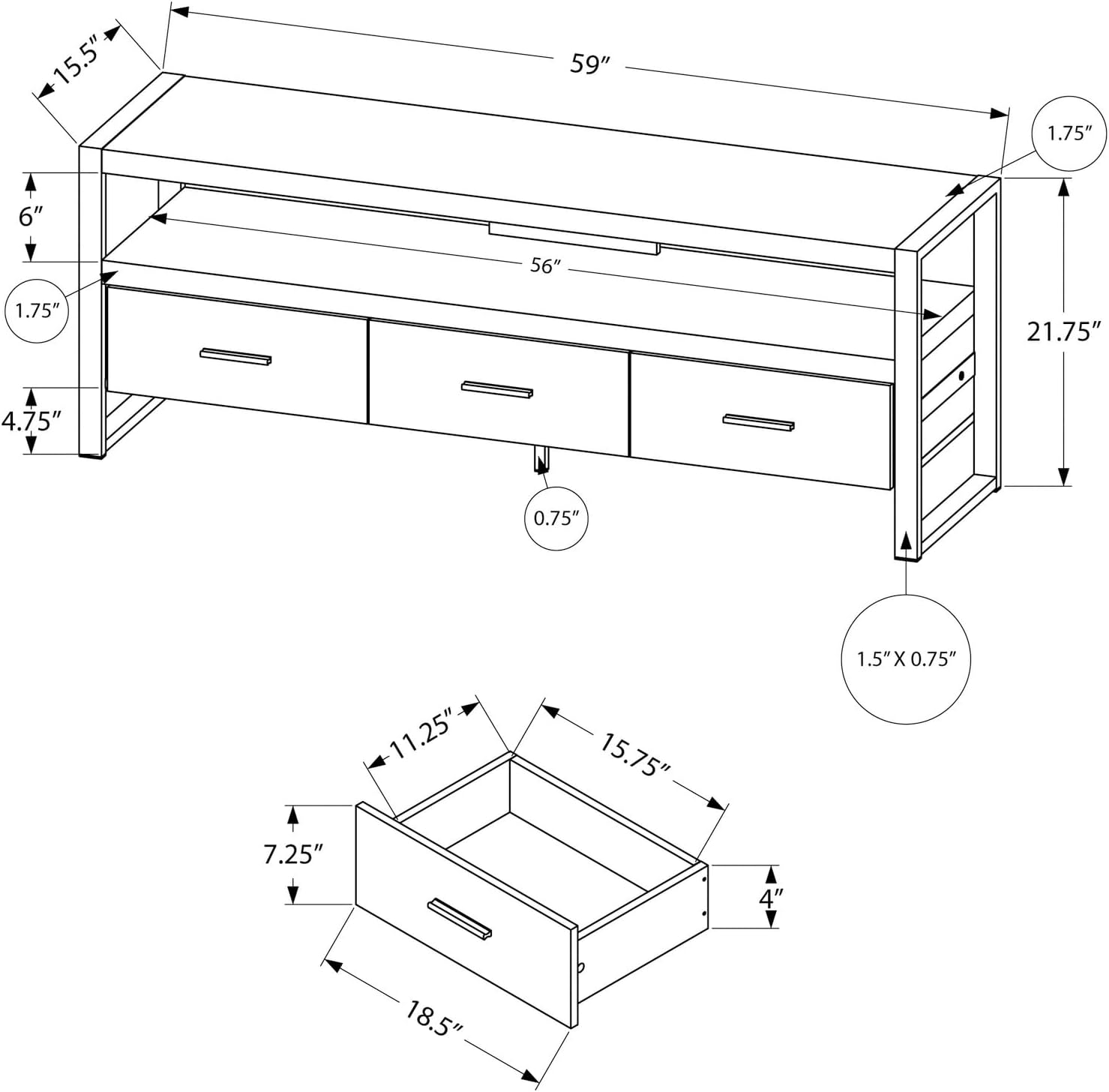
Image: Technical diagram illustrating the dimensions of the Monarch Specialties I 2820 TV Stand, including overall length, width, height, and internal drawer measurements.
Operating Instructions
Once assembled, your Monarch Specialties I 2820 TV Stand is ready for use.
- Placement: Position the TV stand on a level, stable surface. Ensure there is adequate space around the unit for ventilation of electronic devices.
- TV Placement: Center your television on the top surface. The stand is designed to accommodate various TV sizes when centered. Refer to the specifications for maximum weight capacity.
- Media Equipment: Utilize the open shelf for audio/visual equipment such as soundbars, cable boxes, or gaming consoles. The open-back design facilitates easy wire management.
- Storage: Use the three smooth-gliding drawers to store accessories, remote controls, DVDs, or other items, keeping your entertainment area organized and clutter-free.
Maintenance
Proper care will ensure the longevity and appearance of your TV stand.
- Cleaning: Wipe surfaces with a damp cloth. Avoid harsh chemicals or abrasive cleaners, which can damage the finish.
- Spills: Clean up spills immediately to prevent staining or damage to the engineered wood material.
- Hardware: Periodically check all screws and fasteners to ensure they remain tight. Re-tighten as needed to maintain stability.
- Sunlight: Avoid prolonged exposure to direct sunlight, which can cause fading or discoloration.
Troubleshooting
If you encounter any issues with your TV stand, refer to the following common solutions:
- Wobbling Unit: Ensure the TV stand is placed on a level surface. Check and tighten all assembly hardware.
- Drawers Not Sliding Smoothly: Verify that the drawer glides are correctly installed and free of obstructions. Ensure the drawers are assembled squarely.
- Missing Parts: If any parts were missing upon unboxing, do not proceed with assembly. Contact Monarch Specialties customer support immediately for replacement parts.
- Surface Scratches: Minor scratches can sometimes be touched up with furniture repair markers that match the finish. For significant damage, contact customer support for advice.
Specifications
| Model Number | I 2820 |
| Brand | Monarch Specialties |
| Product Dimensions | 149.9 cm (L) x 39.4 cm (W) x 55.2 cm (H) / 59" (L) x 15.5" (W) x 21.75" (H) |
| Item Weight | 34.93 kg / 77 Pounds |
| Material | Engineered Wood |
| Color | Brown (Reclaimed Wood-Look) |
| Number of Drawers | 3 |
| Number of Shelves | 1 (open shelf) |
| Assembly Required | Yes |
| Product Care Instructions | Wipe with Damp Cloth |
Warranty and Support
This Monarch Specialties I 2820 TV Stand comes with a 1 Year limited warranty on parts from the date of purchase. This warranty covers manufacturing defects in materials and workmanship under normal use.
For warranty claims, missing parts, or technical support, please contact Monarch Specialties customer service:
- Manufacturer: Monarch Specialties
- Place of Business: LAVAL, PQ, H7P 0A8 CA
- Refer to your purchase documentation for specific contact details or visit the official Monarch Specialties website.


