
1. Introduction
This manual provides essential information for the installation, operation, and maintenance of your YHTAUTO Parking Brake Control Switch with Auto Hold Button (Model YHTWS0047). Please read these instructions carefully before installation and use to ensure proper function and safety.
2. Product Features
- Professional Specifications: Designed for 11-pin connections, ensuring compatibility with specified BMW models.
- LED Indicator: Features a white LED indicator for improved visibility and safer night-time operation.
- Smart Convenience: Provides easy control of parking brake and auto hold functions with a simple button press.
- Direct Replacement: Engineered to match original factory specifications for a seamless fit and worry-free use.
- Durable Construction: Made from high-impact resistant plastic, designed to resist oxidation, corrosion, and cracking.

Image: The YHTAUTO Parking Brake Control Switch featuring a soft white LED indicator light for enhanced visibility.

Image: Close-up view of the parking brake switch, highlighting its construction from high-impact resistant plastic for durability.
3. Compatibility (Vehicle Fitment)
This parking brake control switch is a direct replacement for OEM Part Number 61319385029 and 61 31 9 385 029. It is compatible with the following BMW models:

Image: A comprehensive list of compatible BMW models and years for the parking brake switch.
- BMW 528i: 2011-2016
- BMW 528i xDrive: 2012-2016
- BMW 535d: 2014-2016
- BMW 535d xDrive: 2014-2016
- BMW 535i: 2011-2016
- BMW 535i xDrive: 2011-2016
- BMW 550i: 2011-2016
- BMW 550i xDrive: 2011-2016
- BMW ActiveHybrid 5: 2012-2016
- BMW 640i: 2012-2017
- BMW 640i Gran Coupe: 2013-2018
- BMW 640i xDrive: 2014-2017
- BMW 640i xDrive Gran Coupe: 2014-2018
- BMW 650i: 2012-2017
- BMW 650i Gran Coupe: 2013-2018
- BMW 650i xDrive: 2012-2017
- BMW M5: 2013-2016
- BMW M6: 2012-2015
- BMW M6 Gran Coupe: 2014-2015
Important: This switch is designed for vehicles without an automatic upgrade function (auto up/down for windows). Please verify the pin count (11 pins) and the authentic appearance of your existing switch before purchase to ensure proper fitment.

Image: Visual comparison showing the correct switch type (left) for vehicles without auto up/down function, and an incompatible switch type (right) with automatic upgrade function.
4. Setup and Installation
The YHTAUTO Parking Brake Control Switch is designed for a 'Plug and Play' installation, meaning it is intended to fit directly into the existing frame and connectors of your vehicle. However, proper installation requires careful attention.
4.1 Pre-Installation Check
- Ensure the vehicle's ignition is off and the battery is disconnected before beginning any electrical work.
- Confirm that the new switch matches the original switch in terms of appearance and pin configuration (11 pins).
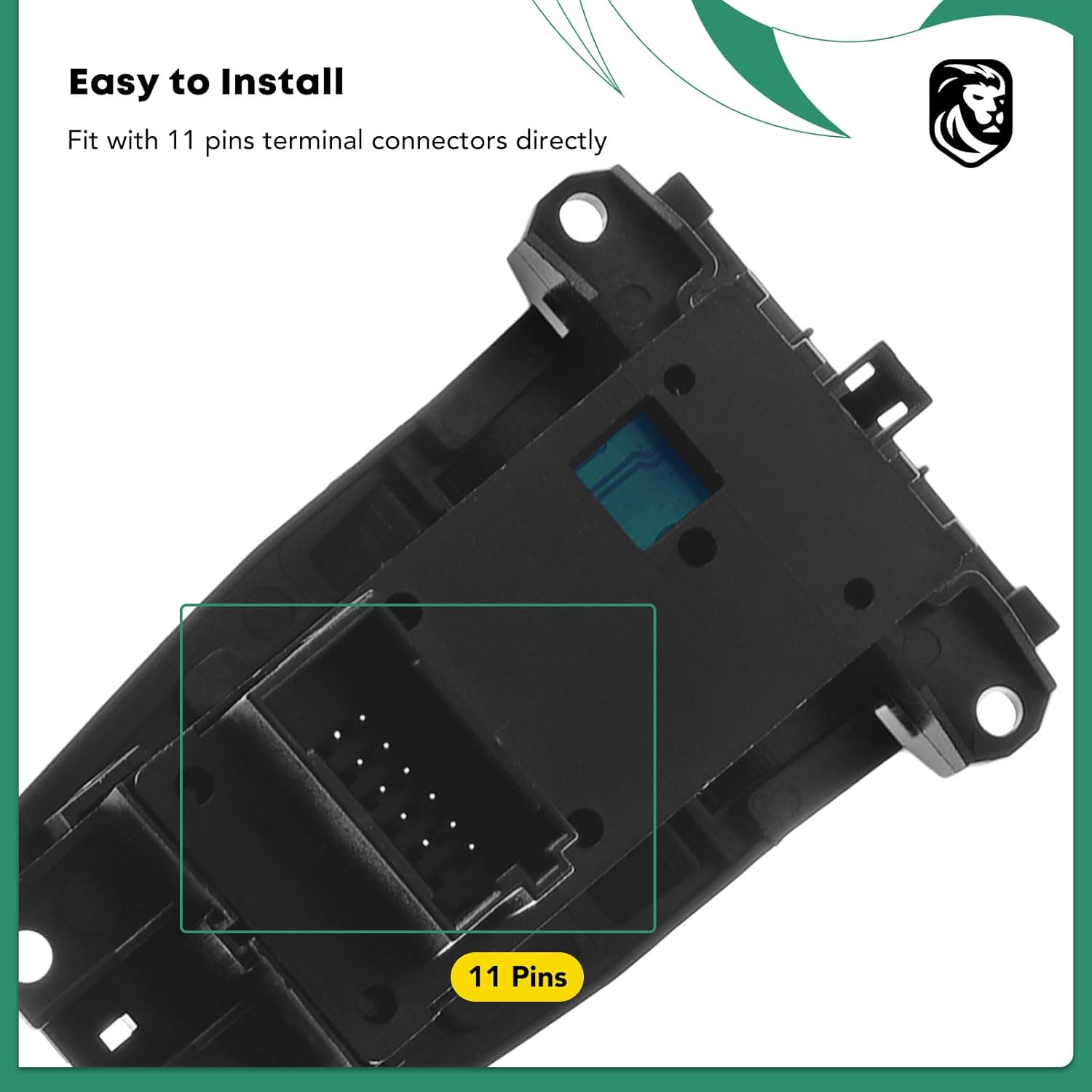
Image: Underside view of the parking brake switch, clearly showing the 11-pin terminal connector for direct fitment.
4.2 Installation Steps (General Guidance)
- Carefully remove the trim panel surrounding the existing parking brake switch.
- Disconnect the electrical connector from the old switch.
- Remove the old switch from its housing.
- Connect the electrical connector to the new YHTAUTO switch, ensuring a secure fit.
- Insert the new switch into the housing.
- Reattach the trim panel.
- Reconnect the vehicle battery and test the switch functionality.
Note: If you are uncertain about any step of the installation process, it is highly recommended to seek assistance from a qualified automotive technician.
5. Operating Instructions
The YHTAUTO Parking Brake Control Switch integrates two primary functions: the Parking Brake and the Automatic Hold (Auto H).

Image: The parking brake control switch with labels indicating the Parking Brake (1) and Automatic Hold (2) functions.
5.1 Parking Brake Function (P)
- To Engage: With the vehicle stationary, press the button marked with the 'P' symbol. An indicator light will illuminate, confirming the parking brake is engaged.
- To Disengage: Press the 'P' button again while the vehicle is on, or gently accelerate with the seatbelt fastened (automatic release). The indicator light will turn off.
5.2 Automatic Hold Function (AUTO H)
- To Activate: Press the button marked 'AUTO H'. An indicator light will illuminate, signifying that the Automatic Hold function is active.
- Functionality: When active, the vehicle will automatically hold the brakes when stopped (e.g., at a traffic light or in traffic), preventing it from rolling. The driver can remove their foot from the brake pedal.
- To Deactivate: Press the 'AUTO H' button again. The indicator light will turn off.
6. Maintenance
To ensure the longevity and reliable operation of your parking brake control switch, consider the following maintenance tips:
- Regular Cleaning: Keep the switch surface clean from dust and debris using a soft, dry cloth. Avoid using harsh chemicals or abrasive cleaners.
- Avoid Liquid Exposure: Prevent liquids from spilling onto the switch, as this can cause internal damage or malfunction.
- Periodic Inspection: Periodically check the switch for any signs of physical damage, loose connections, or unusual operation.
7. Troubleshooting
If you experience issues with your parking brake control switch, refer to the common problems and potential solutions below:

Image: Visual examples of common issues that may necessitate replacing a power window switch, including a stuck button, a loose or broken switch, and overall switch panel failure.
- Button Stuck or Unresponsive:
Cause: Debris under the button, internal mechanical failure, or electrical contact issue.
Solution: Ensure the area around the button is clean. If the issue persists, the switch may need replacement. - Switch Loose or Broken:
Cause: Physical damage, improper installation, or wear over time.
Solution: Check if the switch is properly seated in its housing. If physically broken, replacement is necessary. - Switch Panel Failure (No Functionality):
Cause: Electrical connection issues, fuse blown, or complete switch unit failure.
Solution: Verify all electrical connections are secure. Check the vehicle's fuse box for any blown fuses related to the parking brake system. If fuses are intact and connections are good, the switch unit likely requires replacement.
For complex electrical issues or if troubleshooting steps do not resolve the problem, consult a professional automotive technician.
8. Specifications
| Specification | Detail |
|---|---|
| Brand | YHTAUTO |
| Model Number | YHTWS0047 |
| OEM Part Number | 61319385029, 61 31 9 385 029 |
| Operation Mode | Auto |
| Contact Type | Normally Open |
| Connector Type | Plug In |
| Terminal | Button |
| Item Dimensions (L x W x H) | 3.74 x 2.95 x 2.36 inches |
| Circuit Type | 1-way |
| Actuator Type | Push Button |
| Contact Material | Copper, Brass |
| International Protection Rating | IP40 |
| Number of Positions | 1 |
| Control Method | Touch |
| Item Weight | 2.75 ounces |
9. Important Notes and Safety Information

Image: An important message advising users to take proper precautions and seek professional help if uncertain about installation.
Please take proper precautions and pay particular attention to all cautions and warnings in the user manual for your vehicle before beginning the installation. If you are uncertain of how to install the parts or lack the necessary experience, please seek the help of a qualified technician. Periodically checking the condition of the parts and keeping them in top condition is also highly recommended.
10. Warranty and Support
For warranty information or technical support, please refer to the documentation provided with your purchase or contact YHTAUTO customer service directly through their official channels. Ensure you have your product model number (YHTWS0047) and purchase details available when contacting support.