
1. Introduction
This manual provides comprehensive instructions for the safe and effective use of your AGARO HC-8001 Hair Curler. Please read all instructions carefully before use and retain this manual for future reference. The AGARO HC-8001 is designed for creating tight curls with its 10mm ceramic-coated barrel.
2. Safety Information
WARNING: Curling irons can reach very high temperatures (up to 180°C / 356°F) and can cause burns if touched or if hair is held too close for too long. Burns can occur on the skin, scalp, or even the cornea.
- Always ensure your hair is completely dry before using the curler.
- Do not use this appliance near water, in a bathroom, or over a sink filled with water.
- Keep the appliance out of reach of children.
- Always place the curler on a heat-resistant surface when not in use or during cooling.
- Do not wrap the power cord around the appliance.
- Unplug the appliance immediately after use and before cleaning.
- If the supply cord is damaged, it must be replaced by the manufacturer, its service agent, or similarly qualified persons to avoid a hazard.
- Do not use the appliance if it is damaged.
3. Product Features
The AGARO HC-8001 Hair Curler is equipped with features designed for efficient and safe hair styling:
- 10mm Barrel Diameter: Ideal for creating tight, defined curls.
- Ceramic Coating: Ensures even heat distribution and reduces hair damage.
- Cool Touch Tip: Provides a safe area to hold the curler during styling, preventing accidental burns.
- Fast Heating: Reaches optimal temperature quickly, up to 180°C.
- LED Indicator Light: Illuminates when the curler is powered on.
- 360° Swivel Cord: Prevents tangling and allows for flexible styling.
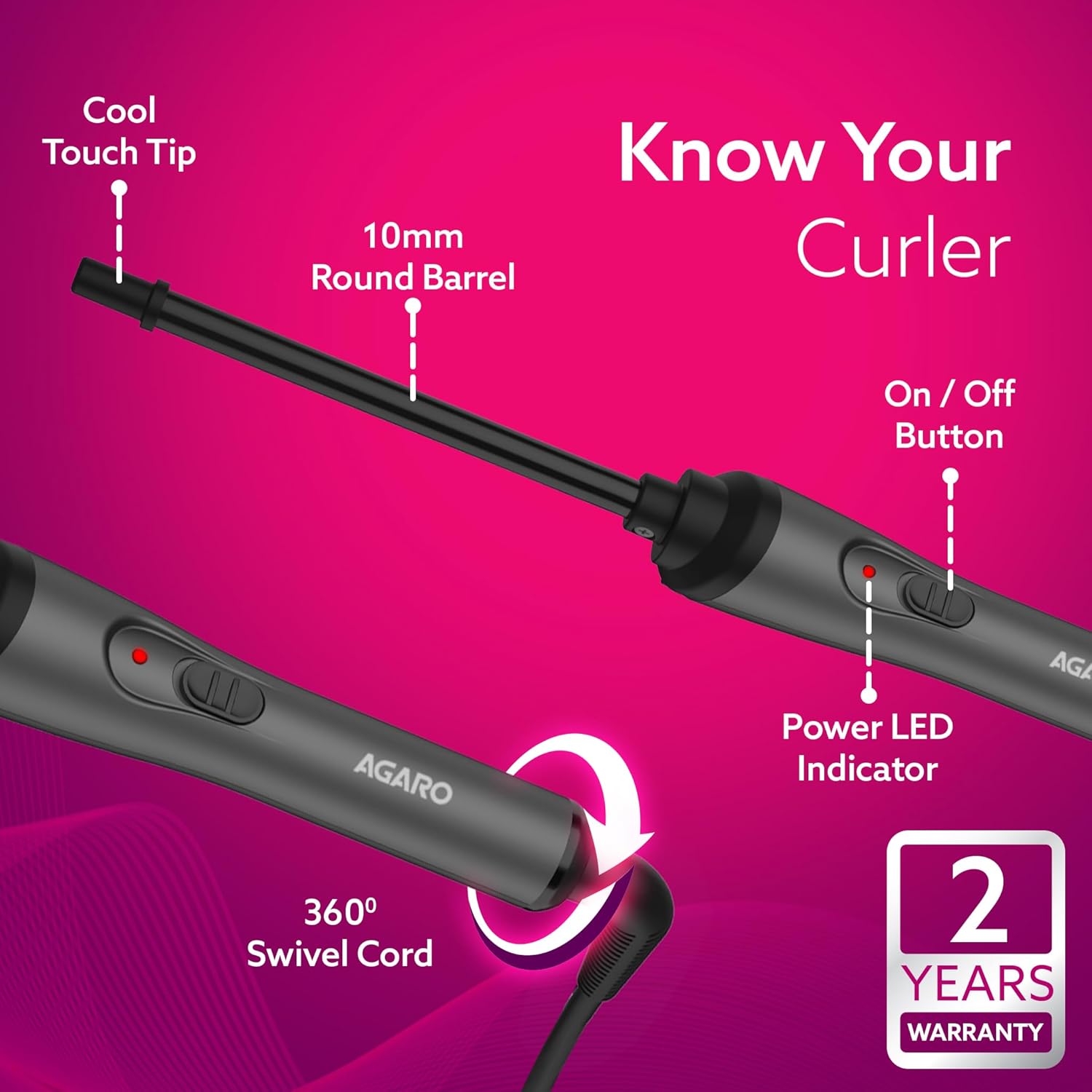
Image: AGARO HC-8001 Hair Curler with its key components labeled, including the cool touch tip, 10mm round barrel, on/off button, power LED indicator, and 360-degree swivel cord.

Image: The AGARO HC-8001 Hair Curler showcasing its main features: fast heating, swivel cord, cool touch tip, and LED indicator.
4. Setup
- Unpack: Carefully remove the hair curler from its packaging.
- Inspect: Check the appliance for any signs of damage. Do not use if damaged.
- Placement: Place the curler on a flat, heat-resistant surface.
- Plug In: Insert the power plug into a suitable electrical outlet. Ensure the voltage matches the specifications of the appliance.
5. Operating Instructions
Follow these steps to achieve desired curls:
- Preparation: Ensure your hair is clean, dry, and detangled.
- Power On: Press the On/Off button. The LED indicator light will illuminate, indicating the curler is heating up.
- Heating: Allow the curler to heat for approximately 30-60 seconds until it reaches its operating temperature of 180°C.
- Section Hair: Divide your hair into small, manageable sections. For best results with the 10mm barrel, use thin sections.
- Curl Hair: Starting from the root or mid-length, wrap a section of hair around the barrel, holding the cool touch tip. Ensure the hair is evenly distributed around the barrel.
- Hold: Hold the hair in place for 5-10 seconds, depending on your hair type and desired curl intensity.
- Release: Gently unwrap or slide the curler out of the curled section.
- Repeat: Continue this process for all sections of your hair.
- Cool Down: Allow curls to cool completely before styling or brushing to set them.
- Power Off: After use, press the On/Off button to turn off the appliance. Unplug it from the power outlet.

Image: A user demonstrating the curling process with the AGARO HC-8001, wrapping hair around the barrel.
6. Maintenance and Care
Proper maintenance ensures the longevity of your hair curler:
- Cleaning: Always ensure the appliance is unplugged and completely cool before cleaning. Wipe the barrel and handle with a soft, damp cloth. Do not use abrasive cleaners or immerse the appliance in water.
- Storage: Store the curler in a cool, dry place, away from direct sunlight and moisture. Do not wrap the cord tightly around the appliance, as this can cause damage.
7. Troubleshooting
If you encounter issues with your AGARO HC-8001 Hair Curler, refer to the following:
| Problem | Possible Cause | Solution |
|---|---|---|
| Curler does not heat up. | Not plugged in correctly; Power outlet malfunction; Appliance fault. | Ensure plug is fully inserted. Test outlet with another device. If still not working, contact customer support. |
| Curls are not holding. | Hair is not completely dry; Sections are too large; Not holding long enough; Curls not cooled before styling. | Ensure hair is completely dry. Use smaller sections. Hold hair on barrel for longer. Allow curls to cool before touching. |
| Burning smell. | Product residue on barrel; Hair product residue; Overheating. | Unplug and let cool. Clean barrel thoroughly. Ensure hair is clean and free of excessive product. If smell persists, discontinue use and contact support. |
8. Specifications
| Model Number | HC-8001 |
| Barrel Diameter | 10 mm |
| Max Temperature | 180°C |
| Heater Surface Material | Ceramic |
| Power Source | Corded Electric |
| Item Weight | 284 g |
| Product Dimensions (LxWxH) | 7.49 x 7.49 x 7.49 cm |
| Included Components | Agaro PCA |
9. Warranty and Support
Your AGARO HC-8001 Hair Curler comes with a 2-Year Manufacturer Warranty.
This warranty covers manufacturing defects of the product during the warranty period.
For any queries or concerns, please contact:
- Email: info@uclindia.com
- Customer Support: 9821486487
- Timings: 10:00 AM to 6:00 PM (IST) Monday-Saturday (Excluding Holidays)