
1. Introduction
This manual provides comprehensive instructions for the installation, operation, and maintenance of your DPI 20 Amp DC to DC Converter (Model 13-063). This converter is designed to efficiently convert 36V or 48V DC input to a stable 12V DC output, suitable for various applications, including replacing SurePower 41020C10 models in E-Z-GO and Yamaha OEM systems.
Please read this manual thoroughly before installation and use to ensure proper function and safety.
2. Safety Information
Always observe the following safety precautions to prevent injury or damage to the converter and connected equipment:
- Ensure the input voltage matches the converter's specifications (36V or 48V DC).
- Disconnect all power sources before attempting any installation or maintenance.
- Do not expose the converter to moisture, extreme temperatures, or corrosive environments.
- Verify all wiring connections are secure and correctly polarized to prevent short circuits or damage.
- Do not attempt to open or modify the converter. Refer all servicing to qualified personnel.
- Use appropriate wire gauges for all connections to handle the specified current.
3. Product Overview
The DPI 20 Amp DC to DC Converter is a robust and efficient power conversion unit designed for demanding applications. It provides a stable 12V DC output from a 36V or 48V DC input, making it ideal for powering 12V accessories in golf carts and other electric vehicles.

Figure 3.1: DPI 20 Amp DC to DC Converter (Model 13-063).
Key Features:
- Universal Fit: Compatible with all 36V or 48V electric models.
- Direct Replacement: Designed for drop-in mounting and electrical connection as a replacement for SurePower 41020C10 converters in E-Z-GO/Yamaha applications.
- High Output: Provides 13Vdc, 20Adc continuous output.
- Advanced Connectivity: Features a 6-pin Deutsch Type Weather Sealed Connector.
- Flexible Outputs: Includes one switched output and one un-switched output, with ignition key input for the switched line.
- Safety Protections: Incorporates no spark connection, reverse battery protection, and is fully overload and short circuit protected with automatic hiccup mode recovery.
- High Efficiency: Achieves 93% peak minimum electrical efficiency.
- Compliance: Exceeds UL and California Emission Standards.
- Quality: Designed and Manufactured in the USA.
4. Setup & Installation
Proper installation is crucial for the safe and efficient operation of the converter. If you are unsure about any step, consult a qualified technician.
4.1. Pre-Installation Checklist:
- Ensure the vehicle's main power is disconnected.
- Confirm the vehicle's battery system voltage is either 36V or 48V DC.
- Gather necessary tools: wire strippers, crimpers, multimeter, mounting hardware.
- Identify a suitable mounting location that is dry, well-ventilated, and away from heat sources.
4.2. Mounting the Converter:
The converter is designed for drop-in mounting in applications replacing SurePower 41020C10 models. Secure the converter firmly using appropriate fasteners through its mounting tabs. Ensure there is adequate clearance around the unit for air circulation.
4.3. Wiring Connections:
The converter utilizes a 6-pin Deutsch Type Weather Sealed Connector. Refer to the diagram below and the following instructions for correct wiring.
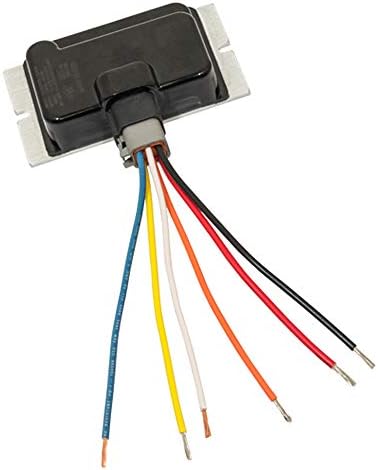
Figure 4.1: Wiring harness of the DPI 20 Amp DC to DC Converter.
- Input Power (High Voltage DC): Connect the high voltage input wires from your 36V or 48V battery system to the designated input terminals on the converter's connector. Ensure correct polarity (positive to positive, negative to negative).
- Ground Connection: Connect the ground wire from the converter to a reliable chassis ground point on the vehicle.
- Un-switched 12V Output: This output provides continuous 12V power whenever the converter is active. Connect your constant 12V accessories to this output.
- Switched 12V Output: This output provides 12V power only when an ignition key input is detected. Connect accessories that should only be active with the vehicle's ignition to this output.
- Ignition Key Input: Connect this wire to a switched 36V or 48V source (e.g., the vehicle's ignition switch output) to control the switched 12V output.
After all connections are made, double-check for proper polarity and secure connections before restoring main power.
5. Operating Instructions
The DPI DC to DC Converter operates automatically once properly installed and connected to a power source.
- Power On: Once the main battery power is connected, the converter will activate, providing 13Vdc to the un-switched output.
- Switched Output Control: The switched 12V output will become active when the ignition key input receives a signal (e.g., when the vehicle's ignition is turned on).
- Automatic Protection: The converter features built-in overload and short circuit protection. In case of an overload or short, the unit will enter a "hiccup mode" and automatically attempt to recover once the fault is cleared.
6. Maintenance
The DPI DC to DC Converter is designed for minimal maintenance. Regular checks can help ensure its longevity and reliable performance.
- Periodic Inspection: Annually inspect the converter and its wiring for any signs of damage, corrosion, or loose connections.
- Cleaning: Keep the converter free from dust, dirt, and debris. Use a dry, soft cloth for cleaning. Do not use liquid cleaners.
- Ventilation: Ensure that the mounting area remains clear and allows for adequate airflow around the unit to prevent overheating.
7. Troubleshooting
If you encounter issues with your DPI DC to DC Converter, refer to the following troubleshooting guide:
| Problem | Possible Cause | Solution |
|---|---|---|
| No 12V output from un-switched line. | No input power (36V/48V), blown fuse, loose connection, or converter fault. |
|
| No 12V output from switched line. | No ignition key input signal, loose connection, or converter fault. |
|
| Converter repeatedly cycles on/off (hiccup mode). | Overload or short circuit on the 12V output. |
|
| Converter is hot to the touch. | Excessive load, poor ventilation, or internal fault. |
|
The converter includes reverse battery protection. If input polarity is reversed, the unit will not operate and will not be damaged, but it will not provide output until correctly wired.
8. Specifications
| Feature | Detail |
|---|---|
| Brand | DPI |
| Model Number | 13-063 |
| Input Voltage | 36V DC or 48V DC |
| Output Voltage | 13V DC (Continuous) |
| Output Current | 20 Amps (Continuous) |
| Peak Electrical Efficiency | 93% minimum |
| Connector Type | 6-pin Deutsch Type Weather Sealed |
| Protection Features | Overload, Short Circuit (with hiccup mode recovery), Reverse Battery Protection, No Spark Connection |
| Compatibility | Universal fit for 36V/48V electric models; Direct replacement for SurePower 41020C10 in E-Z-GO/Yamaha OEM applications. |
| Item Weight | 1 Pound |
| Manufacturing Location | Designed and Manufactured in USA |
| UPC | 841417141173 |
| ASIN | B07VYVNQP6 |
9. Warranty and Support
For warranty information or technical support regarding your DPI 20 Amp DC to DC Converter, please contact the manufacturer, DPI, directly. Refer to the product packaging or the manufacturer's official website for the most current contact details and warranty terms.
When contacting support, please have your product model number (13-063) and purchase information readily available.