
Product Overview
The Dowinx Gaming Chair (Model LS) is designed for comfort and durability, suitable for extended gaming sessions or office work. It features a vintage-style design with breathable perforated leather, scratch-resistant diamond quilting, and robust construction. Key features include ergonomic adjustability, massage lumbar support, and a retractable footrest.
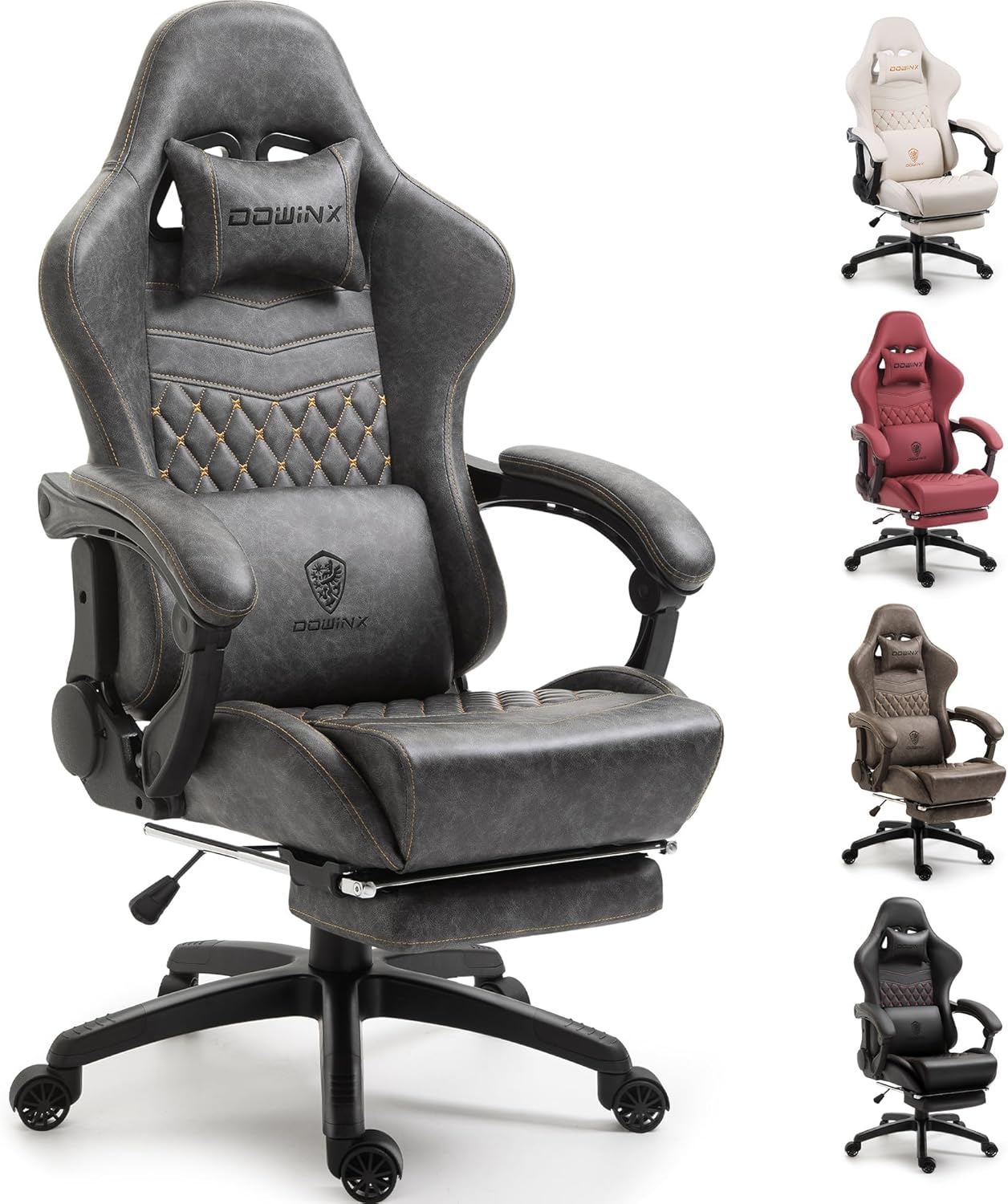
Figure 1: Dowinx Gaming Chair (Linkage Armrests, Grey)
Setup and Assembly
Your Dowinx Gaming Chair is designed for hassle-free assembly, typically taking under 20 minutes. Detailed numbered instructions are included in the packaging. It is recommended to have a second person for assistance during certain steps.
Assembly Steps Overview:
- Unpack all components and verify against the parts list.
- Attach the casters to the chair base.
- Install the gas lift cylinder into the base.
- Assemble the seat and backrest components.
- Attach the armrests and reclining mechanism.
- Connect the assembled seat to the gas lift.
- Install the headrest and lumbar support pillows.
- Ensure all screws are tightened securely to prevent wobbling and noise.

Figure 2: Chair components and material layers, including cold-cured foam and durable PU leather.
Helpful Assembly Video:
Video 1: A detailed assembly guide for the Dowinx Gaming Chair. This video provides visual instructions for each step of the setup process.
Operating Instructions
The Dowinx Gaming Chair offers multiple adjustment options to enhance your comfort and support during use.
Adjusting Chair Height:
Locate the lever on the right side of the seat. Pull the lever upwards while applying or releasing weight from the seat to adjust the height. Release the lever to lock the height in place.
Reclining the Backrest:
The backrest can recline smoothly from 90° to 165°. Pull the recline lever (typically on the right side, near the armrest) and lean back to your desired angle. Release the lever to lock the backrest position.
Using the Retractable Footrest:
Pull the footrest out from underneath the seat. Flip up the padded section for full leg support. Push it back in when not in use.

Figure 3: Demonstrating the adjustable height, recline, and retractable footrest features.
Massage Lumbar Support:
The lumbar pillow features a built-in massage function. Connect the USB cable from the pillow to any USB-C port to activate the massage. Unplug to turn off.
Rocking Function:
The chair supports a 20° rocking function. Adjust the tension knob located underneath the seat to control the rocking resistance. Pull the lever to enable rocking, push to lock.

Figure 4: The ergonomic design ensures the backrest and seat conform to the body, distributing pressure effectively.
Maintenance
Proper care will extend the life and appearance of your Dowinx Gaming Chair.
- Cleaning: For general cleaning, gently wipe the PU leather with a damp cloth. For deeper cleaning, dry clean only.
- Tightening Screws: Periodically check and tighten all assembly screws to maintain stability and prevent squeaking.
- Caster Care: Keep casters free of debris to ensure smooth movement.
Troubleshooting
| Problem | Possible Cause | Solution |
|---|---|---|
| Chair wobbles or feels unstable | Loose assembly screws | Check and tighten all screws, especially those connecting the seat, backrest, and armrests. |
| Squeaking noises | Loose connections or friction between parts | Tighten all screws. Apply a small amount of lubricant to moving parts if necessary. |
| Gas lift not functioning | Improper installation or defect | Ensure the gas lift is correctly inserted into the base and seat mechanism. If issues persist, contact customer support. |
| Footrest difficult to extend/retract | Obstruction or misalignment | Check for any obstructions. Ensure the footrest rails are clean and free of debris. |
Specifications
| Feature | Detail |
|---|---|
| Brand | Dowinx |
| Model Name | Gaming Chair (LS) |
| Color | Grey |
| Material | PU Leather, Cold-Cured Foam |
| Product Dimensions | 24"W x 23"H (Seat & Backrest) |
| Maximum Weight Recommendation | 350 Pounds |
| Reclining Position Count | 90° to 165° |
| Special Features | Reclining, Adjustable Height, Ergonomic, Adjustable Backrest, Foot Rest, Massage Lumbar Support |
| Item Weight | 44 pounds |
| UPC | 741416916607, 711567121014 |

Figure 5: Key dimensions and recommended user specifications.
Warranty and Support
Your Dowinx Gaming Chair comes with a 1-year free parts replacement warranty. For any assistance, questions, or parts replacement needs, our exceptional customer support team is available 24/7.
Please refer to the contact information provided in your user guide or visit the official Dowinx website for support.


