
1. Introduction
The DieHard DH6L is a 6A 12V fully automatic battery charger designed for a variety of 12V battery types, including lithium ion (LiFePO4), AGM, standard, and gel cell batteries. This charger features microprocessor-controlled multi-stage charging for precision and safety, along with reverse hook-up protection. Its digital display provides step-by-step instructions for proper battery charging, and quick connectors ensure easy setup.

Image 1.1: The DieHard DH6L charger, highlighting its fully automatic operation, multi-stage charging, float mode monitoring, and reverse hook-up protection.
2. Safety Information
Read all instructions carefully before using the charger. Failure to follow safety guidelines can result in electric shock, fire, or serious injury.
- Ventilation: Ensure adequate ventilation when charging batteries. Batteries can produce explosive gases.
- Eye Protection: Always wear eye protection when working with batteries.
- Gloves: Wear protective gloves to prevent contact with battery acid.
- Connection Order: Connect the output clips to the battery and chassis in the order specified in the operating instructions to prevent sparking.
- Power Disconnection: Disconnect the AC power cord before connecting or disconnecting the battery clips.
- Indoor Use: This charger is designed for indoor use. Do not expose to rain or excessive moisture.
- Children: Keep out of reach of children.
- Damaged Equipment: Do not operate the charger if it has been dropped or damaged.
3. What's Included
The DieHard DH6L package includes the following components:
- DieHard 6A 12V Fully Automatic Battery Charger and Maintainer (DH6L)
- Quick-connect battery clamps
- Quick-connect 12V accessory plug
- Quick-connect ring leads
- User manual
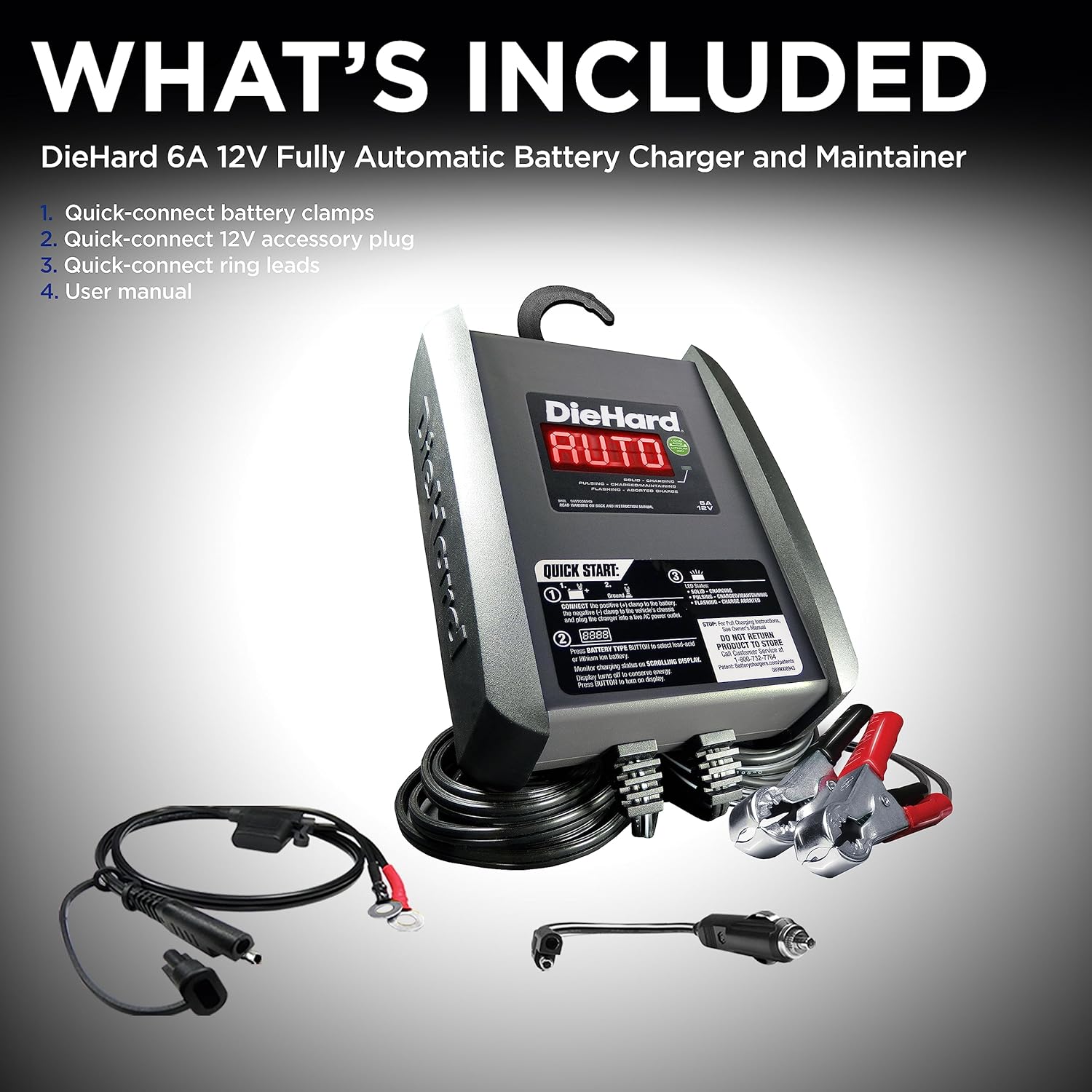
Image 3.1: All components included with the DieHard DH6L charger: the main unit, quick-connect battery clamps, a 12V accessory plug, and quick-connect ring leads.
4. Setup
Follow these steps to prepare your DieHard DH6L charger for use:
- Identify Components: Familiarize yourself with the charger unit, quick-connect battery clamps, 12V accessory plug, and quick-connect ring leads.
- Choose Connection Method: Select the appropriate quick-connect accessory (battery clamps, 12V accessory plug, or ring leads) for your application.
- Connect Accessory: Attach the chosen quick-connect accessory to the charger's output cable. Ensure a secure connection.
- Position Charger: Place the charger on a stable, flat surface or hang it using the integrated hook attachment, ensuring it is away from flammable materials and has good ventilation.

Image 4.1: A detailed view of the DieHard DH6L charger, showing its hook attachment, digital display, and the various quick-connect accessories: ring leads, battery clamps, and the 12V accessory plug.
5. Operating Instructions
Follow these steps to safely charge your 12V battery:
- Ensure Charger is Unplugged: Before making any connections to the battery, ensure the charger's AC power cord is unplugged from the electrical outlet.
- Connect to Battery:
- For Battery Clamps: Connect the RED positive (+) clamp to the positive (+) battery terminal. Connect the BLACK negative (-) clamp to the vehicle chassis or engine block, away from the battery and fuel line. Do NOT connect the negative clamp directly to the negative battery terminal unless charging a battery outside of a vehicle.
- For Ring Leads: Permanently attach the ring leads to the battery terminals (RED to positive, BLACK to negative).
- For 12V Accessory Plug: Insert the plug into a 12V accessory outlet in your vehicle.
- Plug in Charger: Once connections to the battery are secure, plug the charger's AC power cord into a standard 120V AC electrical outlet.
- Select Battery Type: The charger will automatically detect the battery voltage. Use the MODE button (if available, or follow scrolling digital instructions) to select the correct battery type (LiFePO4, AGM, Standard, Gel Cell) if automatic detection is incorrect or if you wish to override. The scrolling digital display will guide you through the selection process.
- Monitor Charging: The charger will begin the multi-stage charging process. The digital display will show charging status, battery percentage, and other relevant information. The charger will automatically switch to float mode once the battery is fully charged to maintain optimal battery health.
- Disconnect Charger: To disconnect, first unplug the AC power cord from the electrical outlet. Then, disconnect the negative (-) connection (black clamp from chassis/engine block) followed by the positive (+) connection (red clamp from battery terminal).

Image 5.1: A user connecting the DieHard DH6L charger to a car battery, demonstrating the typical setup for charging a vehicle battery.
6. Maintenance
Proper maintenance ensures the longevity and safe operation of your battery charger:
- Cleaning: Disconnect the charger from power before cleaning. Wipe the case with a soft, dry cloth. Do not use solvents or abrasive cleaners.
- Cable Inspection: Regularly inspect the AC power cord and output cables for any signs of damage, cuts, or fraying. Do not use the charger if cables are damaged.
- Storage: Store the charger in a cool, dry place when not in use. Keep cables neatly coiled to prevent damage.
- Terminal Cleaning: Ensure battery terminals are clean and free of corrosion before connecting the charger for optimal contact.
7. Troubleshooting
If you encounter issues with your DieHard DH6L charger, refer to the following common troubleshooting steps:
| Problem | Possible Cause | Solution |
|---|---|---|
| Charger does not turn on | No AC power; Faulty outlet | Check AC power connection. Test outlet with another device. |
| Charger not charging battery | Incorrect battery connection; Battery is severely discharged or faulty; Incorrect battery type selected | Verify correct positive/negative connections. Have battery tested by a professional. Ensure correct battery type is selected on the charger. |
| Error message on display | Reverse polarity connection; Internal fault | Disconnect charger, correct battery connections (RED to +, BLACK to - or chassis). If error persists, contact customer support. |
| Charger gets warm during operation | Normal operation | Some warmth is normal during charging. Ensure adequate ventilation around the charger. |
If these steps do not resolve the issue, please contact customer support.
8. Specifications
| Feature | Specification |
|---|---|
| Brand | DieHard |
| Model Number | DH6L |
| Output Voltage | 12V DC |
| Input Voltage | 120V AC |
| Current Rating | 6A |
| Compatible Devices | Cars, boats, RVs, and other vehicles with 12V batteries (LiFePO4, AGM, Standard, Gel Cell) |
| Item Weight | 2.5 pounds |
| Manufacturer | Schumacher |
| UPC | 026666911306 |
9. Warranty
The DieHard DH6L 6A 12V Fully Automatic Battery Charger comes with a 1-Year Limited Warranty from the date of purchase. This warranty covers defects in materials and workmanship under normal use. Please retain your proof of purchase for warranty claims. For full warranty details, refer to the documentation included with your product or contact customer support.
10. Customer Support
For product questions, technical assistance, or feedback, please contact Schumacher Customer Support:
- Phone: 1-800-621-5485
- Email: info@schumacherelectric.com

Image 10.1: Schumacher Customer Support details, including phone number and email address for assistance.


