
Milwaukee 48-22-8410
Milwaukee PACKOUT Dolly 48-22-8410 Instruction Manual
Brand: Milwaukee | Model: 48-22-8410
Introduction
The Milwaukee PACKOUT Dolly (Model 48-22-8410) is a component of the Milwaukee PACKOUT Modular Storage System, designed to enhance the mobility of your tool storage. This instruction manual provides essential information for the safe and effective use of your PACKOUT Dolly.
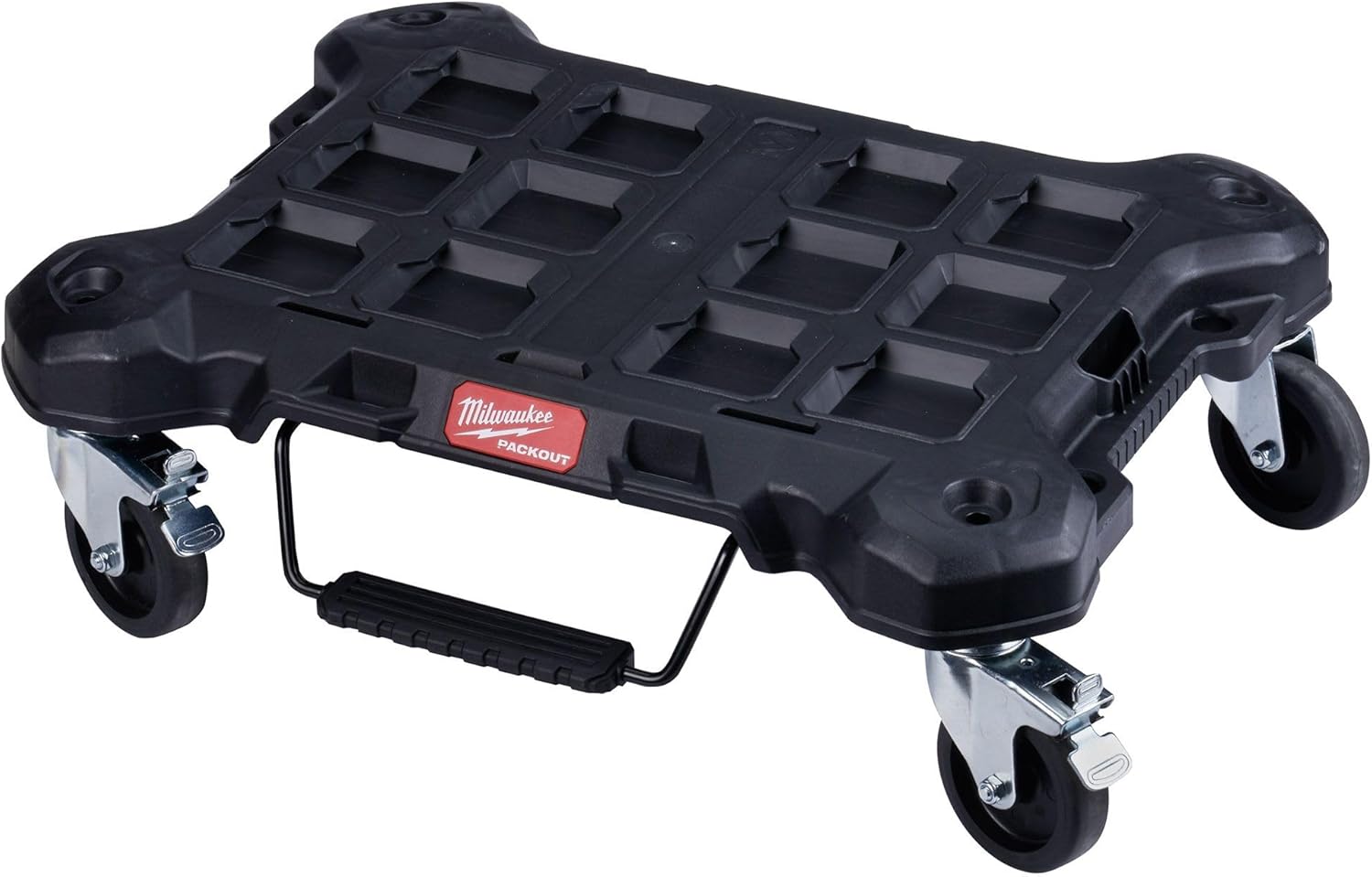
The Milwaukee PACKOUT Dolly, a robust base for the modular storage system, featuring four swivel casters for easy maneuverability.
Key Features
- Impact Resistant Polymer Construction: Engineered for durability in demanding job site conditions.
- Locking Casters: Four swivel casters with locking mechanisms ensure stability during loading, unloading, and storage.
- 250 lbs Load Capacity: Designed to support substantial weight, accommodating multiple PACKOUT boxes.
- Integrated Quickstop Loading Lever: Allows for quick and secure positioning of the dolly.
- Modular Connectivity: Fully compatible with all Milwaukee PACKOUT components for a customizable storage solution.
Specifications
| Feature | Detail |
|---|---|
| Brand | Milwaukee |
| Model Number | 48-22-8410 |
| Color | Black |
| Item Weight | 10.98 pounds (4.98 kg) |
| Product Dimensions | 24.4"L x 18.8"W x 7.6"H (62.0 cm L x 48.0 cm W x 19.3 cm H) |
| Wheel Type | Caster |
| Load Capacity | 250 Pounds (113.4 kg) |
| Number of Wheels | 4 |
| Construction Material | Impact Resistant Polymer |
| UPC | 045242524082 |

Detailed dimensions of the Milwaukee PACKOUT Dolly, showing length, width, and height measurements.
Setup and Assembly
Unpacking
Carefully remove all components from the packaging. Verify that all parts are present: the dolly base, four casters, and the quickstop loading lever assembly.
Attaching the Casters
- Invert the dolly base to expose the four caster mounting points.
- Insert each of the four casters into the designated holes on the underside of the dolly. Ensure they are fully seated.
- The casters are designed for a secure fit. A rubber mallet may be used gently if needed to fully seat them, but avoid excessive force.
Attaching the Quickstop Loading Lever
- Locate the quickstop loading lever assembly.
- Align the lever's attachment points with the corresponding slots on the dolly base.
- Secure the lever by pushing it into place until it clicks, ensuring it can pivot freely.
Operating Instructions
Attaching PACKOUT Boxes
The Milwaukee PACKOUT Dolly features integrated locking cleats on its top surface. To attach a PACKOUT box, align the box's base with the dolly's cleats and press down firmly until it clicks into place.
Moving the Dolly
Once PACKOUT boxes are securely attached, the dolly can be easily maneuvered using its four swivel casters. Push or pull the stacked system to transport your tools.

A Milwaukee PACKOUT Dolly with multiple stacked toolboxes, demonstrating its use for transporting equipment.
Engaging the Locking Casters
To prevent the dolly from moving, engage the locking mechanism on each caster. This is typically done by pressing down on a lever located on each wheel.
Using the Quickstop Loading Lever
The quickstop loading lever provides additional stability when loading or unloading heavy items. Step on the lever to temporarily secure the dolly in place, preventing unwanted movement. Release the lever to resume mobility.
Maintenance
Cleaning
Regularly clean the dolly and casters to remove dirt, dust, and debris. Use a damp cloth and mild soap if necessary. Avoid harsh chemicals that may damage the polymer.
Caster Inspection
Periodically inspect the casters for any signs of wear, damage, or obstruction. Ensure they swivel freely and the locking mechanisms function correctly. Lubricate moving parts of the casters if needed with a suitable lubricant.
Storage
Store the PACKOUT Dolly in a clean, dry environment when not in use.
Troubleshooting
Dolly Not Rolling Smoothly
- Check casters for debris (e.g., string, hair, dirt) and remove any obstructions.
- Ensure caster locking mechanisms are disengaged.
- Lubricate caster swivel points and wheel axles if they appear stiff.
PACKOUT Boxes Not Securing
- Verify that the PACKOUT box is correctly aligned with the dolly's locking cleats.
- Apply firm downward pressure until an audible click is heard, indicating a secure connection.
- Inspect the locking cleats on both the dolly and the PACKOUT box for damage or wear.
Quickstop Loading Lever Not Functioning
- Check for any obstructions preventing the lever from engaging or disengaging fully.
- Ensure the lever assembly is securely attached to the dolly.
Warranty and Support
Warranty Information
This Milwaukee PACKOUT Dolly is covered by Milwaukee's standard warranty. Please refer to the warranty card included with your product or visit the official Milwaukee website for detailed terms and conditions.
Customer Support
For technical assistance, parts, or service, please contact Milwaukee Customer Support. Contact information can be found on the Milwaukee website or on your product packaging.
Online resources, including FAQs and additional product information, are available at www.milwaukeetool.com.
Related documents48-22-8410


Ask a question about this manual
Ask about setup, troubleshooting, compatibility, parts, safety, or missing instructions. Manuals+ will review the question and use this page’s manual context to help answer it.