
1. Introduction and Overview
Welcome to the world of classic arcade gaming with your new Arcade1Up Party-Cade Retro Arcade Game. This compact and versatile arcade system brings the excitement of vintage arcade titles directly into your home. Designed for ease of use and enjoyment, it features a collection of 8 iconic games from Atari, providing hours of entertainment for players of all ages.
The included games are:
- Asteroids
- Asteroids Deluxe
- Tempest
- Super Breakout
- Lunar Lander
- Gravitar
- Warlords
- Avalanche
This manual provides essential information for setting up, operating, maintaining, and troubleshooting your Party-Cade arcade game.
2. Setup
Your Arcade1Up Party-Cade is designed for quick and easy setup, arriving pre-assembled for immediate enjoyment. It can be placed on a flat surface or mounted on a wall.
2.1 Unboxing and Placement
- Carefully remove the arcade unit from its packaging. Inspect for any signs of damage during transit.
- Choose a stable, flat surface for placement, or a suitable wall for mounting. Ensure adequate space around the unit for ventilation and comfortable gameplay.
- The unit's dimensions are approximately 18.5 x 18.5 x 28.75 inches (L x W x H).
2.2 Power Connection
- Locate the power adapter included with your unit.
- Connect the power adapter to the designated power input port on the arcade unit.
- Plug the power adapter into a standard electrical outlet. The unit will power on automatically or can be turned on using the power switch (if present).

Figure 2.1: Front view of the Arcade1Up Party-Cade, showcasing its compact design and game selection screen.

Figure 2.2: Rear view of the Arcade1Up Party-Cade, highlighting its wall-mountable design and ventilation.
3. Operating Instructions
The Arcade1Up Party-Cade is designed for intuitive gameplay, replicating the classic arcade experience.
3.1 Power On/Off
- To power on, ensure the unit is plugged into an electrical outlet. The unit typically powers on automatically.
- To power off, disconnect the power adapter from the electrical outlet.
3.2 Game Selection
- Upon powering on, the main menu displaying the 8 available games will appear on the 17-inch LCD screen.
- Use the joystick to navigate through the game titles.
- Press the 'A' button (or designated select button) to choose and launch a game.
3.3 Controls
The Party-Cade features classic arcade controls for an authentic experience:
- Joystick: Used for directional movement within games.
- Buttons: Various action buttons (e.g., Fire, Thrust, Rotate Left/Right, Hyper Space) are available depending on the game. Refer to the on-screen game control guide for specific button functions.
- Volume Control: Adjust the game audio using the dedicated volume controls on the unit.
The system supports two players, allowing for competitive or cooperative gameplay on applicable titles.
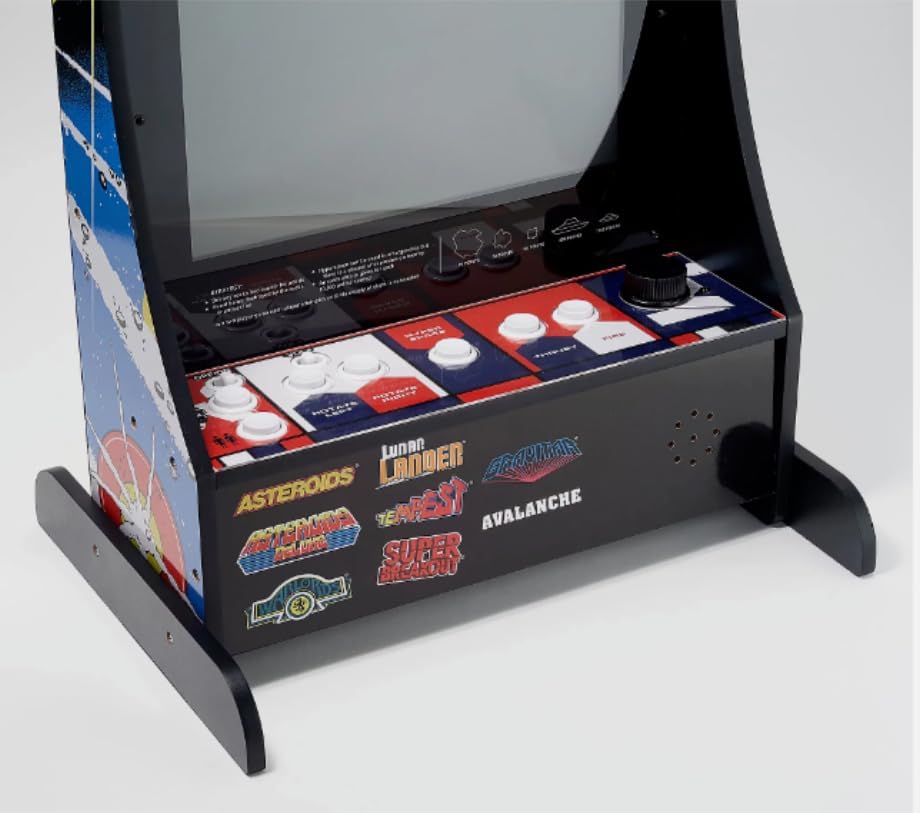
Figure 3.1: Detail of the control panel, illustrating the joystick and button layout for gameplay.
4. Maintenance
Proper maintenance ensures the longevity and optimal performance of your arcade unit.
4.1 Cleaning
- Always unplug the unit before cleaning.
- Use a soft, dry cloth to wipe down the exterior surfaces.
- For stubborn marks, lightly dampen the cloth with water or a mild, non-abrasive cleaner. Avoid spraying liquids directly onto the unit.
- Clean the screen with a screen-specific cleaner and a microfiber cloth to prevent scratches.
4.2 Storage
- Store the unit in a cool, dry place away from direct sunlight and extreme temperatures.
- If storing for an extended period, cover the unit to protect it from dust.
5. Troubleshooting
If you encounter issues with your Arcade1Up Party-Cade, refer to the following common troubleshooting steps:
| Problem | Possible Cause | Solution |
|---|---|---|
| Unit does not power on. | No power connection or faulty adapter. | Ensure power adapter is securely plugged into the unit and a working electrical outlet. Test the outlet with another device. |
| Screen is fuzzy, jumbled, or distorted. | Loose internal connection or display issue. | Power off the unit, unplug it, wait 30 seconds, then plug it back in and power on. If the issue persists, contact customer support. |
| Controls (joystick/buttons) are unresponsive. | Game frozen or control panel issue. | Try restarting the unit. Ensure no debris is obstructing the controls. If unresponsive after restart, contact customer support. |
| No sound or low sound. | Volume too low or muted. | Adjust the volume control on the unit. Ensure the volume is not set to minimum. |
If these steps do not resolve the issue, please refer to the Warranty and Support section for further assistance.
6. Specifications
Detailed technical specifications for the Arcade1Up Party-Cade Retro Arcade Game:
- Manufacturer: Arcade1Up
- Model Number: 8226
- UPC: 725084968762
- Product Dimensions (L x W x H): 18.5 x 18.5 x 28.75 inches
- Item Weight: 27.5 pounds
- Screen Size: 17 Inches
- Display Type: LCD
- Controller Type: Joystick, Button Control
- Hardware Interface: HDMI (internal)
- Operation Mode: Manual
- Form Factor: Upright design with built-in display
7. Warranty and Support
For warranty information, product support, or to inquire about replacement parts, please contact the manufacturer, Arcade1Up, directly. Refer to the contact information provided on the product packaging or their official website.
It is recommended to retain your proof of purchase for warranty claims.


