
Bestol RC-ZAT04
AIWA TV AV System Remote Control
Model: RC-ZAT04 User Manual
1. Introduction
This user manual provides detailed instructions for the Bestol RC-ZAT04 remote control. This remote is designed as a replacement or spare for various AIWA TV, AV systems, audio power amplifiers, and DVD players. It offers intuitive control over your compatible devices, ensuring a seamless entertainment experience.
Please read this manual thoroughly before using the remote control to ensure proper operation and to maximize its lifespan.

Figure 1: Angled view of the RC-ZAT04 Remote Control.
This image displays the Bestol RC-ZAT04 remote control from an angled perspective, highlighting its ergonomic shape and the arrangement of its various control buttons, including the numeric keypad, navigation controls, and function buttons.
2. Setup
2.1 Battery Installation
The RC-ZAT04 remote control requires two AAA batteries (not included) for operation. Follow these steps to install the batteries:
- Locate the battery compartment cover on the back of the remote control.
- Press down on the tab and slide the cover off.
- Insert two AAA batteries, ensuring the positive (+) and negative (-) terminals align correctly with the markings inside the compartment.
- Slide the battery compartment cover back into place until it clicks securely.
Note: Always use new batteries and replace both batteries at the same time. Do not mix old and new batteries or different types of batteries. Remove batteries if the remote will not be used for an extended period.
3. Operating Instructions
The RC-ZAT04 remote control is designed for straightforward operation. Point the remote directly at the infrared sensor of your AIWA device. Ensure there are no obstructions between the remote and the device.
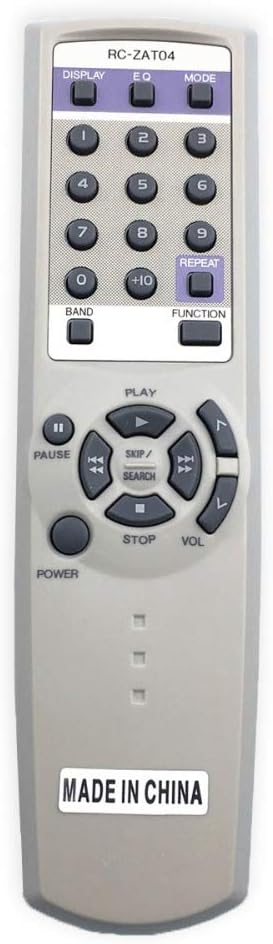
Figure 2: Front view of the RC-ZAT04 Remote Control with button labels.
This image provides a direct front view of the Bestol RC-ZAT04 remote control, allowing for clear identification of each button's function label, including the numeric pad, media controls, and specific function buttons like DISPLAY, EQ, and MODE.
3.1 Button Functions
| Button | Function |
|---|---|
| POWER | Turns the device on or off. |
| DISPLAY | Toggles display information on the screen. |
| EQ | Adjusts equalizer settings for audio output. |
| MODE | Switches between different operating modes (e.g., TV, DVD, Audio). |
| 0-9, +10 | Numeric keypad for direct channel selection or input. '+10' for channels 10 and above. |
| BAND | Selects radio bands (e.g., AM/FM) on compatible audio systems. |
| FUNCTION | Cycles through various functions or input sources. |
| REPEAT | Repeats playback of a track, chapter, or disc. |
| PAUSE | Pauses playback. |
| PLAY | Starts or resumes playback. |
| STOP | Stops playback. |
| SKIP / SEARCH (Left/Right Arrows) | Skips to the next/previous track or chapter. Hold to fast forward/rewind. |
| VOL (Up/Down Arrows) | Adjusts the volume level. |
4. Maintenance
Proper care and maintenance will ensure the longevity and optimal performance of your remote control.
4.1 Cleaning
- Wipe the remote control with a soft, dry cloth.
- For stubborn dirt, slightly dampen the cloth with water or a mild, non-abrasive cleaner.
- Do not use harsh chemicals, solvents, or abrasive cleaning pads, as these can damage the remote's surface or internal components.
4.2 Battery Replacement
Replace batteries when the remote's range decreases or it becomes unresponsive. Refer to Section 2.1 for battery installation instructions.
4.3 Storage
Store the remote control in a cool, dry place away from direct sunlight, extreme temperatures, and high humidity. If storing for an extended period, remove the batteries to prevent leakage.
5. Troubleshooting
If you encounter issues with your RC-ZAT04 remote control, try the following solutions:
- Remote not responding:
- Check if the batteries are inserted correctly with the correct polarity (+/-).
- Replace old batteries with new ones.
- Ensure there are no obstructions between the remote and the device's infrared sensor.
- Make sure you are pointing the remote directly at the device.
- Limited range:
- Replace the batteries.
- Ensure no strong light sources (like direct sunlight or bright fluorescent lights) are interfering with the infrared signal.
- Specific buttons not working:
- Clean the remote's surface, especially around the unresponsive buttons, to remove any dirt or debris.
- If only certain buttons fail, it might indicate internal damage. Consider replacing the remote.
If the problem persists after trying these steps, the remote control may be faulty and require replacement.
6. Specifications
| Feature | Detail |
|---|---|
| Model Number | RC-ZAT04 |
| Brand | Bestol |
| Compatible Devices | AIWA TV, AV System, Audio Power Amplifier, DVD Player |
| Connectivity Technology | Infrared (IR) |
| Power Source | 2 x AAA Batteries (not included) |
| Item Weight | 2.08 ounces (approx. 59 grams) |
| Package Dimensions | 7.48 x 2.83 x 0.79 inches (approx. 19 x 7.2 x 2 cm) |
| Special Feature | Ergonomic design |
7. Support
For further assistance or inquiries regarding your Bestol RC-ZAT04 remote control, please contact the retailer or manufacturer from whom you purchased the product. Please have your product model number (RC-ZAT04) ready when seeking support.
Ask a question about this manual
Ask about setup, troubleshooting, compatibility, parts, safety, or missing instructions. Manuals+ will review the question and use this page’s manual context to help answer it.