
Introduction
Welcome to the Angelcare AC127 Baby Monitor User Manual. This monitor is designed to provide peace of mind by combining sound monitoring with a unique Sensasure movement detection pad and a room temperature display. Please read this manual thoroughly before use to ensure proper setup, operation, and maintenance of your device.

The Angelcare AC127 Baby Monitor system, featuring both the Parent Unit and the Baby Unit.
Important Safety Information
WARNING: This product is not a medical device and is not intended to prevent Sudden Infant Death Syndrome (SIDS). It is designed to monitor your baby's movements and sounds. Always ensure proper installation and follow all safety guidelines.
- Keep all cords and cables out of reach of children to prevent strangulation hazards.
- Never place the Baby Unit or Parent Unit inside the crib or playpen.
- Ensure the movement sensor pad is placed correctly under the mattress and is not accessible to the baby.
- Use only the power adapters provided with the product.
- Do not use the monitor near water or in damp environments.
- Regularly check the monitor's functionality and battery levels.
Package Contents
Verify that all items are present in your package:
- Parent Unit (portable and rechargeable)
- Baby Unit (with temperature indicator ring)
- Sensasure Wireless Movement Sensor Pad
- 2 Power Adapters (for Parent Unit and Baby Unit)
- Rechargeable Lithium-ion Battery (pre-installed in Parent Unit)
- Instruction Manual (this document)
Product Overview
Parent Unit

The Parent Unit is portable and rechargeable, allowing you to monitor your baby from anywhere in your home. It features a digital display showing the room temperature, sound levels, and movement indicators. It also enables two-way communication with your baby.
- LCD Display: Shows temperature, battery status, signal strength, and movement/sound indicators.
- Volume Controls: Adjust listening level.
- Talk Back Button: Activates two-way communication.
- Power/Menu Button: Turns unit on/off and accesses menu settings.
Baby Unit

The Baby Unit is placed in your baby's room and transmits sounds and temperature readings to the Parent Unit. It features a color-changing light ring that visually indicates the room's temperature.
- Microphone: Picks up baby's sounds.
- Speaker: For two-way talk function.
- Temperature Indicator Ring: Changes color based on room temperature (Blue for too cold, White for optimal, Red for too warm).
- Power Input: Connects to the power adapter.
Sensasure Wireless Movement Sensor Pad

The Sensasure Movement Sensor Pad is a non-contact, wireless pad that detects your baby's movements across the entire mattress surface. It triggers an alarm if no movement is detected for 20 seconds. This pad is designed to be placed under the mattress.
- Wireless Technology: No cords in the crib.
- Under-Mattress Placement: Stays out of reach of the baby.
- Adjustable Sensitivity: Can be adjusted to suit different mattress types and baby's movements.
- Movement Alarm: Alerts if no movement is detected for 20 seconds.
Setup
1. Charging the Units
- Connect the provided power adapters to the Parent Unit and Baby Unit.
- Plug the adapters into a wall outlet.
- Charge the Parent Unit for at least 8 hours before first use to ensure optimal battery life. The Baby Unit operates on AC power.
2. Placing the Baby Unit
Place the Baby Unit on a flat surface in your baby's room, at least 1 meter (3 feet) away from the crib. Ensure it is out of your baby's reach.
3. Installing the Sensasure Movement Sensor Pad

The movement sensor pad must be placed directly under the crib mattress.
- Place the sensor pad on a firm, flat surface (e.g., a wooden board) under the crib mattress.
- Ensure the pad is centered under where your baby will sleep.
- The pad is wireless and connects to the Baby Unit via Bluetooth. No physical connection is needed between the pad and the Baby Unit.
- Important: The sensor pad is designed for use with standard crib mattresses. It may not function correctly with memory foam mattresses or mattresses thicker than 12 cm (approximately 4.7 inches), which can lead to false alarms or missed movements.
4. Powering On and Pairing
- Press and hold the Power button on both the Parent Unit and Baby Unit to turn them on.
- The units should automatically pair. If not, refer to the troubleshooting section for manual pairing instructions.
- Once paired, the Parent Unit display will show the room temperature and movement indicators.
Operating Instructions
Monitoring Movement
The Sensasure Movement Sensor Pad continuously monitors your baby's movements.
- A green light or indicator on the Parent Unit confirms movement detection.
- If no movement is detected for 20 seconds, an alarm will sound on the Parent Unit.
- To adjust the sensitivity of the movement sensor pad, access the menu on the Parent Unit. Increase sensitivity for thicker mattresses or decrease it if you experience false alarms.
Monitoring Temperature

The Baby Unit continuously monitors the room temperature and displays it on the Parent Unit. The color-changing ring on the Baby Unit provides a quick visual reference:
- Blue: Room is too cold.
- White: Room temperature is optimal.
- Red: Room is too warm.
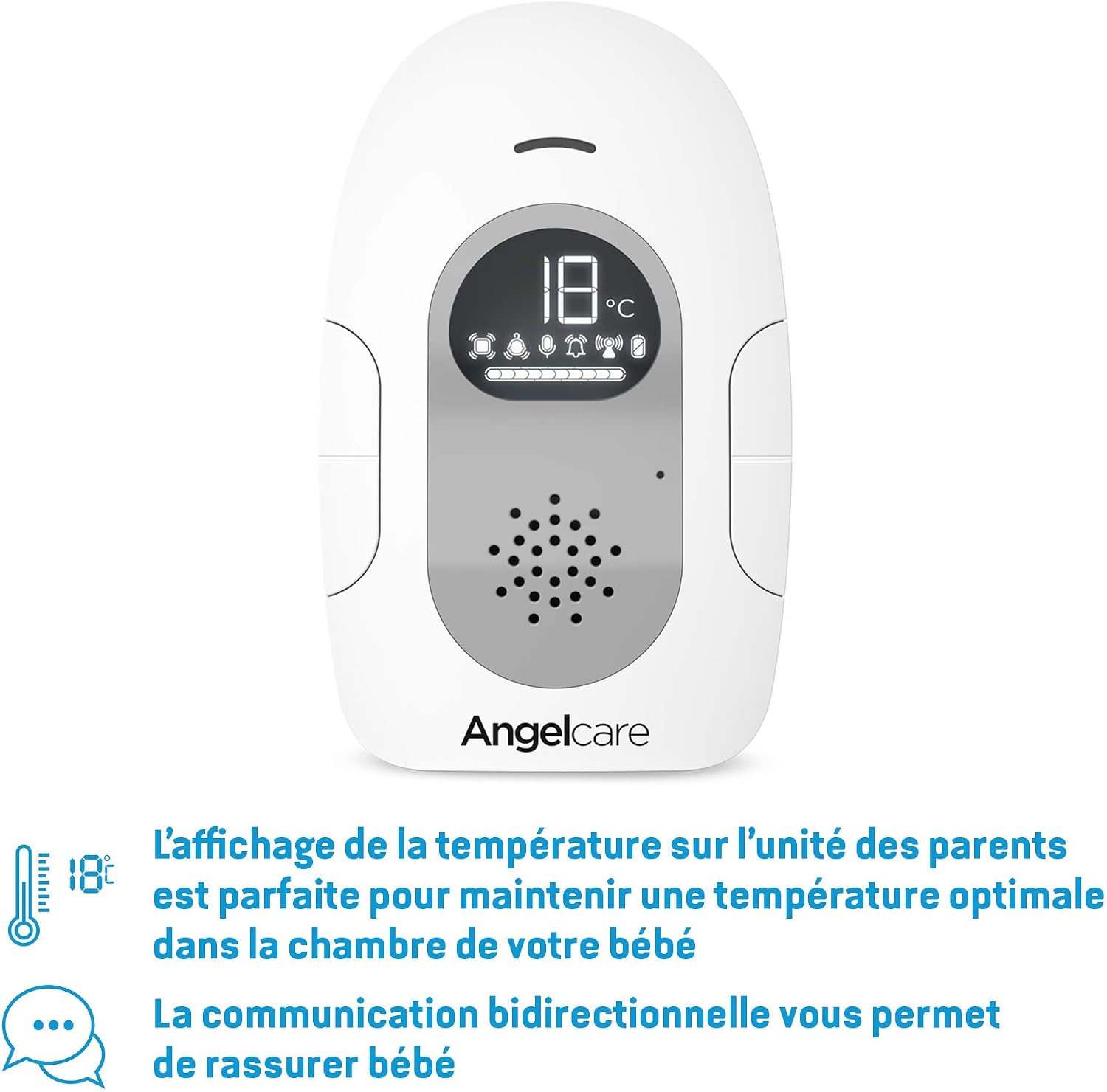
The Parent Unit displays the room temperature, allowing you to ensure an optimal environment for your baby.
Two-Way Talk Function
To speak to your baby, press and hold the "Talk Back" button on the Parent Unit. Your voice will be transmitted through the Baby Unit's speaker. Release the button to resume listening.
Power Options
The Parent Unit operates on a rechargeable battery or AC power. The Baby Unit operates on AC power with automatic switch to battery mode in case of power outage (if batteries are installed and charged).
Maintenance
- Cleaning: Wipe the units with a dry, soft cloth. Do not use abrasive cleaners or solvents.
- Battery Care: For optimal battery life, fully charge the Parent Unit before first use and avoid completely draining the battery frequently.
- Storage: If storing the monitor for an extended period, remove batteries from the Parent Unit and store in a cool, dry place.
Troubleshooting
| Problem | Possible Cause | Solution |
|---|---|---|
| No sound or poor sound quality. | Volume too low, units out of range, interference. | Increase Parent Unit volume. Move units closer. Reduce interference from other electronic devices. |
| Movement alarm sounds frequently (false alarms). | Sensor pad sensitivity too high, incorrect mattress type, external vibrations. | Decrease sensor pad sensitivity. Ensure mattress is not memory foam or too thick (max 12cm). Ensure crib is not touching walls or furniture that transmit vibrations. |
| No movement detected, but baby is moving. | Sensor pad sensitivity too low, incorrect placement. | Increase sensor pad sensitivity. Re-center the pad under the baby's sleeping area. |
| Parent Unit not charging. | Adapter not connected, faulty adapter/battery. | Ensure adapter is securely connected to unit and outlet. Try a different outlet. Contact support if issue persists. |
| Temperature display is inaccurate. | Baby Unit placed near heat source/vent, direct sunlight. | Relocate the Baby Unit to a more central location in the room, away from direct heat or cold sources. |
| Units not pairing. | Units too far apart, interference, pairing mode not activated. | Bring units closer together. Turn both units off and on again. Refer to the full manual for specific manual pairing steps if needed. |
Specifications
| Feature | Detail |
|---|---|
| Brand | Angelcare |
| Model Number | AC127 |
| Color | White |
| Compatible Devices | Baby Monitor |
| Product Dimensions (L x W x H) | 21.6 x 8.2 x 17.1 cm |
| Battery Type | Lithium-ion |
| Number of Items | 1 |
| UPC/GTIN | 666594204219 |
Warranty and Support
Angelcare products come with a manufacturer's warranty. For specific warranty details, registration, or technical support, please visit the official Angelcare website or contact their customer service. Keep your proof of purchase for warranty claims.
Online Support: www.angelcarebaby.com/support (This is a placeholder link, as no specific support link was provided in the JSON. Users should always refer to the official product packaging or website for accurate support information.)


