Introduction
This manual provides comprehensive instructions for the installation, operation, and maintenance of your SSONTONG Dash Camera. Designed to record driving scenery and events, this dual-camera system offers enhanced safety and peace of mind on the road. Please read this manual thoroughly before using the device to ensure proper functionality and longevity.
Package Contents
Please verify that all items listed below are included in your package:
- Front Dash Camera Unit
- Rear Camera Unit
- Suction Mount
- Car Charger (Cigarette Lighter Adapter)
- Mini USB Power Cable
- SD Card Reader
- 32GB Class 10 Micro SD Card (pre-formatted)
- User Manual
- Special Cleaning Cloth
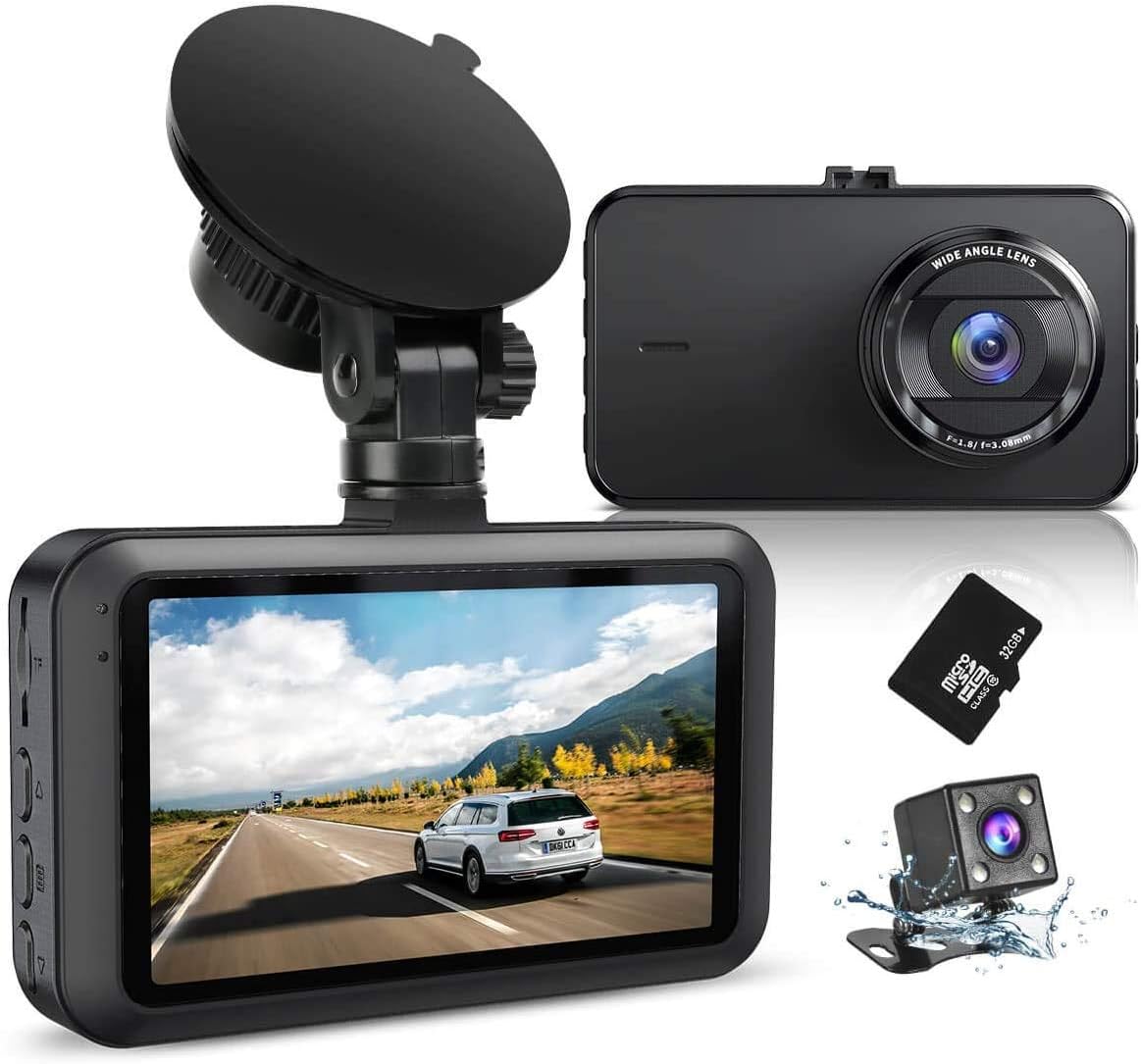
Image: SSONTONG Dash Camera and included accessories.
Product Features
Full HD 1080P Recording & Wide Angle Lens
The front dash camera records in Full HD 1080P resolution, capturing clear and detailed footage of the road ahead. It features a 170° wide-angle lens, providing extensive coverage of multiple lanes.

Image: Front camera with 170° wide-angle view.
Dual Camera Monitoring
The system includes both a front and rear camera, allowing simultaneous recording of both views. The rear camera provides a 140° wide-angle view, useful for monitoring traffic behind your vehicle and assisting with parking.

Image: Dual lens monitoring capability.
Night Vision & HDR Technology
Equipped with a Sony Sensor and 6-layer glass lens, the dash camera offers enhanced night vision capabilities, capturing clear footage even in low-light conditions. HDR (High Dynamic Range) technology ensures optimal exposure for balanced video quality in varying light environments.

Image: Enhanced night vision with Sony Sensor.
Loop Recording & G-Sensor
Loop recording automatically overwrites the oldest footage when the SD card is full, ensuring continuous recording. The built-in G-Sensor detects sudden movements or impacts, automatically locking and saving the current video segment to prevent it from being overwritten, providing crucial evidence in case of an accident.

Image: Key functions including Loop Recording and G-Sensor.
Parking Monitor & Motion Detection
When activated, the 24-hour parking monitor mode uses motion detection to automatically record when movement is detected around your parked vehicle. This feature helps protect your car from potential incidents while unattended.
Important: Do not turn on parking monitoring and motion detection while driving.
Built-in Super Capacitor
The dash camera utilizes a built-in super capacitor, offering enhanced heat resistance and a longer service life compared to traditional batteries. This component is primarily for saving video files after the external power supply is cut off (e.g., when the car is turned off).
Image: Built-in Super Capacitor benefits.
Setup Guide
1. Prepare the Micro SD Card
Insert the provided 32GB Class 10 Micro SD card into the dash camera's TF card slot. The included card is pre-formatted and ready for use. If using a different card, ensure it is Class 10 or above (16GB or 32GB recommended) and format it within the camera's menu before first use.
2. Install the Front Dash Camera
Attach the suction mount to the dash camera unit. Clean your windshield thoroughly before attaching the suction cup for optimal adhesion. Mount the camera on your windshield, ideally below the rearview mirror, ensuring it does not obstruct your view. Adjust the camera angle to capture the desired field of view.

Image: Front dash camera installation.
3. Connect Power
Connect the Mini USB power cable to the dash camera's power interface (DC 5V/2A). Plug the car charger into your vehicle's cigarette lighter socket. The dash camera is designed to automatically power on and off with your vehicle's ignition.
4. Install the Rear Camera (Optional)
Connect the rear camera cable to the dedicated port on the main dash camera unit. For optimal rear view and parking assistance, it is recommended to install the rear camera near your license plate. The package includes screws to help you fix it. Ensure the cable is routed safely and does not interfere with vehicle operation.

Image: Rear camera parking assistance view.
Operating Instructions
Basic Operation
- Power On/Off: The device automatically turns on/off with the car's ignition.
- Recording: Once powered on, the camera will automatically begin loop recording. A red indicator light will flash to confirm recording is active.
- Menu Navigation: Use the navigation buttons on the side of the unit to access settings and playback modes. The "OK" or "Enter" button confirms selections.
- Date & Time: It is recommended to set the correct date and time in the settings menu for accurate timestamping of your recordings.
Modes and Settings
- Video Mode: Default recording mode.
- Photo Mode: Capture still images in JPG format.
- Playback Mode: View recorded videos and photos directly on the 3-inch IPS screen.
- G-Sensor Sensitivity: Adjust the sensitivity of the G-Sensor (Off, Low, Medium, High) based on your driving conditions. Higher sensitivity will trigger emergency recording more easily.
- Parking Monitor: Enable or disable this feature for 24-hour surveillance.
- Motion Detection: Enable or disable this feature to start recording when motion is detected.
Maintenance
- SD Card Formatting: Regularly format your Micro SD card (e.g., once a month) to ensure optimal performance and prevent data corruption. This can be done through the camera's settings menu.
- Cleaning: Use the provided special cleaning cloth to wipe the camera lens and screen. Avoid abrasive materials or chemical cleaners.
- Temperature: Avoid exposing the dash camera to direct sunlight for prolonged periods or temperatures exceeding 170°F (75°C), as this may affect its performance and longevity.
Troubleshooting
- Camera Not Turning On: Ensure the power cable is securely connected to both the camera and the car's cigarette lighter socket. Check if the car charger is receiving power.
- "Card Full" Error: Format the SD card in the camera's menu. Ensure you are using a Class 10 or higher Micro SD card.
- Poor Video Quality: Check if the lens is clean. Ensure the protective film has been removed from the lens. Adjust HDR settings if experiencing overexposure or underexposure.
- Rear Camera Not Displaying: Verify that the rear camera cable is securely connected to the main unit. Check the cable for any damage.
- Audio Issues: Ensure the microphone is not muted in the settings.
Specifications
| Feature | Description |
|---|---|
| LCD Screen Size | 3 inch IPS Screen |
| Video Capture Resolution | 1080p (Front), 720p (Rear) |
| Video Format | AVI |
| Maximum Photo Resolution | 12M |
| Photo Format | JPG |
| TF Card Support | Support 16GB or 32GB, Class 10 or above |
| Field Of View | 170 Degrees (Front), 140 Degrees (Rear) |
| Microphone/Speaker | Internal |
| Power Interface | DC 5V/2A |
| Battery | Built-in Li-ion Battery (for saving files) |
| Mounting Type | Suction Mount |
Warranty and Support
Your SSONTONG Dash Camera comes with a 12-month warranty. If you encounter any problems or have questions, please contact the manufacturer's support team. They are committed to providing a satisfactory solution within 24 hours.
Contact Information:
- Email: ssontong_service@163.com
- Please provide your Amazon order ID when contacting support.