
1. Introduction
The OnLyee CR1009 Emergency Weather Radio is a versatile and essential device designed to keep you informed and safe during emergencies and outdoor activities. This portable radio features multiple power sources, including solar, hand crank, and rechargeable battery, ensuring continuous operation. It provides access to AM, FM, SW, and NOAA weather bands, along with integrated lighting and an SOS alarm function.

Figure 1: OnLyee CR1009 Emergency Weather Radio Overview
2. What's in the Box
- Emergency Radio
- Micro USB Cable
- Compass
- Handy Braid belt
- Carabiner

Figure 2: Package Contents
3. Setup
3.1 Powering the Radio
The OnLyee CR1009 offers five methods to ensure it's always powered:
- Internal Rechargeable Battery (5000mAh): The radio comes with a built-in 5000mAh lithium-ion battery. This is the primary power source for extended use.
- USB Charging: Connect the provided Micro USB cable to the radio's DC IN 5V port and a 5V/2A (not included) power adapter or a computer USB port. The charging indicator will illuminate.
- Solar Panel: Place the radio with its solar panel facing direct sunlight. This method is ideal for maintaining charge or for slow charging in outdoor environments.
- Hand Crank: Extend the hand crank from the back of the radio and rotate it clockwise or counter-clockwise for approximately 3-5 minutes to generate enough power for short-term use.
- AAA Batteries (3x, not included): For a last-minute power backup, open the battery compartment and insert 3 AAA batteries. Ensure the power switch is set to 'AAA' mode.

Figure 3: Five Power Supply Methods
3.2 Antenna Setup
For optimal radio reception, extend the telescopic antenna fully when listening to FM, SW, or NOAA bands. For AM reception, the radio uses a built-in AM antenna, so no external antenna adjustment is needed.
4. Operating Instructions
4.1 Radio Functions
- Power On/Off: Rotate the 'VOLUME' knob clockwise to turn the radio on and adjust the volume. Rotate counter-clockwise until it clicks to turn off.
- Band Selection: Use the 'BAND' switch to select between SW (Shortwave), AM (Amplitude Modulation), FM (Frequency Modulation), and WB (Weather Band).
- Tuning: Rotate the 'TUNING' knob to scan for stations within the selected band. The frequency display will show the current station.
- NOAA Weather Band: For weather alerts, switch to the 'WB' band. Then, use the 'WEATHER BAND' selector to choose one of the 7 preset NOAA weather channels (162.400MHz, 162.425MHz, 162.450MHz, 162.475MHz, 162.500MHz, 162.525MHz, 162.550MHz). The radio will sound a loud SOS alarm and flash a red light for 9 seconds when a severe weather alert is issued by the National Weather Service.
- Headphone Jack: Plug 3.5mm headphones (not included) into the headphone jack for private listening. The speaker will be muted automatically.
4.2 Lighting Functions
- LED Flashlight: Press the flashlight button on the side of the radio to activate the 3W LED flashlight. Press again to cycle through brightness levels or turn off.
- Reading Light: Flip up the solar panel to reveal the 2.5W reading lamp. Press the reading light button to turn it on and cycle through its 2 adjustable brightness levels.

Figure 4: Lighting and Audio Features
4.3 SOS Alarm
In an emergency, press the red 'SOS' button to activate a loud siren and flashing red light. This feature is designed to attract attention and signal for help.

Figure 5: SOS Alarm Activation
4.4 Charging External Devices
The radio's built-in 5000mAh battery can be used to charge external USB-powered devices like smartphones. Connect your device's USB charging cable to the radio's USB output port (USB CHARGING 5V 1A).

Figure 6: Charging External Devices
5. Maintenance
- Keep the radio clean by wiping it with a soft, dry cloth. Avoid using harsh chemicals or abrasive cleaners.
- Store the radio in a cool, dry place when not in use.
- If using AAA batteries, remove them if the radio will not be used for an extended period to prevent leakage.
- Regularly check the internal rechargeable battery level and recharge as needed to maintain its lifespan.
6. Troubleshooting
- No Power: Ensure the internal battery is charged, or try using the hand crank, solar panel, or fresh AAA batteries. Check the power source switch (Li-ion/AAA).
- Poor Radio Reception: Fully extend the telescopic antenna for FM/SW/NOAA. Try repositioning the radio to improve signal. Ensure you are within range of broadcast towers.
- External Device Not Charging: Verify the radio's internal battery has sufficient charge. Ensure the USB cable is securely connected to both the radio and the external device.
- SOS Alarm Not Working: Ensure the radio has power. Press and hold the SOS button firmly.
7. Specifications
| Feature | Specification |
|---|---|
| Brand | OnLyee |
| Model Number | CR1009 |
| Color | Green |
| Product Dimensions | 6.69"L x 2.36"W x 3.74"H (17.2 x 9.4 x 7.4 cm) |
| Item Weight | 14.88 ounces (420 grams) |
| Power Source | Micro USB input, 5000mAh Rechargeable Battery, Solar Panel, Hand Crank, 3x AAA Battery |
| Radio Bands Supported | AM/FM/SW/WB (NOAA) |
| AM Frequency | 520-1710 kHz |
| FM Frequency | 88-108 MHz |
| SW Frequency | 7-19.00 MHz |
| NOAA Weather Bands | 7 preset bands (162.400-162.550 MHz) |
| LED Flashlight | 3W, illuminates up to 80 meters |
| Reading Light | 2.5W, 2 adjustable brightness levels |
| Speaker Output Power | 2.5 Watts |
| Water Resistance Level | IPX6 (Waterproof) |
| Material | Acrylonitrile Butadiene Styrene (ABS) |
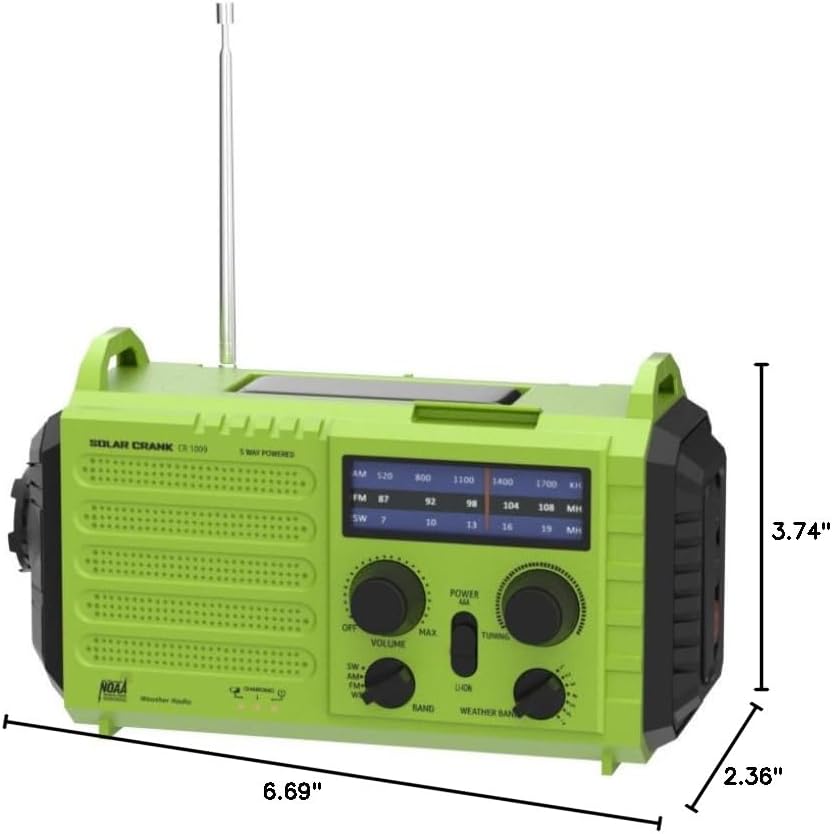
Figure 7: Product Dimensions
8. Warranty and Support
OnLyee provides a one-year manufacturer's warranty for this product, along with a 30-day money-back guarantee. Our customer service team is available 24/7 to assist you with any inquiries or issues. Please refer to the contact information provided in your product packaging for support.