
1. Important Safety Information
Read all safety warnings and instructions before operating this product. Failure to follow the warnings and instructions may result in electric shock, fire, and/or serious injury. Save all warnings and instructions for future reference.
General Power Tool Safety Warnings
- Work Area Safety: Keep work area clean and well lit. Cluttered or dark areas invite accidents. Do not operate power tools in explosive atmospheres, such as in the presence of flammable liquids, gases, or dust. Power tools create sparks which may ignite the dust or fumes.
- Electrical Safety: Power tool plugs must match the outlet. Never modify the plug in any way. Do not use any adapter plugs with earthed (grounded) power tools. Unmodified plugs and matching outlets will reduce risk of electric shock.
- Personal Safety: Stay alert, watch what you are doing, and use common sense when operating a power tool. Do not use a power tool while you are tired or under the influence of drugs, alcohol, or medication. A moment of inattention while operating power tools may result in serious personal injury.
- Tool Use and Care: Do not force the power tool. Use the correct power tool for your application. The correct power tool will do the job better and safer at the rate for which it was designed.
- Battery Tool Use and Care: Ensure the switch is in the off-position before inserting battery pack. Inserting the battery pack into power tools that have the switch on invites accidents. Recharge only with the charger specified by the manufacturer. A charger that is suitable for one type of battery pack may create a risk of fire when used with another battery pack.
Specific Blower Safety Warnings
- Always wear eye protection.
- Do not point the blower nozzle at people or animals.
- Keep all parts of the body away from moving parts.
- Do not operate without the blower tube properly attached.
- Use only DEWALT 20V MAX battery packs and chargers.
2. Product Overview
The Dewalt DCE100BR is a 20V MAX Cordless Lithium-Ion Jobsite Blower designed for clearing debris from work areas. Familiarize yourself with the components of your blower before operation.
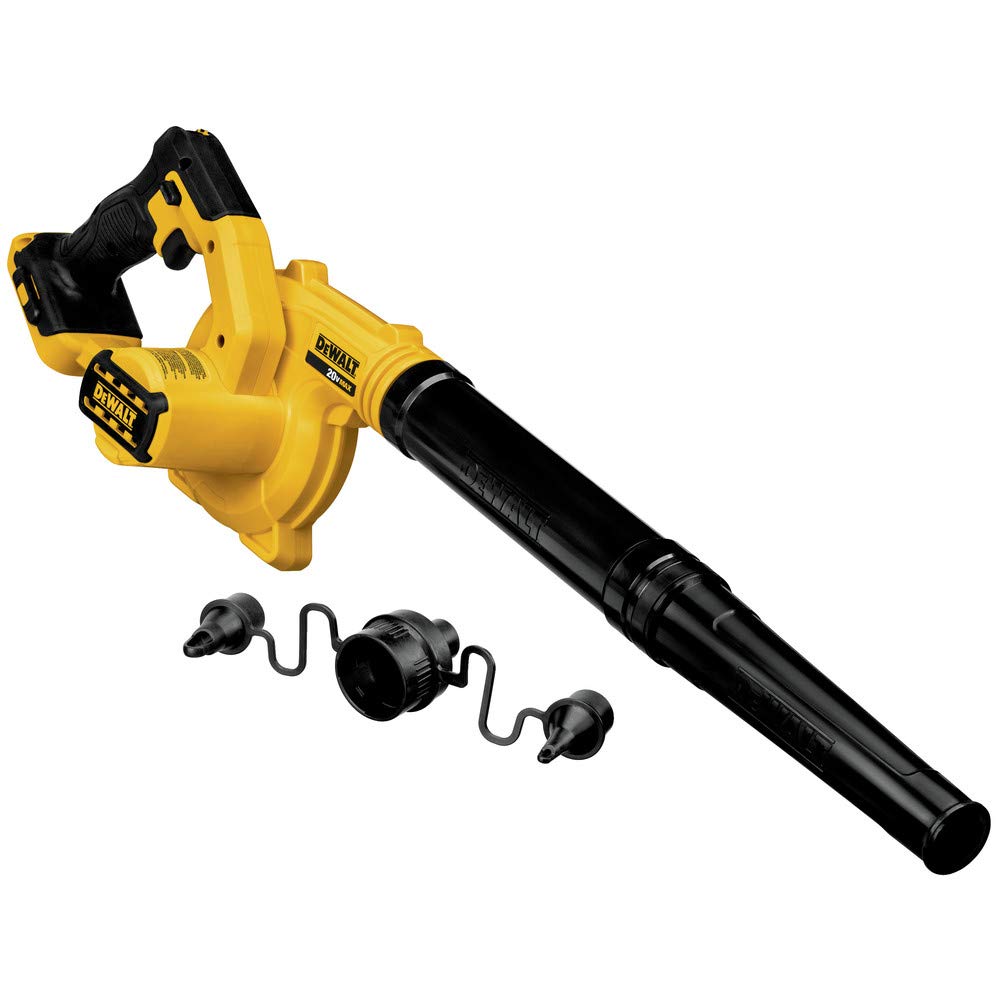
Figure 2.1: Overall view of the Dewalt DCE100BR Jobsite Blower. This image displays the main body of the blower, including the motor housing, handle, and nozzle attachment point.
Key Components:
- Blower Nozzle: Directs airflow.
- Air Intake: Where air is drawn into the blower. Keep clear of obstructions.
- Handle: Ergonomic grip for comfortable operation.
- Trigger Switch: Activates the blower.
- Speed Control Dial: Adjusts the airflow speed.
- Battery Port: Where the 20V MAX battery pack is inserted.
3. Setup
3.1 Attaching the Blower Nozzle
- Align the grooves on the blower nozzle with the tabs on the blower's air outlet.
- Push the nozzle onto the outlet until it clicks securely into place.
- Ensure the nozzle is firmly attached before operation.
3.2 Installing the Battery Pack
The Dewalt DCE100BR is a tool-only product and requires a separate 20V MAX Lithium-Ion battery pack (sold separately).
- Ensure the blower's trigger switch is in the OFF position.
- Align the battery pack with the battery port on the blower.
- Slide the battery pack into the port until it locks securely. A click indicates it is properly seated.
- To remove the battery, press the release button on the battery pack and slide it out.
4. Operating Instructions
4.1 Starting and Stopping the Blower
- Ensure the battery pack is fully charged and securely installed.
- To start the blower, depress the trigger switch located on the handle.
- To stop the blower, release the trigger switch.

Figure 4.1: Proper grip and trigger activation. This image shows a hand holding the blower handle, demonstrating how to depress the trigger switch for operation.
4.2 Adjusting Airflow Speed
The blower features a variable speed control dial to adjust the airflow intensity.
- While the blower is running, rotate the speed control dial (typically located near the trigger) to increase or decrease the airflow.
- Higher settings provide maximum blowing power for heavier debris.
- Lower settings are suitable for lighter debris or delicate areas.
4.3 General Operating Tips
- Always wear appropriate personal protective equipment (PPE), including eye protection.
- Start at a lower speed and increase as needed to avoid scattering debris unnecessarily.
- Work in a sweeping motion, directing debris away from yourself and others.
- Avoid operating the blower in wet conditions.
5. Maintenance
Regular maintenance ensures optimal performance and extends the life of your Dewalt DCE100BR blower.
5.1 Cleaning
- Before Cleaning: Always remove the battery pack before performing any cleaning or maintenance.
- Exterior: Wipe the exterior surfaces with a clean, damp cloth. Do not use harsh chemicals or abrasive cleaners.
- Air Vents: Keep the air vents clear of dust and debris to prevent overheating. Use a soft brush or compressed air if necessary.
- Blower Nozzle: Remove any debris that may accumulate inside the nozzle.
5.2 Storage
- Store the blower in a cool, dry place, out of reach of children.
- Remove the battery pack from the blower before storing for extended periods.
- Store battery packs in a cool, dry place, away from direct sunlight and extreme temperatures.
6. Troubleshooting
Refer to the table below for common issues and their potential solutions.
| Problem | Possible Cause | Solution |
|---|---|---|
| Blower does not start. | Battery pack not installed correctly. | Ensure battery pack is fully inserted and locked. |
| Battery pack is discharged. | Recharge the battery pack. | |
| Battery pack or tool is too hot/cold. | Allow battery/tool to reach normal operating temperature. | |
| Reduced airflow. | Air intake or nozzle is obstructed. | Clear any debris from the air intake and nozzle. |
| Battery charge is low. | Recharge the battery pack. | |
| Blower stops during operation. | Battery pack is depleted. | Replace with a charged battery pack. |
| Overload protection activated. | Reduce load, allow tool to cool, then restart. |
If the problem persists after attempting these solutions, contact DEWALT customer service for assistance.
7. Specifications
| Feature | Specification |
|---|---|
| Model Number | DCE100BR |
| Voltage | 20V MAX |
| Power Source | Cordless (Lithium-Ion Battery) |
| Item Weight | 2.5 Pounds (Tool Only) |
| Product Dimensions | 12.63 x 5.75 x 7.88 inches |
| ASIN | B07VPM2XMZ |
| UPC | 885911486606 |
8. Warranty and Support
This product is sold as 'Renewed' by Amazon Renewed. Warranty terms for renewed products may differ from new products. Please refer to the specific warranty information provided with your purchase or visit the Amazon Renewed product page for details regarding warranty coverage and support.
For technical assistance or to inquire about service, please contact DEWALT customer service or visit their official website. Have your model number (DCE100BR) and ASIN (B07VPM2XMZ) ready when contacting support.
- DEWALT Official Website: www.dewalt.com
- Amazon Renewed Support: Refer to your Amazon order details for specific renewed product support.


