
HACH DR300 Iron, FerroVer
Hach DR300 Pocket Colorimeter User Manual
Model: DR300 Iron, FerroVer (LPV445.97.22110)
Brand: HACH
Introduction
The Hach DR300 Pocket Colorimeter is a portable, single-parameter photometer designed for reliable and accurate water analysis. This instrument maintains the legacy of previous Pocket Colorimeters while introducing state-of-the-art data transfer capabilities and connection to Claros, Hach's Water Intelligence System. Its design aims to reduce data collection hassles, minimize transcription errors, and enhance compliance traceability. The optional Bluetooth connectivity allows for secure transfer of measurement data to existing databases or to Claros, streamlining data management and saving time by eliminating manual data entry.
This manual provides essential information for the proper setup, operation, maintenance, and troubleshooting of your DR300 Pocket Colorimeter.
What's Included
Each DR300 Pocket Colorimeter kit is supplied as a ready-to-use package within a sturdy custom carrying case. The kit includes:
- DR300 Pocket Colorimeter (Iron, FerroVer configuration)
- 4 AAA batteries (included and pre-installed)
- 2 glass sample cells
- 2 plastic sample cells
- Instruction Manual
- Custom carrying case
Note: Reagents for specific tests must be purchased separately.

The DR300 Pocket Colorimeter kit, neatly organized within its custom carrying case, includes the instrument, sample cells, and manual.
Setup
-
Unpacking:
Carefully remove all components from the carrying case. Inspect the colorimeter and accessories for any signs of damage during transit. If any damage is observed, contact Hach customer support immediately.
-
Battery Installation/Check:
The DR300 operates on 4 AAA batteries, which are typically pre-installed. To check or replace batteries, open the battery compartment cover located on the back of the instrument. Ensure batteries are inserted with correct polarity as indicated inside the compartment. Close the cover securely.
-
Initial Power On:
Press the power button (①) located at the bottom of the instrument to turn it on. The display should illuminate, showing the Hach logo and then the main measurement screen.

The Hach DR300 Pocket Colorimeter with its clear digital display and intuitive button layout.
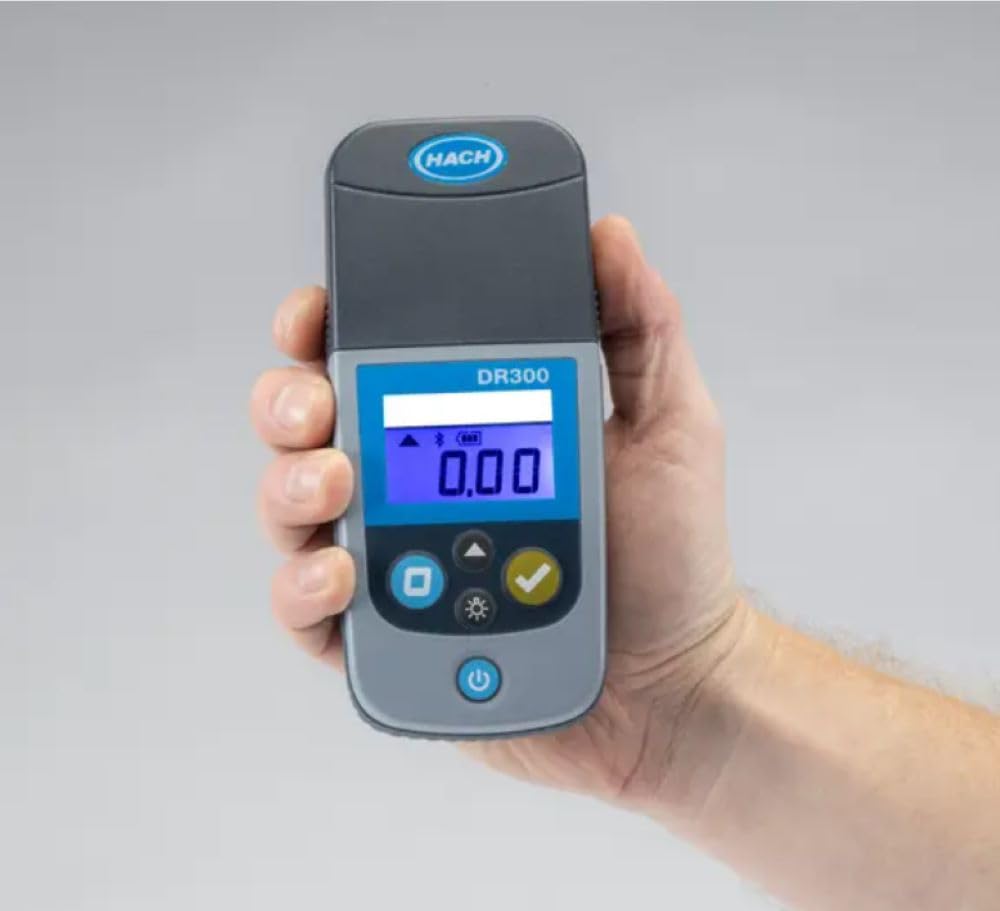
The DR300 Pocket Colorimeter is designed to fit comfortably in one hand, emphasizing its portability for field use.
-
Familiarize with Controls:
- Power Button (①): Turns the instrument on/off.
- Zero Button (⑨): Used to zero the instrument with a blank sample.
- Read Button (✓): Initiates a measurement.
- Menu/Settings Button (☀): Accesses instrument settings and options.
Operating Instructions
The DR300 Pocket Colorimeter is designed for straightforward operation. Always refer to the specific reagent instructions for the parameter you are testing (e.g., Iron, FerroVer) as sample preparation and reaction times are crucial for accurate results.
-
Prepare the Blank Sample:
Fill a clean sample cell with the appropriate blank solution (usually deionized water or a prepared reagent blank) as specified in your reagent instructions. Wipe the outside of the cell with a lint-free cloth to remove fingerprints or smudges.
-
Zero the Instrument:
Insert the blank sample cell into the cell holder of the DR300. Ensure the cell is oriented correctly (if applicable, check for alignment marks). Close the cell compartment lid. Press the Zero Button (⑨). The display will show "0.00" or "ZERO" indicating successful zeroing.
-
Prepare the Reacted Sample:
Following your specific reagent instructions, prepare your sample by adding the required reagents and allowing the specified reaction time. This will typically result in a color change proportional to the concentration of the analyte.
-
Measure the Sample:
Wipe the outside of the reacted sample cell with a lint-free cloth. Insert the reacted sample cell into the cell holder, ensuring correct orientation. Close the cell compartment lid. Press the Read Button (✓). The instrument will display the measurement result in the specified units (e.g., mg/L Fe).

The DR300 Pocket Colorimeter in use, demonstrating its portability and ease of handling during a measurement.
-
Data Transfer (Optional Bluetooth):
If your DR300 has Bluetooth connectivity, you can transfer measurement data to a compatible device or to Hach's Claros system. Refer to the detailed instructions in the full product manual or Hach's website for pairing and data transfer procedures.
Maintenance
Proper maintenance ensures the longevity and accuracy of your DR300 Pocket Colorimeter.
-
Cleaning the Instrument:
Wipe the exterior of the colorimeter with a damp cloth. Do not use abrasive cleaners or solvents. Ensure the sample cell compartment is clean and free of spills or debris. A cotton swab can be used to gently clean the optical path if necessary, but avoid scratching the lenses.
-
Sample Cell Care:
Always clean sample cells thoroughly after each use. Rinse with deionized water and allow to air dry. Store cells in a clean, dust-free environment. Scratched or dirty cells can significantly affect measurement accuracy.
-
Battery Replacement:
Replace batteries when the low battery indicator appears on the display. Use only high-quality AAA alkaline batteries. Dispose of used batteries according to local regulations.
-
Storage:
When not in use, store the DR300 in its carrying case in a cool, dry place, away from direct sunlight and extreme temperatures. The instrument is IP67 rated for water and dust resistance, but proper storage further protects it.
Troubleshooting
This section addresses common issues you might encounter with your DR300 Pocket Colorimeter.
| Problem | Possible Cause | Solution |
|---|---|---|
| Instrument does not turn on. | Dead or incorrectly installed batteries. | Check battery polarity or replace with new AAA batteries. |
| "Error" message on display. | Sample cell dirty, scratched, or improperly inserted; optical path obstructed; instrument malfunction. | Clean and re-insert sample cell. Ensure cell compartment is clean. If error persists, contact Hach support. |
| Inaccurate or inconsistent readings. | Improper sample preparation; dirty/scratched sample cells; expired reagents; incorrect zeroing. | Review reagent instructions for proper procedure. Clean/replace sample cells. Check reagent expiry dates. Re-zero the instrument with a fresh blank. |
| Bluetooth connectivity issues. | Device not in pairing mode; out of range; interference; incompatible receiving device. | Ensure DR300 Bluetooth is enabled. Move closer to receiving device. Check for other wireless interference. Refer to full manual for detailed Bluetooth setup. |
Specifications
- Model: DR300 Pocket Colorimeter (Iron, FerroVer)
- Manufacturer: HACH
- Item Model Number: Iron, Ferrover (LPV445.97.22110)
- ASIN: B07VP9CJD5
- Dimensions (Package): 8.19 x 7.2 x 5.35 inches
- Weight (Package): 2.84 Pounds
- Power Source: 4 AAA batteries (included)
- Battery Life: Approximately 5000 tests
- Waterproof Rating: IP67 (dust tight and protected against immersion in water up to 1 meter for 30 minutes)
- Connectivity: Optional Bluetooth for data transfer
- First Available: July 23, 2019

The DR300 Pocket Colorimeter is designed for rugged field use, as demonstrated by its application in an industrial environment.
Warranty and Support
HACH provides a standard warranty for the DR300 Pocket Colorimeter against defects in materials and workmanship. For specific warranty terms, duration, and conditions, please refer to the warranty card included with your product or visit the official Hach website. Keep your purchase receipt as proof of purchase.
For technical support, troubleshooting assistance beyond this manual, or to order replacement parts and reagents, please contact Hach Customer Service:
- Hach Official Website: www.hach.com
- Customer Service Contact: Refer to the website for regional contact information.
Related documentsDR300 Iron, FerroVer


Ask a question about this manual
Ask about setup, troubleshooting, compatibility, parts, safety, or missing instructions. Manuals+ will review the question and use this page’s manual context to help answer it.