

Introduction
The ThruNite TC15 V3 is a high-performance, USB-C rechargeable LED handheld flashlight designed for versatile indoor and outdoor use, including camping, security, and emergency situations. Featuring an Ultra-Bright XHP 35.2 LED, it delivers an extreme output of up to 2403 lumens and a beam distance of 223 meters. Its user-friendly design includes multiple lighting modes and a convenient battery level indicator, making it an ideal companion for various activities.

Image: The compact and lightweight design of the TC15 V3 makes it suitable for everyday carry and various applications.
What's in the Box
Your ThruNite TC15 V3 package includes the following components:
- ThruNite TC15 V3 Flashlight
- Rechargeable IMR Battery Cell (pre-installed)
- USB-C Charging Cable
- Pocket Clip
- Holster
- Lanyard
- Spare O-Rings (2)
- Spare USB Rubber Cover
- Spare Side Switch Cap

Image: All components included with the ThruNite TC15 V3 flashlight.
Setup
Initial Use and Charging
Before using your ThruNite TC15 V3 flashlight for the first time, ensure it is properly charged. The flashlight utilizes a rechargeable IMR battery cell and features a built-in USB Type-C charging port.
- Tighten Components: Prior to charging and for optimal performance, tightly screw down both the light head and the tail cap of the flashlight.
- Connect Charger: Connect the included USB-C charging cable to the flashlight's USB Type-C port and to a compatible power source (e.g., USB wall adapter, computer USB port).
- Monitor Battery Indicator: The battery level indicator will show the charging status.

Image: Ensure the light head and tail cap are tightly screwed down before operation or charging.

Image: The TC15 V3 features a built-in USB Type-C charging port for convenient recharging.
Operating Instructions
Power On/Off
- Turn On: Press the side switch once to turn the flashlight on.
- Turn Off: Press the side switch once again to turn the flashlight off.
Mode Switching
The TC15 V3 offers multiple lighting modes for various situations:
- Cycle Modes: When the flashlight is on, press and hold the side switch to cycle through Low, Medium, and High modes. Release the switch to select the desired mode.
- Firefly Mode: When the flashlight is off, press and hold the side switch for 1 second to activate Firefly mode (1 lumen).
- Turbo Mode: Double-click the side switch quickly from any mode (including off) to activate Turbo mode (2403 lumens). Double-click again to return to the previous mode.
- Strobe Mode: Triple-click the side switch quickly from any mode (including off) to activate Strobe mode. Triple-click again to return to the previous mode.
Lockout Function
- Activate Lockout: From Firefly mode, press and hold the side switch to access the lockout mode. The flashlight will flash once to indicate it is locked.
- Deactivate Lockout: In lockout mode, press and hold the side switch to unlock the flashlight. It will flash once and then turn on in Firefly mode.

Image: Instructions for activating and deactivating the lockout feature to prevent accidental activation.
Modes and Brightness Levels
The ThruNite TC15 V3 offers a range of brightness levels to suit various needs:
| Mode | Output (Lumens) | Runtime | Beam Distance (Meters) |
|---|---|---|---|
| Turbo | 2403 (~792) | 2.3 mins + 106 mins | 223 (max) |
| High | 1057 (~54) | 1.8 mins + 108 mins | - |
| Medium | 330 | 4.6 hours | - |
| Low | 34 | 50 hours | - |
| Firefly | 1 | 30 days | - |
| Strobe | 1040 | 190 mins | - |

Image: The TC15 V3 provides powerful illumination with a maximum output of 2403 lumens and a beam distance of 223 meters.
The TC15 V3 is available in two color temperatures:
- Cool White (CW): 6500K (Crisp and Clean)
- Neutral White (NW): 5000K (Natural and Balanced)

Image: Choose between Cool White and Neutral White versions for your preferred lighting experience.
Charging and Battery Indicator
The TC15 V3 features a convenient USB Type-C charging port and a battery level indicator integrated into the side switch.
- Charging Port: The USB-C port allows for universal compatibility and fast charging.
- Battery Indicator: The indicator light on the side switch provides real-time battery status:
- Blue Light: 21-100% battery remaining.
- Red Light: 11-20% battery remaining.
- Flashing Red Light: 1-10% battery remaining (critical level).
- Off: 0% battery (needs immediate charging).

Image: Understanding the battery indicator light on the side switch.
Safety and Maintenance
- Water Resistance: The TC15 V3 is rated IPX8 (2M) for water resistance, meaning it can be submerged up to 2 meters.
- Impact Resistance: Designed to withstand impacts from up to 1.5 meters.
- Cleaning: Keep the flashlight clean, especially the lens and charging port, to ensure optimal performance.
- Storage: Store the flashlight in a cool, dry place when not in use for extended periods.
- Battery Care: Use only the recommended IMR battery cell. Avoid over-discharging or over-charging the battery.
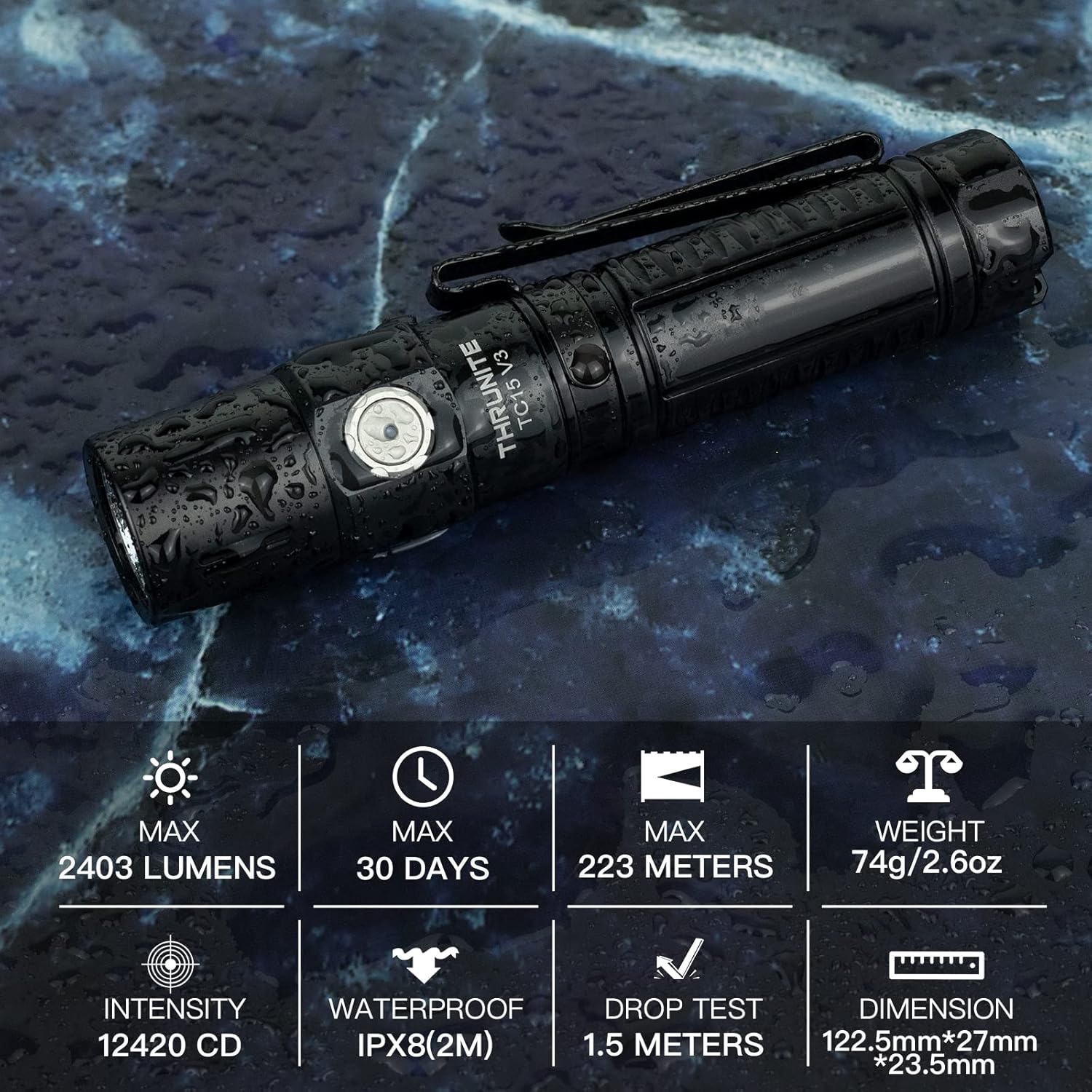
Image: The TC15 V3 is built for durability, featuring IPX8 waterproofing and 1.5-meter impact resistance.
Troubleshooting
If you encounter issues with your ThruNite TC15 V3 flashlight, consider the following common solutions:
- Flashlight Not Turning On:
- Ensure the battery is fully charged.
- Check that the light head and tail cap are tightly screwed on. A loose connection can prevent operation.
- Verify the battery is inserted with the correct polarity.
- If in lockout mode, deactivate it by pressing and holding the side switch.
- Dim Light or Flickering:
- Recharge the battery.
- Clean the battery contacts and the flashlight's internal contacts with a clean cloth.
- Charging Issues:
- Ensure the USB-C cable is securely connected to both the flashlight and the power source.
- Try a different USB-C cable or power adapter.
- Check the USB rubber cover for any debris obstructing the port.
Specifications
| Feature | Detail |
|---|---|
| Brand | ThruNite |
| Model | TC15 MT CW |
| Special Feature | Adjustable Light Modes, High Power, Rechargeable, Impact Resistant, Non Slip Grip, Light weight, Portable |
| Color | TC15 V3 Black CW |
| Power Source | Battery Powered |
| Light Source Type | LED (XHP 35.2) |
| Material | Aluminum |
| Product Dimensions | 4.82 x 1.06 x 0.94 inches; 2.5 ounces |
| Voltage | 3.6 Volts |
| Light Path Distance | 223 Meters |
| Battery Cell Composition | Lithium Ion |
| Number of Batteries | 1 Lithium Ion (included) |
| Water Resistance Level | Waterproof (IPX8, 2M) |
| Brightness | 2403 Lumen (Max) |
| Runtime | Up to 30 days (Firefly mode) |
| Impact Resistance | 1.5 meters |
Warranty and Support
The ThruNite TC15 V3 comes with a Manufacturer and Seller Combination Warranty. For detailed warranty information or technical support, please refer to the official ThruNite website or contact their customer service.
An official user manual in PDF format is available for download: Download User Manual (PDF)
For additional product information and support, visit the ThruNite Store: ThruNite Store

