
1. Introduction
This manual provides detailed instructions for the safe and efficient operation of your Auna Sarah Ann multi-functional audio system. Please read this manual thoroughly before using the device and retain it for future reference.
The Auna Sarah Ann is a versatile audio system featuring a 3-speed turntable, CD player, cassette player, DAB+ and FM radio, Bluetooth connectivity, USB and SD card playback, AUX input, and headphone output. It also includes integrated stereo speakers and a remote control for convenient operation.
2. Safety Instructions
- Read all instructions carefully before use.
- Keep the unit away from heat sources, direct sunlight, humidity, water, and other liquids.
- Do not operate the unit if it has been exposed to water, moisture, or any other liquids to prevent electric shock, explosion, and/or injury to yourself and damage to the unit.
- Do not use the unit if it has been dropped or damaged in any way.
- Repairs to electrical equipment should only be performed by a qualified electrician. Improper repairs may place the user at serious risk.
- Do not use the unit with wet hands.
- Do not insert objects into any openings.
- Keep the unit free from dust, lint, hair, etc.
- Do not use this unit for anything other than its intended use.
- Keep the unit out of reach of children.
3. Package Contents
- Auna Sarah Ann Multi-functional Audio System
- Remote Control
- 45 RPM Adapter
- User Manual (this document)
4. Product Overview
The Auna Sarah Ann combines classic audio playback with modern connectivity options.

Image 4.1: Front view of the Auna Sarah Ann audio system, displaying the turntable, control panel, CD tray, and integrated speakers. A remote control and a smartphone connected via Bluetooth are also shown.
4.1 Key Features
- 3-Speed Turntable: Supports 33 1/3, 45, and 78 RPM records. Includes a 45 RPM adapter.
- Integrated Stereo Speakers: Provides clear audio output.
- Bluetooth Connectivity: Wirelessly stream audio from compatible devices.
- CD Player: For playback of audio CDs.
- Cassette Player: For playback of audio cassettes.
- DAB+ and FM Radio: Digital and analog radio reception.
- USB and SD Card Slots: For MP3 playback and recording.
- AUX Input: Connect external audio sources via 3.5mm jack.
- Headphone Output: For private listening via 3.5mm jack.
- RCA Line Out: Connect to external amplifiers or powered speakers.
- Remote Control: Convenient operation from a distance.
- Automatic Stop Function: Protects vinyl records by stopping the turntable when a record finishes.
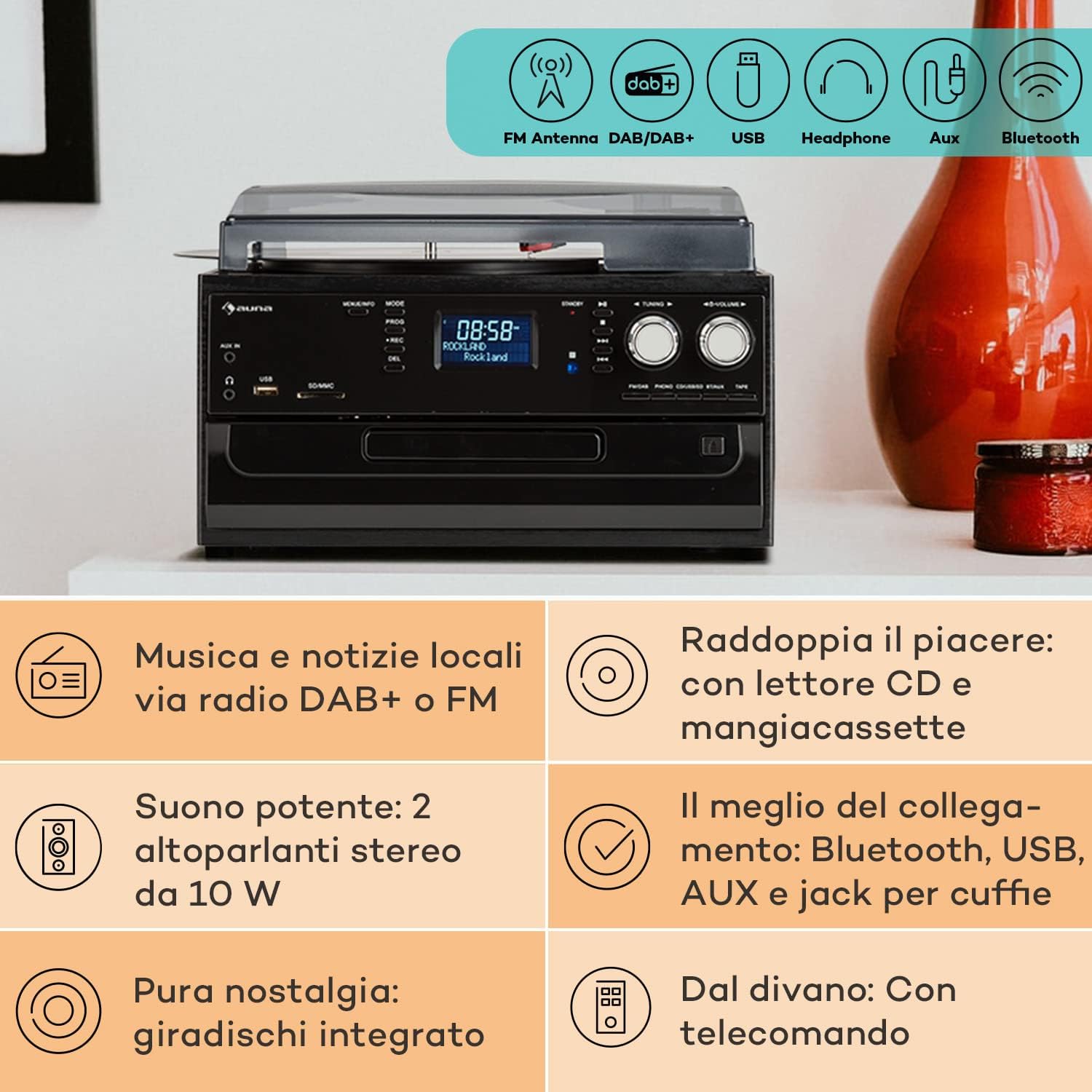
Image 4.2: Visual representation of the various connectivity options available on the Auna Sarah Ann, including FM/DAB+ radio, USB, headphone jack, AUX input, and Bluetooth.
5. Setup
5.1 Unpacking and Placement
- Carefully remove the unit from its packaging.
- Place the unit on a stable, level surface, away from direct sunlight, heat sources, and excessive dust or moisture.
- Ensure adequate ventilation around the unit.
5.2 Power Connection
Connect the power cable to the AC inlet on the back of the unit and then to a standard 230V, 50Hz wall outlet.
5.3 Remote Control Battery Installation
The remote control requires 2 x AAA batteries (not included). Open the battery compartment on the back of the remote control, insert the batteries according to the polarity indicators, and close the compartment.
5.4 Antenna Connection
The unit features an integrated FM antenna. For optimal DAB+ and FM radio reception, ensure the unit is placed in an area with good signal strength. Adjust the unit's position if reception is poor.
5.5 Connecting External Devices (Optional)
- Headphones: Plug 3.5mm headphones into the headphone jack on the front panel.
- External Audio Source (AUX IN): Connect an external audio device (e.g., MP3 player, smartphone) to the AUX IN jack on the front panel using a 3.5mm audio cable.
- External Amplifier/Speakers (RCA LINE OUT): Connect the RCA LINE OUT jacks on the rear of the unit to the audio input of an external amplifier or powered speakers using an RCA cable.
6. Operating Instructions
6.1 Basic Operation
- Press the POWER button to turn the unit ON or OFF.
- Use the MODE button on the unit or remote control to select the desired function (PHONO, CD, TAPE, USB, SD, AUX, FM, DAB, Bluetooth).
- Adjust the volume using the VOLUME knob on the unit or the VOL+/- buttons on the remote control.
6.2 Turntable Operation (PHONO)

Image 6.1: Detailed view of the turntable section, showing the platter, tonearm, and a vinyl record in place, highlighting the classic playback functionality.
- Lift the dust cover.
- Place a vinyl record on the turntable platter.
- Select the appropriate speed (33, 45, or 78 RPM) using the speed selector switch. Use the 45 RPM adapter for singles if needed.
- Release the tonearm lock.
- Gently lift the tonearm and position the stylus over the desired track of the record.
- Lower the tonearm slowly onto the record. Playback will begin.
- The automatic stop function will stop the turntable when the record finishes. To disable/enable this, refer to the specific switch on the unit (if present, usually labeled "AUTO STOP").
- At the end of playback, gently lift the tonearm, return it to its rest, and engage the tonearm lock.
6.3 CD Player Operation (CD)
- Press the MODE button to select CD mode.
- Press the OPEN/CLOSE button to open the CD tray.
- Place a CD with the label side facing up into the tray.
- Press the OPEN/CLOSE button again to close the tray. The unit will read the CD.
- Press PLAY/PAUSE to start or pause playback.
- Use SKIP FORWARD/BACKWARD buttons to navigate tracks.
- Press STOP to end playback.
6.4 Cassette Player Operation (TAPE)
- Press the MODE button to select TAPE mode.
- Insert a cassette tape into the side cassette slot.
- Use the cassette control buttons (PLAY, STOP/EJECT, FWD, REW) to operate the cassette player.
6.5 Radio Operation (DAB+/FM)
- Press the MODE button to select FM or DAB mode.
- In FM mode, press and hold the TUNING +/- buttons for automatic station search, or press briefly for manual tuning.
- In DAB mode, the unit will automatically scan for available stations. Use the TUNING +/- buttons to navigate through the station list.
- To save a station, refer to the manual's specific instructions for preset functions (usually involving a "PROG" or "MEMORY" button).
6.6 Bluetooth Operation

Image 6.2: Demonstrates wireless music streaming via Bluetooth from a smartphone to the audio system, and the use of a USB drive for digital media playback.
- Press the MODE button to select Bluetooth mode. The display will show "BT" or "Bluetooth" and the unit will enter pairing mode, indicated by a flashing Bluetooth icon.
- On your Bluetooth-enabled device (smartphone, tablet, etc.), enable Bluetooth and search for available devices.
- Select "Auna Sarah Ann" (or similar name) from the list of devices.
- Once paired, the Bluetooth icon will stop flashing, and you can play music from your device through the Auna Sarah Ann.
6.7 USB/SD Card Operation
- Insert a USB flash drive into the USB port or an SD card into the SD/MMC slot.
- Press the MODE button to select USB or SD mode. The unit will automatically detect and begin playing MP3 files.
- Use SKIP FORWARD/BACKWARD buttons to navigate tracks.
- Use the FOLDER button on the remote to navigate through folders (if applicable).
- MP3 Recording: The unit supports recording from other sources (e.g., vinyl, CD, radio) to USB/SD. Press the REC button to start recording. Manual title division is available during recording. Refer to the full manual for detailed recording instructions.
6.8 AUX Input Operation
- Connect your external audio device to the AUX IN jack using a 3.5mm audio cable.
- Press the MODE button to select AUX mode.
- Control playback from your external device. The volume can be adjusted on the Auna Sarah Ann unit.
7. Maintenance
7.1 Cleaning the Unit
- Always unplug the unit from the power outlet before cleaning.
- Use a soft, dry cloth to wipe the exterior surfaces.
- Do not use abrasive cleaners, waxes, or solvents as they may damage the finish.
- For the dust cover, use a soft cloth and a mild, non-abrasive cleaner if necessary.
7.2 Turntable Stylus Care
- The stylus (needle) is a delicate component. Handle it with extreme care.
- Clean the stylus periodically using a soft brush, brushing gently from back to front.
- A worn stylus can damage records and degrade sound quality. Replace the stylus when signs of wear are apparent (e.g., distorted sound, skipping).
7.3 Record Care
- Keep records clean and free of dust. Use a record brush before each play.
- Store records vertically in their sleeves, away from heat and direct sunlight.
8. Troubleshooting
If you experience problems with your Auna Sarah Ann, please consult the following table before seeking professional service.
| Problem | Possible Cause | Solution |
|---|---|---|
| No power | Power cable not connected; Power outlet not active. | Ensure power cable is securely connected; Try a different power outlet. |
| No sound | Volume too low; Incorrect mode selected; Headphones connected. | Increase volume; Select correct input mode; Disconnect headphones if using speakers. |
| Turntable not spinning | Unit not in PHONO mode; Auto-stop engaged and no record playing. | Select PHONO mode; Place a record and lower the tonearm. |
| Poor radio reception | Weak signal; Antenna position. | Adjust unit position for better signal; Perform a new auto-scan for DAB+ stations. |
| Bluetooth pairing failure | Device too far; Bluetooth not enabled on external device; Unit not in pairing mode. | Ensure devices are within range; Enable Bluetooth on your device; Select Bluetooth mode on the Auna Sarah Ann. |
| Remote control not working | Batteries depleted or incorrectly inserted; Obstruction between remote and unit. | Replace batteries; Check battery polarity; Remove any obstructions. |
If the problem persists after trying these solutions, please contact customer support.
9. Specifications
| Feature | Detail |
|---|---|
| Brand | AUNA |
| Model Name | Sarah Ann |
| Product Dimensions (L x W x H) | 30 x 32.5 x 21.5 cm |
| Weight | 4.55 kg |
| Power Supply | 230V, 50Hz |
| Turntable Speeds | 33 1/3, 45, 78 RPM |
| Motor Type | Direct Drive |
| Radio Tuner | DAB+, FM |
| Bluetooth Support | Yes |
| Connectivity | USB Input, SD Input, AUX Input (3.5mm), Headphone Output (3.5mm), RCA Line Out |
| Audio Output Mode | Stereo |
| Remote Control Batteries | 2 x AAA (not included) |

Image 9.1: Visual representation of the unit's dimensions (length, width, height) and a summary of its various input/output connections.
10. Warranty and Support
10.1 Warranty Information
Your Auna Sarah Ann audio system comes with a manufacturer's warranty. Please refer to the warranty card or documentation included with your purchase for specific terms, conditions, and duration of the warranty. Keep your proof of purchase for warranty claims.
10.2 Customer Support
For technical assistance, troubleshooting beyond this manual, or warranty inquiries, please contact Auna customer support. Contact details can typically be found on the Auna website or on the product packaging.