
Introduction
Welcome to the user manual for your PAXCESS Portable Power Station. This guide provides essential information for the safe and efficient operation, maintenance, and troubleshooting of your device. Please read this manual thoroughly before using the power station.
Product Overview
The PAXCESS Portable Power Station is a versatile and high-capacity power source designed for various applications, including outdoor activities, emergency backup, and mobile power needs. It features a robust battery and multiple output ports to power a wide range of electronic devices.
Key Features
- Large Capacity: Equipped with a 78000mAh/288.6Wh power capacity, capable of extended device operation.
- Wireless Charging: Features a convenient wireless charging pad on top for compatible devices.
- Enhanced LED Light: Includes an integrated LED light with SOS mode for illumination and emergency signaling.
- Durable Design: Protected by a silica gel anti-collision strip for enhanced durability.
- Pure Sine Wave Inverter: Provides stable and safe AC power output, protecting sensitive electronics.
- Multiple Outputs: Offers diverse connectivity with 110V/330W (Peak 700W) AC, 3x QC3.0 USB, 1x Type-C, and 12V DC ports.
- Multiple Charging Methods: Can be recharged via solar panel (not included), wall outlet, or car charger.
- Silent Operation: Utilizes a pure lithium battery and pure sine wave inverter for quiet performance.
- Advanced Safety: Integrated Battery Management System (BMS) provides temperature control, voltage control, and comprehensive safety protection.
Components and Ports
Familiarize yourself with the various components and ports of your power station:

Image: Front view of the PAXCESS Portable Power Station with numbered labels indicating its various components and ports.
- 1. SOS Flashlight: Integrated light for illumination and emergency signaling.
- 2. DC 15V/4.0A Input: Port for charging the power station via AC adapter or solar panel.
- 3. Anti-collision Strip: Protective silicone strip around the edges.
- 4. 330W MAX AC Output: Standard 110V AC outlet for household appliances.
- 5. USB QC3.0 (5V/3.1A): Three Quick Charge 3.0 USB ports for fast charging compatible devices.
- 6. Type-C (5V/3A 18W): USB Type-C port for modern devices.
- 7. Cigarette Lighter (12V/10A): Car-style DC output port.
- 8. DC 9-12.6V/5A (MAX): Two DC output ports for 12V devices.
- 9. LCD Display: Shows battery level, input/output wattage, and active ports.
- 10. Power ON/OFF Button: Main power control for the unit.
- 11. Hideable Handle: Integrated handle for easy portability.
- 12. Wireless Charging (5V/1A): Charging pad on top for Qi-compatible devices.
Setup
Before using your PAXCESS Portable Power Station for the first time, it is recommended to fully charge it.
Initial Charge
Connect the power station to a standard wall outlet using the provided AC adapter. The LCD display will show the charging progress. A full charge typically takes 5-6 hours.
Placement
Place the power station on a stable, flat surface. Ensure adequate ventilation around the unit to prevent overheating. Avoid placing it in direct sunlight or near heat sources.
Operating Instructions
Powering On/Off
To turn the unit on or off, press and hold the main power button (labeled 'Power ON/OFF') for approximately 3 seconds. The LCD display will illuminate upon activation.
Using AC Outputs
Press the 'AC' button to activate the 110V AC output. Plug your device into the AC outlet. Ensure the total power consumption of your connected devices does not exceed 330W (700W peak) to prevent overload.
Using DC Outputs
Press the 'DC' button to activate the 12V DC outputs. Connect your 12V compatible devices to the 12V/5A or 12V/10A ports. The cigarette lighter port is also a 12V DC output.
Using USB Outputs
The USB ports (QC3.0 and Type-C) are typically active when the unit is powered on. Simply plug in your USB-compatible devices for charging.
Wireless Charging
Place your Qi-compatible smartphone or device on the wireless charging pad located on the top surface of the power station. Ensure the device is centered for optimal charging. The LCD display may indicate wireless charging activity.

Image: A smartphone being wirelessly charged on the top surface of the PAXCESS Portable Power Station, highlighting the wireless charging function.
LED Light Operation
Press the dedicated light button to cycle through the LED light modes: On, SOS (flashing), and Off. This feature is useful for illumination in low-light conditions or for emergency signaling.

Image: The PAXCESS Portable Power Station with its front LED light turned on, providing illumination in a low-light setting, demonstrating its utility as a light source.
Charging the Power Station
Your PAXCESS Portable Power Station offers flexible recharging options to suit various environments.

Image: A visual representation of the three primary methods to recharge the PAXCESS Portable Power Station: using a solar panel, a car charger, and a standard wall outlet.
1. Wall Outlet Charging
Connect the provided AC wall charger to the DC input port of the power station and then plug it into a standard 110V AC wall outlet. Charging time is approximately 5-6 hours for a full charge.
2. Car Charger Charging
Use the included car charger cable to connect the power station to your vehicle's 12V cigarette lighter socket. This method is convenient for recharging while traveling. A full charge typically takes 7-8 hours.
3. Solar Panel Charging (Solar Panel Not Included)
For eco-friendly charging, connect a compatible 100W solar panel (with MC4 connector) to the power station's DC input port. The integrated MPPT (Maximum Power Point Tracking) solar charge controller optimizes charging efficiency. Charging time varies depending on sunlight intensity, typically 9-10 hours for a full charge under optimal conditions.
Applications and Usage Examples
The PAXCESS Portable Power Station is designed for a wide array of uses, providing reliable power wherever you need it.
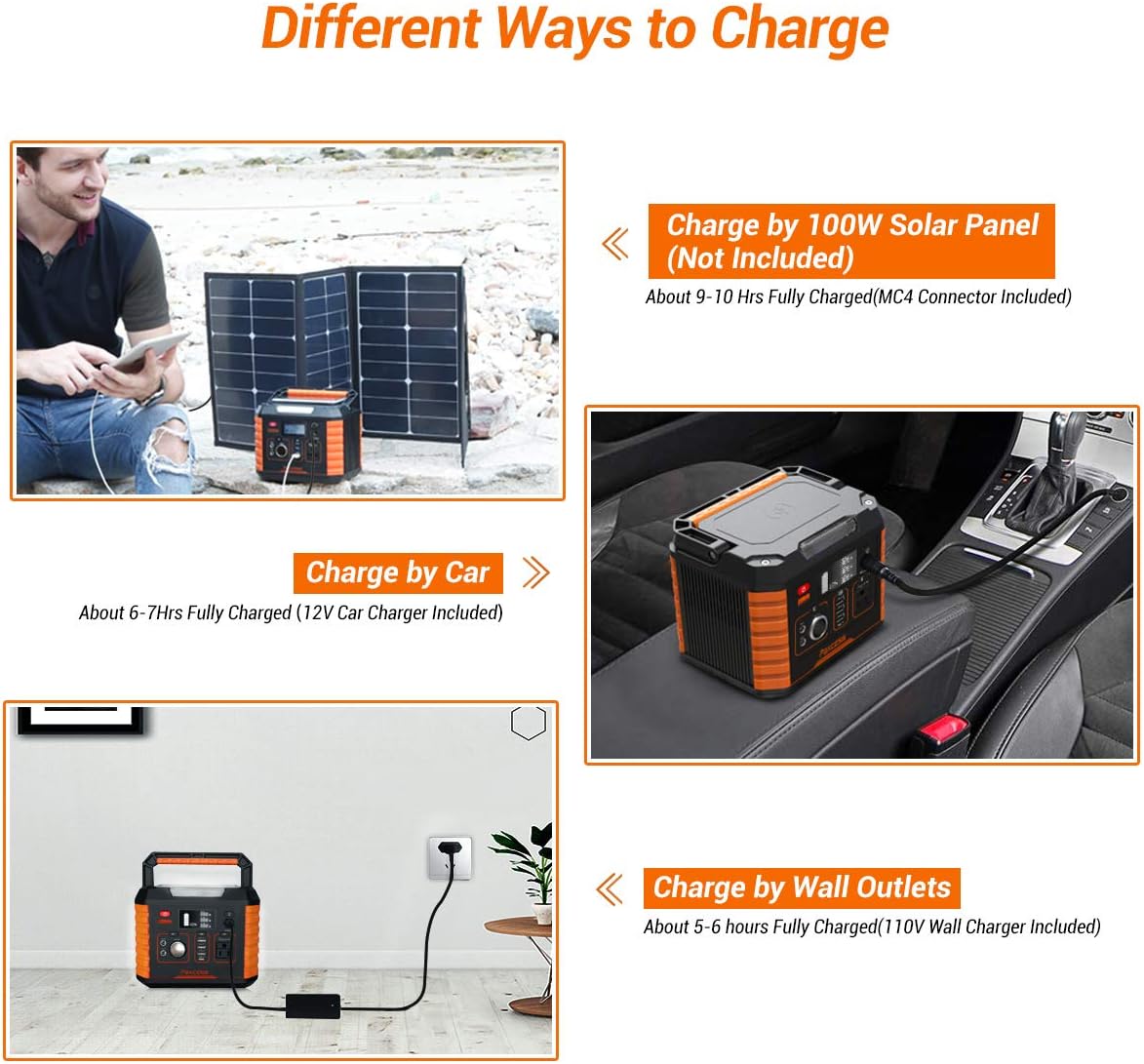
Image: An infographic illustrating the number of times various devices like laptops, video cameras, recreation machines, drones, mini-fridges, and TVs can be powered or charged by the power station.
- Camping and Outdoor Activities: Power lights, portable fans, mini-fridges, and other small appliances at your campsite.
- Emergency Backup: Keep essential devices like phones, laptops, and medical equipment (e.g., CPAP machines) running during power outages.
- CPAP Machine Power: Provides extended runtime for CPAP devices, offering approximately 18 hours for a CPAP Resmed S9 without a heated humidifier.
- Mobile Office: Charge laptops, tablets, and smartphones on the go, ensuring productivity anywhere.
- Photography/Drone Operations: Recharge camera batteries and drone batteries in remote locations.

Image: A collage depicting various scenarios such as a mountain fire, camping, hurricane aftermath, and an outdoor party, where the PAXCESS Portable Power Supply serves as a reliable power backup.
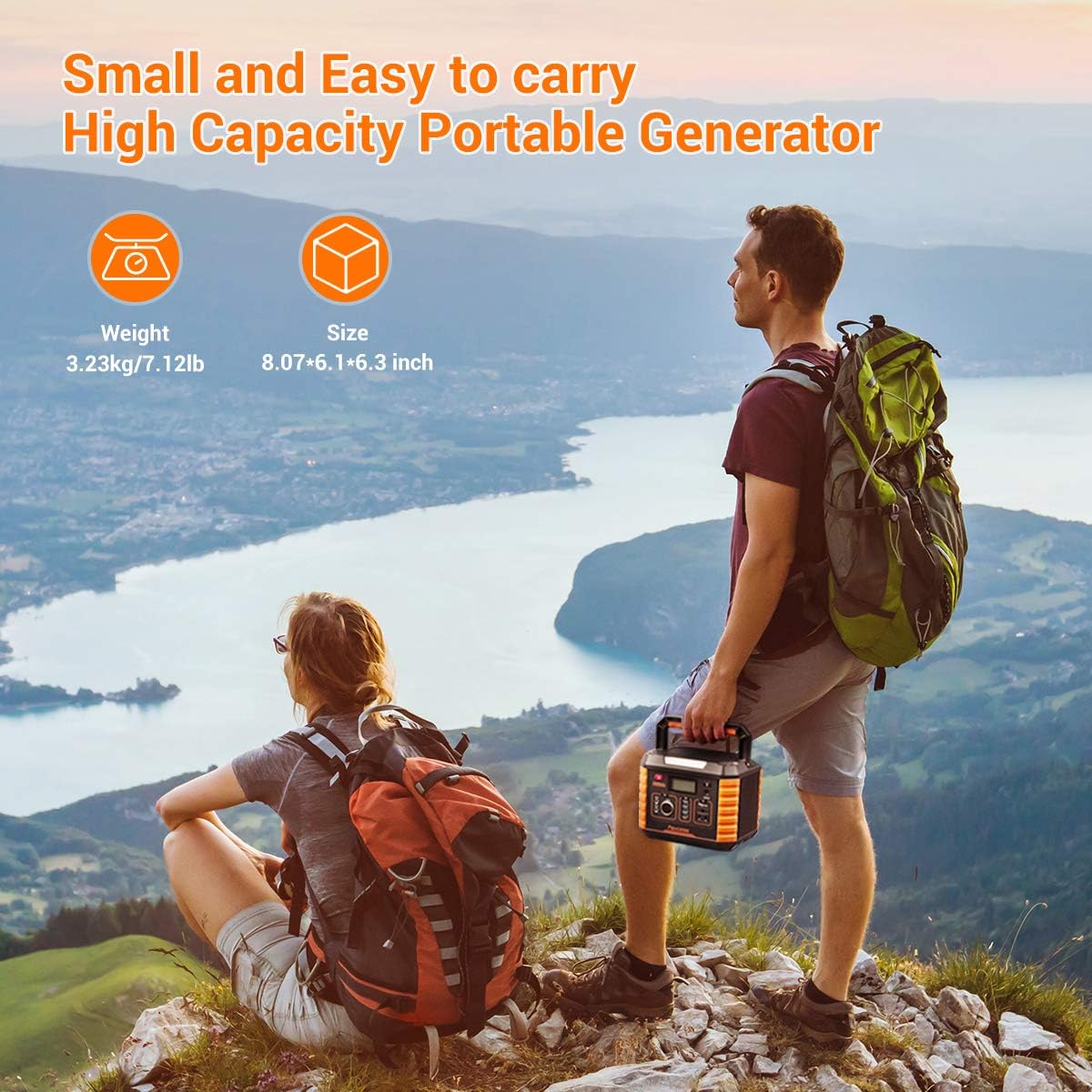
Image: Two individuals hiking in a scenic outdoor environment, with one carrying the PAXCESS Portable Power Station, emphasizing its compact size and ease of transport.
Official Product Video: Know more about PAXCESS 330W
Video: An official overview video providing more information about the PAXCESS 330W Portable Power Station, demonstrating its features and capabilities.
Official Product Video: Portable Camping Generator, 330W/78000mAh Portable Power Station...
Video: An official product video showcasing the PAXCESS Portable Camping Generator, highlighting its 330W/78000mAh capacity and its use as a CPAP battery power supply and solar generator.
Maintenance
Proper maintenance ensures the longevity and optimal performance of your power station.
- Storage: Store the unit in a cool, dry place, away from direct sunlight and extreme temperatures.
- Long-Term Storage: If storing for extended periods (more than 3 months), recharge the power station to at least 50% every 3-6 months to preserve battery health.
- Cleaning: Use a soft, dry cloth to clean the exterior of the unit. Do not use abrasive cleaners, solvents, or immerse the unit in water.
- Temperature: Operate and store the power station within the recommended temperature ranges specified in the 'Specifications' section.
- Avoid Overload: Do not connect devices that exceed the power station's rated output capacity to prevent damage to the unit and connected devices.
Troubleshooting
If you encounter issues with your PAXCESS Portable Power Station, refer to the table below for common problems and their solutions.
| Issue | Possible Cause / Solution |
|---|---|
| Unit does not power on. | Ensure the power button is pressed and held for 3 seconds. Check the battery level on the LCD display; recharge if the battery is low. |
| Device not charging from output port. | Verify that the specific output (AC, DC, or USB) is activated by pressing its respective button. Check if the device's power consumption exceeds the port's maximum limit. Ensure the charging cable is securely connected. |
| Wireless charging not working. | Confirm that your device is Qi-compatible. Ensure the device is properly aligned on the wireless charging pad. Remove any thick phone cases that might interfere with charging. |
| Unit is overheating. | Ensure the power station is placed in a well-ventilated area and its vents are not obstructed. Reduce the load if operating near maximum capacity for extended periods. If overheating persists, discontinue use and contact customer support. |
| LCD display is blank or not functioning. | Try turning the unit off and on again. If the issue persists, the unit may require service. |
Specifications
Detailed technical specifications for the PAXCESS Portable Power Station.
| Feature | Specification |
|---|---|
| Brand | PAXCESS |
| Model Name | Portable Camping Generator |
| Item Model Number | PA-GDO00030-AMUS-new-1 |
| Wattage (Running) | 330 watts |
| Wattage (Starting/Peak) | 700 watts |
| Fuel Type | Battery and Solar |
| Power Source | Battery-Powered and Solar powered |
| Item Weight | 7.1 Pounds (3.22 kg) |
| Voltage | 110 Volts (AC Output) |
| Product Dimensions | 8.1"L x 6.1"W x 6.3"H (20.6 x 15.5 x 16 cm) |
| Material | Lithium battery |
| Runtime | 6 hours (general, depends on load) |
| Total Power Outlets | 7 |
| Frequency | 50 Hz |
| Current Rating (DC) | 5 Amps, 10 Amps |
| Batteries | 30 Lithium Ion batteries (included) |
| Special Feature | Wireless charger |
| Date First Available | August 21, 2019 |
Warranty and Support
For detailed warranty information, product registration, and technical support, please visit the official PAXCESS website or contact their customer service department directly. Keep your purchase receipt for warranty claims.
You can also refer to the official PDF user manual for additional details:
For more products and information, visit the PAXCESS Official Store:


