
Furmax gc81ad0
Furmax Video Gaming Chair Instruction Manual
Model: gc81ad0
Introduction
Thank you for choosing the Furmax Video Gaming Chair. This manual provides detailed instructions for assembly, operation, maintenance, and troubleshooting to ensure you get the most out of your new chair. Please read this manual thoroughly before assembly and use, and retain it for future reference.

Image: The Furmax Video Gaming Chair in black, showcasing its ergonomic design and racing-style aesthetics.
Safety Information
To prevent injury or damage, please observe the following safety precautions:
- Do not stand on the chair.
- Do not use the chair as a step stool.
- Ensure all bolts and screws are securely tightened before use. Periodically check and re-tighten as needed.
- Do not exceed the maximum weight capacity of 300 lbs (136 kg).
- Keep children away from small parts during assembly.
- Avoid exposing the chair to direct sunlight or extreme temperatures to prevent material degradation.
Parts List
Before beginning assembly, verify that all components are present and undamaged. Refer to the included installation manual for a detailed diagram of parts and hardware.

Image: A detailed diagram illustrating the key components of the Furmax Gaming Chair, including the sturdy metal frame, 3D soft padded armrests, mute chair wheels, head and lumbar support system, and thick cushion.
Typical components include:
- Backrest
- Seat Cushion
- Armrests (Left & Right)
- Gas Lift Cylinder
- Base (5-star)
- Casters (Wheels)
- Mechanism Plate
- Headrest Pillow
- Lumbar Support Pillow
- Hardware (screws, washers, Allen wrench)
Setup and Assembly
Assembly is straightforward and typically takes about 40 minutes. No professional skills are required. Please follow the step-by-step instructions provided in the separate installation manual included in your package. Ensure you have ample space and all parts are accounted for before starting.
General Assembly Steps (Refer to included manual for specifics):
- Attach the casters to the chair base.
- Insert the gas lift cylinder into the center hole of the base.
- Attach the mechanism plate to the underside of the seat cushion.
- Attach the armrests to the seat cushion.
- Connect the backrest to the seat cushion.
- Place the assembled seat and backrest onto the gas lift cylinder.
- Attach the headrest and lumbar support pillows.
For detailed visual instructions, please consult the Installation Manual (PDF).
Operating Instructions
Adjusting the Chair
The Furmax Gaming Chair offers several adjustment features for personalized comfort:
- Height Adjustment: Use the lever located under the seat on the right side to raise or lower the chair. Pull the lever up while seated to lower, or pull up while standing to raise.
- Recline Function: The backrest can be adjusted from 90 to 160 degrees. Pull the recline lever on the right side of the chair (below the seat) to unlock, adjust to your desired angle, and release the lever to lock in place.
- Swivel Function: The chair is capable of rotating a full 360 degrees on its seat and casters, allowing for easy movement and access in your workspace.
- Lumbar and Headrest Support: The included headrest and lumbar support pillows are adjustable and can be positioned to provide optimal ergonomic support for your neck and lower back.
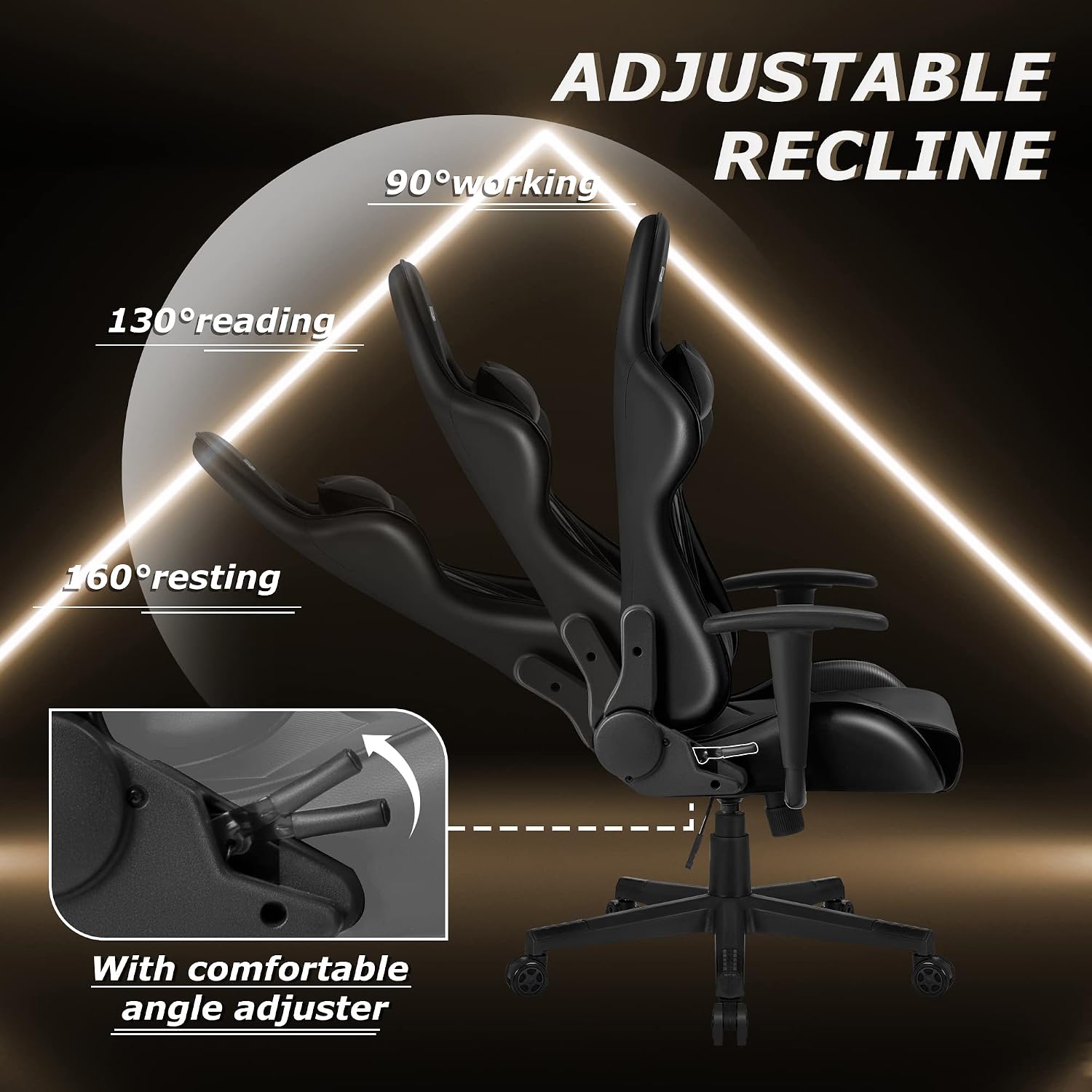
Image: A visual representation of the Furmax Gaming Chair's adjustable recline feature, showing positions for 90-degree working, 130-degree reading, and 160-degree resting, with a close-up of the comfortable angle adjuster.

Image: A diagram highlighting the ergonomic design of the Furmax Gaming Chair, showing how the headrest supports the neck and the lumbar support fits the spine for optimal comfort.
Maintenance
Proper care will extend the life and appearance of your Furmax Gaming Chair:
- Cleaning: Wipe clean with a damp cloth. For stubborn stains on the PU leather, use a mild soap solution and then wipe dry immediately. Avoid harsh chemicals or abrasive cleaners.
- Regular Checks: Periodically inspect all screws and bolts to ensure they are tight. Re-tighten if necessary.
- Avoid Direct Sunlight: Prolonged exposure to direct sunlight can cause the PU leather to fade or crack.
- Lubrication: If the casters or gas lift become stiff, a small amount of silicone-based lubricant can be applied, avoiding contact with the leather.
Troubleshooting
If you encounter any issues with your Furmax Gaming Chair, refer to the following common problems and solutions:
| Problem | Possible Cause | Solution |
|---|---|---|
| Chair wobbles or feels unstable | Loose screws or uneven assembly. | Check and tighten all assembly screws. Ensure the chair is on a flat, even surface. |
| Chair does not adjust height | Gas lift cylinder issue or mechanism plate not properly installed. | Ensure the gas lift is fully inserted into the base and mechanism. Check if the height adjustment lever is functioning correctly. |
| Backrest does not recline or lock | Recline mechanism jammed or lever not fully engaged. | Check for obstructions around the recline mechanism. Ensure the recline lever is pulled fully to unlock and released fully to lock. |
| Casters do not roll smoothly | Debris in casters or casters are damaged. | Clean any hair or debris from the caster wheels. If damaged, replacement casters may be needed. |
If the problem persists after attempting these solutions, please contact Furmax customer support for further assistance.
Specifications
Key specifications for the Furmax Video Gaming Chair:
- Brand: Furmax
- Model Name: Adjustable Swivel Chair with Headrest and Lumbar Support for Adults (Black)
- Item Model Number: gc81ad0
- Color: Black
- Product Dimensions: 25.6"D x 21.7"W x 57.1"H
- Seat Height: 20.1 Inches
- Seat Depth: 22.4 inches
- Chair Backrest Width: 25.6 Inches
- Item Weight: 40 pounds
- Maximum Weight Recommendation: 300 Pounds
- Back Style: Solid Back
- Special Feature: Adjustable, Durable, Resistant
- Finish Type: Leather (PU Leather)
- Furniture Base Movement: Swivel
- Reclining Position Count: Adjustable from 90 to 160 degrees

Image: A diagram illustrating the key dimensions of the Furmax Gaming Chair, including height, width, and depth measurements for the seat, backrest, and overall chair.
Warranty and Support
Furmax is committed to customer satisfaction. This gaming chair has adopted SGS and Bifma tested material, ensuring its quality and durability.
For any questions, concerns, or warranty claims, please contact Furmax customer support. Details regarding specific warranty periods and terms are typically provided with your purchase documentation or can be found on the official Furmax website.
We are quite sure that our products can make you satisfied and free from worries.
Related documentsgc81ad0

Ask a question about this manual
Ask about setup, troubleshooting, compatibility, parts, safety, or missing instructions. Manuals+ will review the question and use this page’s manual context to help answer it.