
1. Introduction
This manual provides essential information for the safe and effective installation, operation, and maintenance of your TrueCut Premium Medium Lift Replacement XHT Lawn Mower Blades. Please read this manual thoroughly before attempting any installation or maintenance procedures. Proper use and care will ensure optimal performance and longevity of your blades.
1.1 Safety Information
- Always wear appropriate personal protective equipment (PPE), including heavy-duty gloves and eye protection, when handling lawn mower blades.
- Ensure the lawn mower engine is turned off, the spark plug wire is disconnected, and the blade is disengaged before performing any maintenance or installation.
- Allow the engine and blades to cool down completely before touching them.
- Never attempt to sharpen or balance blades without proper tools and knowledge. Consult a professional if unsure.
- Keep hands and feet clear of the blade area at all times.
2. Product Overview and Specifications
The TrueCut Premium Medium Lift Replacement XHT Lawn Mower Blade is designed for efficient grass cutting and bagging. This package includes two replacement blades.
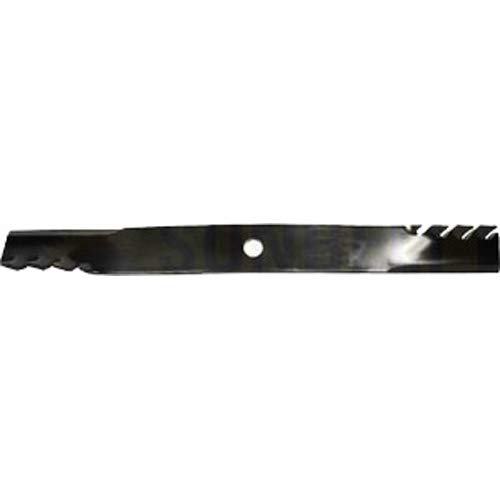
An image showing a single TrueCut Premium Medium Lift Lawn Mower Blade, featuring its cutting edge, lift angle, and central mounting hole. The blade is dark metallic with a circular hole in the center and serrated edges on one side, indicating its medium lift design.
2.1 Key Specifications
| Brand | TrueCut |
| Model Number (Fits) | 91264 (Designed to fit mowers requiring Laser Sales 91264 blades) |
| Blade Length | 24.9375 inches |
| Blade Width | 2.5 inches |
| Blade Thickness | 0.312 inches |
| Center Hole Diameter | 0.90625 inches |
| Blade Type | Medium Lift, XHT (Extreme Hardness & Toughness) |
3. Setup and Installation
Replacing lawn mower blades requires careful attention to safety and proper procedure. If you are unsure about any step, consult a qualified service technician.
3.1 Required Tools
- Heavy-duty work gloves
- Eye protection
- Wrench or socket set (appropriate size for blade bolts)
- Block of wood or blade removal tool (to prevent blade rotation)
- Wire brush (for cleaning)
3.2 Installation Steps
- Prepare the Mower: Turn off the engine, remove the spark plug wire to prevent accidental starting, and ensure the engine is cool.
- Secure the Mower: If possible, raise the mower deck or tilt the mower onto its side (with the carburetor facing up to prevent fuel leakage) to access the blades. Ensure it is stable and cannot tip over.
- Remove Old Blades: Place a block of wood between the blade and the mower deck to prevent the blade from turning. Using the appropriate wrench, loosen and remove the blade bolt(s) by turning counter-clockwise. Carefully remove the old blade(s).
- Clean the Deck: Use a wire brush to clean any accumulated grass clippings and debris from the underside of the mower deck and around the blade mounting area.
- Install New Blades: Position the new TrueCut blade onto the blade adapter, ensuring the cutting edge faces the correct direction (usually towards the front of the mower when viewed from below). The lift wing (the curved part) should point upwards towards the deck. Align the center hole of the blade with the spindle.
- Secure the Blade: Reinstall the blade bolt(s) and washer(s). Hand-tighten first, then use the wrench to tighten securely. Use the block of wood again to prevent the blade from turning while tightening. Refer to your mower's owner's manual for specific torque specifications.
- Final Check: Ensure the blade is firmly attached and spins freely without wobbling. Reconnect the spark plug wire.
4. Operating Guidelines
Once new blades are installed, follow these general guidelines for optimal mowing performance:
- Mow Dry Grass: For the best cut quality and to prevent clogging, mow when the grass is dry.
- Maintain Engine Speed: Operate the mower at the recommended engine speed to ensure sufficient blade tip speed for a clean cut.
- Avoid Obstacles: Be vigilant for rocks, branches, and other debris that can damage blades.
- Overlap Passes: Overlap each mowing pass slightly to ensure complete coverage and an even cut.
5. Maintenance
Regular maintenance of your TrueCut blades will extend their lifespan and maintain cutting performance.
- Clean Blades: After each use, clean grass clippings and debris from the blades and underside of the deck. This prevents rust and maintains balance.
- Inspect Blades: Regularly inspect blades for nicks, bends, cracks, or excessive wear. Damaged blades should be replaced immediately.
- Sharpening: Blades should be sharpened periodically, depending on usage and grass conditions. Use a blade sharpener or file to maintain a sharp edge. Ensure the blade remains balanced after sharpening to prevent vibration and damage to the mower. If you lack the proper tools or experience, seek professional sharpening services.
- Balancing: An unbalanced blade can cause excessive vibration, leading to premature wear on the mower's engine and components. After sharpening, check the blade's balance using a blade balancer. Remove material from the heavier side until balanced.
6. Troubleshooting
This section addresses common issues related to lawn mower blades.
| Problem | Possible Cause | Solution |
|---|---|---|
| Uneven cut or ragged grass | Dull or bent blades; incorrect blade installation; mowing wet grass. | Sharpen or replace blades; ensure blades are installed correctly with the cutting edge facing down; mow when grass is dry. |
| Excessive vibration | Unbalanced blade; bent blade; loose blade bolt. | Balance or replace blade; check blade for bends and replace if necessary; tighten blade bolt to specified torque. |
| Poor bagging or discharge | Clogged deck; dull blades; incorrect blade type for conditions. | Clean underside of deck; sharpen or replace blades; ensure blades are appropriate for your mowing needs (e.g., medium lift for bagging). |
7. Warranty and Support
For warranty information and customer support regarding your TrueCut Premium Medium Lift Replacement XHT Lawn Mower Blades, please refer to the specific warranty policy provided by the manufacturer or retailer at the time of purchase. Keep your proof of purchase for any warranty claims.
If you have further questions or require assistance, please contact the TrueCut customer service department or your authorized dealer.