
ZTE Blade V30
ZTE Blade V30 User Manual
Model: ZTE Blade V30
1. Introduction
This user manual provides essential information for operating your new ZTE Blade V30 smartphone. Please read this manual thoroughly before using the device to ensure proper function and safety. The ZTE Blade V30 features a 6.67-inch FHD+ display, a 64MP ultra HD quad camera system, a 16MP selfie camera, and a 5000mAh battery with 18W fast charging. It is powered by an octa-core 2.0GHz processor and comes with 4GB RAM and 128GB internal storage.
2. Safety Information
- Do not use the device in extreme temperatures.
- Avoid exposing the device to water or excessive moisture.
- Use only ZTE-approved chargers and accessories.
- Do not attempt to disassemble or repair the device yourself.
- Keep the device away from medical devices and pacemakers.
- Dispose of the device and its battery responsibly according to local regulations.
3. Package Contents
Ensure all items are present in your product package:
- ZTE Blade V30 Smartphone
- Charger
- USB Cable
- SIM Ejector Tool
- Quick Start Guide
- Safety Information Booklet
4. Device Layout
Familiarize yourself with the physical components of your ZTE Blade V30.

Figure 4.1: Front View. This image shows the front of the ZTE Blade V30 smartphone, highlighting its large display with a punch-hole camera at the top center. The screen displays a stylized image of a planet and a moon.
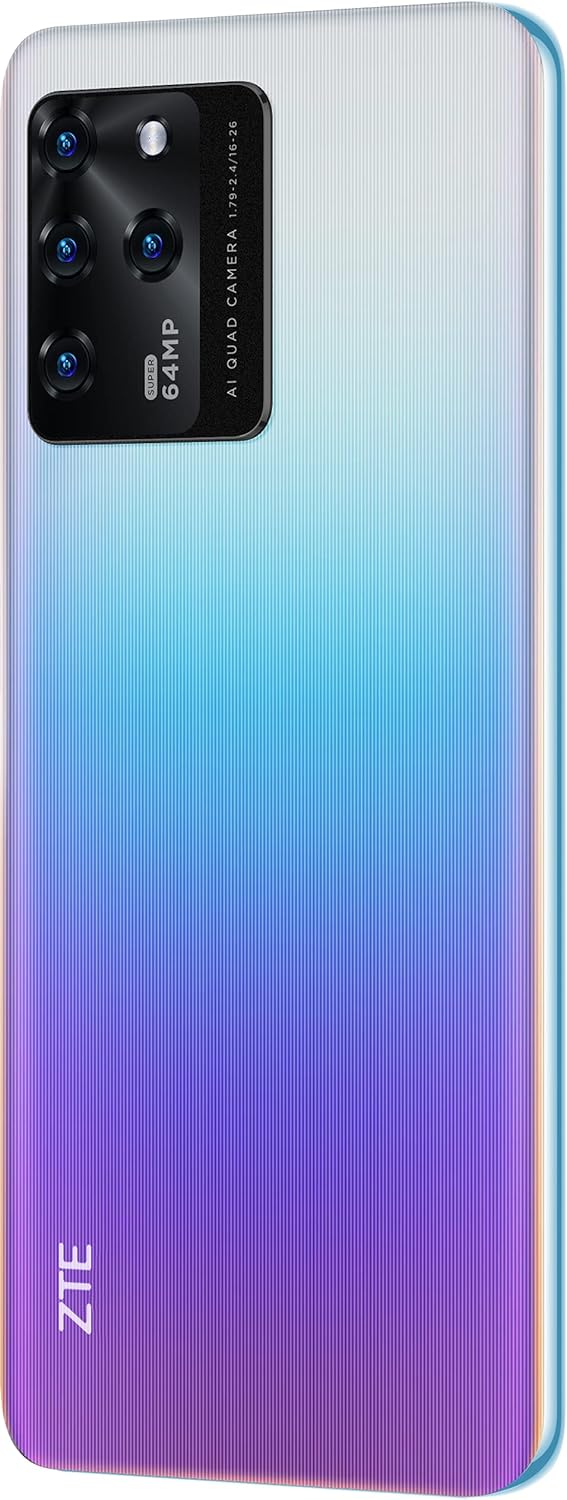
Figure 4.2: Rear View. This image displays the back of the ZTE Blade V30, featuring its prominent rectangular quad-camera module in the upper left corner. The module includes four lenses and a flash, with "SUPER 64MP AI QUAD CAMERA" text. The ZTE logo is vertically aligned on the lower left side. The phone's back has a gradient blue-to-purple finish.
- Front Camera: Located at the top center of the display.
- Display: 6.67-inch FHD+ screen.
- Power Button/Fingerprint Sensor: Typically on the side.
- Volume Buttons: Typically on the side.
- USB Port: For charging and data transfer.
- Speaker: For audio output.
- Microphone: For voice input.
- SIM/SD Card Tray: For inserting SIM cards and a microSD card.
- Rear Camera Module: Houses the 64MP main camera and other lenses.
- 3.5mm Audio Jack: For headphones.
5. Setup
5.1 Inserting SIM and SD Cards
- Locate the SIM/SD card tray on the side of your device.
- Insert the SIM ejector tool into the small hole next to the tray and push gently until the tray pops out.
- Place your Nano-SIM card(s) and/or microSD card into the designated slots on the tray, ensuring correct orientation.
- Carefully push the tray back into the device until it is flush with the side.
5.2 Initial Power On and Setup
- Press and hold the Power button until the ZTE logo appears.
- Follow the on-screen prompts to select your language, connect to a Wi-Fi network, and set up your Google account.
- Configure security settings, including fingerprint unlock if desired.
6. Operating Your Device
6.1 Basic Navigation
- Tap: Touch the screen once to open an app, select an item, or press a button.
- Swipe: Drag your finger across the screen to scroll through lists or switch between home screens.
- Pinch: Use two fingers to zoom in or out on photos and web pages.
- Long Press: Press and hold an item to access contextual menus or move icons.
6.2 Making Calls and Sending Messages
To make a call, open the Phone app, enter the number, and tap the call icon. To send a message, open the Messages app, tap the new message icon, enter the recipient and your message, then send.
6.3 Camera Usage
The ZTE Blade V30 features a versatile camera system:
- 64MP Ultra HD Main Camera: For high-resolution photos.
- Quad Camera System: Includes 64MP Auto Focus + 8MP + 5MP + 2MP lenses for various photography modes (e.g., wide-angle, macro, depth sensing).
- 16MP Selfie Camera: For clear self-portraits and video calls.
Open the Camera app, select your desired mode (Photo, Video, Portrait, etc.), and tap the shutter button to capture.
6.4 Battery Management
Your device is equipped with a 5000mAh large battery. For optimal battery life:
- Use the provided 18W fast charger for quick recharging.
- Reduce screen brightness.
- Close unused apps running in the background.
- Enable Battery Saver mode when needed.
6.5 Connectivity
- Wi-Fi: Connect to wireless networks via Settings > Network & internet > Wi-Fi.
- Bluetooth: Pair with other Bluetooth devices via Settings > Connected devices > Bluetooth.
- USB: Connect to a computer for file transfer or charging.
- GPS: Enable location services for navigation and location-based apps.
6.6 Storage Management
The device comes with 128GB of internal storage. You can expand this using a microSD card. To manage storage, go to Settings > Storage to view usage and free up space.
6.7 Operating System
The ZTE Blade V30 runs on Android 11.0. Regular software updates may be available to improve performance and add new features. Check for updates via Settings > System > System update.
7. Maintenance
- Cleaning: Use a soft, lint-free cloth to clean the screen and body. Avoid harsh chemicals.
- Software Updates: Keep your device's software up to date to ensure optimal performance and security.
- Data Backup: Regularly back up your important data to a cloud service or computer to prevent loss.
- Storage Optimization: Periodically clear cache, delete unnecessary files, and uninstall unused apps to maintain sufficient storage space.
8. Troubleshooting
| Problem | Possible Solution |
|---|---|
| Device does not power on | Ensure the battery is charged. Connect the charger and wait a few minutes before attempting to power on again. |
| Cannot connect to Wi-Fi | Check if Wi-Fi is enabled in settings. Restart your router and the phone. Ensure you have the correct Wi-Fi password. |
| Apps are crashing or freezing | Close and reopen the app. Clear the app's cache in settings. Restart the device. Ensure the app is updated. |
| Poor battery life | Reduce screen brightness, disable unnecessary features (GPS, Bluetooth, Wi-Fi when not in use), close background apps, and check for software updates. |
| Storage full | Delete old photos/videos, uninstall unused apps, clear app cache, or transfer files to a computer or cloud storage. Consider adding a microSD card. |
9. Specifications
| Feature | Detail |
|---|---|
| Model Name | Blade V30 |
| Operating System | Android 11.0 |
| RAM | 4 GB |
| Internal Storage | 128 GB |
| Display Size | 6.67 Inches |
| Display Resolution | 1080 x 2400 |
| Main Camera | 64MP Auto Focus + 8MP + 5MP + 2MP Quad Camera |
| Selfie Camera | 16MP |
| Battery Capacity | 5000 mAh |
| Charging | 18W Fast Charging |
| Processor | Octa-core 2.0GHz |
| SIM Support | Dual SIM |
| Connectivity | Bluetooth, Wi-Fi, USB, Cellular, GPS |
| Audio Jack | 3.5 mm |
| Color | Blue |
| Item Weight | 610 g |
10. Warranty and Support
For warranty information and customer support, please refer to the warranty card included in your product package or visit the official ZTE website. Keep your proof of purchase for warranty claims.
Online Support: ZTE Global Support
Related documentsBlade V30


Ask a question about this manual
Ask about setup, troubleshooting, compatibility, parts, safety, or missing instructions. Manuals+ will review the question and use this page’s manual context to help answer it.