
1. Introduction
The GYS Powerduction 37LG Induction Station is a powerful and portable tool designed for professional use in mechanical and maintenance applications. It provides immediate, flameless heating for various metal parts, making it ideal for tasks such as degriping, heating steel or aluminum, and dismantling seized components.
Its liquid cooling system allows for extended operation, and its precise heating capability ensures work can be performed safely near heat-sensitive parts without disassembly.
2. Safety Information
Always read and understand all safety warnings and instructions before operating the Powerduction 37LG. Failure to follow these instructions may result in electric shock, fire, serious injury, or property damage.
- Electrical Safety: Ensure the power source matches the unit's requirements. Do not operate in wet conditions. Always use a grounded outlet.
- Personal Protective Equipment (PPE): Wear appropriate eye protection, gloves, and protective clothing. Avoid loose clothing that could get caught.
- Heat Hazard: The induction head and heated parts will become extremely hot. Allow parts to cool or use appropriate tools for handling.
- Magnetic Fields: Individuals with pacemakers or other medical implants should consult a physician before operating this equipment due to strong magnetic fields.
- Ventilation: Ensure adequate ventilation in the work area.
- Flammable Materials: Keep flammable materials and liquids away from the heating area.
3. Setup
Follow these steps to set up your GYS Powerduction 37LG Induction Station:
- Unpacking: Carefully remove the induction station and all accessories from the packaging. Inspect for any shipping damage.
- Placement: Place the unit on a stable, level, and non-flammable surface. Ensure adequate space around the unit for ventilation.
- Liquid Cooling System: The Powerduction 37LG features a liquid cooling system. Ensure the cooling fluid reservoir is filled to the appropriate level with the recommended coolant. Refer to the specific instructions for coolant type and filling procedure.
- Connect Induction Head: Securely connect the induction head cable to the designated port on the front of the unit. Ensure the connection is tight to prevent arcing.
- Power Connection: Connect the power cord to a suitable grounded electrical outlet. Verify the voltage and current requirements match your power supply.

Figure 3.1: GYS Powerduction 37LG Induction Station with induction head and cooling hose.
4. Operating Instructions
The Powerduction 37LG is designed for efficient and precise heating. Always ensure the work area is clear and safe before beginning operation.
- Power On: Turn on the main power switch, usually located on the front or side of the unit. The display should illuminate.
- Select Mode/Power: Use the control panel to select the desired power level or operating mode. Refer to the display for current settings.
- Position Induction Head: Place the induction head directly onto or around the metal part to be heated. Ensure good contact or proximity for efficient heat transfer.
- Activate Heating: Press and hold the trigger or activation button on the induction head or unit. The part will begin to heat rapidly.
- Monitor Heating: Observe the part as it heats. The unit's liquid cooling system allows for continuous operation for several minutes. Release the trigger once the desired temperature is reached or the part is loosened.
- Typical Applications:
- Dismantling of steering rods and seized windows.
- Unripping bolts and steering joints without damaging bellows.
- Dismantling of gripped shafts in hubs.
- Dismantling of exhaust lines.
- Takeoff of bonded steel or aluminum elements.
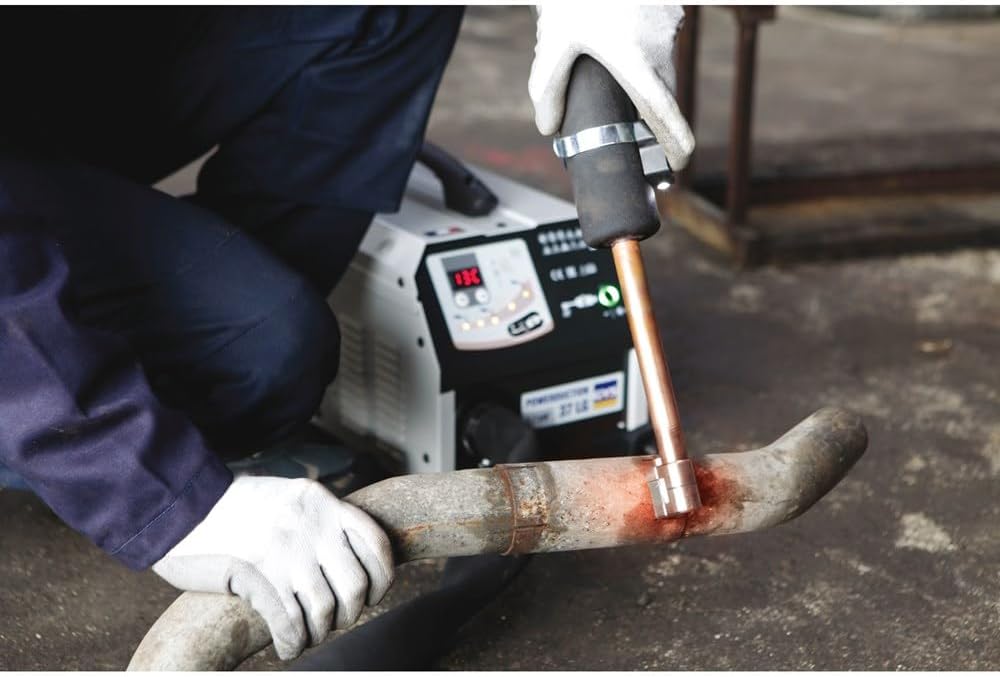
Figure 4.1: The Powerduction 37LG in use, heating an exhaust pipe for removal.

Figure 4.2: The Powerduction 37LG being used to heat a seized suspension component.
5. Maintenance
Regular maintenance ensures the longevity and optimal performance of your Powerduction 37LG.
- Cleaning: Keep the unit clean and free of dust and debris. Use a dry, soft cloth for cleaning. Do not use solvents or abrasive cleaners.
- Coolant Level: Periodically check the level of the liquid coolant. Top up as necessary with the manufacturer-recommended fluid.
- Air Vents: Ensure the air vents are clear and unobstructed to prevent overheating.
- Cable Inspection: Regularly inspect the power cord and induction head cable for any signs of damage, fraying, or cuts. Replace damaged cables immediately.
- Storage: Store the unit in a dry, clean environment when not in use.
6. Troubleshooting
If you encounter issues with your Powerduction 37LG, refer to the following common troubleshooting steps:
| Problem | Possible Cause | Solution |
|---|---|---|
| Unit does not power on | No power supply; Main switch off; Blown fuse | Check power cord and outlet; Turn on main switch; Check and replace fuse if necessary |
| No heat from induction head | Induction head not connected; Incorrect power setting; Faulty induction head | Ensure induction head is securely connected; Adjust power setting; Contact service for inspection |
| Unit overheats / Shuts down | Insufficient coolant; Blocked air vents; Prolonged use | Check and refill coolant; Clear air vents; Allow unit to cool down before resuming operation |
| Error code displayed | Internal fault | Note the error code and consult the full service manual or contact GYS support. |
If the problem persists after attempting these solutions, contact GYS customer support or a qualified service technician.
7. Specifications
| Feature | Detail |
|---|---|
| Manufacturer | GYS |
| Part Number | 056992 |
| Colour | Black/Silver |
| Material | Aluminum, Stainless Steel |
| Power Source | Induction |
| Wattage | 1700 watts |
| Special Features | Induction Heating, Hard-to-Reach Access |
| Item Weight | 2 kg |
| Date First Available | March 5 2022 |
| Heating Elements | 1 |
8. Warranty and Support
For detailed warranty information, please refer to the warranty card included with your product or visit the official GYS website. Keep your proof of purchase for warranty claims.
For technical support, spare parts, or service inquiries, please contact GYS customer service through their official channels. Provide your product model number (056992) and serial number (if applicable) when contacting support.
GYS Official Website: www.gys.fr


