
Amazon Echo Show 10 (3rd Gen)
Amazon Echo Show 10 (3rd Gen) User Manual
Your comprehensive guide to setting up, operating, and maintaining your smart display.
Introduction
The Amazon Echo Show 10 (3rd Gen) is a smart display designed to move with you, offering a dynamic visual and audio experience. It features a 10.1" HD screen, premium sound, and the intelligent Alexa voice assistant. This manual provides essential information to help you get the most out of your device.
What's in the Box
- Echo Show 10 device
- Glacier white power adapter (30W) / cable (5 ft.)
- Motion footprint template
- Quick start guide
Setup
Setting up your Echo Show 10 is designed to be straightforward. Ensure you have a stable Wi-Fi connection available.
Initial Placement
Due to its motion capabilities, the Echo Show 10 requires adequate space. The recommended footprint is 15"W x 10"D to allow for its +/- 175° rotation. Use the included motion footprint template to ensure proper clearance from objects.
Powering On and Wi-Fi Connection
- Connect the power adapter to your Echo Show 10 and plug it into a wall outlet.
- The device will power on automatically. Follow the on-screen instructions to select your language and connect to your Wi-Fi network.
- The Echo Show 10 supports 802.11a/b/g/n/ac Wi-Fi networks (dual-band, dual-antenna MIMO). Wi-Fi 6 (802.11ax) is not currently supported.
- If your device was purchased through your Amazon account, it may come pre-configured for easy setup using Amazon WiFi simple setup.
Alexa App and System Requirements
The Alexa app is compatible with Fire OS, Android, and iOS devices and is also accessible via your web browser. It is recommended to install the Alexa app on your mobile device for full control and customization of your Echo Show 10.
Operating Your Echo Show 10
The Echo Show 10 is designed for intuitive voice control and touch interaction. Simply say "Alexa" to activate the device.
Motion and Display

The Echo Show 10 features a 10.1" HD touchscreen that rotates to keep you in view, enhancing interactions for music, timers, smart home control, and more.
The device's brushless motor allows the screen to rotate +/- 175° to follow your movement, ensuring the display is always facing you during video calls, while watching content, or interacting with Alexa. You can manually tilt the screen up and down to your desired vertical position. Motion can be disabled at any time by saying "Alexa, disable Motion" or through the Alexa app settings.
Camera Features

Monitor your home by viewing multiple camera live feeds simultaneously on the Echo Show 10.
Equipped with a 13MP camera, the Echo Show 10 offers high-quality video calls with auto-framing, keeping you centered in the frame as you move. You can also use the camera to securely monitor your home remotely via the Alexa app or other Echo Show devices. For privacy, a built-in camera shutter is available to physically cover the lens.

The physical camera shutter provides an easy way to ensure privacy by covering the lens.
Audio and Entertainment

Enjoy premium sound and view lyrics with Amazon Music HD on your Echo Show 10.
The Echo Show 10 features a 2.1 audio system with two 1.0" tweeters and a 3.0" woofer, delivering premium, directional sound. You can stream music and podcasts from services like Amazon Music and Spotify. Additionally, you can watch shows and movies from Prime Video, Netflix, Hulu, and more.
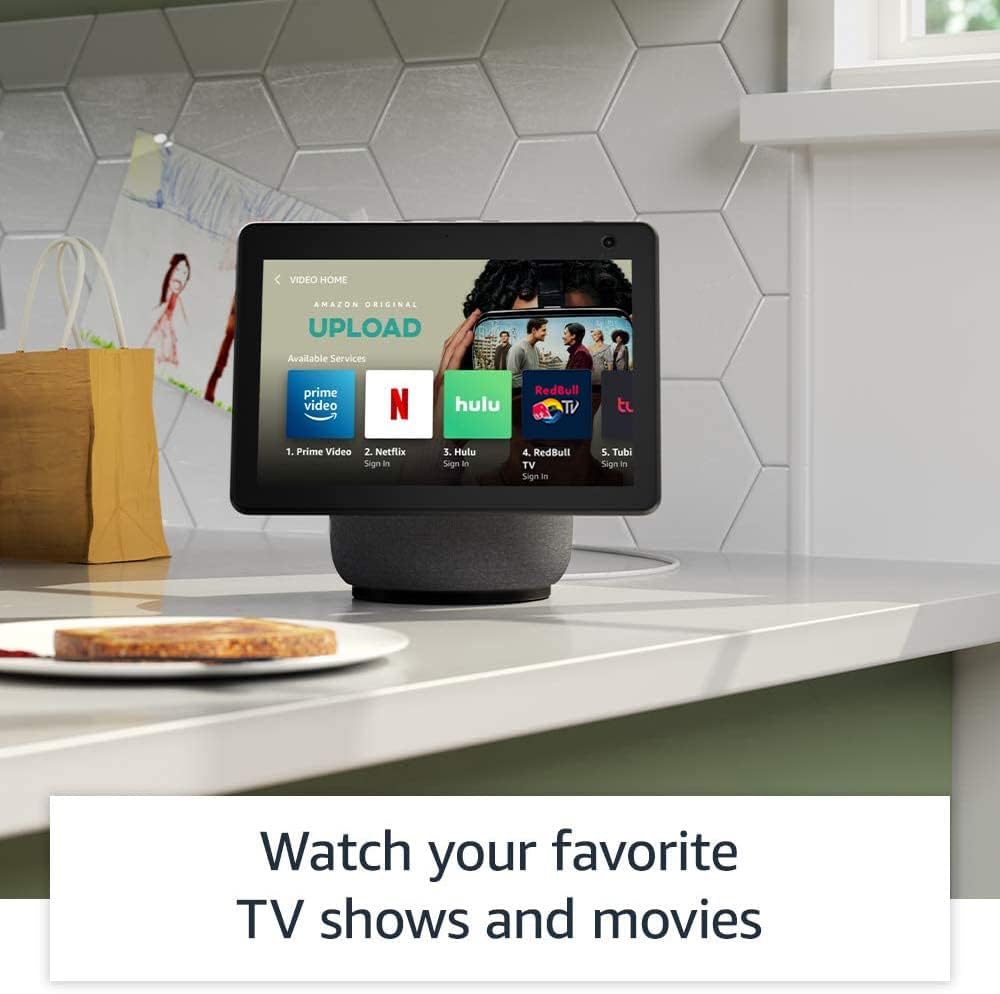
Access a wide range of entertainment options, including popular streaming services, directly on your Echo Show 10.
Smart Home Integration
The Echo Show 10 includes a built-in Zigbee, Sidewalk, and Matter smart home hub, allowing you to set up compatible devices without a separate hub. Use voice commands to control lights, adjust thermostats, and view security cameras.
Daily Assistance and Productivity

Get personalized recipes and hands-free cooking instructions by asking Alexa.
Alexa can assist with daily tasks such as providing personalized recipes, offering step-by-step cooking instructions, setting timers, and managing your grocery list. You can also use Amazon Photos to turn your home screen into a digital photo frame.
Privacy Features
The Echo Show 10 is designed with multiple layers of privacy controls. These include:
- Wake word technology: The device only begins listening after detecting the wake word ("Alexa").
- Streaming indicators: Visual indicators show when audio or video is being streamed to the cloud.
- Microphone/camera off button: A physical button to electronically disconnect the microphones and camera.
- Camera shutter: A physical slider to cover the camera lens.
- Voice recording management: Ability to view and delete your voice recordings.
- Motion disable: Option to turn off the device's motion tracking.
For more details, visit the Alexa Privacy Hub.
Accessibility Features
The Echo Show 10 offers various accessibility features to personalize Alexa to your abilities. These can be accessed via Settings → Accessibility on your device.
- Tap to Alexa: Interact with Alexa via touch through on-screen tiles or a keyboard.
- Adaptive Listening: Provides more time to finish speaking before Alexa responds.
- Preferred Speaking Rate: Control how fast or slow Alexa speaks.
- Captioning: Alexa Captioning, Call Captioning, and Closed Captioning for supported content.
- Show and Tell: Helps identify products for users who are blind or visually impaired.
- VoiceView screen reader: For users who are blind or visually impaired.
- Screen Magnifier: Zoom in/out and pan around the screen.
- Notify When Nearby: Plays notification sounds when detected near the device.
- Kindle Read Aloud: Alexa reads your Kindle books aloud.
- Real Time Text: Type live text in a video call.
- Additional settings include Color Inversion, Color Correction, Request Sound, and more.
Maintenance
To ensure the longevity and optimal performance of your Echo Show 10, follow these general maintenance guidelines:
- Cleaning: Gently wipe the screen and device exterior with a soft, lint-free cloth. Avoid using abrasive cleaners or sprays directly on the device.
- Placement: Keep the device in a dry environment, away from direct sunlight, heat sources, and excessive dust.
- Software Updates: Ensure your device receives regular software security updates. These are guaranteed for at least four years after the device is last available for purchase as a new unit.
Troubleshooting
If you encounter issues with your Echo Show 10, consider the following common troubleshooting steps:
- No Power: Ensure the power adapter is securely connected to both the device and a working power outlet.
- Wi-Fi Connectivity Issues:
- Check if your Wi-Fi router is on and functioning correctly.
- Restart your router and the Echo Show 10.
- Verify your Wi-Fi password in the device settings.
- Alexa Not Responding:
- Ensure the microphone is not muted (check the mic/camera off button).
- Speak clearly and at a normal volume.
- Try moving closer to the device.
- Motion Not Working:
- Check if motion tracking is enabled in the device settings or via voice command ("Alexa, enable Motion").
- Ensure there are no obstructions in the device's rotation path.
- Screen Issues: If the screen is unresponsive, try restarting the device by unplugging it for a few seconds and plugging it back in.
For further assistance, refer to the Alexa app or Amazon's online support resources.
Specifications
| Feature | Detail |
|---|---|
| Generation | Echo Show (3rd Gen) |
| Size | 9.9" x 9" x 6.7" (251 x 230 x 172mm) |
| Weight | 90.3 oz (2560 g) |
| Display | 10.1" touchscreen. Rotating screen with manual tilt. |
| Camera | 13MP + Shutter (Photo quality/size may vary) |
| Motion | Brushless Motor +/- 175° rotation |
| Audio | 2.1 System: 2 x 1.0" tweeters and a 3.0" woofer |
| Processor | MediaTek 8183 main processor plus second processor with Amazon AZ1 Neural Edge |
| Wi-Fi Connectivity | Dual-band, dual-antenna WiFi (MIMO). Supports 802.11a/b/g/n/ac WiFi networks. (WiFi 6 not supported) |
| Bluetooth Connectivity | A2DP support for audio streaming, AVRCP for voice control of connected mobile devices. |
| Smart Home Hub | Zigbee + Sidewalk + Matter |
| Sensor | ALS RGB |
| Language | Alexa speaks English and Spanish |
| Recommended Device Footprint | 15"W x 10"D |
Warranty and Support
Your Echo Show 10 comes with a 1-year limited warranty and service included. Optional 1-year, 2-year, and 3-year extended warranties are available for U.S. customers, sold separately.
For detailed warranty terms and conditions, please refer to the documentation provided with your device or visit Amazon's official support website. For general support, troubleshooting, and managing your device, use the Alexa app or visit the "Manage Your Content and Devices" section on Amazon's website.
This device receives guaranteed software security updates until at least four years after the device is last available for purchase as a new unit on Amazon's websites.
Related documentsEcho Show 10 (3rd Gen)


Ask a question about this manual
Ask about setup, troubleshooting, compatibility, parts, safety, or missing instructions. Manuals+ will review the question and use this page’s manual context to help answer it.