
Chauvin Arnoux P01651904
Chauvin Arnoux C.A 1954 DiaCAM2 Thermal Camera User Manual
Model: P01651904
1. Introduction
This manual provides essential information for the safe and effective operation of your Chauvin Arnoux C.A 1954 DiaCAM2 Thermal Camera. Please read this manual thoroughly before using the device and keep it for future reference. The C.A 1954 is a high-performance thermal imager designed for various applications, including building thermography, electrical maintenance, and mechanical diagnostics.

Figure 1: Front view of the Chauvin Arnoux C.A 1954 DiaCAM2 Thermal Camera, showing the display with a thermal image.
2. Key Features
The C.A 1954 DiaCAM2 Thermal Camera offers a range of advanced features for professional use:
- Extended Battery Life: Up to 9 hours of continuous operation with standard NiMH or alkaline batteries.
- Focus-Free Operation: No manual focus adjustment needed, ensuring sharp images at any distance.
- Wide Field of View: A 38° x 28° lens for comprehensive area coverage.
- Integrated Connectivity: Bluetooth for connection to clamp current transformers, multimeters, and environmental sensors.
- Voice Comments: Directly add voice notes to captured thermal images.
- Programmable Alarms: Acoustic and visual alarms for critical temperature detection.
- Intuitive Interface: Large 2.8-inch display with automatic brightness adjustment and single-hand operation.
- CAmReport Software: Advanced thermal imaging analysis and automatic report generation.
- Robust Design: IP54 protection rating for use in various environments.
3. Setup and Initial Use
3.1. Battery Installation
- Ensure the device is powered off.
- Locate the battery compartment on the handle of the camera.
- Open the compartment cover.
- Insert standard NiMH or alkaline batteries, ensuring correct polarity.
- Close the battery compartment cover securely.
3.2. MicroSD Card Insertion
- Locate the MicroSD card slot, typically on the side of the camera.
- Gently insert the MicroSD card (2GB card included, supports up to 32GB) into the slot until it clicks into place.
- To remove, press the card gently to release it.
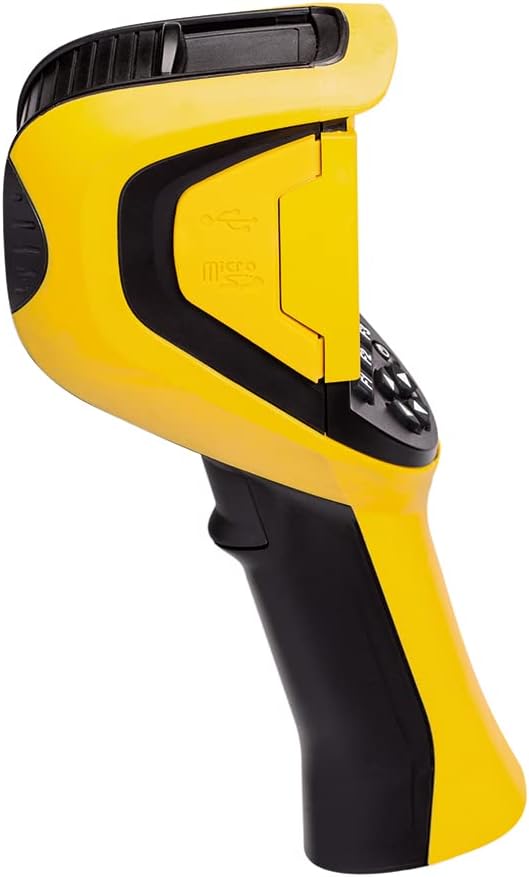
Figure 2: Side view of the C.A 1954, highlighting the MicroSD card slot.
3.3. Initial Power On
- Press and hold the power button until the display illuminates.
- The camera will perform a self-test and then display the live thermal image.
4. Operating Instructions
4.1. Basic Operation
The C.A 1954 is designed for comfortable single-handed use. The large 2.8-inch display automatically adjusts brightness for optimal viewing.

Figure 3: A user operating the C.A 1954 thermal camera to inspect an electrical panel.
4.2. Capturing Thermal Images
- Point the camera at the target area. The focus-free lens ensures clear images without manual adjustment.
- Press the capture button to take a thermal image.
- Images are automatically saved to the MicroSD card.
4.3. Adding Voice Comments
To add a voice comment to a captured image:
- After capturing an image, select the option to add a voice comment (refer to on-screen prompts).
- Speak clearly into the integrated microphone.
- The voice comment will be saved with the image file.
4.4. Bluetooth Connectivity
The C.A 1954 can connect to other Chauvin Arnoux measuring instruments via Bluetooth to record additional parameters simultaneously (e.g., current intensity, temperature, humidity, dew point). Refer to the camera's on-screen menu for Bluetooth pairing instructions.
4.5. Using CAmReport Software
The CAmReport software is a powerful tool for analyzing thermal images and generating reports. It allows for:
- Precise analysis with measurement cursors to display temperature at selected points.
- Thermal profiles showing min/max/average temperatures along a line.
- Area analysis by drawing squares or circles.
- Customization of the emissivity table.
- Automatic generation of test reports in PDF or Word format.
Install CAmReport on your PC and connect the camera (or insert the MicroSD card) to transfer and analyze data.
5. Maintenance
5.1. Cleaning the Device
To clean the camera body, use a soft, damp cloth. Do not use abrasive cleaners or solvents. For the lens, use a specialized lens cleaning cloth and solution to avoid scratching.
5.2. Lens Protection
The C.A 1954 features a captive sliding shutter to protect the lens when not in use. Always ensure the shutter is closed when storing or transporting the camera.
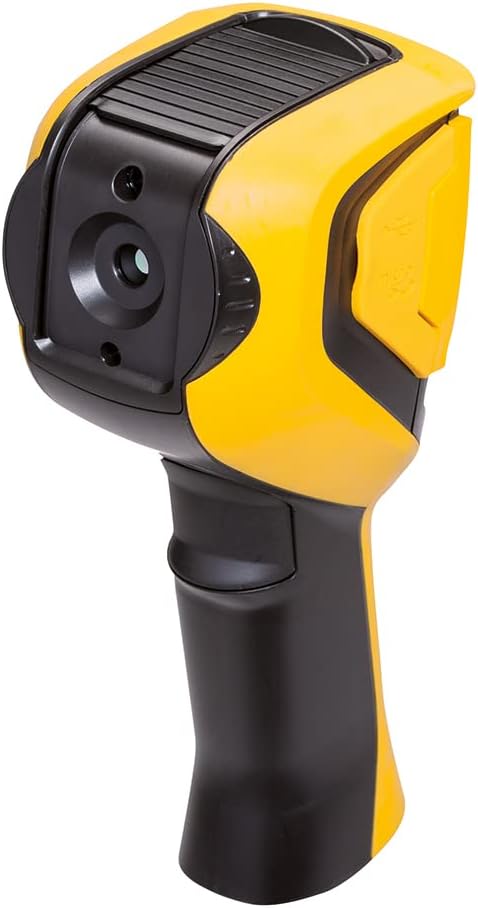
Figure 4: Rear view of the C.A 1954, showing the lens and its protective sliding shutter.
5.3. Battery Care
For optimal battery life and performance, use high-quality NiMH rechargeable batteries or alkaline batteries. Remove batteries if the device will not be used for an extended period.
6. Troubleshooting
If you encounter issues with your C.A 1954, refer to the following common troubleshooting steps:
- Device not powering on: Check battery installation and charge level. Replace batteries if necessary.
- Image unclear/blurry: Ensure the lens is clean and the protective shutter is fully open. The camera is focus-free, so no manual adjustment is needed.
- Cannot save images: Check if the MicroSD card is properly inserted and has sufficient free space. Try reformatting the card (this will erase all data).
- Bluetooth connection issues: Ensure both devices are in pairing mode and within range. Refer to the camera's Bluetooth settings.
For persistent issues or technical support, please contact Chauvin Arnoux customer service.
7. Technical Specifications
| Parameter | Value |
|---|---|
| Infrared Sensor | 160 x 120 UFPA Microbolometer, 8 ~ 14µm |
| Thermal Sensitivity (NETD) | 0.08K @ 30°C (0.08°C @ 30°C) |
| IFOV (Spatial Resolution) | 4.4 mrad |
| Temperature Range | -20°C to 250°C |
| Display Type | Thermal image, Photo image with auto parallax compensation, Image overlay via PC software |
| Measurement Tools | Manual cursor, Auto detection, Min/Max/Avg, Thermal profile, Isotherms (with Bluetooth dew point) |
| Adjustable Parameters | Emissivity, Ambient temperature, Distance, Relative humidity |
| Storage | 2GB µSD card (approx. 4000 images), expandable up to 32GB |
| Protection Rating | IP 54 |
| Dimensions (L x W x H) | 225 x 125 x 83 mm |
| Weight (with batteries) | 700 g |
| Material | Plastic |
| Manufacturer | Chauvin Arnoux |
8. Warranty and Support
For information regarding the product warranty, please refer to the documentation provided with your purchase or contact Chauvin Arnoux directly. Spare parts availability information is not provided in this manual; please inquire with the manufacturer or authorized service centers.
For technical support, service, or spare parts inquiries, please contact Chauvin Arnoux customer service through their official website or the contact details provided at the point of purchase.
Related documentsP01651904


Ask a question about this manual
Ask about setup, troubleshooting, compatibility, parts, safety, or missing instructions. Manuals+ will review the question and use this page’s manual context to help answer it.