
1. Introduction
Thank you for choosing the Orbegozo AP 8030 Cyclonic Vacuum Cleaner. This appliance is designed to provide efficient and thorough cleaning for your home with its high-efficiency 800W motor and bagless cyclonic technology. This manual provides essential information for the safe and effective use, maintenance, and troubleshooting of your vacuum cleaner.

Image 1.1: Orbegozo AP 8030 Cyclonic Vacuum Cleaner main unit with hose and floor brush.
2. Safety Warnings
Please read all safety instructions carefully before using the appliance and keep them for future reference.
- Ensure the voltage indicated on the appliance corresponds to your local mains voltage before connecting.
- Do not immerse the appliance, power cord, or plug in water or other liquids.
- This appliance is for household use only. Do not use it outdoors or for commercial purposes.
- Always unplug the vacuum cleaner from the power outlet before cleaning or performing maintenance.
- Do not pick up flammable or combustible materials, hot ashes, or sharp objects.
- Keep hair, loose clothing, fingers, and all parts of the body away from openings and moving parts.
- Do not operate the vacuum cleaner with a damaged cord or plug. Contact qualified service personnel for repair.
- Supervise children to ensure they do not play with the appliance.
- Do not block the air vents.
3. Product Components
The Orbegozo AP 8030 comes with several components designed for various cleaning tasks:
- Main Vacuum Unit with 2L Bagless Dust Tank
- Flexible Hose
- Telescopic Extension Tube
- Floor Brush (for carpets and hard floors)
- Crevice Tool
- Small Brush (integrated with crevice tool)
- Washable HEPA Filter

Image 3.1: Front view of the vacuum cleaner, showing the dust tank and main controls.
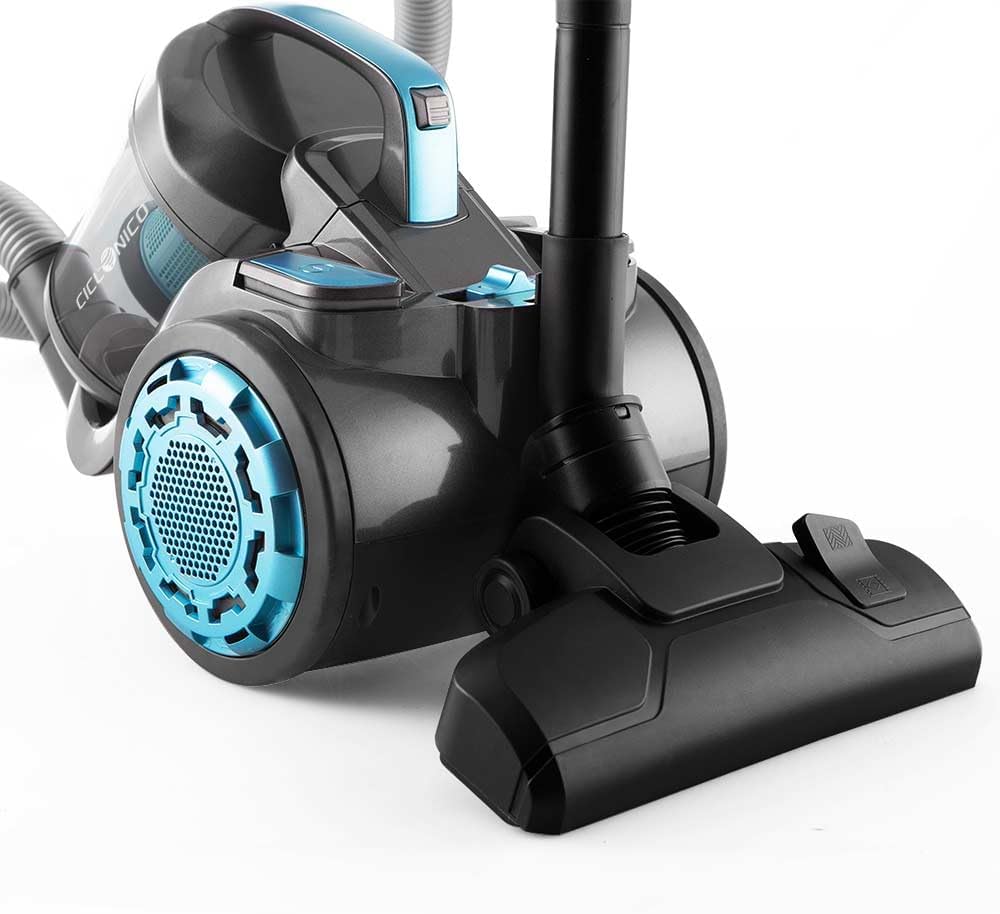
Image 3.2: Side view of the vacuum cleaner, highlighting the wheels and hose connection point.

Image 3.3: Back view of the vacuum cleaner, showing the exhaust filter area.

Image 3.4: Close-up of the power button and automatic cable rewind button on the main unit.

Image 3.5: The crevice tool and small brush attachment for detailed cleaning.

Image 3.6: Detail of the floor brush, showing the pedal to switch between carpet and hard floor modes.
4. Setup and Assembly
- Attach the Flexible Hose: Insert the end of the flexible hose into the suction inlet on the main vacuum unit until it clicks securely into place.
- Assemble the Extension Tube: Connect the telescopic extension tube to the handle end of the flexible hose. Adjust the length of the tube by pressing the release button and sliding it to the desired position.
- Attach the Floor Brush: Connect the floor brush to the end of the telescopic extension tube. Ensure it is firmly attached.
- Attach Accessories: For specific tasks, attach the crevice tool or small brush directly to the handle end of the flexible hose or the telescopic tube.
Image 4.1: The vacuum cleaner fully assembled with hose, extension tube, and floor brush.
5. Operating Instructions
- Power Connection: Extend the power cord to the desired length and plug it into a suitable electrical outlet.
- Power On/Off: Press the power button (refer to Image 3.4) on the main unit to turn the vacuum cleaner on or off.
- Adjust Suction Power: Use the electronic power regulation control (if available, usually a dial or buttons on the main unit or handle) to adjust the suction strength according to the surface being cleaned. Higher power is suitable for carpets, lower for delicate surfaces.
- Select Floor Mode: For the floor brush, press the pedal on the brush head (refer to Image 3.6) to switch between carpet mode (bristles retracted) and hard floor mode (bristles extended).
- Cleaning: Move the floor brush or accessory over the surface to be cleaned.
- Automatic Cable Rewind: After use, unplug the vacuum cleaner. Press the cable rewind button (refer to Image 3.4) to automatically retract the power cord into the unit. Guide the cord to prevent whipping.
6. Maintenance
Regular maintenance ensures optimal performance and extends the life of your Orbegozo AP 8030 vacuum cleaner.
6.1. Emptying the Dust Tank
- Ensure the vacuum cleaner is unplugged.
- Locate the dust tank release button or handle on the main unit.
- Remove the dust tank from the main unit.
- Position the dust tank over a waste bin and open the bottom flap to empty the collected dirt and debris.
- Close the flap securely and reattach the dust tank to the vacuum cleaner until it clicks into place.
6.2. Cleaning the Filters
The Orbegozo AP 8030 features washable HEPA filters. It is recommended to clean the filters regularly, especially when suction power decreases.
- Ensure the vacuum cleaner is unplugged and the dust tank is removed.
- Access the HEPA filter compartment, usually located within or near the dust tank.
- Carefully remove the HEPA filter.
- Rinse the filter under cold running water until the water runs clear. Do not use detergents or hot water.
- Allow the filter to air dry completely for at least 24 hours before reinserting it. Do not use a hairdryer or other heating devices.
- Reinsert the dry filter into its compartment and reattach the dust tank.
Note: The rubber wheels are designed to be extra soft to protect floor surfaces. Periodically check them for embedded debris.
7. Troubleshooting
If you encounter issues with your vacuum cleaner, refer to the following common problems and solutions:
| Problem | Possible Cause | Solution |
|---|---|---|
| Vacuum cleaner does not turn on. | Not plugged in; no power from outlet; power button not pressed. | Check power cord connection; test outlet with another appliance; press power button firmly. |
| Low suction power. | Dust tank full; filters clogged; hose or attachments blocked. | Empty dust tank; clean or replace filters; check hose and attachments for blockages. |
| Unusual noise during operation. | Blockage in hose or brush; foreign object in fan; motor issue. | Turn off and unplug. Check for blockages. If noise persists, contact customer support. |
| Dust escaping from the vacuum. | Dust tank not properly closed; filters not correctly installed or damaged. | Ensure dust tank is securely closed; check filter installation; replace damaged filters. |
If the problem persists after attempting these solutions, please contact Orbegozo customer support.
8. Specifications
| Feature | Detail |
|---|---|
| Brand | Orbegozo |
| Model Number | AP 8030 (17452) |
| Color | Black/Blue |
| Product Dimensions (L x W x H) | 27 x 40.5 x 30 cm |
| Dust Tank Capacity | 2 Liters |
| Power | 800 Watts |
| Voltage | 230 Volts |
| Noise Level | 78 dB |
| Special Features | Compact, HEPA Filter, Bagless, Electronic Power Regulation, Automatic Cable Rewind |
| Item Weight | 4.87 Kilograms |
| Filter Type | HEPA Filter |
| Surface Recommendation | Carpets, Hard Floors |
| Power Source | Corded Electric |
| Included Components | AP 8030 Main Unit, Flexible Hose, Telescopic Tube, Floor Brush, Crevice Tool, Small Brush |
| Cordless? | No |
| Country of Origin | China |
9. Warranty and Support
For warranty information, please refer to the warranty card included with your purchase or contact your local Orbegozo retailer. Keep your proof of purchase for any warranty claims.
For technical support, spare parts, or service inquiries, please visit the official Orbegozo website or contact their customer service department. Contact details can typically be found on the product packaging or the brand's official website.