
ICQN IQ M4251R03N 1IA
ICQN 42L Mini Electric Oven Instruction Manual
Model: IQ M4251R03N 1IA
Introduction
Thank you for choosing the ICQN 42L Mini Electric Oven. This appliance is designed for versatile cooking, offering various functions to meet your culinary needs. Please read this manual carefully before operating the oven to ensure safe and efficient use. Keep this manual for future reference.
Important Safety Instructions
When using electrical appliances, basic safety precautions should always be followed, including the following:
- Read all instructions before use.
- Do not touch hot surfaces. Use handles or knobs.
- To protect against electrical shock, do not immerse cord, plugs, or the appliance in water or other liquid.
- Close supervision is necessary when any appliance is used by or near children.
- Unplug from outlet when not in use and before cleaning. Allow to cool before putting on or taking off parts.
- Do not operate any appliance with a damaged cord or plug, or after the appliance malfunctions or has been damaged in any manner.
- The use of accessory attachments not recommended by the appliance manufacturer may cause hazards.
- Do not use outdoors.
- Do not let cord hang over edge of table or counter, or touch hot surfaces.
- Do not place on or near a hot gas or electric burner, or in a heated oven.
- Extreme caution must be used when moving an appliance containing hot oil or other hot liquids.
- Always attach plug to appliance first, then plug cord into the wall outlet. To disconnect, turn any control to "off", then remove plug from wall outlet.
- Do not use appliance for other than intended use.
- Oversized foods or metal utensils must not be inserted in a toaster oven as they may create a fire or risk of electric shock.
- A fire may occur if the oven is covered or touching flammable material, including curtains, draperies, walls, and the like, when in operation.
- Do not place any of the following materials in the oven: paper, cardboard, plastic, and other similar materials.
- Do not store any materials other than manufacturer's recommended accessories in this oven when not in use.
- Do not cover crumb tray or any part of the oven with metal foil. This will cause overheating of the oven.
Product Overview
The ICQN 42L Mini Electric Oven features a compact design with a spacious interior, offering various cooking functions and easy-to-use controls.

Figure 1: Front view of the ICQN 42L Mini Electric Oven, showing the main body, glass door, and control knobs on the right side.
Key Components:
- Temperature Control Knob: Adjusts oven temperature from 40°C to 230°C.
- Function Selector Knob: Selects desired cooking mode (e.g., convection, top/bottom heat).
- Timer Knob: Sets cooking duration up to 90 minutes or continuous operation.
- Glass Door: Double-glazed for improved insulation and visibility.
- Interior Light: Illuminates the oven cavity during operation.
- Convection Fan: Circulates hot air for even cooking.
- Rack Levels: Three adjustable levels for the baking tray and wire rack.
- Enameled Interior: Designed for easy cleaning.

Figure 2: The oven displaying its 42-liter capacity, interior light, convection fan, double glazing, easy cleaning feature, and suitability for baking bread.

Figure 3: Close-up of the oven interior, highlighting the "Umluft" (convection) fan for even heat distribution.
Setup
- Unpacking: Carefully remove the oven and all accessories from the packaging. Retain packaging for future transport if needed.
- Placement: Place the oven on a stable, heat-resistant surface. Ensure adequate clearance (at least 10 cm) on all sides and above the oven for proper ventilation. Important: Measure the intended placement area before installation to ensure proper fit and ventilation.
- Initial Cleaning: Before first use, wipe the interior and accessories with a damp cloth. Run the oven empty for approximately 15 minutes at maximum temperature (230°C) with the convection function to burn off any manufacturing residues and odors. Ensure the room is well-ventilated during this process.
- Power Connection: Plug the oven into a grounded electrical outlet. Ensure the voltage matches the specifications (230V).
Operating Instructions
Familiarize yourself with the control knobs before operation.
Control Panel:
- Top Knob (Temperature): Turn to set the desired cooking temperature from 40°C to 230°C.
- Middle Knob (Function): Turn to select one of the five cooking functions:
- Convection (Chaleur tournante)
- Convection with Bottom Heat (Chaleur tournante avec chaleur inférieure)
- Top Heat (Chaleur haute)
- Bottom Heat (Chaleur inférieure)
- Top/Bottom Heat (Chaleur voûte/inférieure)
- Defrost Function (Fonction de décongélation)
- Bottom Knob (Timer): Turn clockwise to set the cooking time up to 90 minutes. The oven will automatically switch off when the timer reaches zero. For continuous operation, turn the timer knob counter-clockwise to the "Manual" position. Caution: Do not force the timer knob counter-clockwise from a timed setting, as this may damage the mechanism.
General Operation:
- Place food on the baking tray or wire rack. Select the appropriate rack level (1, 2, or 3) for optimal cooking.
- Close the oven door securely.
- Set the desired temperature using the top knob.
- Select the appropriate cooking function using the middle knob.
- Set the cooking time using the bottom timer knob. The oven will begin heating.
- The oven light will illuminate during operation.
- When the set time expires, the oven will switch off automatically, and a bell will sound. If using continuous operation, manually turn the timer knob to the "Off" position.
- Carefully remove cooked food using oven mitts and the provided handle for the baking tray/wire rack.

Figure 4: Interior of the oven illustrating the three available rack levels for flexible cooking and optimal heat distribution.
Maintenance and Cleaning
Regular cleaning ensures optimal performance and extends the life of your oven.
- Before Cleaning: Always unplug the oven from the power outlet and allow it to cool completely before cleaning.
- Exterior Cleaning: Wipe the exterior surfaces with a soft, damp cloth. Do not use abrasive cleaners or scouring pads, as they may damage the finish.
- Interior Cleaning (Enameled Interior): The oven features an enameled interior for easy cleaning.
- For light soil, wipe the interior with a damp cloth and mild detergent.
- For stubborn stains, the oven offers a self-cleaning function: Add two glasses of water to the baking tray and place it in the oven. Run the oven at a moderate temperature for approximately 30 minutes. The steam will loosen food residues, making them easier to wipe away once the oven has cooled.
- Glass Door Cleaning: The double-glazed door can be disassembled for thorough cleaning. Refer to Figure 5 for guidance. Carefully remove the inner glass panel for cleaning, then reassemble securely.
- Accessories: Wash the baking tray, wire rack, and handle with warm, soapy water. Rinse thoroughly and dry completely before storing.

Figure 5: Illustration demonstrating the process of disassembling the double-glazed oven door for easier cleaning of both inner and outer glass panels, highlighting the enameled interior.
Troubleshooting
If you encounter issues with your oven, please consult the following table before contacting customer support.
| Problem | Possible Cause | Solution |
|---|---|---|
| Oven does not turn on. | Not plugged in; power outage; timer not set. | Ensure the oven is securely plugged into a working outlet. Check circuit breaker. Set the timer knob to a desired time or to the "Manual" position. |
| Food not cooking evenly. | Incorrect rack level; oven overloaded; convection fan issue. | Adjust rack level. Avoid overloading the oven. Ensure the convection fan is selected for even cooking. |
| Smoke or odor during first use. | Manufacturing residues burning off. | This is normal during initial use. Ensure good ventilation. The odor should dissipate after the first few uses. |
| Timer not working correctly. | Timer knob not set properly. | Ensure the timer knob is turned clockwise past the 10-minute mark before setting the desired time. Do not turn counter-clockwise from a timed setting. |
Specifications
| Feature | Detail |
|---|---|
| Brand | ICQN |
| Model Number | IQ M4251R03N 1IA |
| Capacity | 42 Liters |
| Power | 1300 Watts |
| Voltage | 230 Volts |
| Temperature Range | 40°C - 230°C |
| Dimensions (L x W x H) | 45.9 x 53.2 x 35.2 cm |
| Weight | 13 Kilograms |
| Material | Enameled Interior |
| Special Features | 3 rack levels, Timer, Turbo fan with convection, Pizza plate compatibility |
| Included Components | 1 baking tray, 1 wire rack, 1 handle clamp |

Figure 6: Included accessories: a baking tray, a wire rack, and a handle clamp for safe removal of hot items.
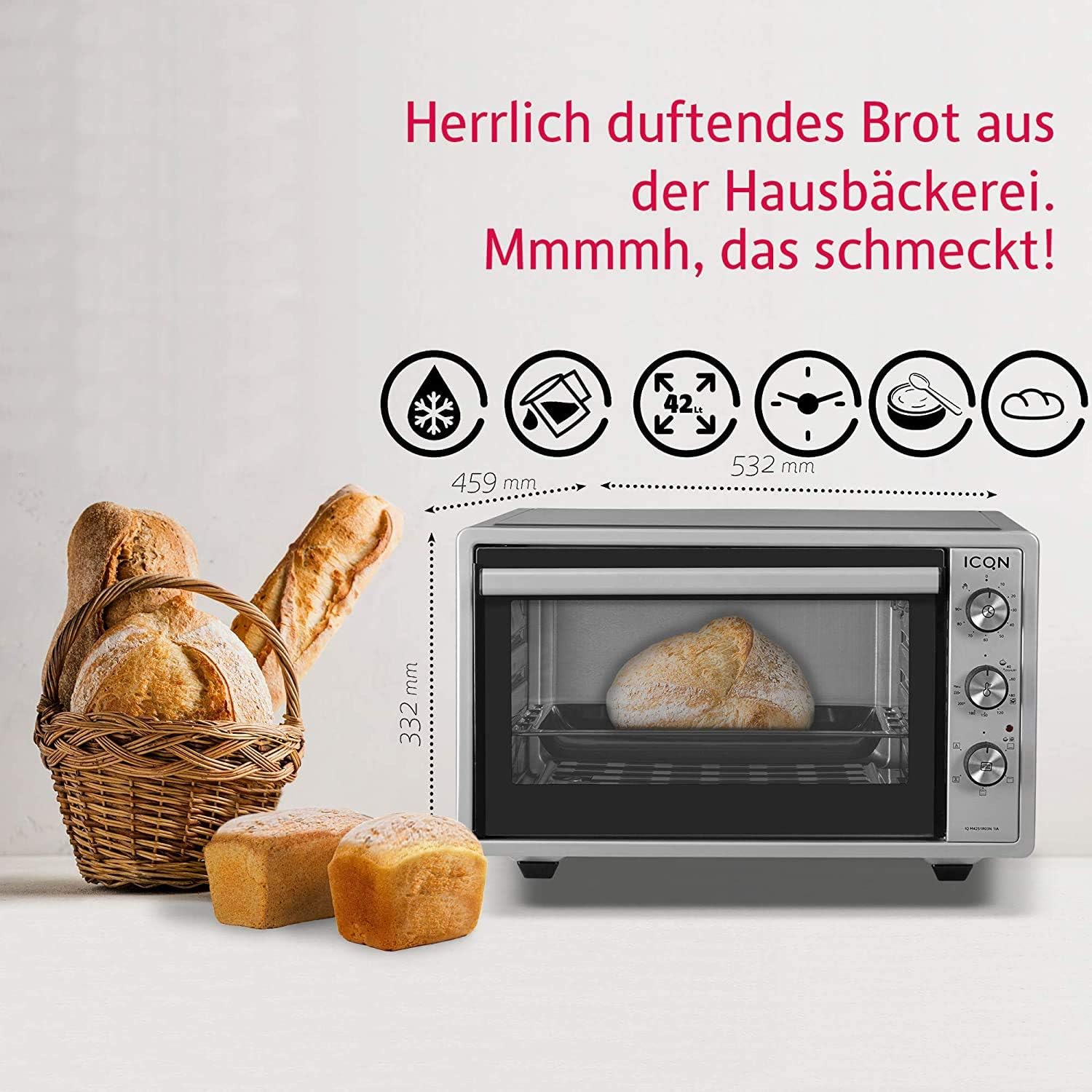
Figure 7: The oven shown with bread, illustrating its external dimensions (width 532mm, depth 459mm, height 332mm).
Warranty and Support
This ICQN Mini Electric Oven comes with a 2-year warranty from the date of purchase. Please retain your proof of purchase for warranty claims.
For technical support, service, or warranty inquiries, please contact your retailer or the manufacturer's customer service department. Contact information may be found on the product packaging or the manufacturer's official website.
Related documentsIQ M4251R03N 1IA


Ask a question about this manual
Ask about setup, troubleshooting, compatibility, parts, safety, or missing instructions. Manuals+ will review the question and use this page’s manual context to help answer it.