
Live Fine LVFRAPD5
Live Fine Automatic Pill Dispenser User Manual
Model: LVFRAPD5
Product Overview
The Live Fine Automatic Pill Dispenser is an electronic medication organizer designed to assist users in managing their medication schedules effectively. It features a 28-day capacity, an easy-to-read LCD display, and provides sound and light alerts to ensure timely medication intake. The dispenser is equipped with a key-locked lid to prevent unauthorized access and an integrated magnifier for clear viewing of dosage information.

Image: Live Fine Automatic Pill Dispenser, top view, displaying the digital clock and internal pill compartments.
Safety Information
Please read and understand all safety precautions before operating the device.
- Always keep the pill dispenser out of reach of children and pets.
- Do not use the device if the locking cover is damaged or missing.
- Be cautious when handling batteries and follow proper disposal procedures.
- Always follow the medication schedule set by your doctor or caregiver to avoid overmedication or under-medication.
- In case of accidental ingestion of pills, seek immediate medical attention.
Setup
Unpacking and Initial Inspection
Carefully remove all components from the packaging. Inspect the dispenser for any signs of damage. Ensure all parts, including the dispenser unit, clear lid, locking key, and dosage rings, are present.
Battery Installation
The dispenser requires 4x AA alkaline batteries (included). To install:
- Locate the battery compartment on the underside of the dispenser.
- Open the battery compartment cover.
- Insert 4x AA batteries, ensuring correct polarity (+/-).
- Close the battery compartment cover securely.
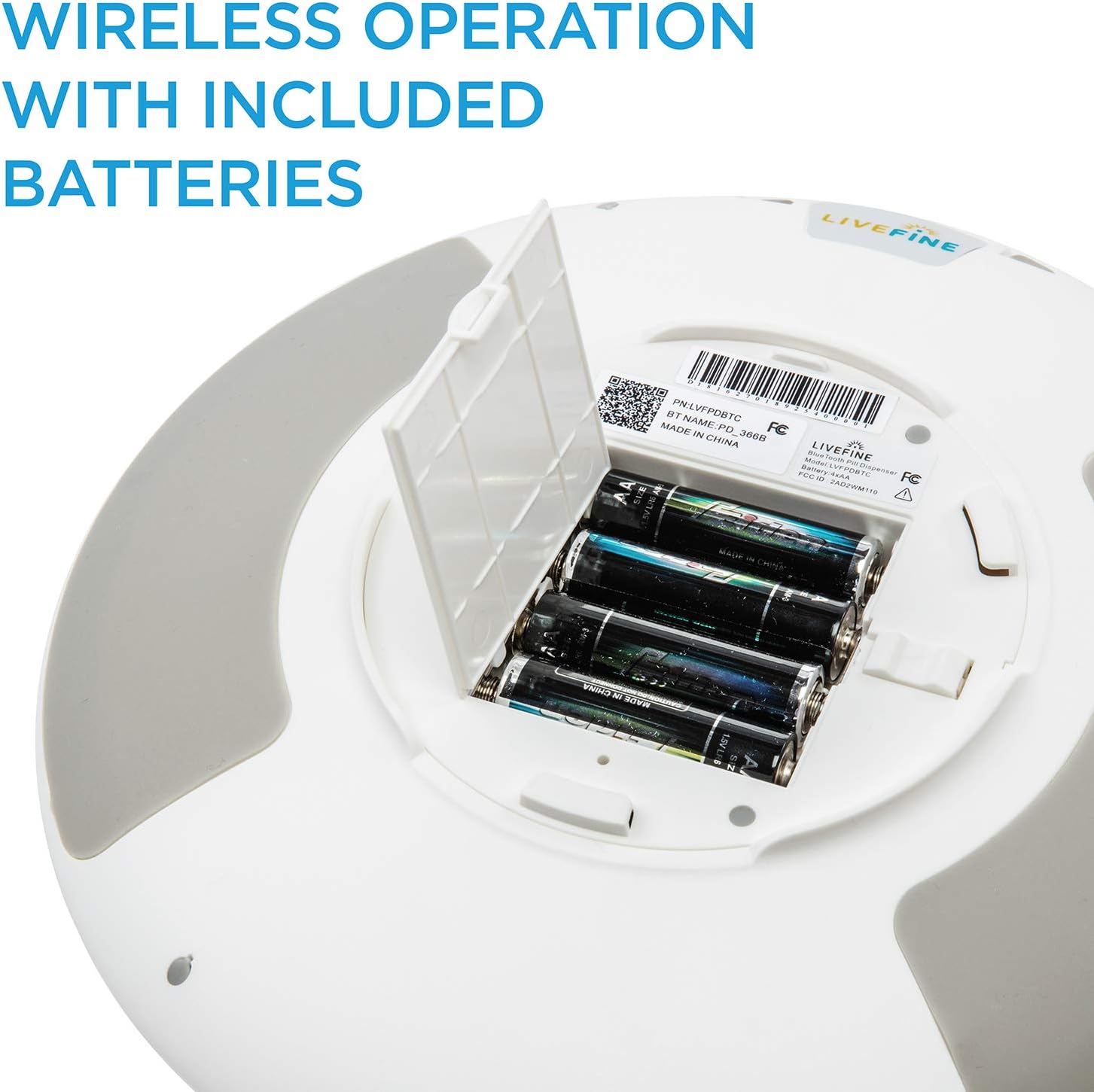
Image: The battery compartment on the underside of the dispenser, showing the insertion of AA batteries.
Loading Medication
The dispenser has 28 high-capacity slots for medication. Use the quick-fill removable carousel for ease of loading.
- Unlock and open the clear lid of the dispenser.
- Identify the appropriate dosage ring based on your daily medication frequency (1X to 6X per day).
- Place the selected dosage ring onto the carousel.
- Load prescriptions, vitamins, or pills into the corresponding compartments according to your prescribed schedule. Each compartment can hold up to 18 pills.
- Ensure pills are laid flat and do not overfill compartments to prevent jamming.

Image: Included dosage rings that display information for different daily frequencies and durations.
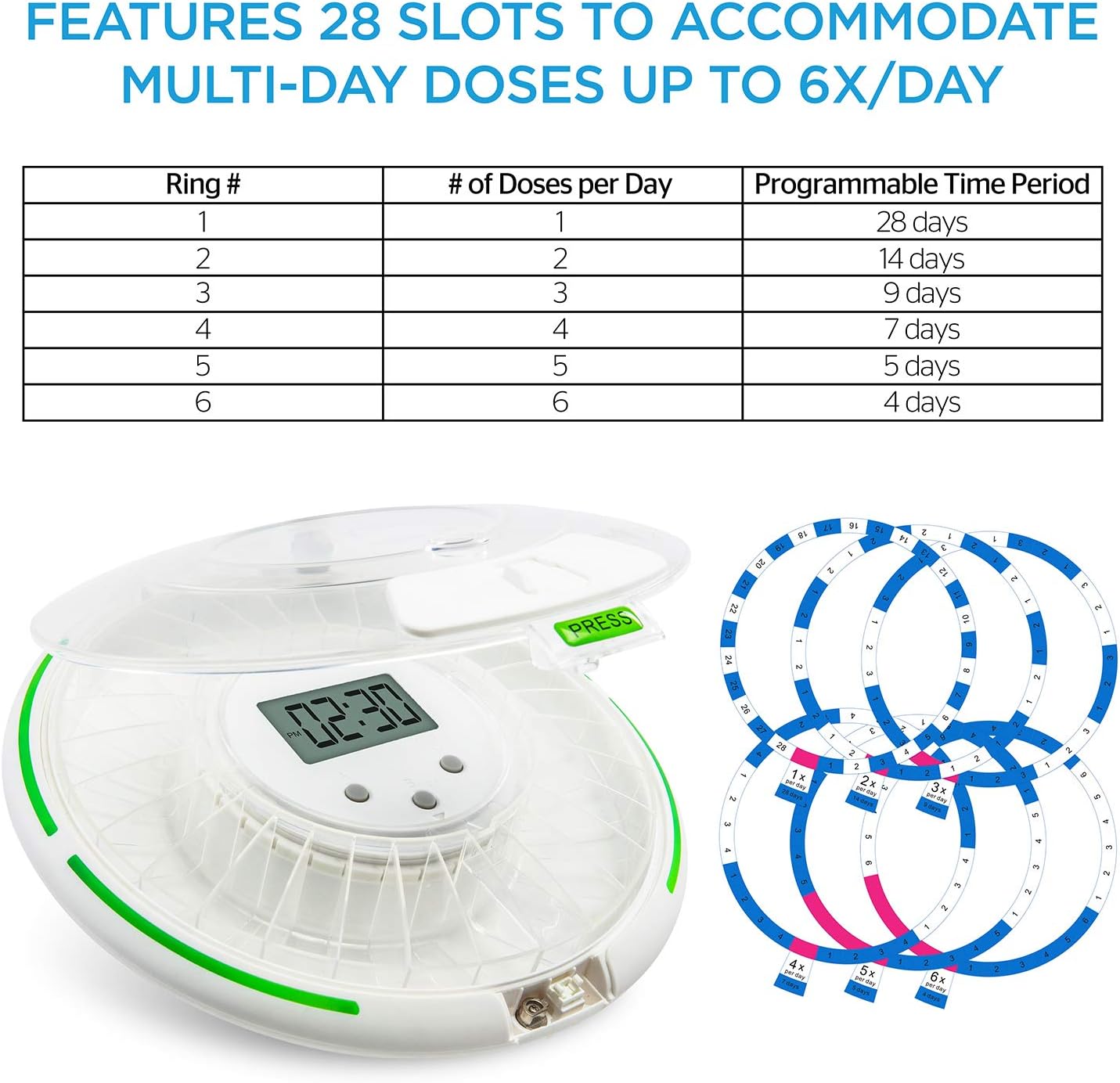
Image: A table illustrating the capacity of the dispenser, showing how different rings accommodate multi-day doses up to 6 times per day.
Operating Instructions
Setting Time and Dosage Schedule
Program the dispenser using the 3-button interface for up to 28 straight days of dosages, with audio and visual alerts 1 to 6 times daily.
- Press and hold the 'SET' button to enter programming mode.
- Use the '+' and '-' buttons to adjust the current time (hour and minute). Press 'SET' to confirm each setting.
- Set the desired alarm times for medication dispensing (up to 6 times per day).
- Confirm all settings by pressing 'SET' until the display returns to the current time.
Dispensing Medication
When a prescription is due, the LCD display will show the time, then beep and flash. To dispense:
- Wait for the alarm to sound and lights to flash.
- Open the dispenser or flip it upside down to allow the medication from the exposed compartment to fall out. This action will stop the alarm.
- Take the dispensed medication as prescribed.

Image: The dispenser with its custom timer, showing lights and alarm activating until the dispenser is flipped to release medication.

Image: A hand collecting dispensed pills from the device, demonstrating the medication release process.
Locking Mechanism
Use the included locking key to secure the lid and prevent unauthorized access to medication.
- Align the key with the keyhole on the side of the dispenser.
- Insert the key and turn it to lock the lid securely.
- To unlock, insert the key and turn it in the opposite direction.

Image: The included locking key being used to safely secure the lid, preventing overdoses or unauthorized access.

Image: An integrated magnifier on the lid provides a close-up view of dosage information and pills.
Maintenance
Cleaning
To ensure proper hygiene and functionality, clean the dispenser regularly.
- Unlock and remove the clear lid and the internal carousel.
- Wipe down all surfaces with a soft, damp cloth. Do not use abrasive cleaners or immerse the electronic unit in water.
- Ensure all parts are completely dry before reassembling.
Battery Replacement
Replace batteries when the low battery indicator appears on the LCD display or if the device's performance diminishes. Follow the battery installation steps outlined in the Setup section.
Troubleshooting
This section addresses common issues you might encounter with your Live Fine Automatic Pill Dispenser.
| Problem | Possible Cause | Solution |
|---|---|---|
| Dispenser displays "Err" message. | Internal mechanism error, possibly due to obstruction or power issue. | Remove batteries, wait 30 seconds, then reinsert. Ensure no pills are jamming the carousel. If the error persists, contact customer support. |
| Alarm sounds but no pills dispense. | Lid not properly closed or locked, or pills are jammed. | Ensure the lid is fully closed and locked. Check for any pills obstructing the dispensing opening. |
| Alarm is too quiet or not sounding. | Low batteries or speaker obstruction. | Replace batteries with fresh ones. Ensure the speaker is not covered. |
| Digital clock is inaccurate. | Time drift or low batteries. | Reset the time as per operating instructions. Replace batteries if they are old. |
Specifications
| Feature | Detail |
|---|---|
| Product Dimensions | 9.25 x 9.25 x 3 inches |
| Weight | 1.92 Pounds |
| Model Number | LVFRAPD5 |
| Batteries | 4 AA batteries required (included) |
| Color | Clear Lid |
| Special Feature | Automatic |
Warranty and Support
For information regarding product warranty, returns, or technical support, please refer to the Live Fine official website or contact their customer service directly. Keep your purchase receipt for warranty claims.
Visit the Live Fine Store on Amazon for more information and support resources.
Legal Disclaimer
Statements regarding dietary supplements have not been evaluated by the FDA and are not intended to diagnose, treat, cure, or prevent any disease or health condition.
Related documentsLVFRAPD5


Ask a question about this manual
Ask about setup, troubleshooting, compatibility, parts, safety, or missing instructions. Manuals+ will review the question and use this page’s manual context to help answer it.