
1. Introduction
Thank you for choosing the INCLAKE Car Backup Camera. This Ultra HD 12 LED Night Vision Waterproof Reverse Camera is designed to enhance your driving safety by providing a clear and wide view of your vehicle's rear surroundings. This manual provides detailed instructions for installation, operation, maintenance, and troubleshooting to ensure optimal performance and a safe driving experience.
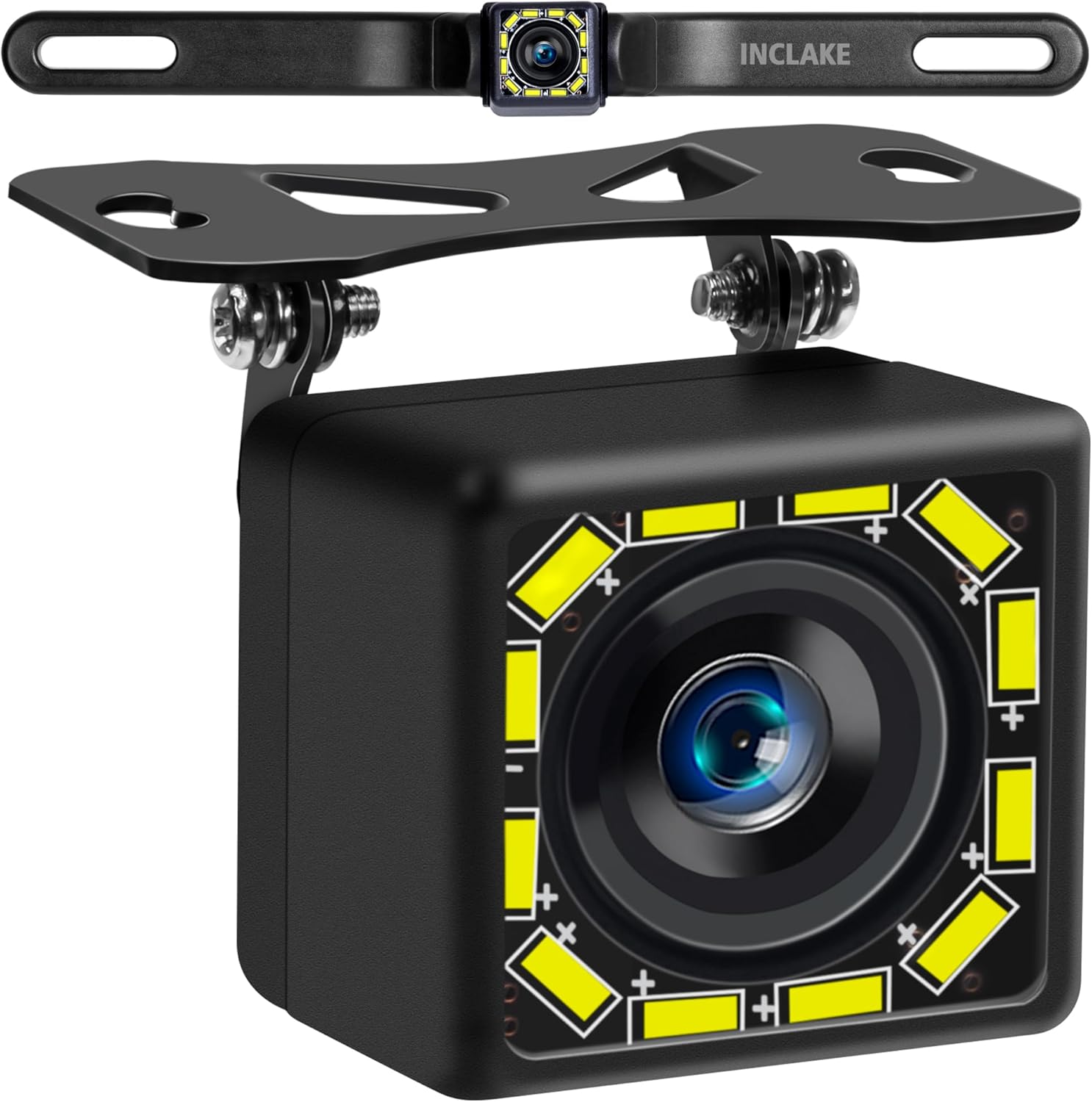
Image: The INCLAKE Car Backup Camera, showcasing its compact design and included mounting brackets.
2. Key Features
- Ultra HD Screen & Accurate Color: Designed to eliminate blind spots and avoid obstacles, providing a clear CVBS Ultra HD picture for the driver.
- 12 LED & Superior Night Vision: Features 12 super bright LED lights that automatically illuminate in low daylight conditions, greatly enhancing night vision with sharp images.
- IP68 Waterproof & 140° View Adjustable Angle: Protected against powerful water jets, ensuring reliable operation in rain and car washes. The 140° adjustable vertical viewing angle allows for optimal positioning.
- 2-in-1 Installation: Can be installed on a license plate frame or mounted on the back, front, or side of the vehicle.

Image: Comparison of daytime and night vision display from the camera, highlighting the clear night vision capabilities.

Image: The camera with its 12 LED lights active, illustrating the 140-degree wide view angle for parking assistance.

Image: Demonstrates the IP68 waterproof rating of the camera, showing it withstanding water exposure.
3. Package Contents
Please verify that all items listed below are included in your package:
- INCLAKE Car Backup Camera
- Power Wire
- 26ft/8m Video Wire
- Wire Clamps
- Double-sided Tape
- Metal Bracket
- Zip Ties
- User Manual

Image: All components included in the INCLAKE Car Backup Camera package.
4. Setup and Installation
The INCLAKE Car Backup Camera requires an actual installation, not just a simple clip-on or paste-on method. For optimal performance and to avoid potential issues, professional installation is highly recommended. If you choose to install it yourself, please follow the instructions carefully.
4.1. Wiring Diagram
Refer to the diagram below for proper wiring connections. Ensure all connections are secure to prevent signal loss or power issues.

Image: Detailed wiring diagram for connecting the camera to a monitor and power source.
- Connect the video output (yellow RCA connector) from the camera to the video input of your monitor.
- Connect the red wire (+12V) of the camera's power cable to the vehicle's reversing light power supply.
- Connect the black wire (GND) of the camera's power cable to a suitable ground-iron part of the vehicle chassis.
- For some monitors, you may need to connect the video input trigger wire (often labeled A/B in diagrams) to the reversing light signal to automatically display the reversing image.
4.2. Mounting Options
The camera offers versatile installation options:
- License Plate Frame Installation: Mount the camera directly onto your vehicle's license plate frame using the provided brackets and screws.
- Surface Mount: The camera can also be mounted on the back, front, or side of your vehicle, depending on your preference and vehicle type. Use the double-sided tape and metal bracket for secure attachment.
Ensure the camera's view is unobstructed and positioned to provide the widest possible angle for your needs.
5. Operation
5.1. Basic Operation
Once properly installed and wired, the camera system will activate automatically when your vehicle is put into reverse gear (if wired to the reverse light power). The image will be displayed on your connected monitor.
5.2. Switching Procedures (Optional Features)
The camera features adjustable settings via specific wire loops. These loops allow you to customize the camera's display and functionality. Note: These features are controlled by cutting or keeping specific wire loops as shown in the diagram. Once cut, they cannot be reconnected to restore the original function.

Image: Illustration of the wire loops used to adjust camera settings.
- Mirror Image / Positive Image:
- Keep the white loop to show reverse front view (mirror image).
- Cut off the white loop to show front view (positive image).
- Reference Lines (Guide Lines):
- Keep the green loop to show guide lines.
- Cut off the green loop to show no guide lines.
- 12 LED Light Control:
- Keep the brown loop to turn on the 12 LED light.
- Cut off the brown loop to turn off the 12 LED light.
6. Maintenance
To ensure the longevity and optimal performance of your INCLAKE Car Backup Camera, follow these maintenance guidelines:
- Cleaning: Regularly clean the camera lens with a soft, damp cloth to remove dirt, dust, or water spots. Avoid abrasive cleaners that could scratch the lens.
- Weather Protection: While the camera is IP68 waterproof, extreme weather conditions (e.g., heavy snow, ice buildup) can temporarily obscure the view. Ensure the lens is clear before operating your vehicle.
- Cable Inspection: Periodically check the wiring and connections for any signs of wear, damage, or loose connections. Secure or replace as necessary.
- Mounting Security: Verify that the camera remains securely mounted to prevent vibrations or dislodgement that could affect image stability or cause damage.
7. Troubleshooting
If you encounter issues with your INCLAKE Car Backup Camera, refer to the table below for common problems and their solutions:
| Problem | Possible Cause | Solution |
|---|---|---|
| No image on monitor | Loose video cable connection; No power to camera; Incorrect monitor input selected. | Check and secure all video cable connections; Verify power supply to the camera; Select the correct video input on your monitor. |
| Blurry or distorted image | Dirty lens; Damaged video cable; Interference from other electrical components. | Clean the camera lens; Inspect video cable for damage and replace if necessary; Ensure proper grounding and routing of cables away from interference sources. |
| Night vision not working | LED lights disabled (brown loop cut); Insufficient power to LEDs. | Check if the brown wire loop is intact (if you want LEDs on); Verify stable 12V power supply. |
| Guide lines not appearing | Guide lines disabled (green loop cut). | Ensure the green wire loop is intact (if you want guide lines). |
| Image is reversed (not mirror) | Mirror image function disabled (white loop cut). | Ensure the white wire loop is intact (if you want mirror image for reverse). |
8. Technical Specifications
| Feature | Specification |
|---|---|
| Product Dimensions | 10.43 x 1.65 x 3.43 inches |
| Item Weight | 9.6 ounces |
| Item Model Number | IN-0637 |
| Display Technology | LED |
| Color | White LED |
| Manufacturer | INCLAKE |
| Lux Rating | 0.1 |
| Compatible Devices | Monitor |
| Installation Type | Bracket Mount, Surface Mount |
| Video Capture Resolution | 1080p |
| Voltage | 12 Volts |
| Optical Sensor Technology | CMOS |
| Lens Type | Wide Angle |
9. Warranty and Support
The INCLAKE backup camera is guaranteed to provide a safe road trip. If you have any issues with the item or require further assistance, please feel free to contact INCLAKE customer service. Refer to your purchase documentation for specific warranty terms and contact information.