
1. Introduction
The Kami Nio Wireless Bluetooth Speaker is designed to provide high-quality audio from your mobile device. This manual provides essential information for setting up, operating, and maintaining your speaker, ensuring optimal performance and longevity.
Key Features:
- Wireless Bluetooth connectivity with a 32 ft. signal range.
- Up to 6 hours of playtime on a single charge.
- Stereo sound with dual drivers for enhanced audio experience.
- Integrated passive subwoofer bass amplifier for rich low-end frequencies.
- Convenient volume and music control directly on the device.
2. Package Contents
Please check the package for the following items:
- Kami Nio Wireless Bluetooth Speaker (1 unit)
- USB Charging Cable (quantity not specified, typically one)
- User Manual (this document)
3. Safety Information
To ensure safe operation and prevent damage, please observe the following precautions:
- Do not expose the speaker to water, moisture, or extreme temperatures.
- Avoid dropping or subjecting the speaker to strong impacts.
- Do not attempt to disassemble or repair the speaker yourself. Contact qualified service personnel.
- Keep the speaker away from heat sources such as radiators, stoves, or other heat-producing appliances.
- Use only the specified charging cable and power source.
4. Product Overview
Familiarize yourself with the physical components and controls of your Kami Nio speaker.

Figure 4.1: Front view of the Kami Nio Wireless Bluetooth Speaker, showcasing its gray fabric grille and rounded rectangular shape.
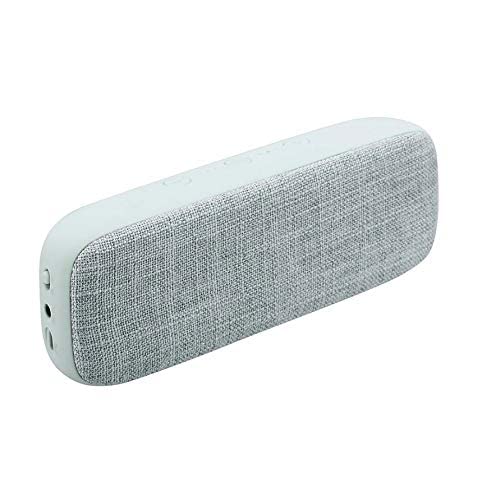
Figure 4.2: Angled view of the Kami Nio Wireless Bluetooth Speaker, highlighting the textured gray fabric covering the speaker grille and the smooth gray casing.
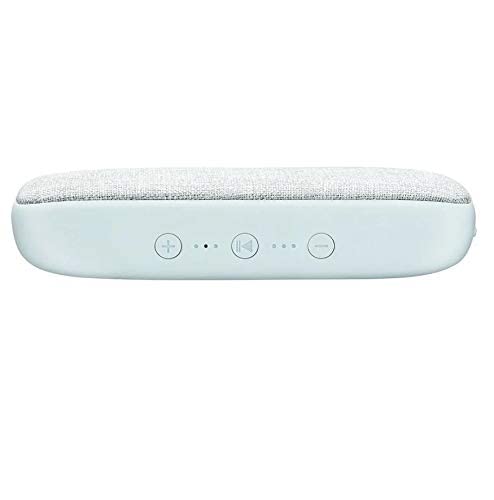
Figure 4.3: Top view of the Kami Nio Wireless Bluetooth Speaker, displaying the control panel with buttons for volume up (+), previous track (|<), play/pause/next track (>||), and volume down (-), along with LED indicators.
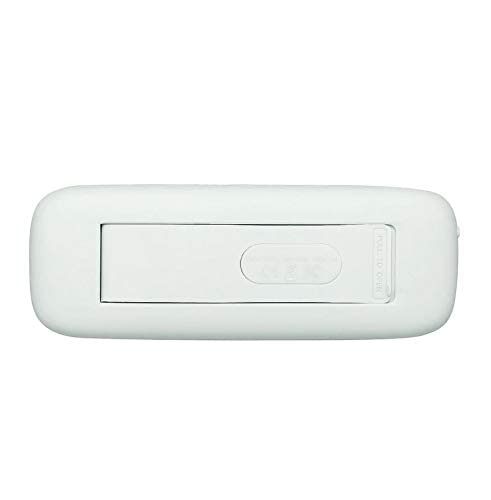
Figure 4.4: Bottom view of the Kami Nio Wireless Bluetooth Speaker, revealing a compartment with a 'PULL TO OPEN' tab, likely for battery access or a port cover.
5. Setup
5.1. Charging the Speaker
- Locate the charging port on the speaker (refer to Figure 4.4 for potential port location).
- Connect the provided USB charging cable to the speaker's charging port.
- Connect the other end of the USB cable to a compatible USB power adapter (not included) or a computer's USB port.
- The LED indicator (refer to Figure 4.3) will illuminate to show charging status. It typically turns off or changes color when fully charged.
- Allow approximately 2-3 hours for a full charge.
5.2. Bluetooth Pairing
- Power On: Press and hold the power button (location not explicitly shown, typically integrated with play/pause or a separate button) until the speaker powers on and the Bluetooth indicator LED starts flashing, indicating pairing mode.
- Activate Bluetooth: On your mobile device (smartphone, tablet, laptop), go to the Bluetooth settings and ensure Bluetooth is enabled.
- Select Speaker: In the list of available devices, select "Kami Nio" (or similar name).
- Confirm Connection: Once paired, the Bluetooth indicator LED on the speaker will stop flashing and remain solid, and you may hear an audible confirmation tone.
- Your Kami Nio speaker is now ready to play audio.
6. Operating the Speaker
Once paired, you can control your music directly from the speaker or your connected device.
6.1. Basic Controls (Refer to Figure 4.3):
- Power On/Off: Press and hold the power button (often combined with Play/Pause) for a few seconds.
- Play/Pause: Press the Play/Pause button (▶‖) once to play or pause audio.
- Next Track: Press and hold the Play/Pause button (▶‖) for 2 seconds to skip to the next track.
- Previous Track: Press the Previous Track button (|<) once to go to the beginning of the current track or the previous track.
- Volume Up: Press the Volume Up button (+) to increase the volume.
- Volume Down: Press the Volume Down button (-) to decrease the volume.
7. Maintenance
Proper care will extend the life of your Kami Nio speaker.
- Cleaning: Use a soft, dry cloth to wipe the exterior of the speaker. Do not use abrasive cleaners, solvents, or harsh chemicals.
- Storage: When not in use for extended periods, store the speaker in a cool, dry place, away from direct sunlight and extreme temperatures.
- Battery Care: To maintain battery health, avoid fully discharging the battery frequently. Charge the speaker regularly, even if not in use.
8. Troubleshooting
If you encounter issues with your speaker, try the following solutions:
- No Power: Ensure the speaker is charged. Connect it to a power source and allow it to charge for at least 30 minutes before attempting to power on.
- Cannot Pair:
- Ensure the speaker is in pairing mode (Bluetooth LED flashing).
- Make sure Bluetooth is enabled on your device.
- Move the speaker closer to your device (within 32 ft.).
- Turn off and on both the speaker and your device's Bluetooth.
- Forget/remove the speaker from your device's Bluetooth list and try pairing again.
- No Sound:
- Check the volume levels on both the speaker and your connected device.
- Ensure the speaker is successfully paired and connected to your device.
- Try playing audio from a different application or source on your device.
- Poor Sound Quality/Intermittent Connection:
- Move the speaker closer to your device.
- Avoid obstacles between the speaker and your device (e.g., walls, large metal objects).
- Minimize interference from other wireless devices (Wi-Fi routers, microwaves).
- Ensure the speaker is fully charged.
9. Specifications
| Feature | Specification |
|---|---|
| Model Name | Nio |
| Item Model Number | KNBTSGY |
| Brand | Kami |
| Speaker Type | Subwoofer |
| Special Feature | Bluetooth, Wireless |
| Wireless Communication Technology | Bluetooth |
| Connectivity Technology | Bluetooth |
| Compatible Devices | Universal |
| Power Source | Battery Powered |
| Audio Output Mode | Stereo |
| Surround Sound Channel Configuration | 1 |
| Mounting Type | Tabletop Mount |
| Product Dimensions (LxWxH) | 12.3 x 3.7 x 8.5 cm |
| Item Weight | 562 g (0.56 Kilograms) |
| Manufacturer | Teqtronix International General Trading Llc |
| Country of Origin | USA |
10. Warranty and Support
For warranty information and customer support, please refer to the documentation provided with your purchase or contact the retailer. Keep your proof of purchase for any warranty claims.
For further assistance, you may also visit the official Kami website or contact their customer service department.