
wolf guard WM2GR-P
Wolf-Guard WM2GR-P Security Alarm System User Manual
Model: WM2GR-P
1. Introduction
The Wolf-Guard WM2GR-P is an intelligent DIY home security alarm system designed to provide comprehensive protection for your property. Compatible with both Android and iOS devices, this system allows for remote monitoring and control via a dedicated mobile application. In the event of an intrusion, the system will send immediate alerts, ensuring your peace of mind whether you are at home or away.
2. Package Contents
Please verify that all items listed below are included in your package:
- 1 x WM2GR Shield Host (SIM card not included)
- 2 x HW-06D Pet Immunity PIR Detectors
- 3 x YK-07A Remote Controls
- 10 x MC-06A Door Sensors
- 1 x JD-05 Wired Siren
- 4 x RFID Cards
- 1 x Power Adapter
- 1 x Bracket
- 1 x Set of Screws
- 1 x User Manual
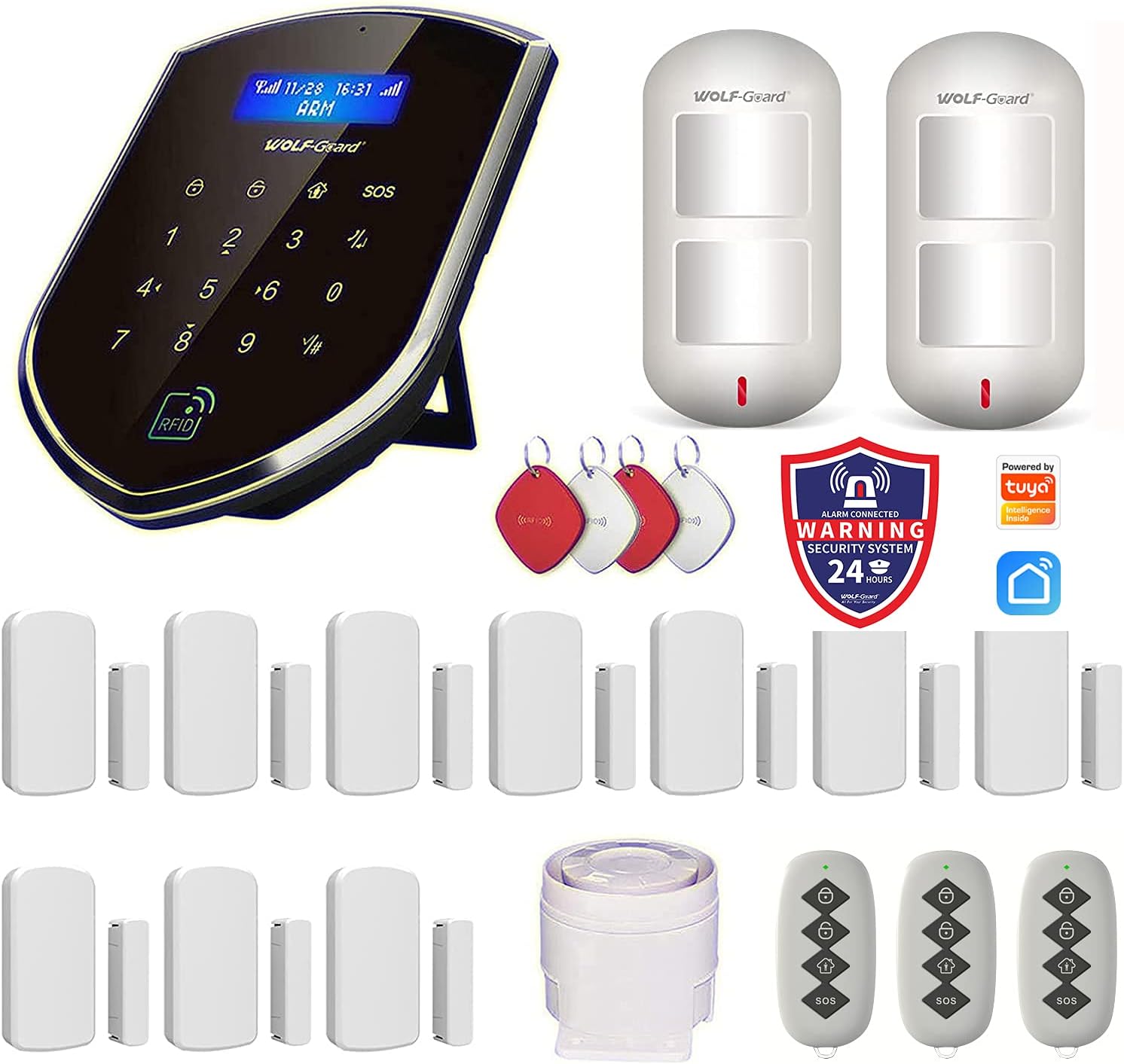
Figure 2.1: Overview of the Wolf-Guard WM2GR-P security alarm system components included in the package.
3. Product Features
The WM2GR-P system offers a robust set of features for enhanced home security:
- Powerful Alarm: Features a 110 dB siren to deter intruders effectively.
- Backup Power: Equipped with a built-in rechargeable battery, providing 2-4 hours of operation during power outages.
- Dual Network Connectivity: Supports both WiFi and 2G/GSM networks, ensuring alerts are sent even if WiFi is offline.
- Smartphone Control: Manage your system remotely via the "S-Home" application (available for Android and iOS).
- Expandable System: Connect up to 100 sensors (door, window, motion, etc.) to customize your security coverage.
- Multiple Alert Options: Pre-set up to 6 alarm call groups and 3 SMS alarm groups.
- RFID and Remote Support: Add up to 10 RFID cards and 8 remote controls for convenient arming and disarming.
- App Functionality:
- Remote arm/disarm.
- Modify zone and sensor names.
- Timer activation/deactivation and delay alarm settings.
- Reset disarming and operation passwords.
- Receive instant push notifications for alarm events.
4. Setup Guide
4.1 Initial Setup of the Main Panel
- Power On: Connect the main panel to the power adapter and plug it into an electrical outlet. The panel will power on automatically.
- SIM Card Installation (Optional): If you wish to use GSM features, insert a 2G SIM card into the designated slot on the back of the main panel. Ensure the panel is powered off before inserting the SIM card.

Figure 4.1: Rear view of the WM2GR-P main panel, indicating the SIM card slot and other ports.

Figure 4.2: Detailed view of the main panel's back, showing labeled ports including SIM Card Slot, Power Port, Siren Port, and Function Interface.
- Download the App: Scan the QR code provided in the physical user manual or search for "S-Home" in your device's app store (Android/iOS) to download the application.
- Connect to Wi-Fi: Open the "S-Home" app and follow the on-screen instructions to connect the alarm system to your home Wi-Fi network. Ensure your Wi-Fi signal is strong and clear.
- Enter Alarm Numbers: Within the app, enter the desired alarm call numbers and SMS alarm numbers that the system should contact in case of an alert.
4.2 Sensor Installation
All included sensors are pre-programmed and ready for use. Simply install them in their desired locations.
- Door/Window Sensors (MC-06A): Install these sensors on doors and windows. Ensure the two parts of the sensor are aligned and within 1 cm of each other when the door/window is closed.

Figure 4.3: Illustration of a door sensor. If the door is opened abnormally, the door sensor will send an alarm to the host.
- PIR Motion Detectors (HW-06D): Mount these detectors in areas where motion detection is critical, such as hallways or living rooms. Position them to cover the desired area without obstructions. These are pet-immune to reduce false alarms from small animals.

Figure 4.4: Illustration of a PIR motion detector. When the detector senses movement, it will send an alarm to the host.
- Wired Siren (JD-05): Connect the wired siren to the main panel's siren port. Place it in a location where its sound can be heard clearly throughout the property.
5. Operating Instructions
5.1 Using the S-Home App
The "S-Home" app provides comprehensive control over your alarm system:
- Arm/Disarm: Tap the respective icons in the app to arm or disarm the system remotely.

Figure 5.1: The S-Home app allows remote control of the alarm system, including arming and disarming.
- Zone/Sensor Management: You can modify the names of zones and individual sensors within the app for easier identification.
- Timer Settings: Configure schedules for automatic arming and disarming. Adjust delay times for alarms as needed.
- Password Reset: Reset disarming and operation passwords directly from the app.
- Alarm Notifications: Receive instant push notifications on your smartphone when an alarm is triggered.
- Family Sharing: Share access to the "S-Home" app with family members to allow multiple users to control the system.
5.2 Using Remote Controls (YK-07A)
The included remote controls provide a convenient way to arm and disarm the system when you are near the main panel.
- Press the Arm button to arm the system.
- Press the Disarm button to disarm the system.
- Press the SOS button to trigger an emergency alarm.

Figure 5.2: Using the remote control to interact with the alarm system.
5.3 Using RFID Cards
RFID cards offer a quick and easy way to disarm the system without needing a code or the app.
- Simply tap an authorized RFID card on the RFID card area of the main panel to disarm the system.

Figure 5.3: Front view of the WM2GR-P main panel, highlighting the RFID Card Area and other interface elements.
6. Maintenance
- Battery Check: The main panel has a built-in rechargeable battery. Ensure it is regularly charged by keeping the unit plugged in. The app may provide low battery alerts for sensors.
- Sensor Placement: Periodically check that all sensors are securely mounted and that their alignment (for door/window sensors) is correct.
- Cleaning: Clean the main panel and sensors with a soft, dry cloth. Avoid using abrasive cleaners or solvents.
- Software Updates: Keep the "S-Home" app updated to the latest version to ensure optimal performance and access to new features.
7. Troubleshooting
- System Not Connecting to Wi-Fi:
- Ensure your Wi-Fi network is 2.4GHz (5GHz networks are often not supported by smart home devices).
- Check Wi-Fi password for accuracy.
- Move the main panel closer to your Wi-Fi router.
- Restart your router and the alarm system.
- Sensors Not Triggering Alarm:
- Verify the system is armed.
- Check sensor battery levels (if applicable, via app).
- Ensure door/window sensors are properly aligned and within range.
- Confirm PIR detectors have a clear line of sight and are not obstructed.
- No SMS/Call Alerts:
- Ensure a valid 2G SIM card is inserted and has credit/active plan.
- Verify alarm call and SMS numbers are correctly entered in the app.
- Check network signal strength on the main panel.
- App Notifications Not Received:
- Ensure the "S-Home" app has notification permissions enabled on your smartphone.
- Check your phone's internet connection.
- Verify the alarm system is connected to Wi-Fi.
8. Specifications
| Feature | Specification |
|---|---|
| Model Number | WM2GR-P |
| Brand | Wolf-Guard |
| Manufacturer | Chi Tong Da |
| Dimensions (L x W x H) | 18.11 x 13.51 x 3.51 cm (approx. 7.13 x 5.32 x 1.38 inches) |
| Weight | 5 Kilograms (Note: This is likely package weight, not unit weight) |
| Color | White |
| Material | ABS |
| Power Source | Battery Powered (with power adapter) |
| Voltage | 5 Volts (DC) |
| Installation Method | Screw-in |
| Sound Level | 110 dB |
| Compatible Devices | Tablet, Smartphone |
| Connectivity Technology | Wireless (WiFi, GSM) |
| Battery Type | Lithium Metal (included) |
| Battery Composition | Lithium-polymer |
| Battery Life (Backup) | 5 hours |
| Battery Capacity | 1.2 Ampere-hours |
9. Warranty and Support
For warranty information and technical support, please refer to the documentation included with your product or contact Wolf-Guard customer service directly. Contact details can typically be found on the manufacturer's official website or on the product packaging.
For further assistance, you may also visit the Wolf-Guard Brand Store on Amazon.
Related documentsWM2GR-P


Ask a question about this manual
Ask about setup, troubleshooting, compatibility, parts, safety, or missing instructions. Manuals+ will review the question and use this page’s manual context to help answer it.