
MM CAMMPRO M831
MM CAMMPRO M831 HD 1296P Police Body Camera User Manual
Model: M831
1. Introduction
The MM CAMMPRO M831 is a high-definition body-worn camera designed for reliable video and audio recording in various environments. Featuring 1296P resolution, night vision capabilities, and a robust design, it is suitable for law enforcement, security personnel, and personal use. This manual provides essential instructions for the proper setup, operation, and maintenance of your device.
Package Contents
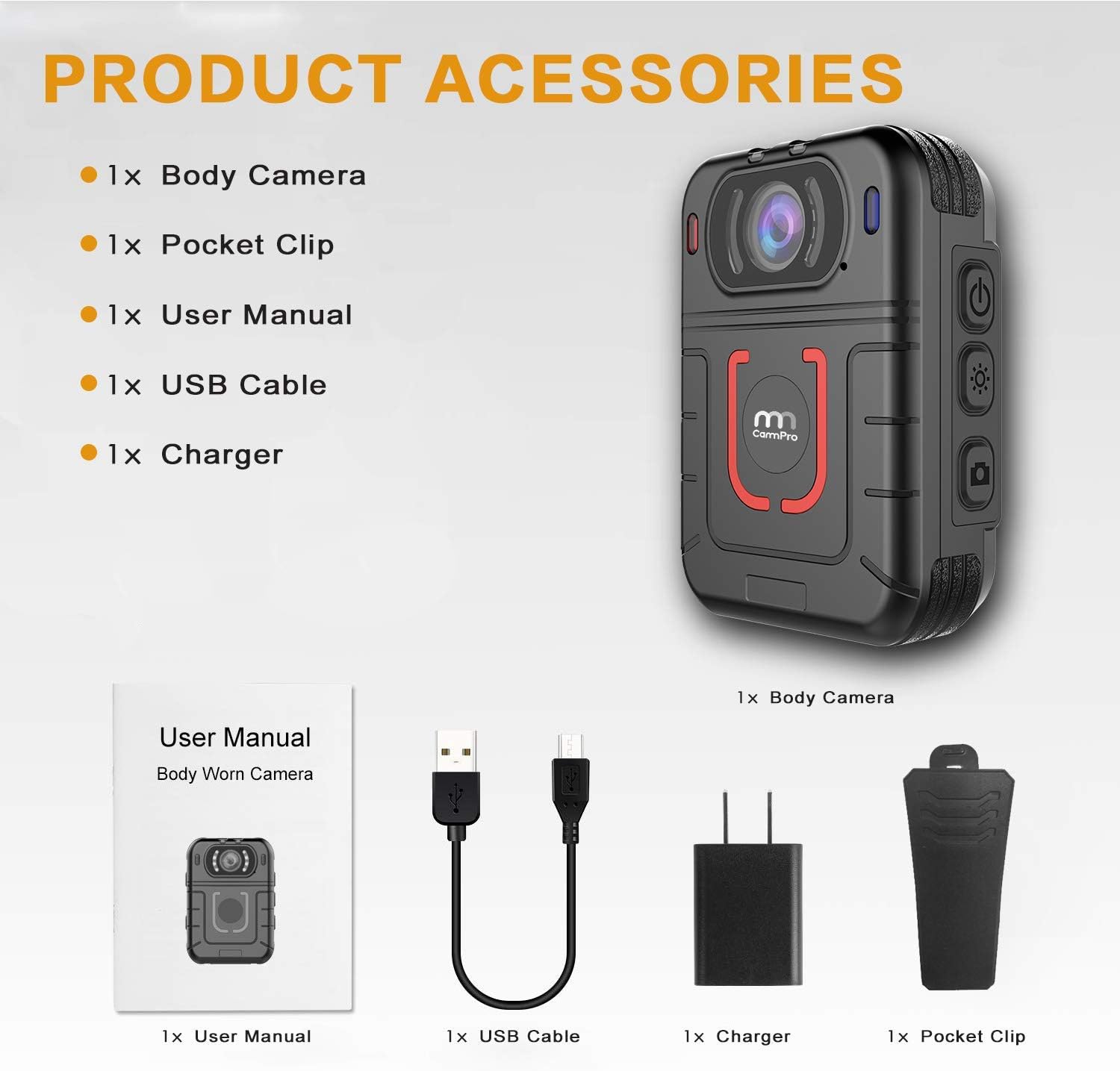
Figure 1.1: MM CAMMPRO M831 Package Contents
- 1x MM CAMMPRO M831 Body Camera
- 1x Pocket Clip
- 1x User Manual
- 1x USB Cable
- 1x Charger
2. Product Overview
The M831 body camera is designed for ease of use and durability. Familiarize yourself with the device's components and controls.

Figure 2.1: MM CAMMPRO M831 Front and Side View
Key Features:
- High-Definition Recording: Supports resolutions up to 2304x1296P at 30fps.
- Integrated Memory: Built-in 64GB memory for extensive storage.
- Extended Battery Life: Up to 13 hours of continuous recording (at 480P 30fps) with a 3500mAh battery.
- Night Vision: Equipped with 8 high-intensity infrared LEDs for clear footage up to 10 meters in low light.
- 2-Inch LCD Display: For live view, playback, and menu navigation.
- Durability: IP66 protection level for water and shock resistance.
- Motion Detection & Loop Recording: Customizable recording options.
- Warning Lights and Alarm: Integrated for signaling.
3. Setup
3.1 Charging the Device
Before first use, fully charge the M831 body camera. Connect the provided USB cable to the camera and the charger, then plug the charger into a power outlet. The charging indicator will illuminate. A full charge typically takes several hours.

Figure 3.1: Battery Capacity and Usage Time
3.2 Powering On/Off
- To Power On: Press and hold the Power button until the screen illuminates.
- To Power Off: Press and hold the Power button until the device shuts down.
3.3 Initial Settings
Upon first power-on or after a factory reset, you may need to configure basic settings such as date, time, and language. Navigate through the menu using the directional buttons and confirm selections with the OK button.
4. Operating Instructions
4.1 Video Recording
- From standby mode, press the Video Record button to start recording. The recording indicator will flash.
- Press the Video Record button again to stop recording.
- Supported resolutions include 2304x1296 30p, 1920x1080 30p, 1440x1080 30p, 1280x720 60p, 1280x720 30p, 848x480 60p, 848x480 30p, and 720x480 30p. Adjust resolution in the settings menu.
4.2 Photo Capture
- From standby mode, press the Photo button to take a still image.
- The camera supports photo resolutions up to 32 Megapixels (7600x4275).
- Burst Shot mode can be configured in settings (Off /2/3/5/10/15/20 shots).
4.3 Night Vision (Infrared)
The M831 features built-in infrared LEDs for recording in low-light or no-light conditions.

Figure 4.1: Night Vision Performance
- To activate/deactivate night vision, locate the IR switch or button (refer to device diagram).
- The camera can capture visible face images up to 10 meters in complete darkness.
4.4 Motion Detection
When enabled, the camera will automatically start recording when motion is detected within its field of view.
- Enable or disable Motion Detection through the camera's settings menu.
4.5 Loop Recording
Loop recording ensures continuous recording by overwriting the oldest files when the memory is full.
- Configure loop recording duration in the settings menu.
4.6 Warning Lights and Alarm
The camera is equipped with warning lights and an alarm function for signaling purposes.
- Refer to the on-screen menu for specific controls to activate these features.
4.7 Car DVR Mode
The M831 can function as a car DVR, automatically starting recording upon ignition.
- Enable "Ignition Auto Start Recording DVR" in the settings menu for this functionality.
4.8 Password Protection
To protect recorded files from unauthorized access or deletion, you can set a password for the camera.
- Access the password settings in the camera's menu to set or change your password.
5. File Management
5.1 Accessing Files on the Device
You can review recorded videos and photos directly on the camera's 2-inch LCD screen.
- Enter playback mode using the designated button.
- Use the navigation buttons to browse through files.
- Press OK to play a video or view a photo.
5.2 Connecting to a Computer
To transfer or manage files on a computer:
- Connect the camera to your computer using the provided USB cable.
- The camera will appear as a removable storage device.
- You can then copy files to your computer or delete them from the camera's memory.

Figure 5.1: Built-in 64GB Memory
6. Maintenance
6.1 Cleaning
- Use a soft, dry cloth to clean the camera body.
- For the lens, use a specialized lens cleaning cloth and solution to avoid scratches.
- Do not use harsh chemicals or abrasive materials.
6.2 Water and Shock Resistance
The M831 has an IP66 protection level, indicating resistance to dust and strong jets of water. While durable, avoid submerging the device in water or exposing it to extreme impacts.

Figure 6.1: Designed for Work Environments
6.3 Storage
Store the camera in a cool, dry place away from direct sunlight and extreme temperatures when not in use.
7. Troubleshooting
- Device not powering on: Ensure the battery is charged. Connect to the charger and try again.
- Recording issues: Check if the memory is full. Ensure sufficient battery charge. Verify recording settings.
- Files not accessible on computer: Ensure the USB cable is securely connected. Try a different USB port or cable.
- Poor night vision quality: Ensure the lens is clean. Check if IR LEDs are obstructed.
If problems persist, refer to the full user manual or contact customer support.
8. Specifications
| Feature | Specification |
|---|---|
| Brand | MM CAMMPRO |
| Model Number | M831 |
| Video Resolution | 2304x1296 30p, 1920x1080 30p, 1440x1080 30p, 1280x720 60p, 1280x720 30p, 848x480 60p, 848x480 30p, 720x480 30p |
| Top Pixel (Photo) | 32M (7600*4275) |
| Display Size | 2 inch LCD |
| Battery Capacity | Built-in 3500mAh Li-polymer Battery |
| Battery Life | More than 13 hours continuous video recording (480P 30fps, IR closed) |
| Viewing Angle | 110 Degrees |
| Digital Zoom | x128 |
| Night Vision Range | Up to 10 meters with visible face image |
| Water Mark | User ID, Time and Date Stamp embedded into video |
| Video Encoding | H.264 |
| Dimensions | 8.2 x 5.6 x 3.1 cm |
| Weight | 135 Grams |
| Memory | Built-in 64GB |
| Waterproof Rating | IP66 |
| Operating Temperature | Low temperature protection feature included |
9. Warranty and Support
MM CAMMPRO products are manufactured to high-quality standards. For specific warranty information, please refer to the warranty card included with your product or visit the official MM CAMMPRO website.
For technical support, troubleshooting assistance, or inquiries regarding your MM CAMMPRO M831 body camera, please contact the manufacturer's customer service department. Contact details are typically provided in the product packaging or on the official brand website.