
1. Introduction and Overview
The Retevis RT47 is a rugged, license-free two-way radio designed for reliable communication in various outdoor and professional environments. Featuring an IP67 waterproof and dustproof rating, it can withstand submersion in 1 meter of water for up to 30 minutes, making it ideal for hiking, camping, fishing, and other demanding activities. With 16 channels and a powerful 1100mAh rechargeable battery, the RT47 ensures clear and consistent communication.

Video 1: An overview of the Retevis RT47 Waterproof Two-Way Radio, highlighting its key features and benefits for users.
2. What's in the Box
Upon opening your Retevis RT47 package, you should find the following items:
- 2 x Retevis RT47 Two-Way Radios
- 2 x 1100mAh Li-ion Batteries
- 2 x USB Charging Docks
- 2 x Charger Adapters
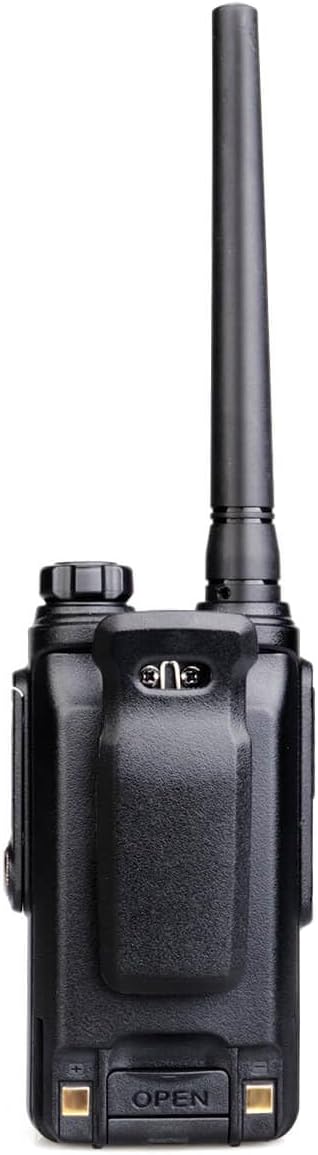
- 2 x Belt Clips
- 1 x User Manual
Video 2: A detailed unboxing of the Retevis RT47 FRS radio, showing all included accessories and components.
3. Product Features
The Retevis RT47 is engineered with several features to enhance your communication experience:
- IP67 Waterproof and Dustproof: Fully protected against dust ingress and immersion in water up to 1 meter for 30 minutes.
- 16 Channels: Provides ample channels for clear and private communication.
- 1100mAh Rechargeable Battery: Ensures extended usage throughout the day.
- CTCSS/DCS: Continuous Tone-Coded Squelch System / Digital-Coded Squelch for interference elimination.
- Squelch Function: Automatically mutes the speaker when no signal is present, reducing background noise.
- VOX Function: Voice-activated transmission allows for hands-free operation.
- Busy Channel Lockout: Prevents transmission on an occupied channel.


Video 3: A demonstration highlighting the waterproof capabilities of the Retevis RT47, showcasing its durability in wet conditions.
4. Setup
4.1 Battery Installation
To install the battery, align the battery pack with the back of the radio and slide it into place until it clicks securely. Ensure the battery is fully seated to maintain the IP67 seal.

4.2 Charging the Radio
Place the radio into the charging dock. Connect the USB charging dock to a power source using the provided charger adapter. The indicator light on the radio or dock will show the charging status (typically red for charging, green for fully charged).

4.3 Attaching the Belt Clip
Secure the belt clip to the back of the radio using the provided screws. This allows for convenient carrying of the radio.

Video 4: A comprehensive guide to unboxing, battery installation, and charging the Retevis RT47 waterproof walkie talkies.
5. Operating Instructions
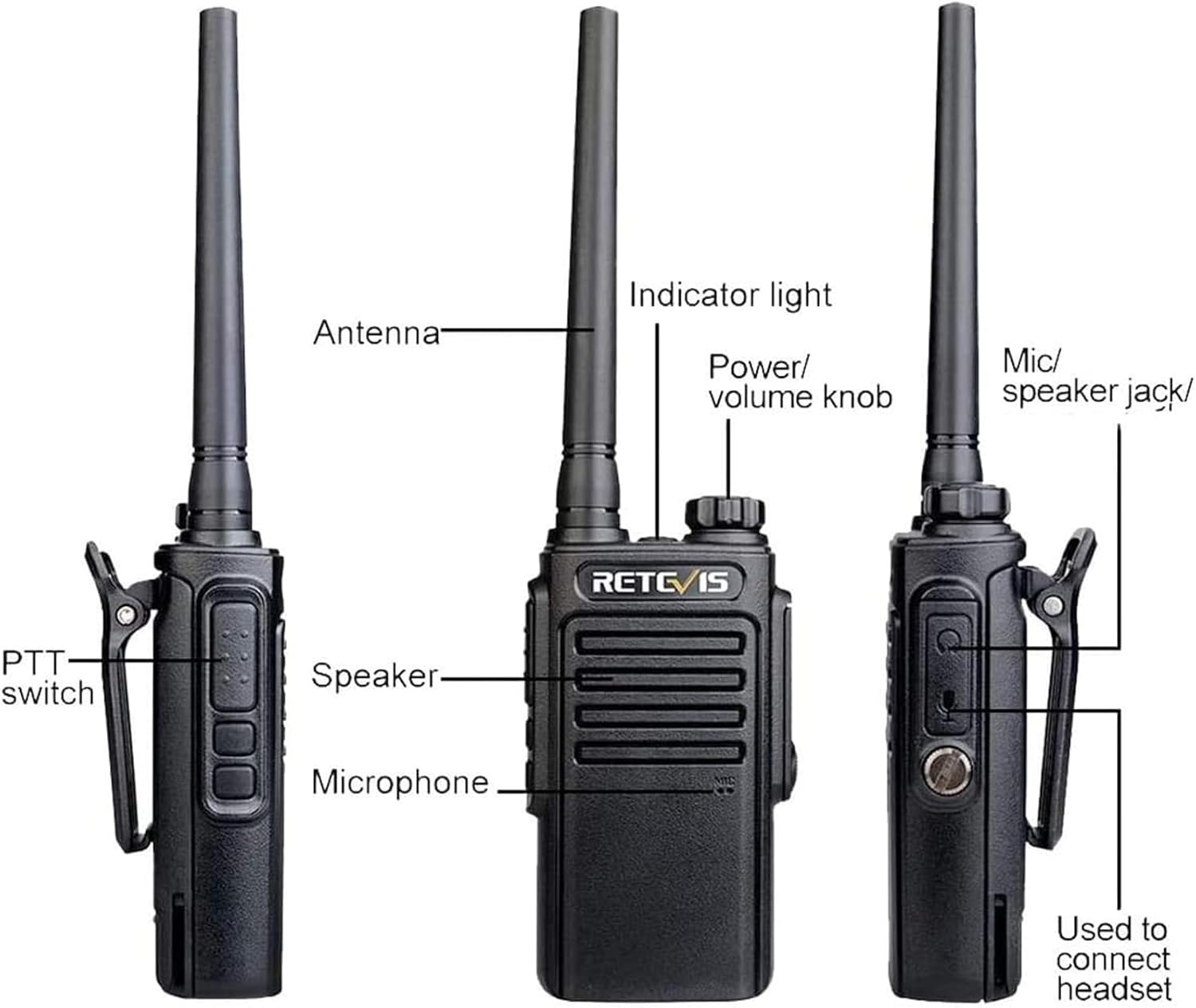
5.1 Radio Parts Overview
5.2 Power On/Off and Volume Control
To power on the radio, rotate the Power/Volume knob clockwise. To power off, rotate it counter-clockwise until it clicks. Continue rotating the knob to adjust the volume level.
5.3 Channel Selection
Use the Channel Up/Down buttons located on the side of the radio to select your desired communication channel. The radio will audibly announce the selected channel number.
5.4 Transmitting and Receiving
To transmit, press and hold the PTT (Push-to-Talk) button on the side of the radio and speak clearly into the microphone. Release the PTT button to receive. Ensure you are on the same channel as the person you wish to communicate with.
5.5 VOX Function
The VOX function allows for hands-free operation. When activated, the radio will automatically transmit when it detects your voice, eliminating the need to press the PTT button. Refer to the full user manual for activation and sensitivity settings.
Video 5: A quick guide demonstrating the easy operation of the Retevis RT47 walkie talkie, including power, volume, and channel selection.
6. Maintenance
6.1 Cleaning
Due to its IP67 rating, the RT47 can be rinsed with water. For general cleaning, wipe the radio with a soft, damp cloth. Avoid using harsh chemicals or abrasive cleaners that could damage the casing or seals.
6.2 Battery Care
To prolong battery life, fully charge the battery before initial use. Avoid overcharging or completely draining the battery frequently. Store the radio and battery in a cool, dry place when not in use for extended periods.

7. Troubleshooting
If you encounter issues with your Retevis RT47, consider the following common solutions:
- No Power: Ensure the battery is fully charged and correctly installed. Rotate the Power/Volume knob clockwise to turn on the radio.
- No Reception/Transmission: Verify that both radios are on the same channel. Check that the volume is turned up. Ensure you are within the effective communication range.
- Interference: Adjust the squelch level or try a different channel. The CTCSS/DCS codes can help filter out unwanted signals.
- Compatibility: The Retevis RT47 works directly with other Retevis FRS radios such as RT21, RT22, RT48, and H777. For compatibility with other brands, contact Retevis support.

8. Specifications
| Feature | Specification |
|---|---|
| Brand | Retevis |
| Model Number | RT47 |
| Color | Black |
| Number of Channels | 16 |
| Frequency Range | 462-467 MHz |
| Talking Range Maximum | 1 Mile |
| Voltage | 3.7 Volts |
| Water Resistance Level | IP67 Waterproof |
| Product Dimensions | 2"D x 4"W x 10"H |
| Battery Capacity | 1100mAh (Li-ion) |
| Battery Average Life | 8 Hours |
| Temperature Range | -20-50 Degrees Celsius |
| Connectivity Protocol | FRS |
9. Warranty and Support
Retevis provides a 2-year warranty for the radio body and a 1-year warranty for accessories. Additionally, a 30-day no-reason return policy is offered. Beyond the warranty period, maintenance services are available, with buyers responsible for associated costs. For any inquiries or support, please contact Retevis via Amazon messaging, and they will respond within 12 hours.
FCC ID: 2ASNSRT47. This device complies with FCC rule part 95 for FRS walkie-talkies.