
KAIWEETS S3
KAIWEETS C60 Laser Distance Measure User Manual
Model: S3
Brand: KAIWEETS
1. Introduction
The KAIWEETS C60 Laser Distance Measure is a high-precision tool designed for accurate distance, area, volume, and Pythagorean measurements. It features a backlit LCD for clear readings in various lighting conditions and a mute function for quiet operation. This manual provides detailed instructions for safe and effective use of your device.

Image: The KAIWEETS C60 Laser Distance Measure, a compact black device with a digital display and multiple function buttons.
2. Safety Information
This device emits a Class II laser with a power output of less than 1mW. Adhere to the following safety guidelines:
- Do not stare directly into the laser beam.
- Avoid directing the laser beam at people or animals.
- Do not disassemble or modify the device. Repairs should only be performed by qualified personnel.
- Keep the device out of reach of children.
- Use the device only for its intended purpose as described in this manual.

Image: The KAIWEETS C60 device highlighting its durable 280° TPE outer case, indicating its waterproof and dustproof (IP54) features.
3. Package Contents
Verify that all items are present in the package:
- 1 x KAIWEETS C60 Laser Distance Measure
- 1 x Wrist Strap
- 1 x User Manual (this document)
- 1 x Storage Bag
- 2 x 1.5V AAA Batteries

Image: All items included in the KAIWEETS C60 package: the laser measure, its box, wrist strap, user manual, storage bag, and two AAA batteries.
4. Setup
4.1 Battery Installation
The device requires two 1.5V AAA batteries. To install:
- Open the battery compartment cover located on the back of the device.
- Insert the two AAA batteries, ensuring correct polarity (+/-).
- Close the battery compartment cover securely.
Video: Demonstrates the process of installing batteries and changing units on the KAIWEETS C60 Laser Distance Measure, including how to exit and save unit changes.
4.2 Initial Power On
Press the MEAS button to power on the device. The backlit LCD screen will illuminate, displaying the current measurement mode and battery level.
5. Operating Instructions
5.1 Basic Distance Measurement
To measure a single distance:
- Point the laser aperture towards the target.
- Press the MEAS button once to activate the laser pointer.
- Press the MEAS button again to take the measurement. The result will be displayed on the screen.

Image: The KAIWEETS C60 Laser Distance Measure being used to measure a distance, showing the laser beam extending to a wall and the measurement displayed on the screen.

Image: The KAIWEETS C60 Laser Distance Measure positioned in a corner, demonstrating its ability to measure from the device's rear reference point.
5.2 Multiple Measurement Modes
Press the Mode button to cycle through different measurement functions:
- Distance: Standard point-to-point measurement.
- Area: Measures length and width to calculate area.
- Volume: Measures length, width, and height to calculate volume.
- Pythagorean Mode: Calculates indirect height or distance using the Pythagorean theorem. Follow on-screen prompts for required measurements.

Image: Illustrations depicting the various measurement modes of the KAIWEETS C60: Distance, Area, Volume, and Indirect (Pythagorean) measurement.
5.3 Continuous Measurement (Max/Min)
For continuous measurement, press and hold the MEAS button. The device will continuously measure and display the current, maximum, and minimum distances as you move it. Press MEAS again to stop.
Video: Demonstrates the continuous measurement function of the KAIWEETS C60, showing how it tracks and displays maximum and minimum distances as the device is moved.
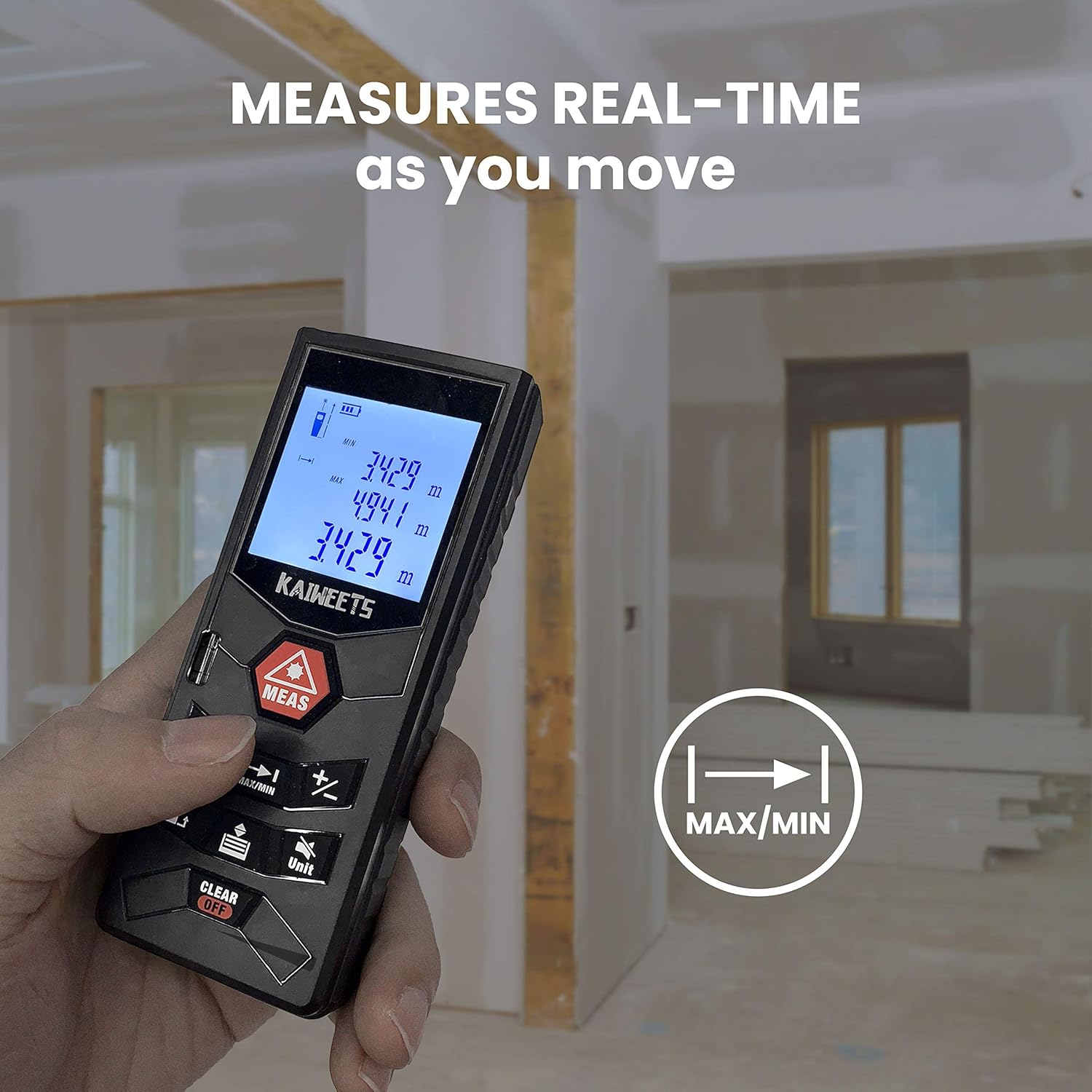
Image: A hand holding the KAIWEETS C60, demonstrating its real-time measurement capability as the user moves, with the display showing continuously updated readings.
5.4 Unit Change
Press the Unit button to switch between measurement units: meters (m), feet (ft), inches (in), and feet+inches (ft+in).
Video: Demonstrates the process of installing batteries and changing units on the KAIWEETS C60 Laser Distance Measure, including how to exit and save unit changes.
5.5 Mute Function
The device features a mute function to silence the beep sounds during operation. Refer to the device's specific button layout for the mute button, typically indicated by a speaker icon.
6. Maintenance
- Clean the device with a soft, damp cloth. Do not use abrasive cleaners or solvents.
- Ensure the laser aperture and display are free from dust and debris for accurate measurements.
- The device is IP54 rated for water and dust resistance, but avoid prolonged exposure to water or extreme conditions.
- Remove batteries if the device will not be used for an extended period to prevent leakage.
7. Troubleshooting
| Problem | Possible Cause | Solution |
|---|---|---|
| Device does not power on. | Low or dead batteries; incorrect battery installation. | Replace batteries; ensure correct polarity. |
| Inaccurate measurements. | Obstructed laser path; dirty lens; measuring in bright outdoor light. | Clear obstructions; clean lens; use indoors or in shaded areas for best accuracy. |
| Laser beam not visible. | Bright ambient light; laser not activated. | Move to a darker area; press MEAS button to activate laser. |
| Device beeps continuously. | Mute function is off. | Activate mute function (refer to section 5.5). |
8. Specifications
| Feature | Detail |
|---|---|
| Brand | KAIWEETS |
| Model Number | S3 |
| Measuring Range | 196 feet |
| Measurement Accuracy | ±1/16 inch |
| Laser Class | Class II, <1mW |
| Power Source | 2 x 1.5V AAA Batteries (included) |
| Display Style | LCD with Backlight |
| Water Resistance Level | IP54 (Waterproof & Dustproof) |
| Material | Acrylonitrile Butadiene Styrene |
| Item Weight | 4.2 ounces (120 Grams) |
| Product Dimensions | 4.72 x 1.89 x 1.46 inches |
9. Warranty and Support
KAIWEETS provides a 36-month Quality Assurance for this product. For any questions, technical support, or warranty claims, please contact KAIWEETS customer service through the official channels or refer to the full user manual PDF available online.
Official User Manual (PDF): Download Here
Related documentsS3


Ask a question about this manual
Ask about setup, troubleshooting, compatibility, parts, safety, or missing instructions. Manuals+ will review the question and use this page’s manual context to help answer it.