
1. Product Overview
The MICROWARE USH3001 is a versatile Full HD 1080P 60fps video capture card designed for capturing high-quality video and audio from SDI and HDMI sources. It facilitates live streaming, game capture, and professional video acquisition without requiring driver installation, offering a plug-and-play experience.
Key Features
- Plug and Play (PNP): No driver installation required.
- USB Powered: Operates without an external power supply.
- High Resolution Capture: Supports video playback resolution up to 1920 x 1200 @ 60 FPS from HD HDMI or 3G-/HD-SDI sources.
- Wide Compatibility: Directly compatible with PC for Microsoft display.
- UVC and UAC Compliance: Enables YUV422 video output and simultaneous audio capture.
- Operating System Support: Compatible with Windows XP, 7, 8.1, 10, MAC OS, and Linux.
- Compact Design: Small form factor for portability.
- High Bandwidth: USB 3.0 interface provides 360 MB/s transmission bandwidth.
- CPU-Independent Processing: Video processing does not require CPU resources through the capture card.
- Automatic Input Detection: Supports automatic detection of input video formats.
- Image Adjustment: Features brightness, contrast, saturation, and hue color adjustment functions.
- Firmware Updatable: Firmware can be updated via the USB port.
Package Contents
- 1 x MICROWARE USH3001 Video Capture Card
- 1 x USB 3.0 Cable

Image: The MICROWARE USH3001 capture card and its included USB 3.0 cable.
2. Setup Instructions
Follow these steps to connect and set up your MICROWARE USH3001 video capture card.
- Connect the Source Device: Connect your video source (e.g., game console, video camera, medical device) to the capture card using either an HDMI cable or an SDI cable, depending on your source's output.

Image: Close-up of the capture card showing the HDMI and SDI input ports.
- Connect to Computer: Connect the MICROWARE USH3001 capture card to your computer's USB 3.0 port using the provided USB 3.0 cable. The device is plug-and-play and does not require additional drivers for most operating systems.

Image: Connection diagram illustrating an HDMI source connected to the capture card, which then connects to a computer via USB 3.0 for video capture and streaming.
- Power On: The capture card is powered via the USB connection. Ensure your computer's USB port provides sufficient power.
- Software Configuration: Open your preferred video capture or streaming software (e.g., OBS Studio, VLC, vMix, Wirecast). Select the MICROWARE USH3001 (or similar name) as your video and audio input device within the software settings.
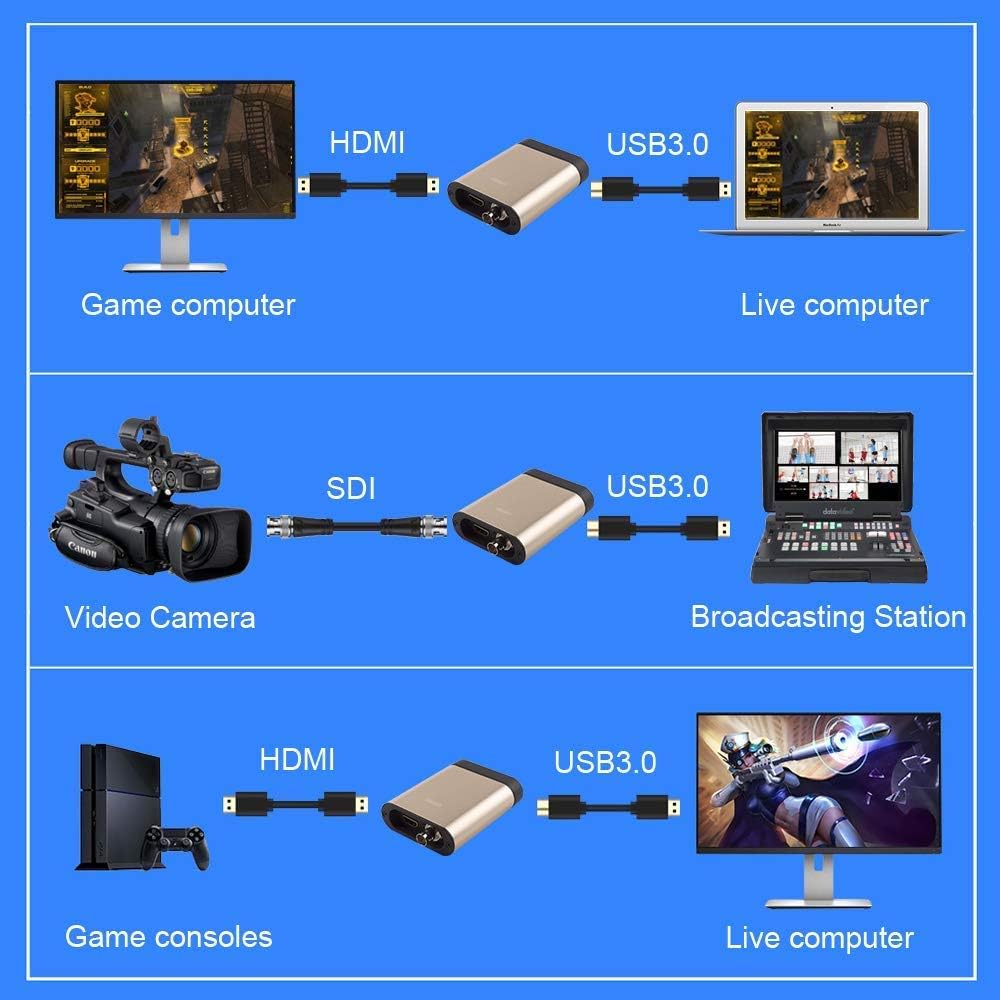
Image: Examples of connecting the capture card to various sources: a game computer via HDMI, a video camera via SDI, and game consoles via HDMI, all connecting to a computer via USB 3.0.
3. Operating Instructions
Once connected and configured in your software, the MICROWARE USH3001 allows for seamless video and audio capture.
Software Compatibility
The capture card is compatible with popular video capture and streaming applications, including but not limited to:
- OBS Studio (Open Broadcaster Software)
- VLC Media Player
- vMix
- Wirecast
- FMLE (Flash Media Live Encoder)
- Potplayer
Supported Operating Systems
The device supports a wide range of operating systems due to its UVC (USB Video Class) and UAC (USB Audio Class) compliance:
- Windows XP, Windows 7, Windows 8.1, Windows 10
- MAC OS
- Linux

Image: Visual representation of the capture card's compatibility with Windows (7, 8, 10), Mac OS, and Linux operating systems.
Typical Applications
The MICROWARE USH3001 is suitable for various applications:
- Live program streaming and editing
- Video conferencing
- Distance education
- Medical device image acquisition

Image: Examples of the capture card's use in live program editing and medical device image acquisition scenarios.
4. Technical Specifications
| Model Number | USH3001 |
| Brand | MICROWARE |
| Hardware Interface | USB 3.0, USB 2.0 |
| Video Capture Resolution | Up to 1080p (1920 x 1200 @ 60 FPS) |
| Input Video Formats | HDMI, 3G-SDI, HD-SDI, SD-SDI |
| Output Video Format | YUV422 |
| Transmission Bandwidth | 360 MB/s (USB 3.0) |
| Operating System Support | Windows XP, 7, 8.1, 10; Mac OS; Linux |
| Power Supply | USB Powered |
| Item Weight | 3.52 ounces |
| Package Dimensions | 4.72 x 3.15 x 1.57 inches |
5. Troubleshooting
If you encounter issues with your MICROWARE USH3001 capture card, refer to the following common problems and solutions:
- No Video Signal:
- Ensure all cables (HDMI/SDI and USB 3.0) are securely connected.
- Verify that your source device is powered on and outputting a signal.
- Check the input resolution and refresh rate of your source device. The capture card supports up to 1080p 60fps.
- Confirm that the capture card is selected as the video input device in your capture software.
- Try connecting the capture card to a different USB 3.0 port on your computer.
- No Audio:
- Ensure the audio is enabled and not muted on your source device.
- Verify that the capture card is selected as the audio input device in your capture software.
- Check your computer's sound settings to ensure the capture card's audio input is recognized and not muted.
- Poor Video Quality or Lag:
- Ensure you are using a USB 3.0 port for optimal bandwidth. USB 2.0 ports may not provide sufficient speed for 1080p 60fps capture.
- Close unnecessary applications on your computer to free up system resources.
- Check your capture software settings for appropriate bitrates and encoding presets.
- Ensure your computer meets the minimum system requirements for your capture software and the desired resolution/framerate.
- Device Not Recognized:
- Disconnect and reconnect the USB cable.
- Try a different USB 3.0 port.
- Restart your computer.
- While the device is driver-free, ensure your operating system is up-to-date.
6. Maintenance
To ensure the longevity and optimal performance of your MICROWARE USH3001 capture card, follow these maintenance guidelines:
- Cleaning: Use a soft, dry cloth to clean the exterior of the device. Avoid using liquid cleaners or solvents.
- Storage: Store the device in a cool, dry place away from direct sunlight and extreme temperatures when not in use.
- Handling: Handle the capture card with care to prevent physical damage to the ports or casing.
- Firmware Updates: Periodically check the manufacturer's website for any available firmware updates to ensure the best performance and compatibility.
7. Warranty and Support Information
For warranty details and technical support, please refer to the documentation provided with your purchase or visit the official MICROWARE website. Keep your proof of purchase for warranty claims.
Manufacturer: jooview
Brand: MICROWARE