
everActive CBC-40
everActive CBC-40 12V/24V Car Battery Charger and Inverter Starter User Manual
Model: CBC-40 (5903205770400) | Brand: everActive
1. Introduction
1.1 Product Overview
The everActive CBC-40 is a professional, high-performance car battery charger and inverter starter designed for a wide range of 12V and 24V lead-acid batteries. This includes VRLA, SLA, WET, and GEL battery types. It features a digital ammeter for precise current monitoring and offers adjustable charging current up to 40A, along with a powerful 300A jump start function. Its robust design ensures reliable operation for automotive and other battery charging needs.

Figure 1: Front view of the everActive CBC-40 Battery Charger, showing the control panel and battery terminals.
1.2 Safety Information
WARNING: Read all safety warnings and instructions before using this product. Failure to follow the warnings and instructions may result in electric shock, fire, and/or serious injury.
- Always wear eye protection and protective clothing when working with batteries.
- Ensure adequate ventilation in the charging area to prevent accumulation of explosive gases.
- Never smoke or allow a spark or flame in the vicinity of the battery or engine.
- Disconnect the AC power cord from the outlet before making or breaking the connections to the battery.
- Do not operate the charger if it has received a sharp blow, been dropped, or otherwise damaged.
- Keep out of reach of children.
2. Setup
2.1 Unpacking and Inspection
Carefully remove the everActive CBC-40 from its packaging. Inspect the unit for any signs of damage during transit. Ensure all components, including the charger unit, power cord, and battery clamps, are present and in good condition.

Figure 2: The everActive CBC-40 charger with its power cord and battery clamps.
2.2 Connecting to the Battery
- Ensure the charger is unplugged from the AC power outlet.
- Connect the RED positive (+) clamp to the positive (+) terminal of the battery.
- Connect the BLACK negative (-) clamp to the negative (-) terminal of the battery. For vehicles, if connecting to the vehicle battery, connect the negative clamp to a non-painted metal part of the vehicle chassis, away from the battery and fuel line.
- Ensure connections are secure and free from corrosion.

Figure 3: The everActive CBC-40 with its red and black battery clamps ready for connection.
2.3 Connecting to Power
Once the battery clamps are securely connected, plug the charger's AC power cord into a standard 230V AC electrical outlet. The charger will power on.
3. Operating Instructions
3.1 Control Panel Overview

Figure 4: Detailed view of the CBC-40 control panel, showing indicators, digital ammeter, and control knob.
- CHARGE Indicator: Illuminates when the battery is actively charging.
- ERROR Indicator: Illuminates if a fault is detected (e.g., reverse polarity, short circuit).
- BOOST Indicator: Illuminates when the boost function is active.
- DIGITAL AMMETER: Displays the current charging amperage.
- MODE Button: Toggles between Charge and Boost modes.
- 12V/24V Selector: Switch to select the appropriate voltage for your battery.
- CHARGING CURRENT Knob: Adjusts the charging current from 5A (Min) to 40A (Max).
3.2 Charging a Battery
- Connect the charger to the battery and AC power as described in Section 2.
- Select the correct voltage (12V or 24V) using the 12V/24V selector switch.
- Rotate the CHARGING CURRENT knob to set the desired charging amperage. For most standard charging, start with a lower current and gradually increase if needed, ensuring the battery does not overheat.
- The CHARGE indicator will illuminate, and the digital ammeter will show the charging current.
- Monitor the charging process. The ammeter reading will gradually decrease as the battery charges.
- Once charging is complete (ammeter reads near zero or battery voltage stabilizes), disconnect the AC power first, then the battery clamps.
3.3 Using the Jump Start Function (300A)
CAUTION: The jump start function provides a high current. Ensure all connections are correct and secure before activating.
- Ensure the battery is connected correctly to the charger and the charger is plugged into AC power.
- Select the appropriate voltage (12V or 24V).
- Press the MODE button to select the BOOST mode. The BOOST indicator will illuminate.
- Attempt to start the vehicle. Do not crank the engine for more than 5 seconds. Wait at least 1 minute between attempts.
- Once the vehicle starts, immediately disconnect the AC power from the charger, then disconnect the battery clamps.
4. Maintenance
4.1 Cleaning
Regularly clean the charger's casing with a soft, dry cloth. Do not use abrasive cleaners or solvents. Keep the ventilation grilles clear of dust and debris to ensure proper airflow for cooling.
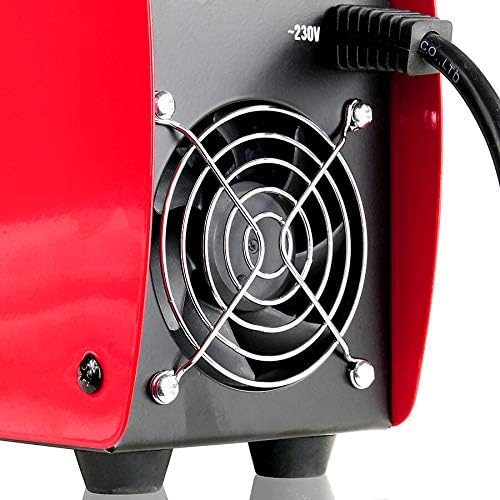
Figure 5: Rear view showing the cooling fan, which should be kept clear for optimal performance.
4.2 Storage
When not in use, store the charger in a cool, dry place, away from direct sunlight and moisture. Coil the cables neatly to prevent tangling or damage. Ensure the battery clamps are clean and free of corrosion before storage.
4.3 Cable and Clamp Inspection
Periodically inspect the power cord and battery cables for any cuts, fraying, or damage. Check the battery clamps for corrosion or loose connections. Replace any damaged components immediately to ensure safe operation.

Figure 6: Close-up of the robust battery clamps, which should be regularly inspected for wear and corrosion.
5. Troubleshooting
This section provides solutions to common issues you might encounter with your everActive CBC-40 charger.
| Problem | Possible Cause | Solution |
|---|---|---|
| Charger does not turn on. | No AC power; Faulty power cord. | Check AC outlet; Inspect power cord for damage. |
| ERROR indicator is lit. | Reverse polarity; Short circuit; Damaged battery. | Check battery clamp connections (+ to +, - to -); Inspect cables for shorts; Have battery tested. |
| Digital ammeter shows 0 or very low current. | Battery fully charged; Poor connection; Internal fault. | Verify battery state; Ensure secure connections; If issue persists, contact support. |
| Fan runs continuously or is noisy. | Normal operation (cooling); Dust in fan; Fan malfunction. | Continuous fan operation can be normal during charging; Clean fan grille; If excessively noisy, contact support. |
| Battery not charging. | Incorrect voltage selected; Battery too deeply discharged; Faulty battery. | Ensure 12V/24V switch is correct; Some deeply discharged batteries may not accept a charge; Have battery tested. |
6. Specifications
| Feature | Specification |
|---|---|
| Brand | everActive |
| Model Number | 5903205770400 |
| Color | Black/Red |
| Product Dimensions (L x W x H) | 17 x 24 x 5 centimeters |
| Item Weight | 4.06 Kilograms |
| Input Voltage | 24 Volts (AC 230V) |
| Output Voltage | 12 Volts / 24 Volts |
| Charging Current | Adjustable 5A - 40A |
| Jump Start Current | 300 A |
| Compliant Specifications | CE |
| Country of Origin | United States of America |
7. Warranty and Support
Warranty information and specific support details for the everActive CBC-40 are not available in this manual. Please refer to the product packaging, the manufacturer's official website, or your point of purchase for comprehensive warranty terms and customer support contact information.
For technical assistance or service inquiries, it is recommended to contact everActive customer service directly.
Related documentsCBC-40


Ask a question about this manual
Ask about setup, troubleshooting, compatibility, parts, safety, or missing instructions. Manuals+ will review the question and use this page’s manual context to help answer it.