
T TICCI T0003VB Watch
TICCI Men's Vibrating Alarm Watch User Manual
Model: T0003VB Watch
1. Introduction
Welcome to the user manual for your new TICCI Men's Vibrating Alarm Watch. This watch is specifically designed to assist with medication reminders, daily alerts, and timekeeping, featuring a strong vibration, large digits for easy readability, and a waterproof design. Please read this manual carefully to understand the full functionality and ensure proper use and maintenance of your watch.
Key features of your TICCI Vibrating Alarm Watch include:
- Easy-to-Read Display: Large face and big digits for clear visibility, even for those with impaired eyesight. Includes calendar display (Year, Month, Week, Date).
- 8 Strong Vibrating Alarms: Tailored for individuals who are hard of hearing. Offers three alarm modes: both sound (beep) and vibration, sound only, or vibration only for discreet alerts. Ideal for medication, pill, and task reminders. Alarms auto-repeat daily.
- Super Bright Backlight: Illuminates the entire display with large digits for easy reading in low-light conditions.
- Countdown Timer: Adjustable from 15 minutes to 24 hours, with an auto-start feature.
- Water Resistance: Rated for 30 meters, suitable for splashes or brief immersion. Not recommended for hot water, swimming, or showering.
- Lockout Feature: Prevents accidental changes to settings, beneficial for users who might inadvertently press buttons.
2. Product Overview
Familiarize yourself with the components and functions of your TICCI watch.

Figure 2.1: Front view of the TICCI Vibrating Alarm Watch.
This image shows the main display of the watch, highlighting its large digits and clear layout. The watch features a black case and strap, with visible buttons on the sides for various functions.
2.1 Watch Components and Buttons

Figure 2.2: Watch Buttons and Display.
This diagram illustrates the location of the four main control buttons (A, B, C, D) on the watch, along with the digital display. Button A is typically for 'Light', Button B for 'Up/Menu', Button C for 'Down', and Button D for 'Back/Lap'.
- Button A (LIGHT): Activates the backlight. In setting modes, it may also function as an 'Up' or 'Increase' button.
- Button B (UP/MENU): Used to cycle through different modes (Time, Alarm, Countdown, Stopwatch) and to navigate menus or increase values during settings.
- Button C (DOWN): Used to decrease values during settings or navigate menus.
- Button D (BACK/LAP): Used to confirm settings, exit menus, or record laps in stopwatch mode.
2.2 Multi-Function Display
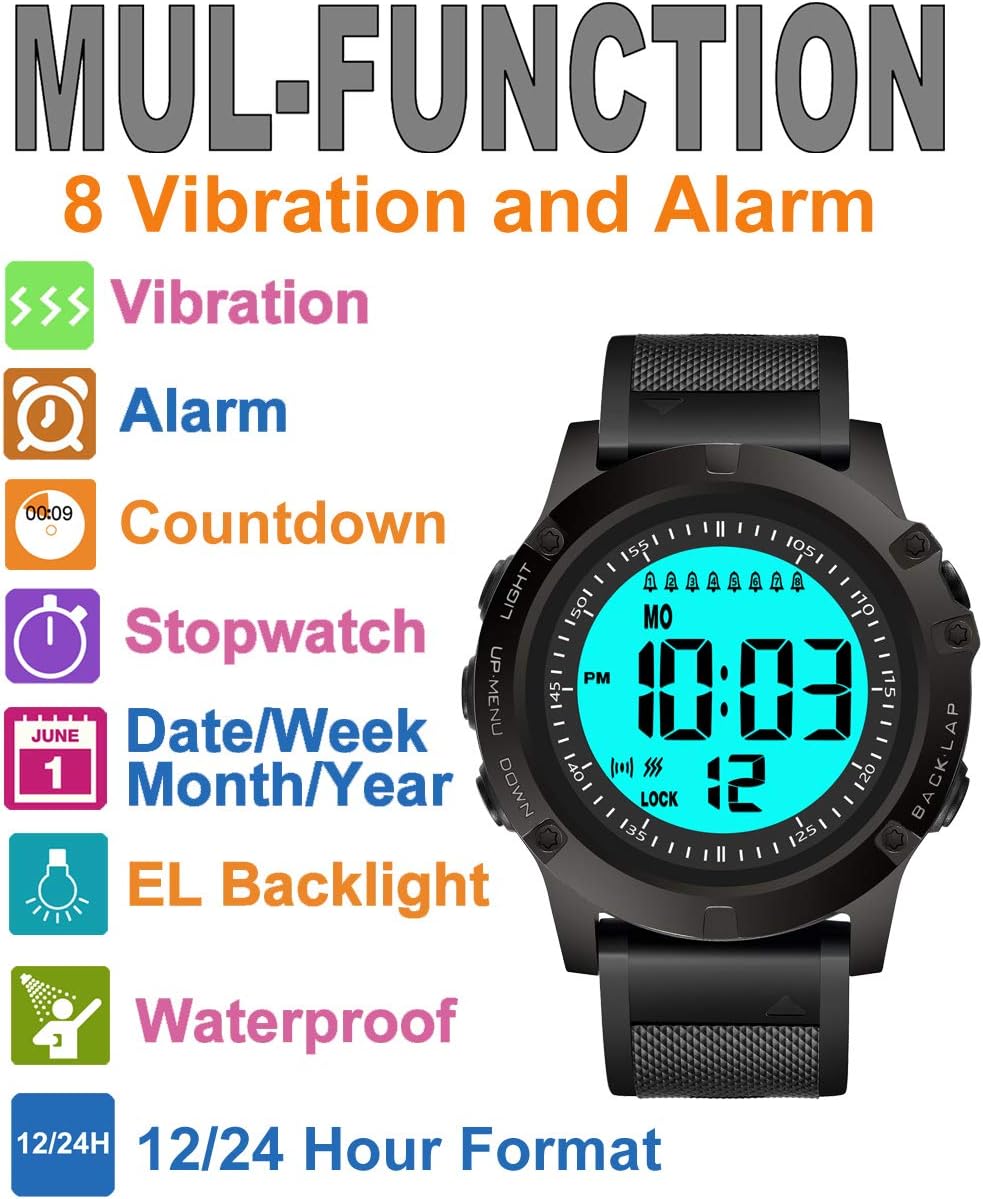
Figure 2.3: Multi-Function Capabilities.
This graphic highlights the various functions of the watch, including vibration alerts, audible alarms, countdown timer, stopwatch, date/week/month/year display, EL backlight, and waterproof rating. It visually represents the versatility of the device.
2.3 Watch Dimensions

Figure 2.4: Watch Dimensions.
This diagram provides approximate measurements of the watch face and strap, including the overall length (58mm), case width (54mm), display width (36mm), and digit height (9.97mm), illustrating its large and easy-to-read display.
3. Setup
Before using your watch, please follow these steps to set it up.
3.1 Setting Time and Date
- From the Time Mode, press Button B repeatedly until "TIME" appears on the display.
- Press Button D to enter Time Setting Mode. The seconds will start flashing.
- Press Button B to cycle through the setting items: Seconds → Hours → Minutes → Year → Month → Date.
- Use Button A or Button C to adjust the flashing value.
- Once all settings are correct, press Button D to confirm and exit Time Setting Mode.
3.2 Setting Alarms (8 Vibrating Alarms)
Your watch supports up to 8 individual alarms. Each alarm can be set for sound, vibration, or both.
- From the Time Mode, press Button B repeatedly until "ALARM" appears on the display.
- Press Button D to select the alarm you wish to set (AL1 to AL8). The alarm number will flash.
- Press Button B to select the alarm number.
- Press Button D to enter alarm time setting. The hours will flash.
- Use Button A or Button C to adjust the hours, then press Button B to move to minutes and adjust.
- After setting the time, press Button B to select the alarm type (sound, vibration, or both). The corresponding icon will appear/disappear on the display.
- Press Button D to confirm and exit alarm setting.
3.3 Setting Countdown Timer
The countdown timer can be set for intervals from 15 minutes to 24 hours.
- From the Time Mode, press Button B repeatedly until "COUNTDOWN" (Timer) appears.
- Press Button D to enter Countdown Setting Mode. The hours will flash.
- Use Button A or Button C to adjust the hours, then press Button B to move to minutes and adjust.
- Press Button D to confirm the countdown time.
- To start the countdown, press Button D again. To pause/resume, press Button D. To stop and reset, press Button B.
3.4 Lockout Function
To prevent accidental changes to your watch settings, you can activate the lockout feature.
- To lock the watch, press and hold Button B and Button C simultaneously for approximately 2 seconds until "LOCK" appears on the display.
- To unlock, repeat the same action. The "LOCK" icon will disappear.
4. Operating Instructions
4.1 Activating the Backlight
To illuminate the display in dark conditions:
- Press Button A (LIGHT). The backlight will activate for a few seconds.
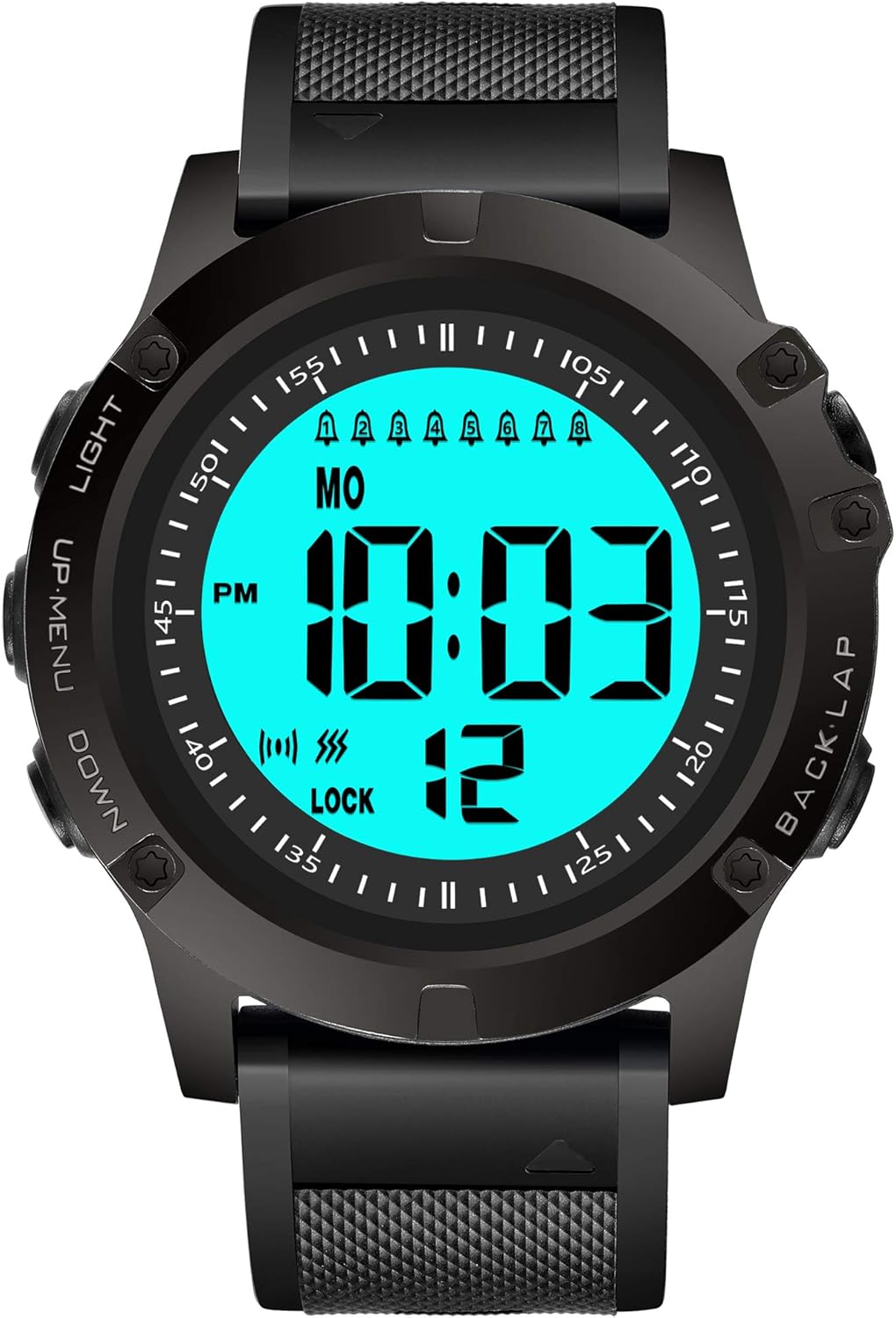
Figure 4.1: Backlight Effect.
This image demonstrates the watch display in normal viewing conditions on the left, and with the super bright backlight activated on the right, showing enhanced visibility of the large digits.
4.2 Using the Stopwatch
Your watch includes a stopwatch function for timing events.
- From the Time Mode, press Button B repeatedly until "STOPWATCH" appears.
- Press Button D to start the stopwatch.
- Press Button D again to pause/resume.
- To reset the stopwatch to zero, press Button B while the stopwatch is paused.
- To record a lap time, press Button A while the stopwatch is running. The lap time will display briefly.
5. Maintenance
5.1 Cleaning Your Watch
To keep your watch in optimal condition:
- Wipe the watch regularly with a soft, dry cloth.
- For stubborn dirt, use a slightly damp cloth and then dry thoroughly.
- Avoid using harsh chemicals, solvents, or abrasive cleaners, as these can damage the watch's finish and seals.
5.2 Water Resistance
Your TICCI watch is rated for 30 meters of water resistance. This means it is designed to withstand splashes, rain, or brief immersion in cold water, such as during hand washing.
Important Note:
- Do NOT expose the watch to hot water, steam, or extreme temperature changes. Hot water can compromise the watch's water resistance seals.
- Do NOT press any buttons while the watch is submerged in water.
- The watch is NOT suitable for swimming, diving, or showering, despite its water resistance rating.
5.3 Battery Replacement
The watch uses 1 CR2 battery. When the display becomes dim or functions become erratic, it may be time to replace the battery. Battery replacement should ideally be performed by a qualified watch technician to ensure the water resistance seal is maintained.
6. Troubleshooting
If you encounter any issues with your watch, please refer to the following common problems and solutions:
| Problem | Possible Cause | Solution |
|---|---|---|
| Watch display is blank or dim. | Low battery. | Replace the CR2 battery. |
| Alarm does not vibrate or sound. | Alarm not activated or set incorrectly; alarm mode set to silent. | Ensure the alarm is enabled and the correct alarm type (vibration/sound) is selected in the alarm settings. Check battery level. |
| Settings change accidentally. | Lockout feature is not enabled. | Activate the lockout function (refer to Section 3.4). |
| Moisture inside the watch display. | Exposure to hot water or prolonged immersion beyond specified water resistance. | Stop using the watch immediately. Seek professional repair to prevent further damage. Avoid hot water. |
| Buttons are unresponsive. | Watch is in lockout mode; internal malfunction. | Unlock the watch (refer to Section 3.4). If still unresponsive, contact customer support. |
7. Specifications
| Feature | Detail |
|---|---|
| Model Number | T0003VB Watch |
| Material | Plastic |
| Clasp Type | Buckle |
| Water Resistance | 30 meters (Not for hot water, swimming, or showering) |
| Alarms | 8 individual vibrating and/or sound alarms |
| Countdown Timer | 15 minutes to 24 hours, auto-start |
| Backlight | Super Bright EL Backlight |
| Battery Type | 1 x CR2 (required) |
| Dimensions (Approx.) | Package: 3.5 x 3.5 x 2.7 inches; Watch: Refer to Figure 2.2 for detailed dimensions. |
| Weight (Approx.) | 4.8 ounces |
8. Warranty Information
Your TICCI Vibrating Alarm Watch is covered by a manufacturer's warranty against defects in materials and workmanship. The specific terms and duration of the warranty may vary based on your region and point of purchase. Please retain your proof of purchase for warranty claims.
For detailed warranty information, please refer to the warranty card included with your product or contact the retailer from whom you purchased the watch.
Extended protection plans may also be available for purchase. Please check with your retailer for options.
9. Customer Support
If you have any questions, require assistance with setup, or encounter issues not covered in this manual, please do not hesitate to contact our customer support team.
For the most efficient support, please have your watch model number (T0003VB Watch) and purchase details ready when contacting us.
You can find more information and contact details by visiting the official T TICCI store: T TICCI Store on Amazon.
Ask a question about this manual
Ask about setup, troubleshooting, compatibility, parts, safety, or missing instructions. Manuals+ will review the question and use this page’s manual context to help answer it.