
BTMETER UK-BT-100
BTMETER BT-100 Digital Handheld Anemometer
Model: UK-BT-100 | Brand: BTMETER
1. Introduction
The BTMETER BT-100 is a portable digital anemometer designed for accurate measurement of wind speed, wind temperature, and wind chill. This compact and user-friendly device is an essential tool for various applications, from environmental monitoring to outdoor sports and industrial use. Its precise sensors and clear display ensure reliable readings in diverse conditions.

Figure 1.1: BTMETER BT-100 Digital Handheld Anemometer with accessories.
2. Key Features
- Multifunction Professional Anemometer: Measures wind speed, wind temperature, and wind chill. Features a low battery indicator on the bright backlit LCD screen.
- Accurate Wind Tester: Provides precise wind speed measurements from 0.67 to 100 km/h (0.1 m/s resolution) and wind temperature from -10 to 45 °C (0.2 °C resolution).
- Multiple Measurement Units: Wind speed can be displayed in m/s, km/h, ft/min, knots, or mph. Wind temperature can be displayed in Celsius (°C) or Fahrenheit (°F).
- Enhanced Sensitivity: Equipped with 2 temperature sensors and 8 sensitive fan blades for highly accurate readings, even for very low airflow.
- Tripod Mountable Design: Features a threaded metal hole at the bottom, allowing for attachment to a tripod for continuous, hands-free wind gauging.
- Portable and Lightweight: A compact, pocket-sized device, ideal for outdoor activities. Includes a protective carrying case.
- User-Friendly Interface: Offers optional manual or automatic power-off and a clear backlit display for visibility in low-light conditions.

Figure 2.1: The 8-leaf wind wheel and dual wind chill sensor for accurate measurements.
3. Package Contents
Upon opening the package, please verify that all the following items are included:
- 1 x BTMETER BT-100 Digital Anemometer
- 1 x Protective Carrying Case
- 2 x AAA 1.5V Batteries
- 1 x Wrist Lanyard
- 1 x Small Screwdriver (for battery compartment)
4. Setup
4.1 Battery Installation
- Locate the battery compartment cover on the back of the device.
- Use the provided small screwdriver to loosen the screw on the battery compartment cover.
- Carefully remove the cover.
- Insert two (2) AAA 1.5V batteries, ensuring correct polarity (+/-) as indicated inside the compartment.
- Replace the battery compartment cover and tighten the screw.
4.2 Powering On/Off
- To Power On: Press the red power button (O) located on the front panel. The LCD screen will illuminate.
- To Power Off: Press and hold the red power button (O) for a few seconds until the display turns off. The device also features an automatic power-off function to conserve battery life if inactive for a period.
4.3 Attaching the Lanyard
Thread the wrist lanyard through the small loop hole located at the bottom of the anemometer. This helps prevent accidental drops during use.
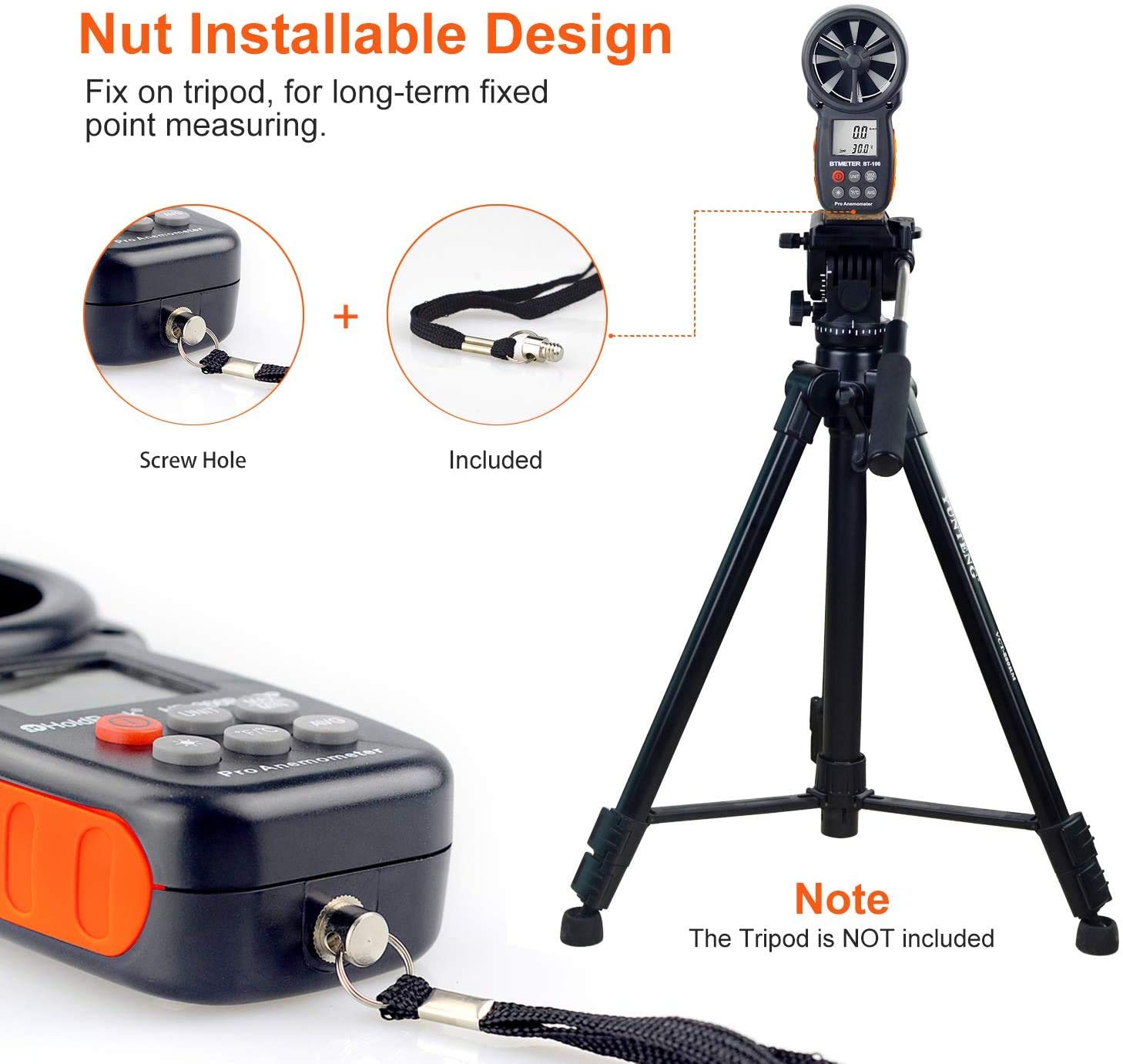
Figure 4.1: Tripod screw hole and lanyard attachment point.
5. Operation
Familiarize yourself with the buttons and display indicators for optimal use.

Figure 5.1: Overview of BTMETER BT-100 buttons and display.
5.1 Measuring Wind Speed and Temperature
Once powered on, hold the anemometer so that the fan (impeller) is exposed to the airflow you wish to measure. The current wind speed and temperature will be displayed on the LCD screen.
5.2 Changing Wind Speed Units
Press the UNIT button to cycle through the available wind speed units: m/s (meters per second), km/h (kilometers per hour), ft/min (feet per minute), knots, and mph (miles per hour).
5.3 Switching Temperature Units
Press the °F/°C button to toggle between Celsius (°C) and Fahrenheit (°F) temperature readings.
5.4 Backlight Control
Press the light bulb icon button to turn the LCD backlight on or off. The backlight will automatically turn off after 15 seconds of inactivity to save power.

Figure 5.2: HD backlit screen for clear readings in any ambient light.
5.5 MAX/MIN/AVG Modes
The device can display maximum, minimum, and average wind speed readings:
- Press MAX/MIN once to display the maximum wind speed recorded since power-on.
- Press MAX/MIN again to display the minimum wind speed recorded.
- Press AVG to display the average wind speed.
- To exit these modes and return to current readings, press the respective button again or power cycle the device.
6. Applications
The BTMETER BT-100 is a versatile tool suitable for a wide range of applications:
- HVAC Installation and Maintenance: Essential for measuring airflow in ducts and vents, assisting with CFM calculations and system balancing.
- Drone Operation: Helps drone pilots assess wind conditions for safe and stable flight, especially for long-distance shooting or aerial photography.
- Shooting and Hunting: Provides crucial wind data for ballistic calculations, improving accuracy in outdoor shooting.
- Outdoor Sports: Ideal for sailing, kite flying, paragliding, climbing, and other activities where wind speed is a critical factor.
- Environmental Monitoring: Useful for hobbyists and professionals to monitor local wind conditions.
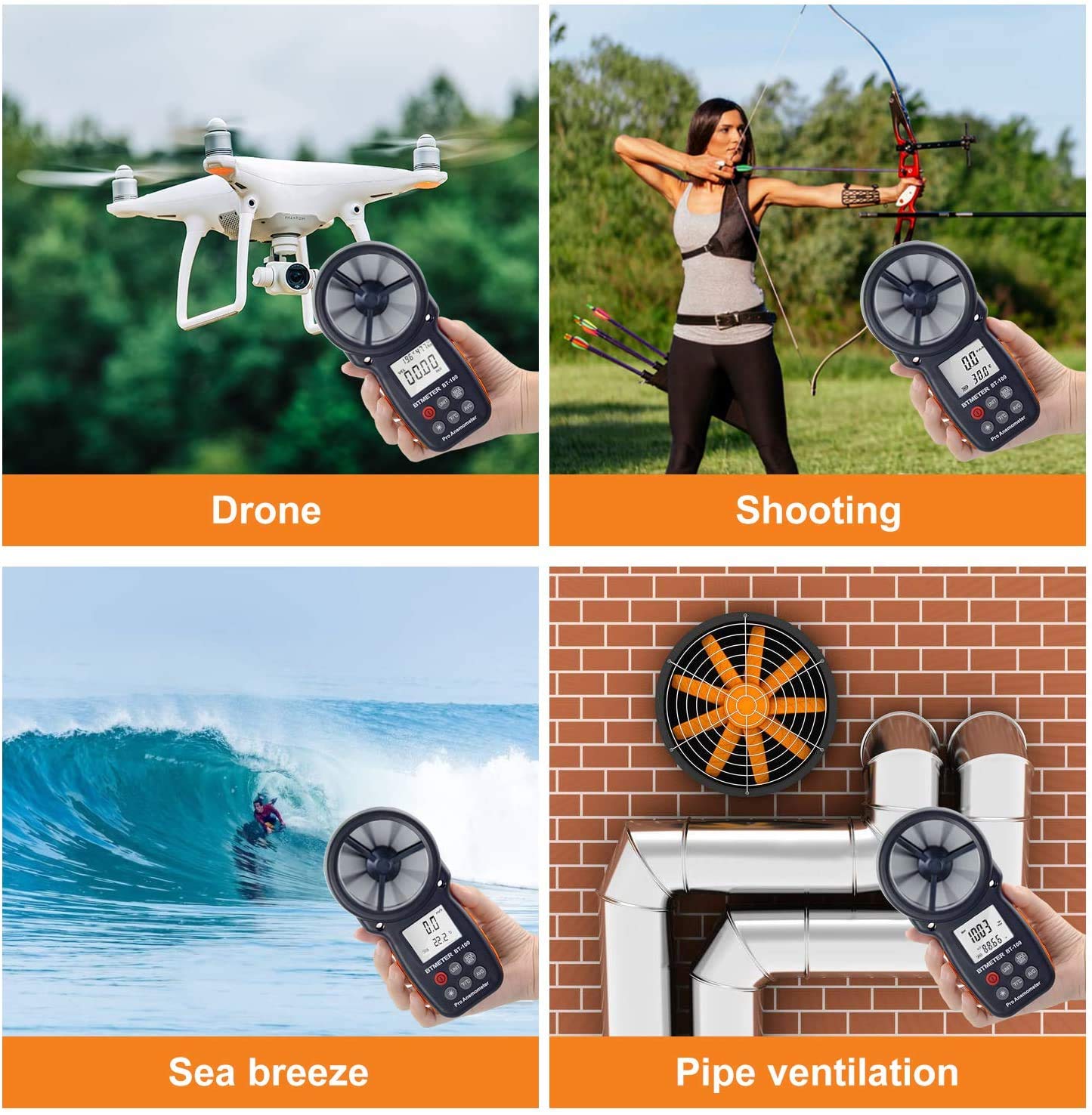
Figure 6.1: Various applications of the BTMETER BT-100.
7. Specifications
| Parameter | Value |
|---|---|
| Model Number | UK-BT-100 |
| Dimensions (L x W x H) | 16.5 x 8.5 x 3.8 cm (6.5 x 3.3 x 1.5 inches) |
| Weight | 200 Grams (0.44 lbs) |
| Material | Acrylonitrile Butadiene Styrene (ABS) |
| Wind Speed Range | 0.67 to 100 km/h (0.18 to 27.78 m/s) |
| Wind Speed Resolution | 0.1 m/s |
| Wind Speed Accuracy | ±5% of readings |
| Temperature Range | -10 °C to 45 °C (14 °F to 113 °F) |
| Temperature Resolution | 0.2 °C |
| Temperature Accuracy | ±2 °C |
| Power Supply | 2 x 1.5V AAA Batteries |
| UPC | 760385085800 |
8. Troubleshooting
| Problem | Possible Cause | Solution |
|---|---|---|
| Device does not power on. | Low or dead batteries; incorrect battery installation. | Replace batteries with new AAA 1.5V batteries. Ensure correct polarity. |
| Inaccurate readings. | Fan obstructed or dirty; device not held correctly in airflow; extreme environmental conditions. | Clean the fan blades gently. Ensure the fan is fully exposed to the airflow. Avoid using in conditions outside specified operating ranges. |
| Display is dim or flickering. | Low battery; backlight issue. | Replace batteries. Press the backlight button to ensure it's on. |
| Auto power-off too quickly. | Default auto-off setting. | This is a built-in feature to save battery. Ensure you are actively using the device or manually turn it back on. |
9. Maintenance
- Cleaning: Use a soft, dry cloth to clean the exterior of the device. For the fan blades, use a soft brush or compressed air to remove dust and debris. Do not use abrasive cleaners or solvents.
- Storage: When not in use for extended periods, remove the batteries to prevent leakage. Store the anemometer in its protective carrying case in a cool, dry place, away from direct sunlight and extreme temperatures.
- Battery Replacement: Replace batteries promptly when the low battery indicator appears on the display to ensure accurate readings and proper device function.
10. Warranty and Support
For warranty information, technical support, or any inquiries regarding your BTMETER BT-100 Digital Handheld Anemometer, please refer to the contact information provided with your purchase or visit the official BTMETER website. Keep your purchase receipt as proof of purchase for warranty claims.
Related documentsUK-BT-100


Ask a question about this manual
Ask about setup, troubleshooting, compatibility, parts, safety, or missing instructions. Manuals+ will review the question and use this page’s manual context to help answer it.