
Introduction
This manual provides detailed instructions for the proper use and maintenance of your Ataller Mini Digital Pocket Scale, Model KS-1005. Designed for precision, this scale offers accurate measurements for various items up to 100g with 0.01g readability. Please read this manual thoroughly before operation to ensure optimal performance and longevity of your device.
Safety Information
- Do not overload the scale beyond its maximum capacity of 100g, as this may cause permanent damage.
- Avoid exposing the scale to extreme temperatures, humidity, or direct sunlight.
- Keep the scale away from strong electromagnetic fields.
- Handle the scale with care. Avoid dropping or subjecting it to strong impacts.
- Clean the scale with a soft, damp cloth. Do not use abrasive cleaners or immerse the scale in water.
- Remove batteries if the scale will not be used for an extended period to prevent leakage.
Package Contents
- 1 x Ataller Mini Digital Pocket Scale (Model KS-1005)
- 2 x AAA Batteries
- 1 x Protective Cover (also functions as a weighing tray)
Product Overview
The Ataller Mini Digital Pocket Scale features a compact design with a stainless steel weighing platform, an LCD display with backlight, and two control buttons for easy operation.
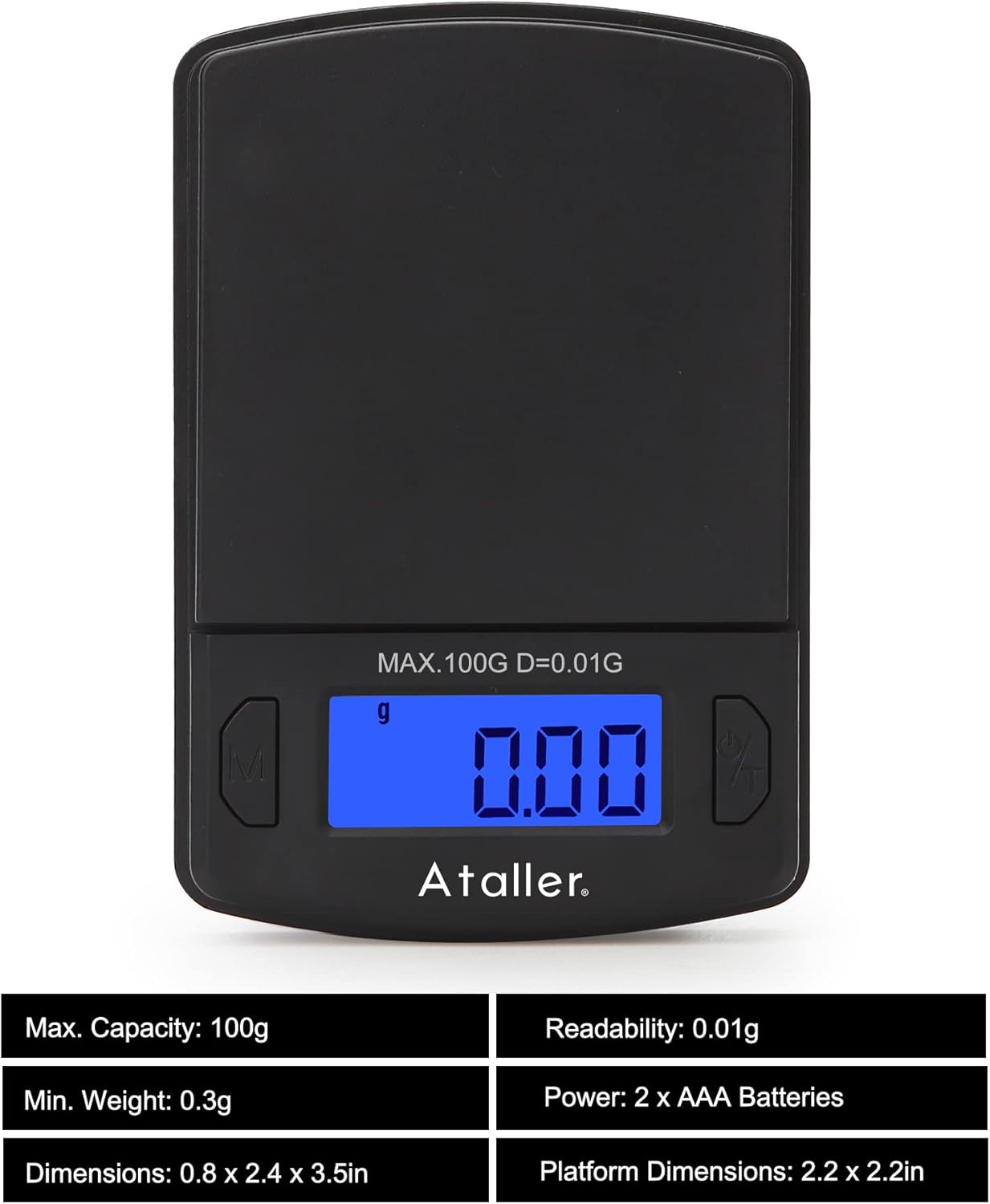
Image: Front view of the Ataller Mini Digital Pocket Scale, displaying '0.00' on the backlit LCD screen. The 'M' (Mode) button is on the left, and the 'Power/Tare' button is on the right. The maximum capacity of 100g and readability of 0.01g are indicated above the display.

Image: Diagram showing the dimensions of the Ataller Mini Digital Pocket Scale (60mm width, 90mm length) and an illustration of two AAA batteries, indicating their inclusion and placement.
Key Components:
- Weighing Platform: Stainless steel surface for placing items.
- LCD Display: Backlit screen showing weight, unit, and status indicators.
- 'M' (Mode) Button: Used to change weighing units.
- 'Power/Tare' Button: Used to power on/off the scale and activate the tare function.
- Protective Cover: Doubles as a weighing tray.
Setup
1. Battery Installation
- Open the battery compartment cover located on the underside of the scale.
- Insert the two AAA batteries, ensuring correct polarity (+/-).
- Close the battery compartment cover securely.
2. Initial Placement
Place the scale on a hard, flat, and stable surface. Ensure there is no wind or vibration in the environment, as this can affect measurement accuracy.
Operating Instructions
1. Power On/Off
- To turn on: Press the 'Power/Tare' button. The display will show '88888' then '0.00g'.
- To turn off: Press and hold the 'Power/Tare' button for approximately 3 seconds. The scale will also automatically shut off after 60 seconds of inactivity to conserve battery life.
2. Unit Conversion
The scale supports 7 different weighing units: grams (g), grains (gn), ounces (oz), troy ounces (ozt), carats (ct), taels (tl), and pennyweights (dwt).
- With the scale powered on, press the 'M' (Mode) button repeatedly to cycle through the available units. The selected unit will be displayed on the screen.

Image: A collage of the scale's display showing various units: g, ct, oz, ozt, dwt, tl, and gn, illustrating the unit conversion feature.
3. Tare Function
The tare function allows you to subtract the weight of a container, so you only measure the contents.

Image: Two panels illustrating the tare function. The first panel shows a hand pressing the 'Power/Tare' button with a container on the scale, zeroing the display. The second panel shows powder being weighed in the container, with the display showing only the powder's weight.
- Place the empty container (e.g., the protective cover) on the weighing platform.
- Press the 'Power/Tare' button. The display will reset to '0.00g'.
- Add the items you wish to weigh into the container. The display will show only the net weight of the items.
4. Calibration
Calibration ensures the accuracy of your scale. A 100g calibration weight is required but not included with the scale.

Image: A four-step visual guide for calibrating the Ataller Mini Digital Pocket Scale. It shows the display changes from a random number to 'CAL', then '100.00g', followed by placing a 100g weight, and finally displaying 'PASS' and '100.00g' to confirm successful calibration.
- Turn the scale off.
- Press and hold both the 'M' and 'Power/Tare' buttons simultaneously until the display shows a random number.
- Release the 'Power/Tare' button, then press the 'Power/Tare' button again. The display will show 'CAL' followed by '100.00g'.
- Carefully place a 100g calibration weight onto the center of the weighing platform.
- Press the 'Power/Tare' button again. The display will show 'PASS' and then return to normal weighing mode, indicating successful calibration.
- Remove the calibration weight.
Note: A 100g calibration weight is not included with the scale.
Maintenance
Cleaning
- Wipe the scale with a soft, slightly damp cloth.
- Do not use chemical cleaning agents, as they may damage the scale's finish or internal components.
- Ensure no liquid enters the scale's interior.
Storage
- Store the scale in a clean, dry, and stable environment.
- Avoid placing heavy objects on the scale when not in use.
- If storing for an extended period, remove the batteries to prevent potential leakage and damage.
Troubleshooting
| Problem | Possible Cause | Solution |
|---|---|---|
| Display shows 'Lo' | Low battery power. | Replace the AAA batteries. |
| Display shows 'OUE2' | Scale is overloaded. | Remove excess weight immediately. Do not exceed 100g. |
| Inaccurate readings | Unstable surface, wind, or need for calibration. | Place the scale on a stable, flat surface. Avoid drafts. Perform calibration as per instructions. |
| Scale does not turn on | Batteries incorrectly installed or depleted. | Check battery polarity. Replace batteries if necessary. |
Specifications
- Model: KS-1005
- Capacity: 0.01g - 100g
- Readability: 0.01g
- Units: g, gn, oz, ozt, ct, tl, dwt
- Automatic Shut-Off: 60 seconds
- Power: 2 x AAA Batteries (included)
- Material: Polypropylene, Stainless Steel Platform
- Product Dimensions: 8.89 x 6.1 x 2.03 cm (3.5 x 2.4 x 0.8 inches)
- Item Weight: 58.11 g (2.05 ounces)
Warranty Information
This product is covered by a standard manufacturer's warranty against defects in materials and workmanship. Please retain your proof of purchase for warranty claims. For specific warranty terms and conditions, refer to the documentation provided at the time of purchase or contact customer support.
Customer Support
If you encounter any issues or have questions regarding your Ataller Mini Digital Pocket Scale, please refer to the troubleshooting section of this manual. If the problem persists, contact your retailer or the manufacturer's customer service for assistance. Please have your model number (KS-1005) and purchase information ready when contacting support.