
Dyson V11TORQUE
Dyson V11 Torque Drive Cordless Vacuum Cleaner User Manual
Model: V11TORQUE
1. Product Overview
The Dyson V11 Torque Drive is a powerful, cordless handheld portable vacuum cleaner designed for versatile cleaning across various floor types. Its advanced technology ensures strong suction and efficient debris collection.
- Integrated LCD screen displays active countdown timer and real-time machine performance.
- High Torque cleaner head intuitively adapts to any floor type in Auto mode.
- Cordless design offers freedom of movement and ease of use.
- Lightweight and portable for convenient cleaning of various surfaces.

Figure 1: The Dyson V11 Torque Drive vacuum cleaner in its upright position, showcasing its sleek design and purple accents.

Figure 2: The Dyson V11 Torque Drive vacuum cleaner disassembled, showing the main unit, wand, and cleaner head, ready for assembly or storage.
2. Setup
2.1 Assembly
- Unpack all components from the packaging.
- Connect the wand to the main body of the vacuum cleaner until it clicks securely into place.
- Attach the desired cleaner head or accessory to the end of the wand or directly to the main body for handheld use, ensuring it clicks firmly.
2.2 Initial Charging
Before first use, fully charge the Dyson V11 Torque Drive. The charging time is approximately 4.5 hours.
- Locate the charging port on the handle of the main unit.
- Plug the charger into a power outlet and connect it to the vacuum.
- The LCD screen will display charging status. A full charge is indicated when the battery icon is completely filled.
- For convenient storage and charging, utilize the wall-mounted docking station (if included).
Figure 3: The Dyson V11 Torque Drive vacuum cleaner securely docked on its wall-mounted charging station, indicating it is ready for charging or storage.
3. Operating Instructions
3.1 Power Modes
The Dyson V11 Torque Drive features multiple power modes to optimize cleaning for different tasks and surfaces:
- Eco Mode: Provides the longest runtime (up to 1 hour) for lighter cleaning tasks and extended use.
- Auto Mode: Intuitively adjusts suction power based on floor type, optimizing runtime and performance. Ideal for mixed surfaces like carpet and hard floors.
- Boost Mode: Delivers maximum suction for intensive spot cleaning and stubborn dirt. Note that this mode significantly reduces battery runtime.
Switch between modes using the button on the LCD screen at the top of the main unit.
3.2 Cleaning Different Surfaces
The High Torque cleaner head is designed to work effectively on both carpet and hard floors. In Auto mode, the vacuum will automatically detect the floor type and adjust its suction power accordingly.

Figure 4: Close-up of the Dyson V11 Torque Drive's High Torque cleaner head, showing its brush bar and adaptive technology for various floor types.
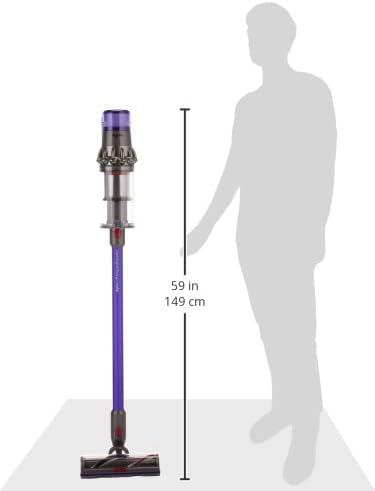
Figure 5: A visual representation of the Dyson V11 Torque Drive's height (59 inches or 149 cm) compared to an average person, highlighting its ergonomic design for upright use.
4. Maintenance
4.1 Emptying the Dustbin
Empty the dustbin regularly to maintain optimal suction performance. The transparent bin allows you to see when it needs emptying.
- Hold the vacuum over a trash bin.
- Push the red lever down firmly to release the bin flap and eject debris.
- Close the bin flap securely until it clicks.
4.2 Filter Cleaning
The Dyson V11 Torque Drive features a washable filter. Regular cleaning is essential for maintaining suction power and preventing odors.
- Twist the filter counter-clockwise from the top of the main unit to remove it.
- Wash the filter under cold tap water until the water runs clear. Do not use detergent.
- Squeeze excess water from the filter and leave it to dry completely for at least 24 hours in a warm, dry place. Ensure it is completely dry before reinserting.
4.3 Brush Bar Maintenance
Periodically check the cleaner head's brush bar for tangled hair or debris. Remove any obstructions to ensure effective cleaning.

Figure 6: Various attachments included with the Dyson V11 Torque Drive, such as the crevice tool, combination tool, and mini-motorized tool, enhancing its versatility for different cleaning needs.
5. Troubleshooting
5.1 No Power / Not Charging
- Ensure the charger is securely plugged into both the wall outlet and the vacuum's charging port.
- Check the power outlet by plugging in another appliance.
- Verify the battery is properly seated in the main unit.
5.2 Reduced Suction
- Empty the dustbin if it is full.
- Clean the filter as per the maintenance instructions.
- Check the cleaner head and wand for blockages. Remove any obstructions.
- Ensure all connections (wand to main unit, cleaner head to wand) are secure.
5.3 Cleaner Head Not Spinning
- Check the brush bar for obstructions like tangled hair or debris.
- Ensure the cleaner head is correctly attached to the wand.
6. Specifications
| Brand | Dyson |
| Model Name | Refurbished Dyson V11 Torque Drive |
| Item Model Number | V11TORQUE |
| Color | Blue |
| Special Feature | Portable |
| Filter Type | Disk |
| Is Cordless? | Yes |
| Runtime | 1 hour |
| Charging Time | 4.5 Hours |
| Item Weight | 3.08 pounds |
| Recommended Uses | Carpet, Hard Floor |
7. Warranty and Support
For warranty information, product support, or to purchase replacement parts and accessories, please visit the official Dyson website or contact Dyson customer service. International products may have separate terms regarding warranty and support.
You can find more information and support at the Dyson Store on Amazon.
Ask a question about this manual
Ask about setup, troubleshooting, compatibility, parts, safety, or missing instructions. Manuals+ will review the question and use this page’s manual context to help answer it.