
1. Introduction
This manual provides comprehensive instructions for the BELIFE Replacement Remote Control, designed for seamless compatibility with Strong SRT43UA6203, SRT49UA6203, SRT55UA6203, and SRT65UA6203 series televisions. This remote offers full functionality without the need for complex programming, allowing immediate use after battery installation.
2. Setup and First Use
2.1 Battery Installation
- Locate the battery compartment cover on the back of the remote control.
- Slide the cover downwards or press the latch to open it.
- Insert two new AAA alkaline batteries (not included), ensuring the positive (+) and negative (-) terminals match the diagrams inside the compartment.
- Replace the battery compartment cover, ensuring it clicks securely into place.
2.2 Initial Operation
Once batteries are installed, the remote control is ready for immediate use. No additional programming or setup is required. Point the remote control directly at your Strong television and begin operating it as you would with the original remote.
3. Operating Instructions: Key Functions Layout
The BELIFE replacement remote control provides all essential functions for your Strong TV. Below is a visual representation of the remote's buttons and a detailed table outlining their functions, including any differences from the original remote where applicable.
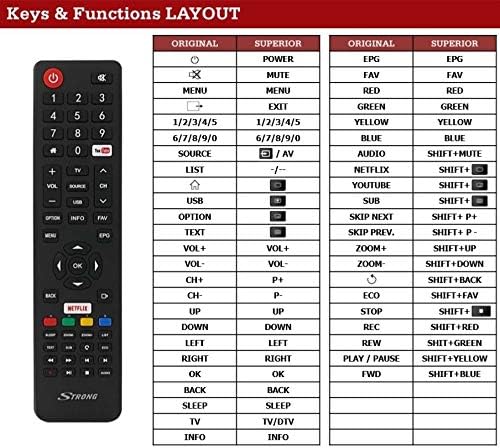
This image displays the physical layout of the BELIFE replacement remote control, showing all buttons. Adjacent to the remote, a table details the function of each button, comparing the 'ORIGINAL' function with the 'SUPERIOR' (replacement remote) function. Key sections include power, mute, menu, number keys, source, volume, channel, navigation, and special function buttons like Netflix and YouTube.
3.1 Button Functions
| Original Function | Superior (Replacement Remote) Function |
|---|---|
| Power (On/Off) | POWER |
| Mute | MUTE |
| MENU | MENU |
| Exit | EXIT |
| Number Keys 1-5 | 1/2/3/4/5 |
| Number Keys 6-0 | 6/7/8/9/0 |
| SOURCE | SOURCE / AV |
| LIST | LIST (-/-) |
| USB | USB (Dedicated Button) |
| OPTION | OPTION (Dedicated Button) |
| TEXT | TEXT (Dedicated Button) |
| Volume Up | VOL+ |
| Volume Down | VOL- |
| Channel Up | CH+ (P+) |
| Channel Down | CH- (P-) |
| Navigation Up | UP |
| Navigation Down | DOWN |
| Navigation Left | LEFT |
| Navigation Right | RIGHT |
| OK / Confirm | OK |
| BACK | BACK |
| SLEEP | SLEEP |
| TV / DTV Mode | TV/DTV |
| INFO | INFO |
| EPG (Electronic Program Guide) | EPG |
| FAV (Favorites) | FAV |
| Red Function Button | RED |
| Green Function Button | GREEN |
| Yellow Function Button | YELLOW |
| Blue Function Button | BLUE |
| AUDIO | SHIFT+MUTE |
| NETFLIX | SHIFT+ (Netflix Button) |
| YOUTUBE | SHIFT+ (YouTube Button) |
| SUB (Subtitles) | SHIFT+ (Subtitle Button) |
| SKIP NEXT | SHIFT+P+ |
| SKIP PREV. | SHIFT+P- |
| ZOOM+ | SHIFT+UP |
| ZOOM- | SHIFT+DOWN |
| Return/Back (Circular Arrow) | SHIFT+BACK |
| ECO Mode | SHIFT+FAV |
| STOP | SHIFT+ (Stop Button) |
| REC (Record) | SHIFT+RED |
| REW (Rewind) | SHIFT+GREEN |
| PLAY/PAUSE | SHIFT+YELLOW |
| FWD (Fast Forward) | SHIFT+BLUE |
4. Specifications
- Brand: BELIFE
- Compatible Devices: Strong SRT43UA6203, SRT49UA6203, SRT55UA6203, SRT65UA6203 Televisions
- Connectivity Technology: Infrared (IR)
- Controller Type: Button Control
- Maximum Operating Range: 10 Meters
- Battery Type: 2 x AAA Alkaline Batteries (not included)
- UPC: 300263426259
5. Troubleshooting
5.1 Remote Not Responding
- Check Batteries: Ensure batteries are inserted correctly with the correct polarity (+/-). Replace old batteries with new AAA alkaline batteries.
- Line of Sight: Make sure there is a clear line of sight between the remote control and the TV's IR receiver. Obstructions can block the signal.
- Distance: Ensure you are within the maximum operating range of 10 meters.
- TV Power: Confirm that your television is powered on.
5.2 Specific Functions Not Working
- Refer to the "Operating Instructions: Key Functions Layout" section (Section 3) to ensure you are pressing the correct button for the desired function, especially for 'SHIFT+' combinations.
- Some advanced functions might require specific TV menu navigation. Consult your Strong TV's original user manual for detailed TV-specific operations.
6. Maintenance
- Cleaning: Wipe the remote control with a soft, dry cloth. Do not use liquid cleaners or abrasive materials.
- Battery Care: Remove batteries if the remote control will not be used for an extended period to prevent leakage.
- Storage: Store the remote control in a cool, dry place away from direct sunlight and extreme temperatures.
7. Warranty and Support
For warranty information and customer support regarding your BELIFE Replacement Remote Control, please refer to the purchase documentation or contact the retailer from whom the product was purchased. Specific warranty terms and support channels are typically provided by the seller or manufacturer at the time of purchase.