
1. Introduction
Thank you for choosing the Thomson 55-inch Smart TV, Model TH55MR17. This manual provides essential information for the safe and efficient operation of your new television. Please read it thoroughly before using the product and retain it for future reference.
Your Thomson Smart TV offers a Full HD viewing experience (1920x1080 resolution) and smart functionalities including Wi-Fi connectivity, Android app installation via Google Play, and support for applications like YouTube.
2. Safety Information
- Power Supply: Ensure the TV is connected to a power source within the specified voltage range (220V, 50/60Hz).
- Ventilation: Do not block ventilation openings. Allow adequate space around the TV for proper airflow.
- Water and Moisture: Do not expose the TV to rain or moisture. Avoid placing objects filled with liquids, such as vases, on the TV.
- Cleaning: Unplug the TV before cleaning. Use a soft, dry cloth. Do not use liquid cleaners or aerosol cleaners.
- Placement: Place the TV on a stable, level surface to prevent it from falling. Keep it away from direct sunlight and heat sources.
- Servicing: Do not attempt to service the TV yourself. Refer all servicing to qualified service personnel.
3. Package Contents
Please check that all the following items are included in your package:
- Thomson 55-inch Smart TV (Model TH55MR17)
- Remote Control
- TV Stand (2 pieces)
- Screws for Stand Assembly
- Power Cable
- User Manual
4. Setup
4.1 Attaching the TV Stand
- Carefully place the TV screen-down on a soft, flat surface (e.g., a blanket or foam) to prevent damage.
- Align each stand piece with the corresponding slots on the bottom of the TV.
- Secure the stands using the provided screws. Ensure they are tightened firmly.
- Carefully lift the TV to its upright position on a stable surface.
4.2 Connecting External Devices
Your TV is equipped with various ports for connecting external devices:
- HDMI Ports (x2): For connecting high-definition devices like Blu-ray players, gaming consoles, or set-top boxes.
- USB Ports (x2): For connecting USB storage devices to play media files.
- PC/VGA Input: For connecting a computer.
- RF Input: For connecting an antenna or cable TV.
- Ethernet Port: For a wired internet connection.
- AV Ports (x2): For connecting older devices using composite video and stereo audio cables.
After connecting your devices, plug the power cable into the TV and then into a wall outlet.
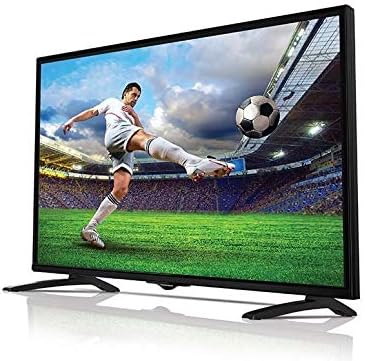
Image: The Thomson 55-inch Smart TV, Model TH55MR17, showcasing its display capabilities with a vibrant football match on screen. The TV features a slim bezel and a stable stand.
5. Operating the TV
5.1 Remote Control Functions
The remote control allows you to access all the TV's features. Familiarize yourself with the buttons:
- Power Button: Turns the TV on or off.
- Volume Up/Down: Adjusts the sound level.
- Channel Up/Down: Changes TV channels.
- Input/Source: Selects the input source (HDMI, USB, AV, etc.).
- Navigation Buttons (Up/Down/Left/Right): For menu navigation.
- OK/Enter: Confirms selections.
- Back/Exit: Returns to the previous menu or exits the current menu.
- Home/Smart Hub: Accesses the Smart TV interface.
- App Buttons: Dedicated buttons for popular apps like YouTube (if available).
5.2 Basic TV Functions
- Power On/Off: Press the Power button on the remote control or the TV.
- Channel Selection: Use the Channel Up/Down buttons or enter the channel number directly.
- Volume Adjustment: Use the Volume Up/Down buttons.
- Input Source Selection: Press the 'Input' or 'Source' button and select the desired input (e.g., HDMI 1, USB, AV).
5.3 Smart TV Features and Internet Connectivity
Your Thomson Smart TV allows you to connect to the internet and access various online services.
- Connecting to Wi-Fi:
- Press the 'Home' or 'Smart Hub' button on your remote.
- Navigate to 'Settings' or 'Network Settings'.
- Select 'Wi-Fi' and choose your home network from the list.
- Enter your Wi-Fi password using the on-screen keyboard.
- Once connected, the TV will confirm the connection.
- Accessing Apps:
- From the 'Home' screen, you can find pre-installed apps like YouTube.
- To install more apps, navigate to the 'Google Play Store' icon.
- Browse or search for desired applications and follow the on-screen instructions to install them.
- Wired Internet Connection:
- Connect an Ethernet cable from your router to the Ethernet port on the TV.
- The TV should automatically detect the wired connection. If not, go to 'Network Settings' and select 'Wired Connection'.
6. Maintenance
- Screen Cleaning: Gently wipe the screen with a soft, lint-free cloth. For stubborn marks, slightly dampen the cloth with water or a specialized screen cleaner (do not spray directly onto the screen).
- Cabinet Cleaning: Use a soft, dry cloth to wipe the TV cabinet.
- Dusting: Regularly dust the ventilation openings to prevent overheating.
- Power Cord: Periodically check the power cord for any damage.
7. Troubleshooting
If you encounter any issues with your TV, refer to the following common problems and solutions:
| Problem | Possible Cause | Solution |
|---|---|---|
| No power | Power cord not connected; Power outlet not working; TV in standby mode. | Check power cord connection; Test outlet with another device; Press power button on remote or TV. |
| No picture, but sound is present | Incorrect input source selected; External device not powered on or connected properly. | Press 'Input' button and select correct source; Check external device power and cable connections. |
| No sound, but picture is present | Volume muted or too low; External audio system issue. | Increase volume; Check if TV is muted; If using external speakers, check their connections and power. |
| Cannot connect to Wi-Fi | Incorrect password; Router issue; TV too far from router. | Re-enter password carefully; Restart router; Move TV closer to router or use wired connection. |
If the problem persists after trying these solutions, please contact customer support.
8. Specifications
| Feature | Specification |
|---|---|
| Brand | Thomson |
| Model Name | T551 |
| Item Model Number | TH55MR17 |
| Screen Size | 55 Inches (140 cm visible diagonal) |
| Display Technology | DLED |
| Resolution | 1920 x 1080 (Full HD) |
| Aspect Ratio | 16:9 |
| Connectivity Technology | Wired, Wireless (Wi-Fi) |
| Supported Internet Services | YouTube, Google Play Store for Android apps |
| Special Features | Intelligent Voice Recognition, ECO technology for energy saving, Dual-core processor |
| Included Components | Stand, TV, Remote Control |
| Ports | 2x HDMI, 2x USB, 1x PC/VGA, 1x RF, 1x Ethernet, 2x AV |
| Power | 220V, 50/60Hz |
9. Warranty and Support
For warranty information and customer support, please refer to the warranty card included with your product or visit the official Thomson website. Keep your purchase receipt as proof of purchase for any warranty claims.
If you require technical assistance or have questions not covered in this manual, please contact Thomson customer service.


