
Introduction
This manual provides essential information for the installation, operation, maintenance, and troubleshooting of your WANATOP Odometer Speed Sensor, model 83181-12040. This sensor is designed to accurately measure vehicle speed and transmit this data to the vehicle's odometer and other relevant systems.
Please read this manual thoroughly before installation and operation to ensure proper function and longevity of the product.
Vehicle Compatibility
The WANATOP Odometer Speed Sensor 83181-12040 is compatible with various Toyota and Lexus models. Please verify the OE part number for your specific vehicle before installation.
- Toyota Corolla
- Toyota Celica
- Toyota RAV4
- Toyota Solara
- Toyota Yaris
- Lexus ES300
OE Part Numbers: 83181-12040, 8318112040, 91872-09919, 94853145.
Parts List
The package typically includes:
- 1 x WANATOP Odometer Speed Sensor (Model: 83181-12040)
Note: Additional tools or components required for installation (e.g., wrenches, vehicle-specific gaskets) are not included and must be acquired separately.
Installation Instructions
Safety First: Always ensure the vehicle is turned off, the parking brake is engaged, and the battery is disconnected before beginning any installation or maintenance work. Consult your vehicle's service manual for specific instructions regarding speed sensor location and removal procedures.
Step-by-Step Installation:
- Locate the Old Sensor: Identify the existing odometer speed sensor on your vehicle. This is typically located on the transmission or transaxle. Refer to your vehicle's service manual for the exact location.
- Disconnect Wiring: Carefully disconnect the electrical connector from the old speed sensor. Be gentle to avoid damaging the wires or connector clips.
- Remove Old Sensor: Using appropriate tools (e.g., a wrench or socket), unbolt or unscrew the old speed sensor from its mounting point. Some sensors may require a specific removal tool.
- Inspect Mounting Area: Clean the mounting surface on the transmission/transaxle to ensure a proper seal for the new sensor. Check for any debris or old gasket material.
- Install New Sensor: Insert the new WANATOP speed sensor into the mounting hole. Ensure it seats correctly. Hand-tighten any bolts or screws first, then tighten to the vehicle manufacturer's specified torque. Do not overtighten.
- Connect Wiring: Reconnect the electrical connector to the new speed sensor. Ensure it clicks securely into place.
- Reconnect Battery: Reconnect the vehicle's battery.
- Test Functionality: Start the vehicle and perform a test drive to verify that the speedometer and odometer are functioning correctly. Check for any warning lights related to the speed sensor.

Figure 1: Side view of the WANATOP Odometer Speed Sensor, showing the main body and the gear mechanism. This image illustrates the overall form factor of the sensor.
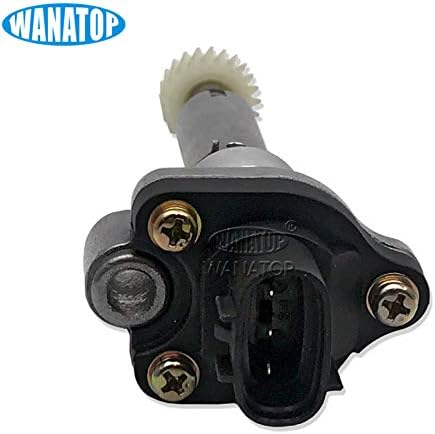
Figure 2: Close-up view of the electrical connector on the WANATOP Odometer Speed Sensor. This is where the vehicle's wiring harness connects to the sensor.
Operating Principles
The WANATOP Odometer Speed Sensor 83181-12040 is an automatic component that operates continuously when the vehicle is in motion. It converts the rotational speed of a transmission component (often a gear) into an electrical signal. This signal is then sent to the vehicle's Engine Control Unit (ECU) or Transmission Control Unit (TCU), which interprets it as vehicle speed.
This speed data is crucial for the proper functioning of the speedometer, odometer, cruise control, anti-lock braking system (ABS), and other vehicle systems that rely on accurate speed information.
Maintenance
The WANATOP Odometer Speed Sensor is designed to be a maintenance-free component. Regular inspection during routine vehicle service is recommended.
- Visual Inspection: Periodically check the sensor and its wiring for any signs of physical damage, corrosion, or loose connections.
- Cleaning: If accessible, gently clean any accumulated dirt or debris from the sensor body, ensuring not to damage the electrical connector or the gear.
- Fluid Leaks: Ensure there are no transmission fluid leaks around the sensor's mounting point, as this could indicate an improper seal or a damaged sensor.
Note: Do not attempt to disassemble the sensor, as it is a sealed unit and contains no user-serviceable parts.
Troubleshooting
If you experience issues with your vehicle's speedometer or odometer after installing or while using the sensor, consider the following troubleshooting steps:
- No Speedometer Reading / Inaccurate Reading:
- Check Connections: Ensure the electrical connector is securely attached to the sensor and that there are no damaged wires.
- Verify Installation: Confirm the sensor is properly seated and tightened to the manufacturer's specifications.
- Inspect Gear: If visible, check the sensor's gear for any damage or wear that might prevent proper engagement with the transmission's drive gear.
- Scan for Codes: Use an OBD-II scanner to check for Diagnostic Trouble Codes (DTCs) related to the Vehicle Speed Sensor (VSS). Codes like P0500, P0501, P0502, P0503 often indicate a VSS issue.
- Check Engine Light (CEL) / ABS Light On:
- A faulty speed sensor can trigger these warning lights. Scan for DTCs to confirm if the sensor is the cause.
- If other systems are affected (e.g., cruise control not working), it further points to a speed sensor issue.
If troubleshooting steps do not resolve the issue, it is recommended to consult a qualified automotive technician for diagnosis and repair.
Specifications
| Feature | Specification |
|---|---|
| Model Number | 83181-12040 |
| Brand | WANATOP |
| OE Part Numbers | 83181-12040, 8318112040, 91872-09919, 94853145 |
| Item Weight | 0.1 Kilograms (100 g) |
| Parcel Dimensions | 8 x 6 x 5 cm |
| Specific Uses For Product | Speed Sensor |
| Measurement Accuracy | +-0.5% |
| Mounting Type | Flange Mount |
| Output Type | Digital |
| Sensing Distance | 100 Micron |
Warranty and Support
For specific warranty information, please refer to the product packaging or contact WANATOP customer support directly. Keep your purchase receipt as proof of purchase.
If you require technical assistance or have questions not covered in this manual, please contact WANATOP customer service through the retailer where the product was purchased or via the official WANATOP website.
Video Resources
No official product installation or demonstration videos from the seller were found for this specific model at this time. Please refer to the written instructions and consult a professional if needed.