
Introduction
Thank you for choosing the Bresser 1877491 Night Vision Digital NV Binoculars. This device is designed for comfortable observation in low-light and complete darkness conditions, featuring integrated infrared lighting and a recording function. Its digital design ensures resistance to overradiation, providing clear and high-contrast black/white images.
Key features include:
- 3x magnification with 2x digital zoom, offering a detection range of approximately 130 meters.
- Large display for comfortable viewing with both eyes.
- Integrated infrared lighting with 5 adjustable brightness levels for observation in complete darkness.
- Recording function to capture events.
- Long battery life of approximately 5 hours using standard AA batteries.
- Compact and lightweight design for portability.
Package Contents
Please ensure all items are present in the package:
- Bresser 1877491 Night Vision Digital NV Binoculars
- Carrying Strap
- Protective Bag

Image: The Bresser Night Vision Binoculars shown alongside its included carrying bag and strap, highlighting the portability accessories.
Setup
1. Battery Installation
The device operates on standard AA batteries. To install:
- Locate the battery compartment on the underside of the device.
- Open the battery compartment cover.
- Insert the required number of AA batteries, ensuring correct polarity (+/-) as indicated inside the compartment.
- Close the battery compartment cover securely.

Image: The underside of the Bresser Night Vision Binoculars, clearly showing the battery compartment cover and tripod mount.
2. Attaching the Carrying Strap
Attach the provided carrying strap to the designated loops on the binoculars for secure handling and portability.

Image: A top-down view of the Bresser Night Vision Binoculars, highlighting the overall design and the attachment points for the carrying strap on either side.
Operating Instructions
1. Power On/Off
Press and hold the power button (usually marked with I/O) to turn the device on or off. The display will illuminate upon power-on.
2. Viewing and Focus
Look through the eyepiece. The large display provides comfortable viewing for both eyes. Adjust the focus ring on the objective lens until the image is clear.

Image: A representation of the view through the Bresser Night Vision Binoculars, showing a clear black and white image of a fox, demonstrating the visual output.
3. Digital Zoom
Use the ZOOM buttons to digitally zoom in or out on your subject. The device offers up to 2x digital zoom in addition to its 3x optical magnification.
4. Infrared (IR) Illumination
For observation in low light or complete darkness, activate the integrated infrared illuminator. Press the IR button to cycle through 5 brightness levels. Higher IR levels provide better visibility in darker conditions but may consume more battery power.
5. Recording Function (SNAP)
The binoculars feature a recording function to capture images or videos. Press the SNAP button to take a still image or start/stop video recording. Ensure a compatible memory card (not included) is inserted into the card slot for saving recordings.
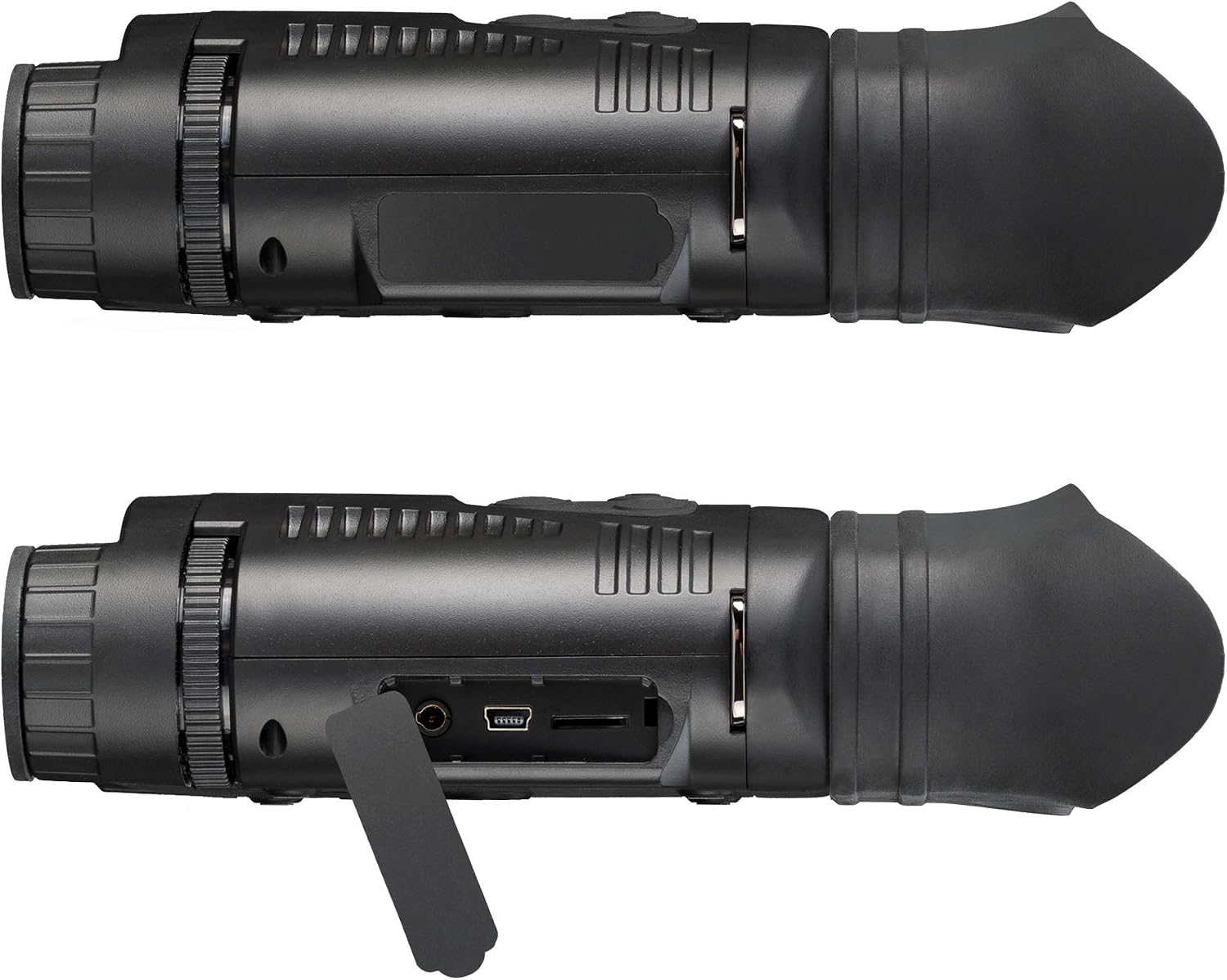
Image: A side view of the Bresser Night Vision Binoculars, revealing the covered ports for connectivity and memory card insertion.
Maintenance
- Cleaning: Use a soft, lint-free cloth to clean the lenses and body of the device. For stubborn marks, a slightly damp cloth can be used, followed by a dry cloth. Avoid abrasive cleaners or solvents.
- Storage: When not in use, store the binoculars in their protective bag in a cool, dry place, away from direct sunlight and extreme temperatures. Remove batteries if storing for extended periods to prevent leakage.
- Battery Care: Always use fresh, high-quality AA batteries. Replace all batteries at the same time.
Troubleshooting
| Problem | Possible Cause | Solution |
|---|---|---|
| Device does not power on. |
|
|
| Image is blurry or unclear. |
|
|
| Poor visibility in darkness. |
|
|
| Cannot record images/videos. |
|
|
Specifications
| Brand | BRESSER |
| Model Name | Bresser Digital Nachtsichtgerät Binokular 3,5x M. Aufnahme Monochrom |
| Part Number | 1877491 |
| Magnification | 3x (Optical) with 2x Digital Zoom |
| Objective Lens Diameter | 48 mm |
| Detection Range | Up to 130 m (in high contrast black/white image) |
| Sensor Resolution | 640 x 480 |
| LCD Resolution | 320 x 240 |
| Infrared Lighting | Integrated, 850 nm, 5 brightness levels |
| Power Source | AA Batteries |
| Battery Life | Approx. 5 hours |
| Dimensions (L x W x H) | 195 x 143 x 48 mm (7.68"L x 5.63"W x 1.89"H) |
| Weight | 0.43 kg (429 g) |
| Material | Plastic |
| Color | Black |
| Included Components | Night Vision Device, Carrying Strap, Bag |
Warranty and Support
BRESSER products are designed for durability and performance. For specific warranty information regarding your Bresser 1877491 Night Vision Digital NV Binoculars, please refer to the warranty card included with your purchase or visit the official BRESSER website.
For technical support, spare parts, or service inquiries, please contact BRESSER customer service. You can find contact details on the official BRESSER website or through the retailer where you purchased the product.
Visit the official BRESSER Store for more information: BRESSER Store on Amazon


