
Innovair WIN12H1V51
Innovair 36000 BTUH 230V Inverter Ductless Mini Split System Heat Pump User Manual
Model: WIN12H1V51
1. Product Overview
The Innovair 36000 BTUH 230V Inverter Ductless Mini Split System Heat Pump is a high-efficiency solution for both cooling and heating. This system is designed for flexible installation in various environments, providing comfortable climate control with advanced features.

Figure 1: Innovair Mini Split System components including indoor unit, outdoor unit, remote control, and installation kit.
Key Features:
- High Efficiency AHRI certified Inverter technology Heat Pump.
- Multiple Operating Modes: Turbo Cool, Sleep Mode, Dehumidifier, Hyper Heat.
- Operates in both AC cooling and Heat Pump heating modes.
- Includes a 16FT Installation Kit and is pre-charged up to 25FT.
- Multiple Protections: Gold-Fin Outdoor unit, Multi-Layer Filter system.
2. Setup and Installation
Proper installation is crucial for the optimal performance and longevity of your Innovair Mini Split System. It is highly recommended that installation be performed by a qualified HVAC professional.
2.1 Installation Kit
The system includes a 16-foot installation kit with necessary components for connecting the indoor and outdoor units. The system is pre-charged with refrigerant for line sets up to 25 feet.

Figure 2: Included installation kit components.
2.2 Placement Considerations
The Innovair Mini Split System is versatile and can be installed in various room types where ductwork is not present or desired. Ensure adequate space for airflow and maintenance around both indoor and outdoor units.

Figure 3: Examples of suitable installation environments.
3. Operating Instructions
Your Innovair Mini Split System offers various modes and controls for optimal comfort.
3.1 Remote Control
The system is controlled via an advanced remote control with a large digital display. Familiarize yourself with the buttons and their functions for efficient operation.

Figure 4: Advanced Remote Control Layout and Functions.
- ON/OFF Button: Powers the unit on or off.
- MODE Button: Selects operating modes (Cool, Heat, Fan, Dry, Auto).
- FAN Button: Adjusts fan speed (Auto, Low, Medium, High).
- ROOM TEMPERATURE Setting Buttons: Adjusts desired room temperature.
- SMART Button: Activates fuzzy logic operation for automatic comfort.
- SLEEP Button: Engages sleep mode for quiet, energy-efficient operation.
- SWING Button: Controls vertical and horizontal louver movement.
- IFeel Button: Activates IFeel mode, sensing temperature at the remote's location.
- CLOCK Button: Sets the current time.
- TIMER ON/OFF Button: Sets or cancels the timer for automatic operation.
- SUPER Button: Initiates fast cooling or heating.
- DIMMER Button: Turns the display light on the indoor unit on or off.
- MUTE Button: Activates quiet operation mode.
- HEAT Button: Directly sets the unit to 8°C heating mode (for anti-freeze).
3.2 Operating Modes
The system provides year-round comfort with its cooling and heating capabilities.

Figure 5: All-season climate control.
3.3 WiFi Control
The system is WiFi-ready, allowing you to control your unit remotely from any location using a compatible smartphone application. Refer to the separate WiFi module instructions for setup.

Figure 6: Remote control via WiFi.
4. Maintenance
Regular maintenance ensures the efficiency and longevity of your Innovair Mini Split System. Always disconnect power before performing any maintenance.
4.1 Air Filter System
The indoor unit features a multi-layer filter system designed to improve air quality. Regular cleaning or replacement of these filters is essential.
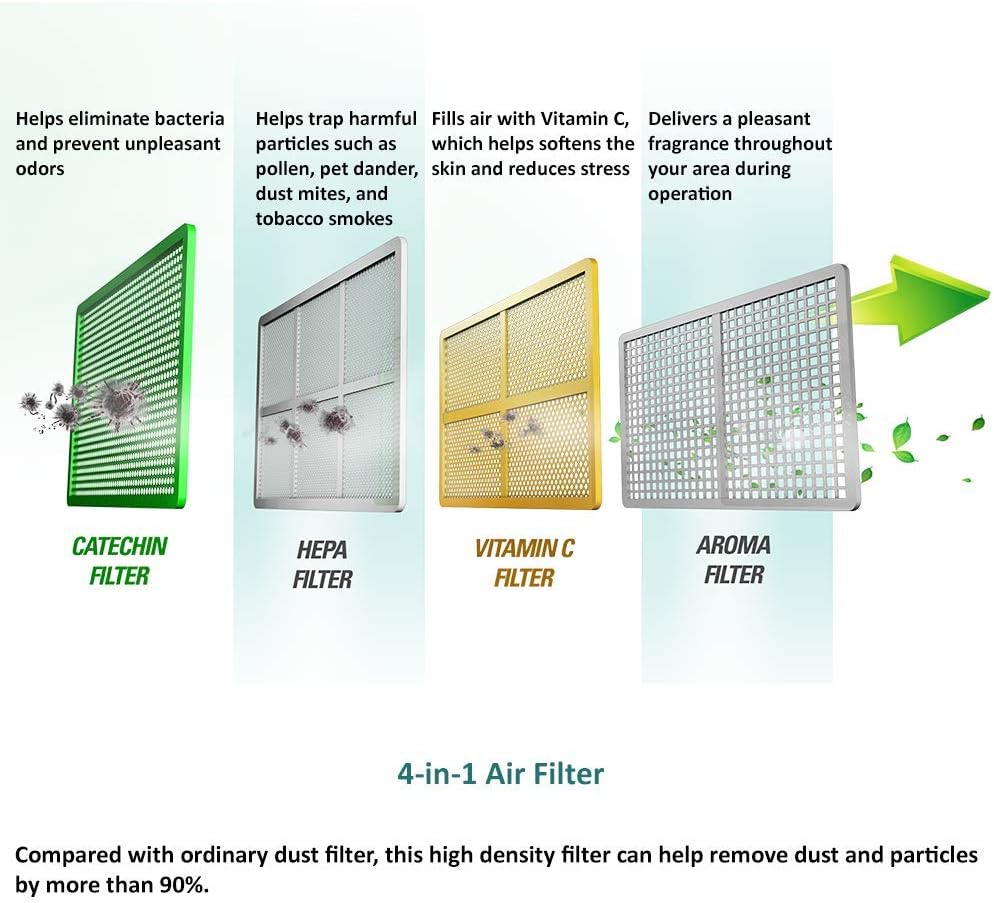
Figure 7: 4-in-1 Air Filter System.
- Catechin Filter: Helps eliminate bacteria and prevent unpleasant odors.
- HEPA Filter: Traps harmful particles such as pollen, pet dander, dust mites, and tobacco smoke.
- Vitamin C Filter: Fills air with Vitamin C, which helps soften the skin and reduces stress.
- Aroma Filter: Delivers a pleasant fragrance throughout your area during operation.
Compared with ordinary dust filters, this high-density filter can help remove dust and particles by more than 90%. Clean filters monthly or as needed, depending on usage and air quality.
4.2 Outdoor Unit Maintenance
The outdoor unit features Gold-Fin protection for enhanced durability. Keep the outdoor unit clear of debris, leaves, and other obstructions to ensure proper airflow and efficient operation. Periodically inspect the coils for dirt buildup and clean gently if necessary. Ensure the condensate drain is not blocked.

Figure 8: Outdoor unit with anti-freeze protection.
5. Troubleshooting
If your Innovair Mini Split System is not operating as expected, refer to the following general troubleshooting tips. For complex issues, contact a qualified technician.
- No Power: Check the circuit breaker and ensure the unit is properly plugged in.
- Not Cooling/Heating Effectively:
- Ensure air filters are clean.
- Check for obstructions around indoor and outdoor units.
- Verify the remote control settings (mode, temperature).
- Ensure windows and doors are closed.
- Unusual Noises: Minor noises during operation are normal. If loud or unusual noises occur, power off the unit and contact support.
- Water Leakage: Check the condensate drain line for blockages or improper installation.
If these steps do not resolve the issue, please contact Innovair customer support or a certified HVAC professional.
6. Specifications
| Feature | Detail |
|---|---|
| Brand | Innovair |
| Model Number | WIN12H1V51 |
| Capacity | 3 Tons (36000 BTUH) |
| Voltage | 230 Volts |
| Efficiency | High (AHRI certified Inverter technology) |
| Seasonal Energy Efficiency Ratio (SEER) | 19 |
| Refrigerant | R 410A |
| Filter Type | High Density (Multi-Layer: Catechin, HEPA, Vitamin C, Aroma) |
| Installation Type | Split System |
| Form Factor | Wall-mounted indoor unit and compact outdoor condenser |
| Item Weight | 24 pounds (Note: This likely refers to the indoor unit or a component, not the full system weight) |
| Product Dimensions (Indoor Unit) | 32 x 11 x 8.5 inches |
| Color | White |
| Special Features | Anti Bacterial Filter, WiFi Ready, Gold-Fin Outdoor |
Note: Specifications are subject to change without notice. Refer to the product packaging or official Innovair website for the most current information.
7. Warranty and Support
For warranty information, please refer to the documentation included with your product or visit the official Innovair website. Warranty terms and conditions may vary.
For technical support, service inquiries, or to purchase replacement parts, please contact Innovair customer service. You can find more information and contact details on the official Innovair store page:
Related documentsWIN12H1V51


Ask a question about this manual
Ask about setup, troubleshooting, compatibility, parts, safety, or missing instructions. Manuals+ will review the question and use this page’s manual context to help answer it.