Introduction
This manual provides comprehensive instructions for the operation and maintenance of your Dolphin LX-20 Dual Portable Bluetooth Waterproof Tube Speaker. Designed for robust performance, this speaker delivers high-definition sound and powerful bass, making it suitable for various environments, including outdoor use. Please read this manual thoroughly before using the device to ensure proper function and longevity.

Image: The Dolphin LX-20 speaker, showcasing its waterproof design with water splashes.
Safety Information
To prevent fire, electric shock, or product damage, please observe the following safety guidelines:
- Do not expose the speaker to extreme temperatures or direct sunlight for extended periods.
- Avoid dropping or subjecting the speaker to strong impacts.
- Do not disassemble, repair, or modify the unit yourself. Refer all servicing to qualified personnel.
- Keep the speaker away from sources of strong magnetic fields.
- Ensure all ports are securely closed when using the speaker near water to maintain its waterproof rating.
- Use only the provided charging cable and accessories.
Package Contents
Verify that all items are present in the package:
- Dolphin LX-20 Portable Bluetooth Speaker
- USB Charger Cable
- AUX Cable
- User Manual (this document)
Product Features
The Dolphin LX-20 speaker is equipped with several features for an enhanced audio experience:
- High Power Audio: Features 2 x 15 watts RMS speakers for clear and loud sound.
- Bluetooth 5.0 Connectivity: For wireless audio streaming from compatible devices.
- Waterproof Design: IPX5 rated for splash resistance, suitable for outdoor use.
- Multiple Playback Options: Supports FM Radio, USB/SD MP3 playback, and AUX input.
- Long Battery Life: Up to 10 hours of playtime with a 3000 mAh rechargeable battery.
- WaveSync Technology: Allows pairing of two LX-20 speakers for stereo sound.
- Integrated Controls: Easy access to volume, track, mode, and power functions.

Image: An exploded diagram illustrating the internal components of the Dolphin LX-20, including its 3" full-range woofers and passive radiators.
Setup
Initial Charging
Before first use, fully charge the speaker. Connect the provided USB charger cable to the speaker's charging port and the other end to a compatible USB power adapter (not included) or a computer USB port. The charging indicator lights will provide status.
Powering On/Off
Press and hold the Power button (O) located on the control panel to turn the speaker on or off.

Image: A close-up of the Dolphin LX-20's control panel, highlighting the power button and other function keys.
Operating Instructions
Bluetooth Pairing
- Turn on the Dolphin LX-20 speaker. It will automatically enter Bluetooth pairing mode, indicated by a flashing Bluetooth indicator light.
- Enable Bluetooth on your device (smartphone, tablet, etc.).
- Search for "Dolphin LX-20" in your device's Bluetooth settings and select it to connect.
- Once connected, the Bluetooth indicator light will become solid, and you will hear a confirmation tone.
FM Radio
- Press the Mode button (M) to switch to FM Radio mode.
- Press and hold the Play/Pause button (►) to auto-scan and save available FM stations.
- Use the Previous (-) and Next (+) buttons to navigate between saved stations.
USB/SD MP3 Playback
- Insert a USB flash drive or SD card (with MP3 files) into the corresponding port on the speaker.
- The speaker will automatically switch to USB/SD mode and begin playing music. If not, press the Mode button (M).
- Use the Play/Pause (►), Previous (-), and Next (+) buttons to control playback.
AUX Input
- Connect one end of the provided AUX cable to the speaker's AUX input port.
- Connect the other end to the audio output jack of your external device (e.g., MP3 player, computer).
- Press the Mode button (M) to switch to AUX mode. Audio will now play through the speaker.

Image: The side panel of the Dolphin LX-20, illustrating the various input ports for USB, TF (MicroSD), and AUX connections.
WaveSync Technology (Pairing Two Speakers)
WaveSync technology allows you to wirelessly connect two Dolphin LX-20 speakers for a true stereo sound experience.
- Ensure both LX-20 speakers are powered on and not connected to any Bluetooth device.
- On one speaker (this will be the primary speaker), press and hold the WaveSync button (∞+) until you hear a pairing tone.
- The primary speaker will automatically search for and connect to the second LX-20 speaker.
- Once connected, both speakers will play audio in stereo.

Image: Detail of the Dolphin LX-20's control panel, highlighting the WaveSync button for multi-speaker pairing.
Charging the Battery
The Dolphin LX-20 is powered by a built-in 3000 mAh rechargeable Lithium Ion battery, providing up to 10 hours of playtime. When the battery is low, the speaker may indicate this with an audible prompt or flashing indicator lights.
- Connect the USB charger cable to the speaker's charging port.
- Plug the other end into a standard USB power source (e.g., wall adapter, computer USB port).
- The charging indicator lights will illuminate during charging and typically turn off or change color when fully charged.

Image: The Dolphin LX-20 speaker displaying its internal lighting, emphasizing its portability and battery life.
Maintenance
- Cleaning: Use a soft, dry cloth to wipe the speaker's surface. For stubborn dirt, a slightly damp cloth can be used, but ensure all ports are sealed and dry thoroughly afterward. Do not use harsh chemicals or abrasive cleaners.
- Storage: Store the speaker in a cool, dry place away from direct sunlight and extreme temperatures. If storing for an extended period, charge the battery to approximately 50% every few months to maintain battery health.
- Water Resistance: While waterproof, avoid submerging the speaker for prolonged periods. Always ensure the port covers are securely closed before exposure to water.
Troubleshooting
| Problem | Possible Cause | Solution |
|---|---|---|
| Speaker does not power on. | Battery is depleted. | Charge the speaker fully. |
| No sound. | Volume is too low; incorrect mode selected; device not connected. | Increase volume on speaker and connected device. Ensure correct mode (Bluetooth, AUX, USB/SD) is selected. Re-pair Bluetooth device or check AUX cable connection. |
| Bluetooth device cannot find speaker. | Speaker is not in pairing mode; speaker is already connected to another device; device Bluetooth is off. | Ensure speaker is in Bluetooth pairing mode (flashing indicator). Disconnect from other devices. Turn Bluetooth on your device. Move devices closer. |
| WaveSync pairing fails. | Speakers are too far apart; one speaker is already connected to a Bluetooth device. | Ensure both speakers are within close proximity. Disconnect both speakers from any other Bluetooth devices before attempting WaveSync pairing. |
Specifications
| Feature | Detail |
|---|---|
| Model Name | SPDALX20 (LX20) |
| Speaker Type | Outdoor, Portable Bluetooth Speaker |
| Output Power | 30 Watts (2 x 15W RMS) |
| Connectivity | Bluetooth, Auxiliary (AUX), USB, SD Card |
| Bluetooth Range | Up to 10 meters (33 feet) |
| Battery Life | Up to 10 hours |
| Battery Capacity | 3000 mAh Lithium Ion |
| Water Resistance | IPX5 Waterproof |
| Product Dimensions | 14" (L) x 6.9" (W) x 5.5" (H) |
| Item Weight | 4 lbs (2.22 kg) |
| Included Components | USB Charger Cable, AUX Cable |
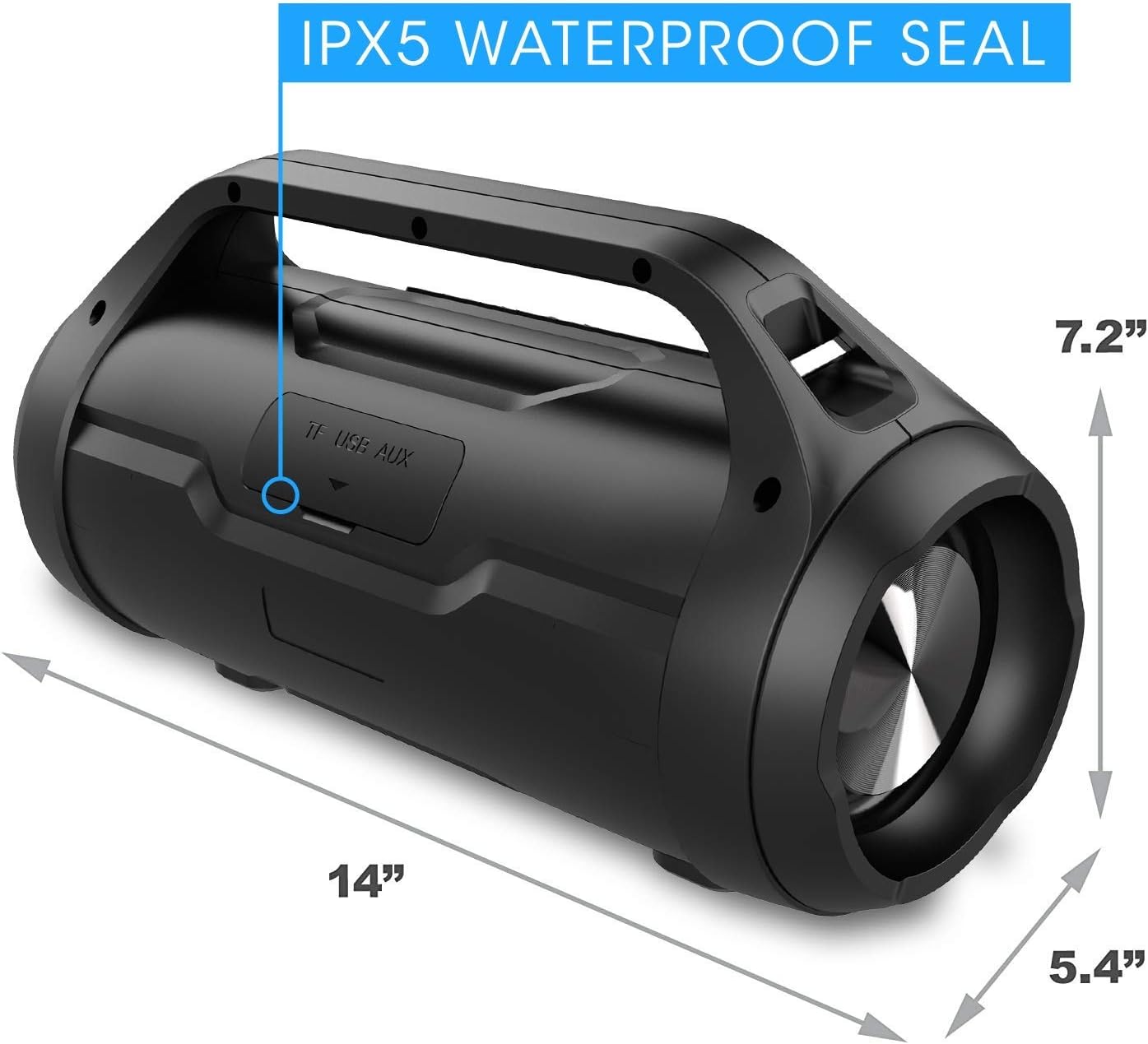
Image: The Dolphin LX-20 speaker with its physical dimensions clearly marked.
Warranty and Support
For warranty information or technical support, please contact Dolphin customer service. Details can typically be found on the product packaging or the official Dolphin website.
For the most up-to-date support resources, visit the official Dolphin store on Amazon: Dolphin Store




