
GIORDON MP900
GIORDON Universal Car Alarm Remote Engine Start Kit MP900 User Manual
Model: MP900
Brand: GIORDON
Product Overview
The GIORDON MP900 Universal Car Alarm Remote Engine Start Kit provides advanced security and convenience features for your vehicle. This system allows for remote engine start, keyless entry, and app control, enhancing your driving experience with modern technology. It is designed to be compatible with a wide range of DC12V compact cars, sedans, coupes, SUVs, and pick-ups.
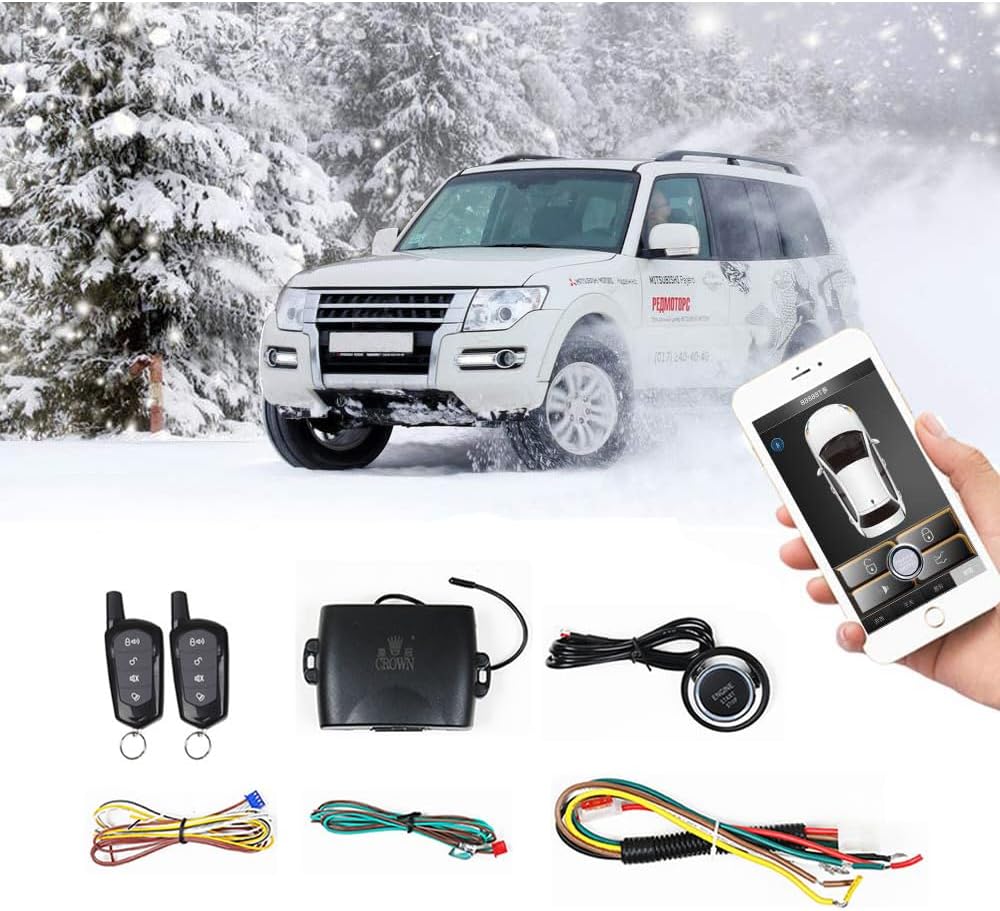
Figure 1: Overview of the GIORDON MP900 Car Alarm Remote Engine Start Kit components, including remote keys, control unit, wiring harnesses, and engine start button, shown with a car in a snowy setting and a smartphone displaying the app interface.
Key Features
- PKE (Passive Keyless Entry) Functionality: Available with specific key models. Allows keyless entry when approaching the vehicle (2-5 meters).
- Remote Engine Start: Pre-warm or pre-cool your car by starting the engine remotely. If the air conditioner was left on, it will activate automatically. Remote start range is 50-150 meters.
- One-Key Start/Keyless Entry: Ideal for upgrading older vehicles, providing modern convenience.
- Remote Key & App Control: Control engine start, lock/unlock, trunk opening, and reservation mode via the remote key or a dedicated smartphone app (compatible with Android and iOS).
- Universal Compatibility: Designed to fit 95% of DC12V compact, sedan, coupes, SUVs, and pick-up vehicles on the market.

Figure 2: Illustration of remote engine start functionality, demonstrating how the system can pre-warm or pre-cool the car's interior using either the remote control or the smartphone app.

Figure 3: Visual representation of various functions: remote engine start, vehicle unlock/lock, automatic air conditioning activation, and remote trunk opening, all controllable via the system.
Installation Guide
Proper installation is crucial for the optimal performance of your GIORDON MP900 system. This section provides a step-by-step guide. It is recommended to consult a professional if you are unsure about any steps.

Figure 4: Important note regarding the one-key start/stop button and a warning about specific car models (Buick, Volkswagen) with incompatible keyhole designs.
Installation Video Tutorial
Video 1: Comprehensive installation guide for the GIORDON MP900 system, demonstrating wiring and connection procedures.
Detailed Wiring Steps
- Identify Lock/Unlock Wires: Use a light bulb test pen. Clip the iron part of the test pen. Touch the pen tip against the wire. If the connection is a switch lock negative trigger line, the lock will open or close. Connect the black/white wire to the open lock and the white wire to the close lock.
- Ignition Line Measurement (+12V): With the original car key in the OFF state, use a test pen to find the wire that has +12V power supply. This is the ignition line. Connect the ignition red wire from the kit to this +12V line.
- ACC Wire Identification: Turn the car key to the ON position; the ACC wire will have power support. Turn the key to the OFF position; power support will be cut off. This is the ACC wire. Connect the ACC wire of the original car with the ignition white wire from the kit.
- ON1 / ON2 Wires:
- ON1: Starts without power cuts.
- ON2: Will power down instantly when it starts.
- Start Motor Wire: This is the start motor line that has power instantly when the original car key starts. Identify this wire using a test pen and connect it to the corresponding wire from the kit.
- Foot-Brake Signal Line: Use a test pen. The foot-brake signal line will have power support when stepping on it, and won't have power support while letting off the foot-brake.
- Side Door Line: Use a test pen. Clip 12V positive. Touch the pen tip against the iron. Open the side door to open the negatively charged line. Close the side door to close the negatively charged line.
- Emergency Light Trigger Line: The trigger line of the emergency light is behind the emergency light switch. Use the light bulb test pen, clip iron, and pen tip against the wire. If the emergency light flashing is an emergency light negative trigger, touch will flash, do not touch won't flash.
- Trunk Trigger Line: The trigger line of the trunk is behind the switch of the original trunk switch. Test pen touch iron, and pen tip against the wire to measure. The trunk will be opened when you touch the negative wire of the trunk.
- Final Connection and Test: After all wires are connected, plug in the main machine to test the function. Restore the vehicle's interior and complete the installation.
Operating Instructions
The GIORDON MP900 system offers convenient control via both a physical remote key and a smartphone application.
Remote Key Operation
- Lock/Unlock: Press the respective buttons on the remote key to lock or unlock your vehicle.
- Remote Engine Start: Use the designated button on the remote key to start the engine from a distance of 50-150 meters.
- Trunk Release: Press the trunk release button to open the vehicle's trunk.
- Reservation Mode: Activate this mode for specific functions as detailed in the full product manual.
Smartphone App Control
The "Crown" app (available for Android and iOS) provides comprehensive control over your vehicle's system.
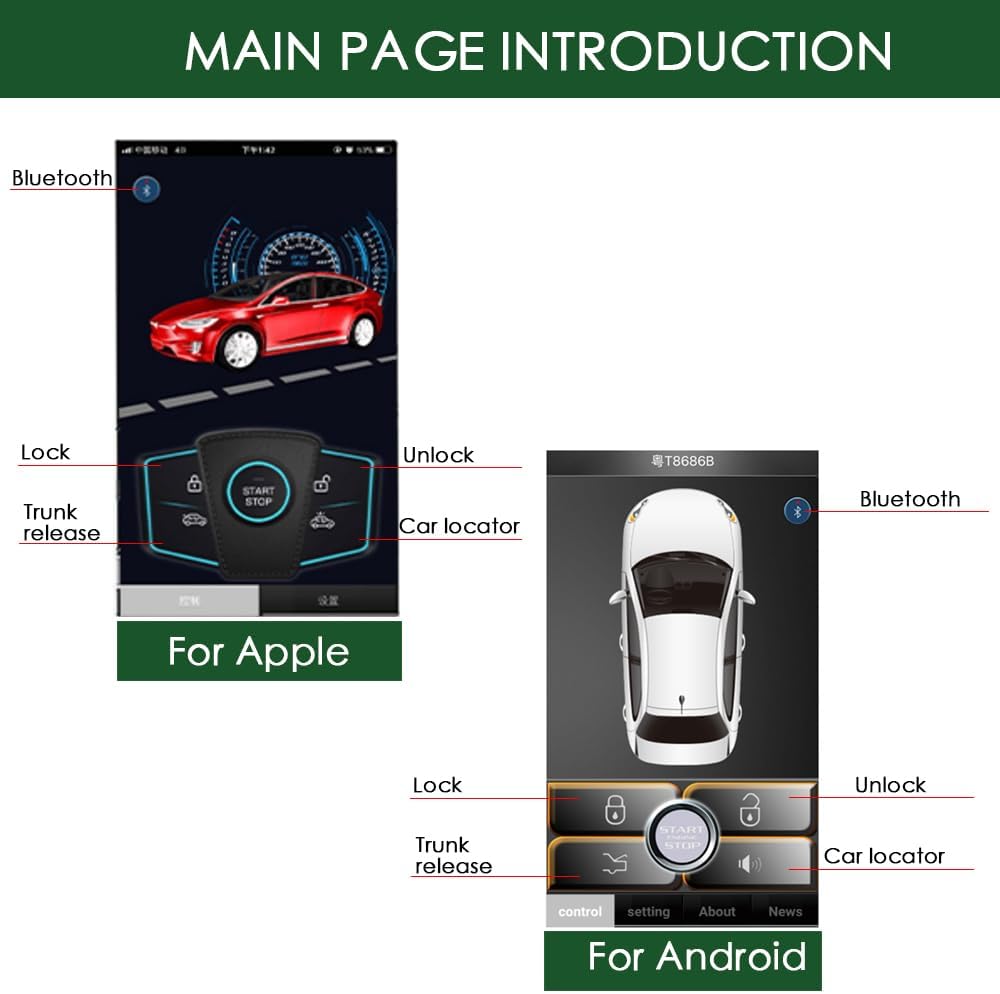
Figure 5: Screenshots of the smartphone application interface for both Apple and Android devices, showing controls for lock, unlock, trunk release, and car locator functions.
- Keyless Entry by App: If your key does not have PKE, the app can replace the key for keyless entry. The door will unlock when the app approaches the car (2-5m).
- Remote Engine Start: Start the engine via the app.
- Lock/Unlock: Control vehicle doors.
- Open Trunk: Remotely open the trunk.
- Car Locator: Utilize the app to locate your vehicle.
- Shake to Lock/Unlock: Some models support shaking the mobile phone to lock or unlock the car.

Figure 6: Visual demonstration of the "shake to lock/unlock" feature using the smartphone app, showing a car being locked/unlocked by phone movement.
Troubleshooting
Here are some common issues and their solutions:
- Whether it fits your car?
Please check the universal fit diagram (Figure 7) to verify compatibility with your car model.

Figure 7: Diagram illustrating the universal fit of the system across various car types, including sedans, SUVs, and pickups.
- Cannot use the key to start the engine?
- Auto Car: When the car is in start-up state, put the car gear in "P" (Park) or "N" (Neutral) position and pull up the hand-brake. Press the start button for 2 seconds; the LED inside the transmitter will flash slowly. When you get off the car, shut down the engine and lock the car, then the start function is activated.
- Manual Car: Step on the foot brake, long press the third and the fourth button at the same time on the key for 4 seconds.
- Cannot lock/unlock the car?
Check these two steps to solve this problem:
- The brake wire is wrongly connected. The brake line is yellow. You need to find the line where, when you use a test pencil to touch it, the light will not light up, but after you step on the footbrake, it can light up. If you use a test pencil to touch it and the light lights up directly, then it is not the correct wire.
- Do you need a bypass to use the starter function?
After inserting the key into the igniter, keep the metal part of the key inserted in the igniter and saw the key off, and bind the chip part of the non-metal part with the anti-theft coil.
- The App shows: "Please scanning again"?
Please open location information of the app. Go to Settings > Application Management > Application Permissions > Find our Crown app > Open location information. After that, launch the app and open it again.
Specifications
| Attribute | Value |
|---|---|
| Item Weight | 11.3 ounces |
| Package Dimensions | 5.04 x 3.66 x 3.07 inches |
| Wireless Remote | Yes |
| Maximum Range | 150 Meters |
| Remote Control Included? | Yes |
| Manufacturer | GIORDON |
| Date First Available | July 14, 2019 |
Warranty and Support
For warranty information and technical support, please refer to the contact details provided with your product packaging or visit the official GIORDON website. Keep your purchase receipt for any warranty claims.
Related documentsMP900

Ask a question about this manual
Ask about setup, troubleshooting, compatibility, parts, safety, or missing instructions. Manuals+ will review the question and use this page’s manual context to help answer it.