
1. Introduction
The SUNWAYFOTO PSLO-a6400 is a one-piece, CNC machined L-plate designed specifically for the Sony a6400 camera. This L-plate provides enhanced stability and versatility for both horizontal and vertical shooting orientations, making it compatible with Arca-Swiss standard quick release clamps and Really Right Stuff (RRS) lever clamps.
Its robust construction ensures a secure fit and improved handling of your camera, especially when mounted on a tripod or monopod. The design allows full access to the camera's battery compartment and ports.
2. Package Contents
- SUNWAYFOTO PSLO-a6400 L-Plate
- 1/4" hex screw (pre-installed)
- 2 x Allen wrenches (one for the main screw, one for smaller safety stop screws)
- 3 x Safety stop hex screws
3. Setup and Installation
Follow these steps to correctly attach the L-plate to your Sony a6400 camera:
- Prepare the Camera: Ensure your Sony a6400 camera is powered off.
- Align the L-Plate: Position the L-plate against the bottom of your camera, aligning the 1/4" mounting screw on the L-plate with the tripod socket on your camera. Ensure the vertical arm of the L-plate is flush with the side of the camera body.
- Secure the Main Screw: Use the larger Allen wrench provided to tighten the 1/4" hex screw into the camera's tripod socket. Turn clockwise until the L-plate is firmly secured to the camera body, ensuring there is no wobble. Do not overtighten.
- Install Safety Stop Screws (Optional): The L-plate includes three small threaded holes on the bottom and side plates. These are for the included safety stop hex screws. These screws prevent the camera from accidentally sliding out of an Arca-Swiss clamp if it is not fully tightened. Use the smaller Allen wrench to install these screws into the desired positions.

Image 1: Rear view of the L-plate attached to the Sony a6400 camera, showing the flush fit.
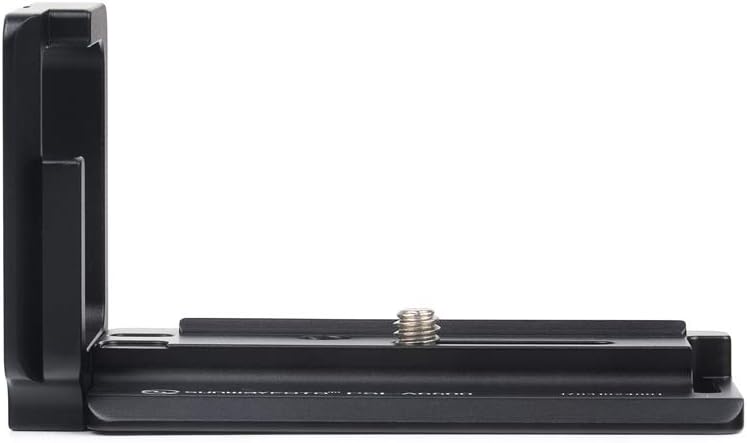
Image 2: Side view of the SUNWAYFOTO PSLO-a6400 L-plate, showing the main mounting screw.
4. Operating Instructions
Once the L-plate is securely attached to your camera, you can utilize its features for various shooting scenarios:
- Horizontal Mounting: To mount your camera horizontally, slide the bottom plate of the L-plate into an Arca-Swiss compatible quick release clamp on your tripod head. Tighten the clamp securely.
- Vertical Mounting: To switch to a vertical orientation without re-positioning the tripod head, slide the vertical arm of the L-plate into an Arca-Swiss compatible quick release clamp. Tighten the clamp securely. This maintains the optical axis over the tripod, which is beneficial for panoramic photography.
- Battery and Port Access: The design of the PSLO-a6400 L-plate ensures that the battery compartment and all camera ports remain fully accessible while the L-plate is attached.

Image 3: The L-plate allows for quick and stable vertical mounting on an Arca-Swiss compatible tripod head.
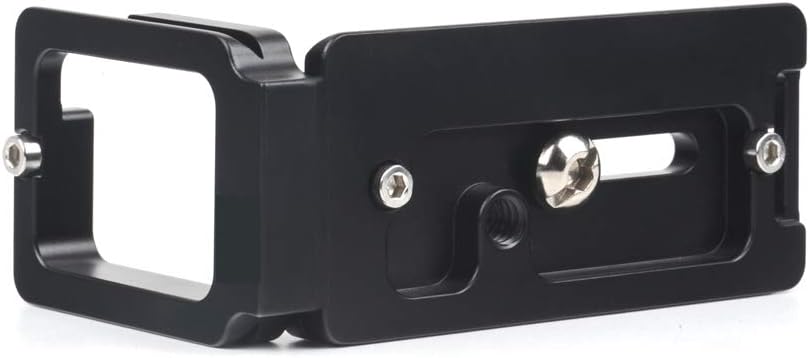
Image 4: Bottom view of the L-plate, highlighting the Arca-Swiss dovetail design and safety stop screw locations.
5. Maintenance
To ensure the longevity and optimal performance of your SUNWAYFOTO PSLO-a6400 L-plate, follow these simple maintenance guidelines:
- Cleaning: Wipe the L-plate with a soft, dry cloth to remove dust and fingerprints. For stubborn dirt, a slightly damp cloth can be used, followed by immediate drying. Avoid harsh chemicals or abrasive materials.
- Inspection: Periodically check the mounting screw for tightness. Ensure there is no play between the L-plate and the camera body.
- Storage: When not in use, store the L-plate in a clean, dry environment, away from extreme temperatures and humidity.
6. Troubleshooting
- L-plate feels loose on camera: Ensure the 1/4" hex screw is fully tightened using the provided Allen wrench. If the screw is stripped, contact customer support for a replacement.
- Camera slides in quick release clamp: Verify that your quick release clamp is fully tightened. If using safety stop screws, ensure they are installed correctly to prevent accidental sliding.
- Difficulty accessing battery/ports: The PSLO-a6400 is designed for full access. Double-check that the L-plate is correctly aligned and fully seated against the camera body.
7. Specifications
| Model Number | PSLO-a6400 |
| Brand | SUNWAYFOTO |
| Compatible Camera Model | Sony a6400 |
| Material | Metal (CNC Machined Aluminum) |
| Color | Black |
| Length | 94 mm |
| Width | 39 mm |
| Height | 54 mm |
| Net Weight | 73.6 g |
| Mounting Type | Surface Mount (1/4"-20 screw) |
| Compatibility | Arca-Swiss Standard, Really Right Stuff (RRS) Lever Clamps |
8. Warranty and Support
For warranty information or technical support regarding your SUNWAYFOTO PSLO-a6400 L-plate, please refer to the official SUNWAYFOTO website or contact their customer service directly. Keep your purchase receipt as proof of purchase for any warranty claims.