
1. Introduction
This user manual provides detailed instructions for the safe and efficient operation of your ROMOSS LT20 Pro 20000mAh Power Bank. Please read this manual thoroughly before using the product and retain it for future reference.
2. Product Overview
The ROMOSS LT20 Pro is a high-capacity 20000mAh portable power bank designed for charging various electronic devices. It features 18W Quick Charge, USB-C Power Delivery (PD), and multiple input/output ports for versatile charging.
2.1 Key Features
- 20000mAh High Capacity: Provides multiple charges for smartphones and other devices.
- 18W Quick Charge & USB-C PD: Enables rapid charging for compatible devices and faster recharging of the power bank itself.
- 3 Input Ports: Micro-USB, Lightning, and USB Type-C for convenient recharging using a single cable.
- 3 Output Ports: Allows simultaneous charging of up to three devices.
- Smart Digital Display: Shows battery percentage, charging voltage, and charging current for precise monitoring.
- Advanced Safety System: Built-in protections against over-heat, over-charge, over-current, over-discharge, and short-circuit.
2.2 Product Components

Figure 2.1: ROMOSS LT20 Pro Portable Charger (Front View)
This image displays the main view of the ROMOSS LT20 Pro portable charger, highlighting its sleek design and digital display.
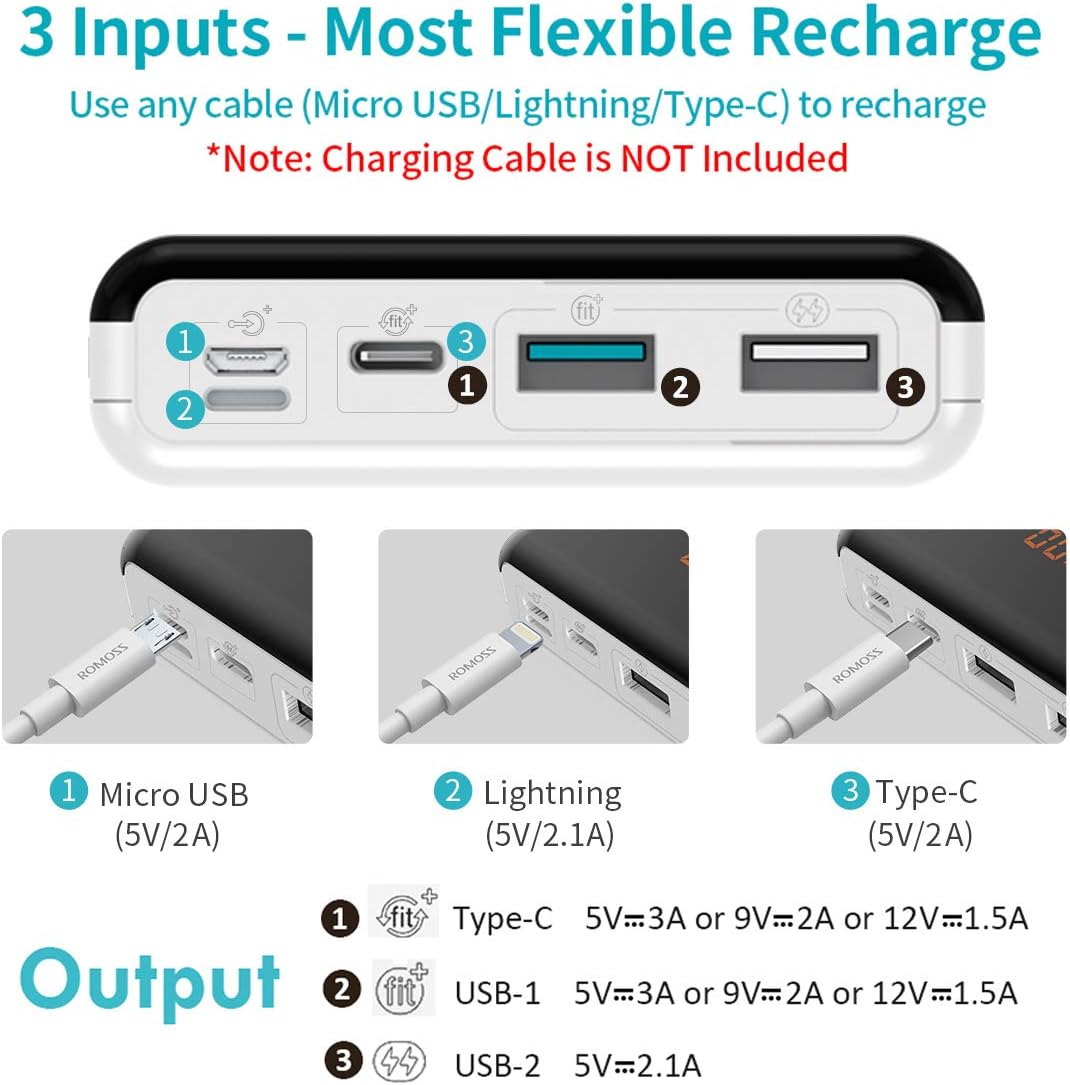
Figure 2.2: Input and Output Ports
This image illustrates the various input (Micro-USB, Lightning, Type-C) and output (USB-A, Type-C) ports available on the power bank, indicating their respective voltage and current capabilities.
3. Setup
3.1 Initial Charging of the Power Bank
Before first use, fully charge your ROMOSS LT20 Pro power bank. Connect a compatible charging cable (Micro-USB, Lightning, or USB Type-C) to one of the input ports on the power bank and the other end to a power adapter (not included). The digital display will show the charging progress.
A full recharge from 0% to 100% typically takes approximately 7.5 hours with an 18W wall charger.

Figure 3.1: Recharging the Power Bank
This image demonstrates the power bank being recharged via its USB-C port, indicating the time required for a full charge with an 18W wall charger.
3.2 Connecting Devices
To charge your device, connect a compatible USB charging cable from your device to one of the output ports on the power bank. The power bank will automatically begin charging your device.
4. Operating Instructions
4.1 Charging Your Devices
- Ensure the power bank is sufficiently charged.
- Connect your device's charging cable to one of the power bank's output ports (USB-A or USB Type-C).
- Connect the other end of the cable to your device.
- The power bank will automatically detect the device and begin charging. The digital display will show the charging status.
The LT20 Pro can charge an iPhone 8 approximately 7.7 times, a HUAWEI P10 about 4.4 times, and a Nintendo Switch. It supports simultaneous charging of up to 3 devices.

Figure 4.1: Simultaneous Device Charging
This image shows the ROMOSS LT20 Pro power bank simultaneously charging three different smartphones, demonstrating its multi-device charging capability.

Figure 4.2: Charging Capacity Examples
This image visually represents the approximate number of charges the 20000mAh power bank can provide for various devices, including iPhone 8, HUAWEI P10, OPPO R11, and VIVO X9.
4.2 Understanding the Digital Display
The upgraded LED digital indicator provides real-time information. Press the power button alternatively during use to cycle through the display modes:
- Battery Percentage: Shows the remaining power level (e.g., "84%").
- Charging Voltage (V): Displays the current charging voltage.
- Charging Current (A): Displays the current charging amperage.
When a Quick Charge-enabled device is connected, a blue sign will indicate Fast Charge mode.

Figure 4.3: Smart Digital Display
This image showcases the power bank's smart digital display, illustrating how it presents battery percentage, charging voltage, and charging current.
4.3 Official Product Video
Video 4.1: ROMOSS LT20 Pro Portable Charger Overview
This video provides a visual overview of the ROMOSS LT20 Pro portable charger, demonstrating its features, charging capabilities, and digital display in action.
5. Maintenance
- Keep the power bank away from extreme temperatures, direct sunlight, and liquids.
- Store in a cool, dry place when not in use.
- Clean the surface with a soft, dry cloth. Do not use harsh chemicals or abrasive materials.
- To prolong battery life, fully charge the power bank at least once every three months if not used regularly.
- Avoid dropping or subjecting the power bank to strong impacts.
6. Troubleshooting
| Problem | Possible Cause | Solution |
|---|---|---|
| Power bank not charging | Charging cable is faulty or not properly connected. Power adapter is not sufficient. | Check cable connections. Try a different charging cable or power adapter. Ensure the adapter meets the power bank's input requirements. |
| Device not charging from power bank | Power bank battery is depleted. Device charging cable is faulty. Device is not compatible. | Recharge the power bank. Try a different charging cable. Ensure your device is compatible with USB charging. |
| Digital display not working | Power button not pressed. Internal malfunction. | Press the power button to activate the display. If issue persists, contact customer support. |
| Slow charging | Cable or adapter not supporting fast charge. Device not supporting fast charge. | Use a fast-charging compatible cable and adapter. Ensure your device supports fast charging. |
7. Specifications
| Feature | Detail |
|---|---|
| Model Number | PLT20 |
| Battery Capacity | 20000mAh |
| Product Dimensions | 6.6 x 3.2 x 0.9 inches |
| Item Weight | 1.04 pounds |
| Input Ports | Micro USB, Lightning, USB Type-C |
| Output Ports | USB Type-C, USB-A (2 ports) |
| Special Features | Fast Charging, Portable, Digital Display |
| Color | Gold |
| Battery Type | Lithium Polymer |
8. Warranty and Support
Your ROMOSS LT20 Pro Power Bank comes with a worry-free 12-month warranty from the date of purchase. This warranty covers manufacturing defects and issues arising from normal use.
For technical support, warranty claims, or any product-related inquiries, please contact ROMOSS customer service through the retailer's platform or the official ROMOSS website. Please have your purchase receipt and product model number ready when contacting support.


