
FUJITSU A574/M
FUJITSU LIFEBOOK A574/M User Manual
Comprehensive Guide for Your FUJITSU LIFEBOOK A574/M Laptop
Introduction
This manual provides essential information for the safe and efficient use of your FUJITSU LIFEBOOK A574/M laptop. Please read this manual thoroughly before using the product and keep it for future reference. This model is a versatile notebook PC designed for everyday computing tasks, featuring a Core i5 processor, 8GB of RAM, and a 256GB SSD for fast performance.

Figure 1: The FUJITSU LIFEBOOK A574/M laptop, shown open with the Windows desktop on its 15.6-inch screen. The keyboard and touchpad are visible, indicating a standard laptop configuration.
Setup
1. Unpacking and Initial Inspection
Carefully remove all components from the packaging. Verify that all listed accessories, including the AC adapter, are present. Inspect the laptop for any physical damage before proceeding.
2. Connecting the AC Adapter
Connect the supplied AC adapter to the power input port on the side of the laptop and then plug it into a wall outlet. The battery will begin charging automatically.
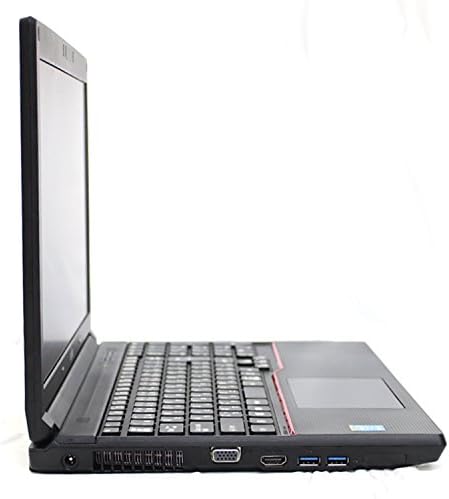
Figure 2: A close-up view of the left side of the laptop, highlighting the power input port, VGA port, HDMI port, and two USB 3.0 ports. This is where the AC adapter should be connected.
3. First Power On
Press the power button located on the keyboard deck to turn on the laptop. Follow the on-screen instructions to complete the initial Windows 10 setup, including language selection, network connection, and user account creation.
4. Connecting Peripherals
Utilize the available USB ports (2x USB 3.0, 2x USB 2.0) to connect external devices such as a mouse, keyboard, or external storage. The laptop also features Bluetooth for wireless peripheral connections.

Figure 3: A view of the right side of the laptop, showing two USB 2.0 ports and the DVD Super Multi drive. These ports are suitable for connecting various USB devices.
Operating Instructions
1. Keyboard and Touchpad Usage
The laptop features a full-sized keyboard and a multi-touch touchpad. Use the touchpad for cursor control and gestures. External mice can be connected via USB or Bluetooth.

Figure 4: A top-down perspective of the laptop's keyboard and touchpad area. The layout includes a numeric keypad, and the touchpad is centrally located below the spacebar.
2. Optical Drive Operation
The integrated DVD Super Multi drive supports reading and writing various CD and DVD formats. To open the tray, press the eject button on the drive itself or use the eject function within your operating system.
3. Network Connectivity
- Wireless LAN: Connect to Wi-Fi networks using the built-in IEEE 802.11 a/b/g/n wireless adapter. Access network settings via the Windows taskbar.
- Wired LAN: For a stable connection, use an Ethernet cable to connect to the LAN port (10/100/1000Mbps).
- Bluetooth: Pair Bluetooth-enabled devices such as headphones, speakers, or input devices through Windows Bluetooth settings.
4. Using the Web Camera
The integrated web camera can be used for video calls and conferencing. Ensure proper lighting for optimal image quality. Most communication applications will automatically detect and utilize the camera.
Maintenance
1. Cleaning the Laptop
Use a soft, lint-free cloth slightly dampened with water or a screen cleaner to clean the display. For the keyboard and chassis, use a dry or slightly damp cloth. Avoid harsh chemicals or abrasive materials.
2. Battery Care
To prolong battery life, avoid extreme temperatures. If storing the laptop for an extended period, ensure the battery is charged to approximately 50%. Periodically discharge and recharge the battery to maintain its health.
3. Software Updates
Regularly update your Windows operating system and drivers to ensure optimal performance, security, and compatibility. Access Windows Update settings through the Start Menu.
Troubleshooting
| Problem | Possible Cause | Solution |
|---|---|---|
| Laptop does not power on. | No power, discharged battery, or faulty AC adapter. | Ensure AC adapter is securely connected and plugged into a working outlet. Check battery charge level. |
| No Wi-Fi connection. | Wi-Fi disabled, incorrect password, or router issue. | Check Wi-Fi settings in Windows. Restart router. Verify password. |
| Slow performance. | Too many applications running, low disk space, or outdated drivers. | Close unnecessary applications. Free up disk space. Update drivers and Windows. |
| Display issues (no image, flickering). | Loose display cable (if external monitor), driver issue, or hardware fault. | Restart laptop. Update graphics drivers. If using external monitor, check cable connections. |
Specifications
| Feature | Detail |
|---|---|
| Model Name | FUJITSU LIFEBOOK A574/M |
| Model Number | FMVA10005 |
| Condition | Used Laptop PC |
| CPU | Intel Core i5-4310M 2.70GHz |
| Memory (RAM) | 8GB DDR3 SDRAM |
| Storage | 256GB SSD (Serial ATA) |
| Optical Drive | DVD Super Multi |
| Display | 15.6-inch WXGA (1366x768 pixels) |
| Operating System | Windows 10 64bit |
| LAN | 10/100/1000Mbps |
| Wireless LAN | IEEE 802.11 a/b/g/n |
| Bluetooth | Yes |
| Web Camera | Yes |
| Interfaces | USB 3.0 x2, USB 2.0 x2, Analog RGB Mini Dsub x1, Speaker Output x1, Microphone Input x1, LAN x1 |
| Dimensions (WxDxH) | 354mm x 250mm x 34.5mm |
| Weight | Approx. 2.4 kg |
| Included Accessories | AC Adapter |
Warranty and Support
This product is a used item. Please refer to the seller's specific warranty terms and conditions at the time of purchase. For technical support or service inquiries, please contact the seller or the authorized service center as indicated in your purchase documentation.
For general information about FUJITSU products, you may visit the official FUJITSU website. Please note that support for used products may vary.
Related documentsA574/M


Ask a question about this manual
Ask about setup, troubleshooting, compatibility, parts, safety, or missing instructions. Manuals+ will review the question and use this page’s manual context to help answer it.